
Listen to this Post
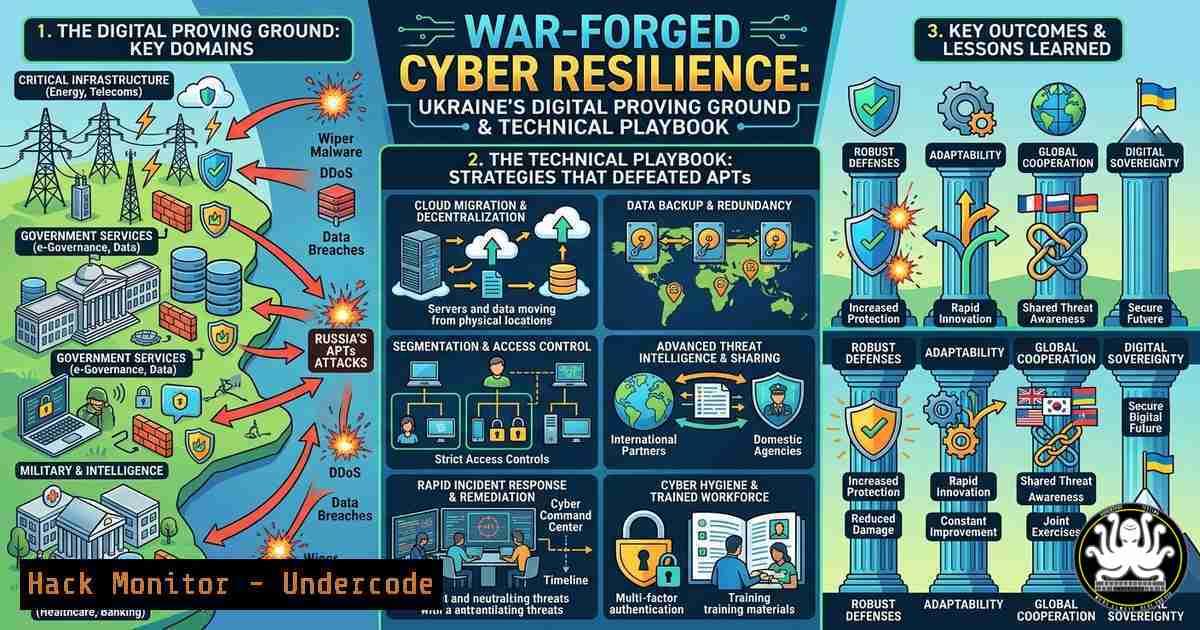
Introduction:
In the crucible of ongoing war, Ukraine has transformed from a target into a global leader in cybersecurity, forging a resilience model born not from theory, but from the reality of constant, high-intensity cyber warfare. The Kyiv International Cyber Resilience Forum highlights how a nation under siege has become a living laboratory for defending critical infrastructure against nation-state actors. This article dissects the technical playbook derived from this conflict, providing actionable intelligence on the strategies, commands, and configurations that have hardened Ukraine’s digital front.
Learning Objectives:
- Understand the shift from reactive defense to proactive resilience in a live-fire cyber warfare environment.
- Analyze specific Linux and Windows hardening techniques used to mitigate advanced persistent threats (APTs).
- Learn how to implement distributed denial-of-service (DDoS) mitigation, incident response, and secure cloud architectures based on wartime adaptations.
You Should Know:
- The “Digital Proving Ground”: Hardening Critical Infrastructure Under Fire
The conflict has demonstrated that traditional perimeter-based security is insufficient against a persistent, well-funded adversary. Ukraine’s approach involves “assumed breach” architectures, where systems are designed to withstand compromise. This means aggressive network segmentation and the principle of “least privilege” enforced at every level. For example, in Linux environments managing SCADA systems, administrators have moved to mandatory access control systems like AppArmor or SELinux to contain any potential breach.
Step‑by‑step guide: Implementing Basic SELinux Hardening on a Linux Server
To ensure a compromised service cannot affect the host system, SELinux must be enforcing.
1. Check Current Status: `getenforce`
2. Set to Enforcing Mode: `sudo setenforce 1`
- Make Persistent: Edit the config file: `sudo nano /etc/selinux/config`
4. Ensure the line reads: `SELINUX=enforcing`
- Apply a Context to a Custom Web Directory: If a web server serves files from
/data/web, you must label it: `sudo semanage fcontext -a -t httpd_sys_content_t “/data/web(/.)?”` followed by `sudo restorecon -Rv /data/web` - Network-Level Defense: BGP Flowspec and Real-Time DDoS Mitigation
Ukrainian networks have faced volumetric DDoS attacks designed to isolate citizens and disrupt military communications. The response involved dynamic, network-level mitigation using Border Gateway Protocol (BGP) Flowspec, allowing for real-time traffic filtering at the ISP level without null-routing entire services. This requires cooperation between network operators and security teams to push rules on-the-fly.
Step‑by‑step guide: Simulating a DDoS Mitigation Rule with BGP Flowspec (Cisco IOS-XR)
This command, pushed to edge routers, drops traffic from a specific attacking IP and protocol, preserving legitimate traffic.
1. Define the Flowspec Rule: This rule drops all TCP traffic from source `192.0.2.1` to any destination with a packet length less than 1000 bytes (a common DDoS signature).
2. Access Router CLI: `ssh admin@border-router`
3. Enter Configuration Mode: `configure terminal`
4. Create the Flowspec Entry:
class-map type traffic match-all BLOCK-ATTACKER
match destination-address 0.0.0.0/0
match source-address 192.0.2.1/32
match protocol tcp
match packet-length lt 1000
!
policy-map type pbr BLOCK-POLICY
class type traffic BLOCK-ATTACKER
drop
!
5. Apply via BGP: This policy is then advertised to peers via BGP Flowspec address-family, effectively stopping the attack at the network edge.
- Windows Event Logging and Forwarding for Threat Hunting
Russian APT groups (like Sandworm) are masters of “living off the land,” using native Windows tools to avoid detection. Ukrainian incident responders have had to over-haul logging policies to capture this activity. They enabled advanced auditing and centralized log forwarding to a Security Information and Event Management (SIEM) system, ensuring that even if an endpoint is wiped, the evidence remains.
Step‑by‑step guide: Enabling Advanced PowerShell Logging via Group Policy
This captures de-obfuscated PowerShell code, which is critical for detecting attacks that use scripts.
1. Open Group Policy Management Console: `gpmc.msc`
- Navigate to: Computer Configuration -> Policies -> Administrative Templates -> Windows Components -> Windows PowerShell.
3. Enable the following policies:
- Turn on Module Logging: Set to Enabled and for “Module Names,” click “Show” and add “ to log all modules.
- Turn on PowerShell Script Block Logging: Set to Enabled. Optionally, check “Log script block invocation start events.”
- Turn on Script Execution: Set to Enabled and set “Execution Policy” to “Allow all scripts.”
- Forwarding these logs: Use `winrm` (WinRM) to configure the Windows Event Forwarding (WEF) collector. On the collector server, run: `wecutil qc` to configure the collector service. On the client, use `gpupdate /force` and then `wevtutil set-log “Windows PowerShell” /enabled:true /retention:true /maxsize:1073741824` to set the log size to 1GB.
-
Cloud Architecture Resilience: Geographic Distribution and Immutable Infrastructure
To prevent a single bombing run or kinetic strike on a data center from taking down government services, Ukraine accelerated its move to the cloud. The strategy involved creating geographically distributed, multi-cloud deployments. The core principle became “immutable infrastructure”—servers are never patched or updated in place; they are destroyed and recreated from a known good image, ensuring attackers cannot persist.
Step‑by‑step guide: Creating an Immutable Web Server Launch Template (AWS CLI)
This ensures every new instance is identical and clean.
1. Create a Base AMI: After hardening a base Linux image, create an Amazon Machine Image (AMI) using the console or CLI.
2. Create a Launch Template:
aws ec2 create-launch-template \
--launch-template-name "ImmutableWebServer-Template" \
--launch-template-data '{
"ImageId": "ami-0abcdef1234567890",
"InstanceType": "t3.medium",
"SecurityGroupIds": ["sg-12345678"],
"UserData": "!/bin/bash\n yum update -y\n systemctl start httpd"
}'
3. Auto Scaling & Deployment: In an Auto Scaling Group, set the “Update” policy to “Replace instances.” To update the software, you don’t patch the running servers; you create a new AMI, update the launch template, and terminate the old instances. The Auto Scaling Group automatically replaces them with the new, immutable version.
- OSINT and Cyber Intelligence: Anticipating the Next Strike
The “Voice-over for the video” emphasizes moving from reaction to anticipation. This is done through intense Open Source Intelligence (OSINT) gathering and cyber threat intelligence. Ukrainian experts monitor adversary infrastructure, forums, and code repositories for indicators of future attacks.
Step‑by‑step guide: Passive DNS Lookup and Certificate Transparency Monitoring
Use command-line tools to investigate potential adversary infrastructure.
- Check Certificate Logs for a Domain: See if a domain has ever had a certificate issued to it, which can reveal hidden subdomains set up for command and control (C2).
curl -s "https://crt.sh/?q=%.example.com&output=json" | jq .
- Perform a Passive DNS Lookup: Use a tool like `dnsrecon` to find historical DNS records without touching the target’s servers.
dnsrecon -d example.com -t rvl
- Query VirusTotal for Subdomains: Check if any subdomains are flagged as malicious.
curl --request GET --url 'https://www.virustotal.com/api/v3/domains/example.com/subdomains?limit=40' --header 'x-apikey: YOUR_API_KEY'
What Undercode Say:
- Resilience is a Process, Not a Product: Ukraine’s success stems from an adaptive, continuous process of hardening, monitoring, and rebuilding, driven by the high stakes of war. No single tool guarantees safety; only a rigorous, practiced methodology does.
- The “High Price” of Experience is Transferable: The tactics, techniques, and procedures (TTPs) developed in Ukraine—from BGP Flowspec rules to immutable cloud deployments—are not unique to the conflict. They represent a new global standard for defending against sophisticated, persistent threats. The open sharing of this “crystalized” experience is the most valuable outcome of the Kyiv International Cyber Resilience Forum, providing a blueprint for nations and corporations worldwide to transform pressure into strength. The focus must now be on automating these hard-won lessons into proactive, predictive defense systems.
▶️ Related Video (76% Match):
🎯Let’s Practice For Free:
IT/Security Reporter URL:
Reported By: Serhii Demediuk – Hackers Feeds
Extra Hub: Undercode MoN
Basic Verification: Pass ✅


