Listen to this Post
Introduction:
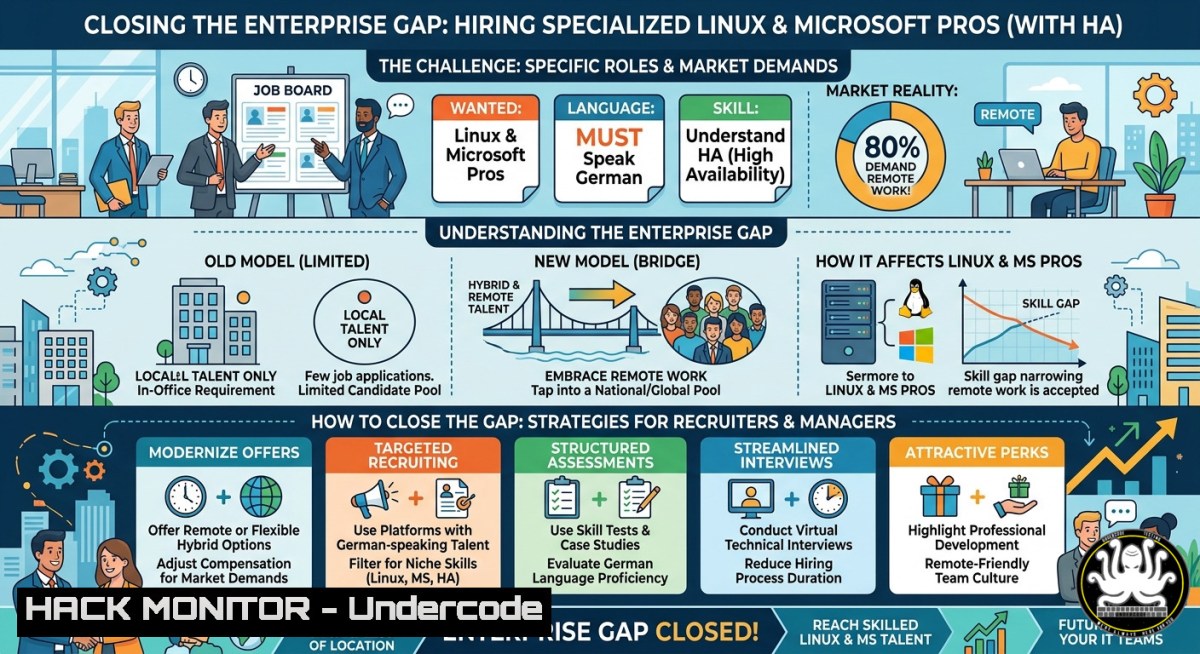
The gap between homelab experimentation and enterprise IT infrastructure is widening, as highlighted by a recent LinkedIn discussion where hiring managers struggle to find Linux and Microsoft professionals who grasp high availability, security compliance, and recovery strategies in production environments. While personal projects teach valuable fundamentals, critical infrastructure demands rigorous documentation, scaling, and 24/7 accountability – a reality check for both employers and candidates in the 2026 IT job market.
Learning Objectives:
- Differentiate between homelab tinkering and production-grade enterprise requirements across Linux and Windows ecosystems.
- Implement high availability, backup/recovery, and security compliance techniques using verified commands and tools.
- Analyze the skills gap and market expectations to better align hiring or career development strategies.
You Should Know:
- Bridging Homelab to Enterprise: Core Disconnects & Verification
Many candidates showcase home labs with Docker, Proxmox, or basic Active Directory setups, but enterprise environments demand documented change management, automated compliance checks, and disaster recovery drills. To verify your readiness, run these diagnostics on any system to compare against production baselines.
Linux – Check System Hardening & Audit Readiness:
 Install and run Lynis for security auditing
sudo apt install lynis -y  Debian/Ubuntu
sudo yum install lynis -y  RHEL/CentOS
sudo lynis audit system --quick | grep -E "Warning|Suggestion"

Verify critical services are running with proper resource limits
systemctl list-units --type=service --state=running | grep -E "ssh|nginx|mysql|postgres"
 Check for open ports and listening services (enterprise compliance)
sudo ss -tulnp | grep LISTEN
Windows – Assess Configuration Drift & Compliance:
 Run Windows Security Baseline check (requires DSSO or local policy)
Get-WindowsOptionalFeature -Online | Where-Object {$<em>.State -eq "Enabled"}
 List all running services with startup type (critical for HA)
Get-Service | Where-Object {$</em>.Status -eq "Running" -and $_.StartType -ne "Automatic"}
 Check for missing critical updates (use PSWindowsUpdate module)
Install-Module PSWindowsUpdate -Force
Get-WUList -Category "Critical","Security"
Step‑by‑step: Run the Linux Lynis scan weekly and document every warning with a remediation plan. On Windows, schedule a PowerShell script that exports service states and baseline deviations to a central SIEM. Enterprise = not just running, but provably compliant.
2. Linux High Availability & Clustering for Production
Homelab users often run single-node services; enterprise demands automatic failover. Use Pacemaker+Corosync to simulate a 2-node HA cluster with shared storage (e.g., DRBD or iSCSI).
Setup a basic HA cluster on Ubuntu 22.04+ (both nodes):
 Install cluster packages
sudo apt install pacemaker corosync pcs drbd-utils -y
 Set cluster user password
echo "clust3rPass" | sudo passwd --stdin hacluster
 Start and enable pcsd service
sudo systemctl enable --now pcsd
 Authenticate nodes (run on node1 only)
sudo pcs host auth node1.local node2.local -u hacluster -p clust3rPass
 Create cluster and start
sudo pcs cluster setup mycluster node1.local node2.local --force
sudo pcs cluster start --all
 Disable STONITH for lab (DO NOT do in production)
sudo pcs property set stonith-enabled=false
 Add a floating IP resource
sudo pcs resource create virtual_ip ocf:heartbeat:IPaddr2 ip=192.168.1.100 cidr_netmask=24 op monitor interval=30s
 Verify failover: shutdown node1 and watch IP move to node2
sudo pcs status
Windows Server Failover Clustering (PowerShell):
 Install Failover Clustering feature on both nodes
Install-WindowsFeature -Name Failover-Clustering -IncludeManagementTools
 Validate cluster configuration
Test-Cluster -Node "HV01","HV02" -Include "Storage","Network","Inventory"
 Create cluster with a static IP
New-Cluster -Name "ProdCluster" -Node "HV01","HV02" -StaticAddress 192.168.1.200
 Add a generic service role (e.g., file share witness)
Add-ClusterFileServerWitness -Cluster ProdCluster -Storage "Cluster Disk 1"
 Test failover: Move cluster group to other node
Move-ClusterGroup -Name "Cluster Group" -Node HV02
Step‑by‑step: First, configure shared storage (iSCSI target on a third VM). Then, on Linux, ensure `corosync` rings are on isolated network interfaces. On Windows, run validation tests before production – any warning about network latency or disk arbitration will cause split-brain in real outages.
3. Security & Compliance Automation (Linux & Windows)
Enterprise environments require continuous compliance with frameworks like CIS, GDPR, or ISO 27001. Homelabs rarely enforce automated remediation. Use these tools and commands to harden systems and generate audit reports.
Linux – OpenSCAP for CIS Benchmarking:
 Install OpenSCAP
sudo apt install libopenscap8 scap-security-guide -y
 Run a scan against the CIS profile for RHEL/Ubuntu
sudo oscap xccdf eval --profile xccdf_org.ssgproject.content_profile_cis --report /tmp/scan_report.html /usr/share/xml/scap/ssg/content/ssg-ubuntu2204-ds.xml
 Remediate automatically (CAREFUL in production)
sudo oscap xccdf eval --remediate --profile xccdf_org.ssgproject.content_profile_cis /usr/share/xml/scap/ssg/content/ssg-ubuntu2204-ds.xml
Windows – Security Compliance Toolkit & PowerShell DSC:
 Download and apply Microsoft Security Baseline for Windows Server 2022
 (Manual: MS Security Compliance Toolkit, then use LGPO.exe)
 Automated using PowerShell DSC:
Configuration SecureWebServer {
Node "WEB01" {
WindowsFeature IIS { Name = "Web-Server"; Ensure = "Present" }
Registry DisableLLMNR {
Key = "HKLM\SOFTWARE\Policies\Microsoft\Windows NT\DNSClient"
ValueName = "EnableMulticast"
ValueData = 0
ValueType = "Dword"
}
}
}
SecureWebServer -OutputPath "C:\DSCConfig"
Start-DscConfiguration -Path "C:\DSCConfig" -Wait -Verbose
Step‑by‑step: Schedule OpenSCAP scans weekly and store HTML reports in a versioned repository. For Windows, integrate LGPO exports into Git to track policy drift. Production compliance requires evidence – not just one-time hardening.
- Backup & Disaster Recovery – Beyond rsync and Veeam Free
Enterprise demands tested recovery strategies with RPO/RTO SLAs. Homelab users often rely on single backup copies without offsite or air-gapped storage.
Linux – Restic with Backblaze B2 or S3-compatible:
 Install restic
sudo apt install restic -y
 Initialize repository (e.g., S3)
restic -r s3:https://s3.amazonaws.com/mybucket restic init
 Backup /etc and critical data with encryption
restic -r s3:https://s3.amazonaws.com/mybucket backup /etc /var/lib/mysql --exclude=".tmp" --tag="weekly"
 Restore to a specific snapshot (list snapshots first)
restic -r s3:https://s3.amazonaws.com/mybucket snapshots
restic -r s3:https://s3.amazonaws.com/mybucket restore <snapshot_id> --target /restore_test
 Verify integrity every month
restic -r s3:https://s3.amazonaws.com/mybucket check
Windows – Native System State Backup & Azure Site Recovery:
 Full system state backup using wbadmin (local or network)
wbadmin start systemstatebackup -backupTarget:\backupserver\Share -quiet
 Schedule recovery testing (automated restore to isolated Hyper-V)
 Create a recovery VM from backup:
$BackupVersion = (Get-WBBackupSet -BackupTarget \backupserver\Share)[bash].VersionId
Start-WBSystemStateRecovery -BackupSetVersion $BackupVersion -TargetPath "C:\RecoveryTest"
 For Azure integration: Install ASR agent and register vault
.\MarsAgent.exe /q /a /v "CERTIFICATEVALIDATIONENABLED=1"
Step‑by‑step: Define RPO (e.g., 15 min) using restic’s `forget –keep-hourly 24` policy. On Windows, implement Azure Backup Server or native wbadmin plus offsite copy. Critical: perform a blind recovery drill every quarter – restore a full VM to an isolated network and validate application functionality.
- API Security & Cloud Hardening for Hybrid Infrastructures
Modern enterprise IT includes APIs and cloud components. Misconfigured APIs are a top attack vector. Here’s how to test and harden API endpoints (relevant to Linux/Microsoft shops using Azure AD or AWS).
Linux – Test API security with curl and jwt-cli:
 Test for missing rate limiting (send 200 requests in 2 seconds)
for i in {1..200}; do curl -s -o /dev/null -w "%{http_code}\n" https://api.target.com/v1/data -H "Authorization: Bearer $TOKEN"; done | sort | uniq -c
 Check for JWT algorithm confusion (none algorithm)
jwt-cli encode --alg none '{"user":"admin"}' --secret ''
 Verify TLS configuration
openssl s_client -connect api.target.com:443 -tls1_2
 Run a simple ZAP scan (headless)
docker run -t ghcr.io/zaproxy/zaproxy:stable zap-cli quick-scan --self-contained --start-options '-config api.disablekey=true' -s all https://api.target.com
Windows – Azure AD hardening & Microsoft Graph API security:
 Review privileged role assignments (prevent excessive permissions)
Get-AzureADDirectoryRole | ForEach-Object { Get-AzureADDirectoryRoleMember -ObjectId $<em>.ObjectId }
 Audit service principal credentials expiry
$apps = Get-AzureADApplication -All $true
foreach ($app in $apps) {
$creds = Get-AzureADApplicationPasswordCredential -ObjectId $app.ObjectId
$creds | Where-Object {$</em>.EndDate -lt (Get-Date).AddDays(30)} | Select AppDisplayName, EndDate
}
 Enforce Conditional Access policies via Graph API (requires consented app)
$body = @{
displayName = "Block legacy auth"
state = "enabled"
conditions = @{ clientAppTypes = @("exchangeActiveSync","other") }
grantControls = @{ operator = "OR"; builtInControls = @("block") }
} | ConvertTo-Json
Invoke-MgGraphRequest -Method POST -Uri "https://graph.microsoft.com/v1.0/identity/conditionalAccess/policies" -Body $body
Step‑by‑step: For any exposed API, implement rate limiting at the reverse proxy (nginx `limit_req` or Azure Front Door). Use automated tools like OWASP ZAP in CI/CD pipelines. On Windows, rotate all service principal secrets every 90 days and enforce MFA for all Graph API apps.
- Scaling & Performance Tuning – Moving from Single Node to Cluster
Production infrastructure must handle load spikes and horizontal scaling. Homelabs rarely simulate 1000+ concurrent users. Use these commands to benchmark and tune.
Linux – Load testing with wrk and tuning sysctl:
 Install wrk (HTTP benchmark)
sudo apt install wrk -y
 Test a web server (10 threads, 100 connections, 30 seconds)
wrk -t10 -c100 -d30s https://yourapp.local
 Optimize kernel for high concurrency (add to /etc/sysctl.conf)
echo "net.core.somaxconn = 1024" | sudo tee -a /etc/sysctl.conf
echo "net.ipv4.tcp_tw_reuse = 1" | sudo tee -a /etc/sysctl.conf
echo "net.ipv4.tcp_fin_timeout = 15" | sudo tee -a /etc/sysctl.conf
sudo sysctl -p
 Use stress-ng to simulate CPU/memory load
sudo apt install stress-ng -y
stress-ng --cpu 4 --io 2 --vm 2 --vm-bytes 128M --timeout 60s
Windows – Performance monitoring and IIS tuning:
 Get CPU/memory usage history using Get-Counter
Get-Counter -ComputerName WEB01 -Counter "\Processor(_Total)\% Processor Time","\Memory\Available MBytes" -MaxSamples 10 -SampleInterval 1
 Configure IIS application pool limits for high scale
Import-Module WebAdministration
Set-ItemProperty "IIS:\AppPools\DefaultAppPool" -Name recycling.periodicRestart.time -Value "00:00:00"
Set-ItemProperty "IIS:\AppPools\DefaultAppPool" -Name processModel.idleTimeout -Value "00:00:00"
Set-ItemProperty "IIS:\AppPools\DefaultAppPool" -Name queueLength -Value 10000
 Use built-in Performance Monitor to create a data collector set
logman create counter "ProdMetrics" -c "\Processor()\% Processor Time" "\Memory\Available Bytes" -f bincirc -max 500 -o "C:\PerfLogs\Prod"
Step‑by‑step: Establish baseline metrics during off-peak hours. Then run load tests until error rate exceeds 1% – record the breaking point. For Linux, adjust `ulimit -n` to increase open file descriptors. For Windows, monitor `\Web Service()\Current Connections` and scale out with a load balancer.
What Undercode Say:
- Key Takeaway 1: The chasm between homelab tinkering and enterprise IT is not about technology stacks but about process, accountability, and compliance – commands alone won’t save you without change control, monitoring, and documented recovery drills.
- Key Takeaway 2: Employers must invest in upskilling candidates who show passion (e.g., homelab enthusiasts) while candidates need to demonstrate production mindset by automating security scans, backup verifications, and HA failover tests – not just listing tools.
Analysis: The LinkedIn discussion reveals a broken expectation cycle. Companies want enterprise-ready engineers without offering remote flexibility or competitive pay (regional vs. global), while candidates demand high salaries but often lack experience in high-availability, compliance, or disaster recovery. The real solution lies in hybrid models: paid apprenticeships, shared responsibility for training, and transparent skill assessments using practical scenarios (e.g., “fix this broken cluster within 2 hours”). Both sides need “Bodenhaftung” – ground reality – acknowledging that a three-node Kubernetes homelab is not a PCI-compliant production environment, but it is a legitimate stepping stone if paired with rigorous self-auditing using tools like OpenSCAP and restic.
Prediction:
By 2028, AI-driven infrastructure validation platforms will automatically compare candidate home lab configs against enterprise compliance frameworks (CIS, NIST), generating skill scores and gap reports – replacing vague résumé claims. Simultaneously, regional companies that fail to offer hybrid remote models will coalesce into shared “IT talent hubs” where multiple firms pool resources to hire and train enterprise-grade Linux/Windows engineers, reducing per-company costs. The most successful professionals will be those who not only master commands but also codify their infrastructure as policy-as-code (e.g., OpenSCAP remediations, DSC configurations) and demonstrate provable recovery drills. The amateur vs. professional cost argument will shift from salary to audit fines and downtime – making continuous compliance the ultimate differentiator.
▶️ Related Video (62% Match):
🎯Let’s Practice For Free:
IT/Security Reporter URL:
Reported By: Christian Vojak – Hackers Feeds
Extra Hub: Undercode MoN
Basic Verification: Pass ✅


