Listen to this Post
Introduction:
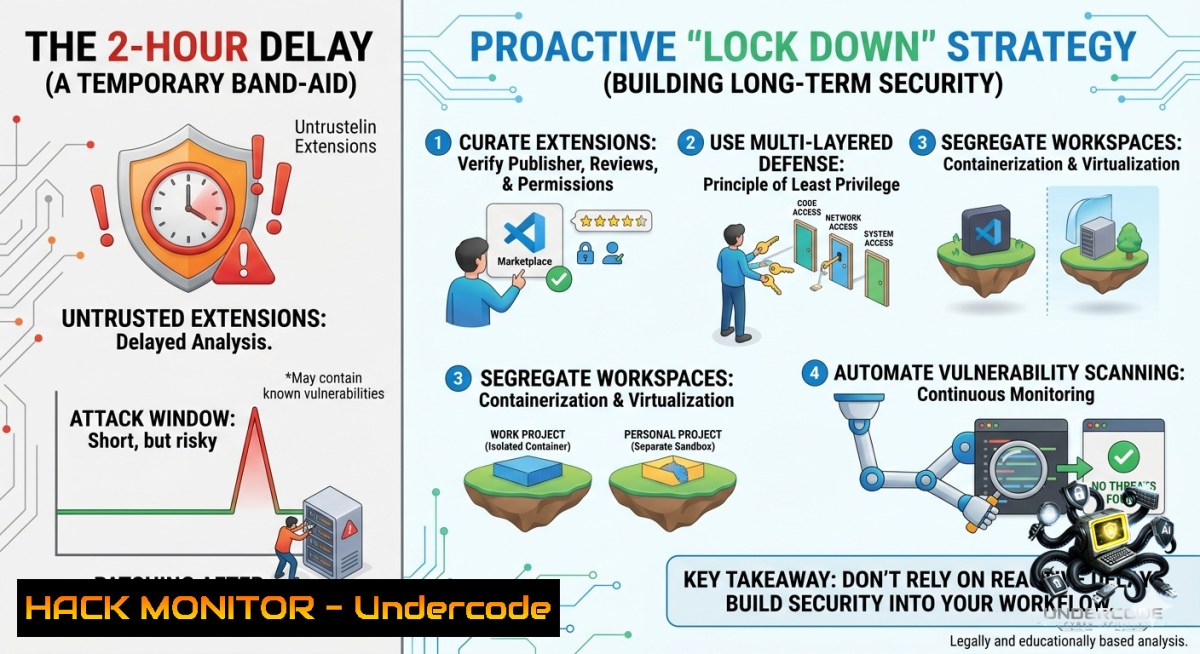
Microsoft’s recent introduction of a 2-hour delay for VS Code extension auto-updates is a tacit admission of a growing crisis: the IDE extension supply chain is under siege. With malware detections nearly quadrupling in 2025—rising from 27 to 105 cases in just the first ten months—the era of blind trust in developer tooling is over. This article delves into the technical realities of the new update delay, dissects the latest attack vectors, and provides actionable, hands-on hardening techniques for both individual developers and enterprise teams.
Learning Objectives:
– Understand the capabilities and limitations of VS Code’s new 2-hour extension update delay.
– Identify real-world extension attack vectors, including credential theft, RCE via localhost servers, and OAuth token hijacking.
– Implement practical hardening commands and configurations for VS Code, Windows, and Linux to mitigate supply chain risks.
You Should Know:
1. Anatomy of a Supply Chain Disaster: What the 2-Hour Delay Actually Buys You
The new 2-hour delay gives maintainers a crucial window to catch “bad” or compromised releases before they auto-propagate to millions of users. This follows similar security “bake times” adopted by npm, pnpm, and Bun. However, it is a reactive measure. The real defense lies in understanding how attackers weaponize extensions. The recent Glassworm campaign used invisible Unicode characters to hide malware in 24 extensions. Another campaign of 19 malicious extensions bundled a trojan inside a fake PNG file within a `node_modules` folder, executing automatically on IDE launch. The now-infamous “prettier-vscode-plus” fake extension delivered a multi-stage chain, using AES-encrypted payloads and process hollowing to deploy the OctoRAT backdoor, all within hours of publication. The 2-hour delay provides a small buffer, but it is not a substitute for proactive defense.
Step‑by‑step guide: Hardening VS Code Against Auto-Update Risks
While you cannot change the 2-hour delay, you can take control. To completely disable automatic extension updates and enable manual security vetting, follow these steps. This turns the auto-update risk into a manual security checkpoint.
On Windows & Linux/macOS:
1. Open VS Code Settings: Press `Ctrl + ,` (Windows/Linux) or `Cmd + ,` (macOS).
2. Access `settings.json` Directly: Open the Command Palette (`Ctrl+Shift+1`) and type “Preferences: Open User Settings (JSON).”
3. Apply Hardened Configuration: Add the following lines to disable automatic updates and checks:
{
// Disable automatic extension updates entirely
"extensions.autoUpdate": false,
// Disable automatic checking for updates (optional, but adds control)
"extensions.autoCheckUpdates": false,
// Wait for the 2-hour window and manually review changelogs
}
4. Manually Update with Scrutiny: To update an extension, go to the Extensions view (`Ctrl+Shift+X`), click the “…” menu, and select “Show Outdated Extensions.” Review the changelog and publisher details for each pending update before manually installing.
2. Enterprise Hardening: Centralized Policies and Locking Down the Local Attack Surface
For organizations, a single developer’s vulnerable extension is an entry point for lateral movement across the entire network. The 2-hour delay does nothing for extensions already installed. The OAuth token attack discovered in June 2026 allowed a malicious workspace extension to simulate keypresses, open the command palette, and install a data-stealing payload without any trust dialog—simply by being placed in a project’s `.vscode/extensions` folder. This was quickly patched by Microsoft, but it highlights the need for centralized, enforceable policies.
Step‑by‑step guide: Implementing Centralized Extension Governance and Local Hardening
For enterprises managing multiple developer machines, individual settings are insufficient. Use VS Code’s support for Managed Device Configuration (MDM) profiles to enforce policies.
1. Proactively Block Unauthorized Extensions: Use the `extensions.allowed` policy in your MDM profile to create an allowlist. Any extension not on this list will be automatically disabled.
{
"extensions.allowed": {
"ms-python.python": true,
"ms-vscode.cpptools": true,
"esbenp.prettier-vscode": true
}
}
2. Enforce the Security Delay Enterprise-Wide: While the 2-hour delay is default, you can make it mandatory by enforcing the `minimumReleaseAge` setting, a concept proposed in GitHub’s issue 316867. This requires an extension to be available for a specified time (e.g., 1-3 days) before installation or auto-update. While not yet a stable feature, you can prepare by monitoring the [official issue](https://github.com/microsoft/vscode/issues/316867) for updates.
3. Harden the Local Development Environment (Windows/Linux): Assume an extension is malicious. Prevent it from reaching critical infrastructure. On the developer’s machine, restrict outbound connections from localhost services using a host-based firewall.
– Windows (PowerShell as Admin):
 Block port 5500 (Live Server) outbound to prevent file exfiltration
New-1etFirewallRule -DisplayName "Block Live Server Exfiltration" -Direction Outbound -LocalPort 5500 -Protocol TCP -Action Block
– Linux (using iptables):
sudo iptables -A OUTPUT -p tcp --dport 5500 -j DROP
sudo iptables-save > /etc/iptables/rules.v4
What Undercode Say:
– The Delay is a Signal, Not a Solution: The 2-hour delay is a valuable admission of risk from Microsoft, but it’s a fragile one. It protects against the next update, not the current, already-installed malicious extension. Real security requires shifting from reactive waiting to proactive lockdown.
– Your Machine is the New Perimeter: Attacks like the GitHub OAuth token theft and the Glassworm campaign show that the developer’s workstation is now a primary attack vector. Treat your IDE and every extension running inside it with the same distrust you would treat a binary downloaded from the internet. The era of “install blindly from the marketplace” must end.
Prediction:
– -1 The 2-hour delay will become a standard, but attackers will adapt faster. Expect to see malicious campaigns that achieve their objective and self-destruct within the 2-hour window, exploiting the delay as a guaranteed window of infection rather than a mitigation.
– +1 This will accelerate the push for immutable, signed, and attestation-based extension distribution. The industry will move toward a model where extensions are not just delayed but are cryptographically verified to have passed automated and manual security reviews before any version is trusted, similar to Sigstore for container images.
▶️ Related Video (66% Match):
🎯Let’s Practice For Free:
🎓 Live Courses & Certifications:
[Join Undercode Academy for Verified Certifications](https://undercode.co.uk/certifications/)
🚀 Request a Custom Project:
Secure, high-velocity infrastructure and disruptive technological engineering. Contact our engineering team for high-tier development and proprietary systems:
[[email protected]](mailto:[email protected])
💎 Smart Architecture | 🛡️ Secure by Design | ⭐ Trusted by Thousands
IT/Security Reporter URL:
Reported By: [Mohit Hackernews](https://www.linkedin.com/posts/mohit-hackernews_microsoft-github-openai-share-7469633856615239680-gmK9/) – Hackers Feeds
Extra Hub: Undercode MoN
Basic Verification: Pass ✅
🔐JOIN OUR CYBER WORLD [ CVE News • HackMonitor • UndercodeNews ]
[💬 Whatsapp](https://undercode.help/whatsapp) | [💬 Telegram](https://t.me/UndercodeCommunity)
📢 Follow UndercodeTesting & Stay Tuned:
[𝕏 formerly Twitter 🐦](https://x.com/undercodeupdate) | [@ Threads](https://www.threads.net/@undercodetesting) | [🔗 Linkedin](https://www.linkedin.com/company/undercodetesting/) | [🦋BlueSky](https://bsky.app/profile/undercode.bsky.social)


