Listen to this Post
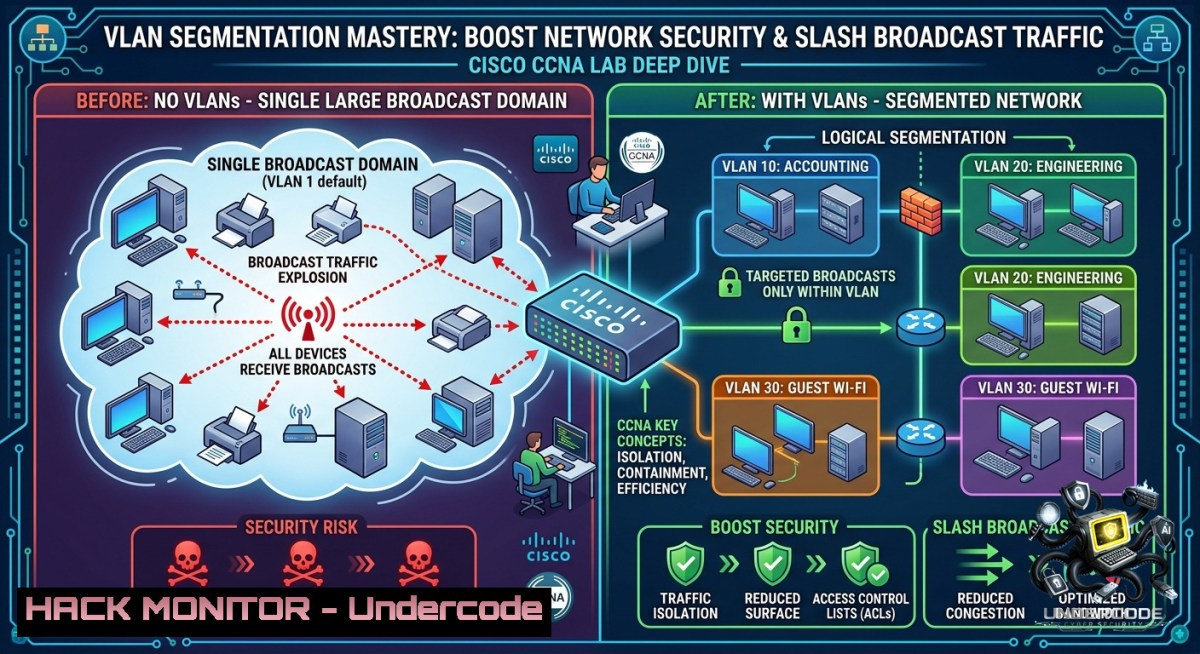
Introduction:
Virtual Local Area Networks (VLANs) logically segment a physical switch into multiple isolated broadcast domains, enabling granular control over traffic flow and reducing unnecessary network congestion. This lab-based approach demonstrates how to configure and verify VLANs on Cisco switches, assign ports to department-specific VLANs (Administration, Finance, IT), and confirm that inter-VLAN communication requires a routing function – a core principle for network security and performance optimization in enterprise environments.
Learning Objectives:
- Create and name VLANs for functional segmentation (Admin, Finance, IT) on a Cisco switch.
- Assign switch access ports to respective VLANs and verify isolation using
show vlan brief. - Differentiate intra-VLAN (works) vs. inter-VLAN (requires routing) communication using ping tests.
- Identify security benefits: reduced broadcast propagation and mitigated lateral movement attacks.
You Should Know:
- VLAN Creation and Port Assignment – Step-by-Step Cisco CLI Guide
This section walks through configuring VLANs on a Cisco switch (IOS-based) exactly as performed in the lab. The goal is to separate departments into distinct Layer 2 domains.
Step 1: Enter global configuration mode and create VLANs
Switch> enable
Switch configure terminal
Switch(config) vlan 10
Switch(config-vlan) name Administration
Switch(config-vlan) exit
Switch(config) vlan 20
Switch(config-vlan) name Finance
Switch(config-vlan) exit
Switch(config) vlan 30
Switch(config-vlan) name IT
Switch(config-vlan) exit
Step 2: Assign switch ports to VLANs (access mode)
Assume ports GigabitEthernet0/1–4 for Admin, 0/5–8 for Finance, 0/9–12 for IT:
Switch(config) interface range gigabitEthernet 0/1-4
Switch(config-if-range) switchport mode access
Switch(config-if-range) switchport access vlan 10
Switch(config-if-range) no shutdown
Switch(config-if-range) exit

Switch(config) interface range gigabitEthernet 0/5-8
Switch(config-if-range) switchport mode access
Switch(config-if-range) switchport access vlan 20
Switch(config-if-range) exit

Switch(config) interface range gigabitEthernet 0/9-12
Switch(config-if-range) switchport mode access
Switch(config-if-range) switchport access vlan 30
Switch(config-if-range) exit
Step 3: Verify configuration
Switch show vlan brief
Expected output shows VLAN 10,20,30 with assigned ports.
Why this matters: Without VLANs, a single broadcast domain allows any device to see traffic from other departments, increasing snooping risks and broadcast storms. Segmentation enforces security zones at Layer 2.
2. Verification Commands for VLAN Health & Troubleshooting
After configuration, you must confirm that VLANs are operational and ports are correctly mapped. Use these verified commands on Cisco switches:
| Command | Purpose |
|||
| `show vlan id 10` | Detailed view of a specific VLAN |
| `show interfaces status` | See which VLAN each port belongs to |
| `show mac address-table vlan 10` | List MAC addresses learned in VLAN 10 |
| `show interfaces trunk` | Verify trunk ports (if inter-switch links exist) |
| `debug sw-vlan events` | Real-time VLAN assignment changes (use with caution) |
Windows/Linux host-side verification (to test connectivity within same VLAN):
– Windows: `ipconfig` (check IP in same subnet), ping <peer_IP>, `arp -a`
– Linux: ip addr show, ping -c 4 <peer_IP>, `bridge fdb show` (if bridge utils installed)
Example: Two PCs in VLAN 10 (Admin) with IPs 192.168.10.2/24 and 192.168.10.3/24. Ping succeeds. A PC in VLAN 20 (Finance) at 192.168.20.2 cannot ping the Admin PC – this proves isolation.
- Inter-VLAN Communication: Why Routing Is Required (and How to Break the Barrier)
A fundamental takeaway: switches operate at Layer 2, so traffic from VLAN 10 to VLAN 20 must cross a Layer 3 device – a router or a multilayer switch. Without routing, they remain isolated. This is both a security feature (default deny between VLANs) and a design constraint.
To enable inter-VLAN routing (traditional “Router-on-a-Stick”):
Router(config) interface gigabitEthernet 0/0.10
Router(config-subif) encapsulation dot1Q 10
Router(config-subif) ip address 192.168.10.1 255.255.255.0
Router(config-subif) exit
Router(config) interface gigabitEthernet 0/0.20
Router(config-subif) encapsulation dot1Q 20
Router(config-subif) ip address 192.168.20.1 255.255.255.0
On the switch, the port connecting to the router must be a trunk:
Switch(config) interface gigabitEthernet 0/24
Switch(config-if) switchport mode trunk
Verification: After configuring subinterfaces and default gateways on hosts, ping from 192.168.10.2 to 192.168.20.2 succeeds. Use `traceroute` (Windows: tracert, Linux: traceroute) to observe the hop through the router.
- Security Hardening via VLANs – Mitigating Broadcast Storms & Lateral Movement
From a cybersecurity perspective, VLANs are a foundational control for network segmentation. The lab demonstrates:
– Reduced broadcast traffic: A broadcast in VLAN 10 never reaches VLAN 20, preserving bandwidth.
– Containment of ARP spoofing: Attackers in Finance cannot ARP poison IT hosts.
– Compliance (PCI-DSS, HIPAA): Segmentation of cardholder data or patient records.
Advanced mitigation commands (Cisco):
– `switchport protected` – Private VLAN edge, prevents same-VLAN communication between protected ports.
– `storm-control broadcast level 10.0` – Limits broadcast traffic to 10% of interface bandwidth.
– `mac address-table static
Linux command to observe broadcast domains: `tcpdump -i eth0 -1 broadcast` – you will only see broadcasts from your own VLAN if the switch is properly configured.
- Cloud & Virtual Context – Extending VLANs to Hypervisors and SDN
While the lab focuses on physical Cisco switches, modern IT environments extend VLANs to VMware NSX, Open vSwitch (OVS), and cloud VPCs. For instance, in a hybrid setup:
On Linux KVM with OVS:
 Create VLAN 10 interface on physical NIC eno1
ovs-vsctl add-port br0 eno1 tag=10
 Assign to a VM
virsh attach-interface --domain vm1 --type bridge --source br0 --model virtio --config
On Windows Server with Hyper-V:
New-VMNetworkAdapter -VMName "FinanceVM" -SwitchName "VLANSwitch" -VlanId 20
Get-VMNetworkAdapterVlan -VMName "FinanceVM"
These mirror the same principle: logical separation without physical rewiring. The lab’s CLI skills translate directly to SDN controllers like Cisco ACI or Cumulus Linux.
6. Common Pitfalls & Troubleshooting Workflow
When VLANs fail to isolate or allow unexpected communication, follow this checklist:
- Check VLAN database: `show vlan` – if a VLAN is missing, create it.
- Verify port mode: Access ports must not have `switchport mode trunk` – use
switchport mode access. - Native VLAN mismatch on trunks: Ensure both ends agree with `switchport trunk native vlan 1` (or other).
- IP addressing: Hosts in same VLAN must share subnet; hosts in different VLANs need a router.
- Windows/Linux firewall: Even with correct routing, local firewalls can block pings – temporarily disable with `netsh advfirewall set allprofiles state off` (Windows) or `sudo ufw disable` (Linux – re-enable after testing).
Example troubleshooting command sequence:
Switch show interfaces trunk | include Native
Switch show running-config interface g0/10
Switch no shutdown (if interface administratively down)
What Undercode Say:
- Key Takeaway 1: VLANs are not just about organization – they are a zero-trust enforcer at Layer 2. This lab proves that without explicit routing, even adjacent switch ports cannot communicate across VLANs, effectively containing breaches.
- Key Takeaway 2: Mastering show commands (
show vlan brief,show mac address-table) is as critical as configuration. Real-world troubleshooting hinges on rapid verification; this lab builds that muscle memory.
Analysis: The original post from Sayed Hamza Jillani emphasizes practical, hands-on learning for CCNA candidates. By walking through VLAN creation, port assignment, and the necessity of routing, it addresses a common interview question: “How do you separate departments on a single switch without buying new hardware?” The inclusion of a WhatsApp community link suggests active mentorship – a valuable resource for students struggling with Packet Tracer labs. The post also subtly teaches network security: reducing broadcast storms improves availability, while segmentation limits attacker lateral movement. For IT professionals, replicating this lab in Cisco Packet Tracer (free) or on physical gear builds core switching competency that applies directly to enterprise network hardening.
Prediction:
- +1 VLAN-aware SD-WAN and SASE solutions will embed automated segmentation as a service, reducing manual CLI but increasing demand for engineers who understand the underlying logic from labs like this.
- -1 Misconfigured VLANs (e.g., trunk misnegotiation, native VLAN leaks) will remain a top cause of internal network breaches, as attackers exploit VLAN hopping techniques like double-tagging attacks.
- +1 The rise of programmable network fabrics (Cisco DNA Center, Juniper Apstra) will make VLAN orchestration declarative, but the verification commands taught here will be repurposed for intent-based verification systems.
- -1 Legacy switches lacking proper VLAN ACLs or private VLANs will expose inter-VLAN routing paths, making router-on-a-stick a bottleneck and a single point of compromise.
- +1 Entry-level certifications like CCNA will continue emphasizing VLAN labs exactly as described, ensuring a baseline of secure network design for new engineers entering the field.
▶️ Related Video (76% Match):
🎯Let’s Practice For Free:
🎓 Live Courses & Certifications:
Join Undercode Academy for Verified Certifications
🚀 Request a Custom Project:
Secure, high-velocity infrastructure and disruptive technological engineering. Contact our engineering team for high-tier development and proprietary systems:
[email protected]
💎 Smart Architecture | 🛡️ Secure by Design | ⭐ Trusted by Thousands
IT/Security Reporter URL:
Reported By: Sayed Hamza – Hackers Feeds
Extra Hub: Undercode MoN
Basic Verification: Pass ✅


