Listen to this Post
Introduction:
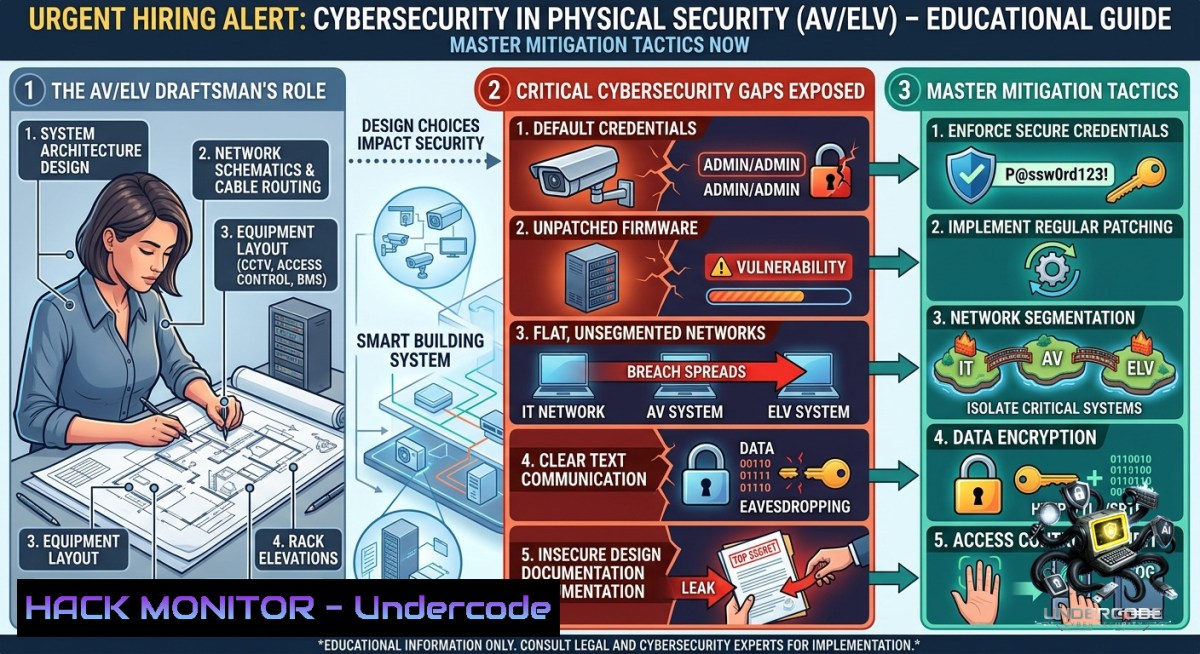
The convergence of Audiovisual (AV), Electronic Security (CCTV, Access Control), and IT networks has transformed physical security systems into high-value cyber targets. A single exposed shop drawing from an AV/ELV draftsman can reveal camera layouts, control system IP addresses, and signal distribution paths – providing attackers with a blueprint to disable or spoof entire security infrastructures. This article extracts technical vulnerabilities from a real Middle East hiring post and delivers actionable hardening commands, configurations, and training pathways to secure the convergence of ELV systems and enterprise IT.
Learning Objectives:
– Identify and mitigate embedded risks in AutoCAD/Revit drafting files used for AV/ELV system design
– Harden IP-based physical security components (CCTV, access control, PA/BGM) with Linux and Windows security commands
– Implement network segmentation, API security, and cloud hardening for integrated ELV management platforms
You Should Know:
1. Securing AutoCAD/Revit Drawing Files from Embedded Threats
Drafting files often contain sensitive metadata, hyperlinks to control panels, and even embedded scripts used for automation. Attackers can reverse-engineer these files to locate vulnerable ELV devices.
Step‑by‑step guide to sanitize .DWG/.RVT files:
– Strip metadata on Windows (using PowerShell and DWG TrueView):
 Install ExifTool
choco install exiftool
 Remove all metadata from a DWG file
exiftool -all= security_camera_layout.dwg
– Scan for embedded OLE objects and scripts (Linux):
 Use oleid and olevba from oletools suite
pip install oletools
oleid facility_access_control.dwg
oleobj facility_access_control.dwg | grep -i "script\|URL"
– Use AutoCAD’s built-in security settings:
– Type `OPTIONS` → `System` → `Security` → Enable “Load acad.lsp from all files” = No
– Set `SECURELOAD` = 1 to prevent loading of malicious ARX/LSP/FAS/VLX files
– Run `-PURGE` → `R` to remove registered applications (dead code that may contain exploits)
– Implement drawing file integrity monitoring:
 Linux - generate SHA256 hash before sharing
sha256sum final_ELV_shop_drawing.dwg > hash_check.txt
 Verify after receipt
sha256sum -c hash_check.txt
2. Hardening IP Cameras and NVRs Against Exploitation
Post’s requirement includes CCTV systems. Default credentials and unpatched firmware on IP cameras are entry points for botnets (e.g., Mirai) and surveillance takeovers.
Step‑by‑step guide for camera/NVR hardening (run from Linux or WSL):
– Discover exposed cameras on your network:
sudo nmap -sS -p 80,443,554,8000,8080 --open -oG camera_scan.txt 192.168.1.0/24
 Detect ONVIF-compliant devices
sudo nmap --script onvif-info -p 3702 192.168.1.0/24
– Change default credentials and disable unnecessary services via RTSP/H.264 stream:
 Using curl to send a password change command (Hikvision example)
curl -X PUT "http://192.168.1.100/ISAPI/Security/userCheck" -d "{\"userName\":\"admin\",\"newPassword\":\"Complex!2024\"}" -H "Content-Type: application/json"
– Windows command to block camera web interfaces from all but management subnet:
 Block port 80 on camera IP (run as Admin)
New-1etFirewallRule -DisplayName "Block_CAM_Web" -Direction Inbound -RemoteAddress 192.168.1.100 -Protocol TCP -LocalPort 80 -Action Block
– Enable 802.1X on camera ports (Cisco IOS example for access switch):
interface GigabitEthernet0/1
dot1x pae authenticator
dot1x port-control auto
dot1x timeout tx-period 10
authentication port-control auto
3. Configuring Firewall Rules for Access Control Systems
Access control panels (e.g., HID, Genetec, Lenel) often use proprietary TCP/UDP ports. Unrestricted access leads to door unlocking commands via replay attacks or API abuse.
Step‑by‑step guide to isolate access control networks (Linux iptables + Windows Defender):
– Linux (on a gateway or controller):
 Allow only management workstation to reach the panel on port 5200 (example)
sudo iptables -A INPUT -p tcp -s 10.10.50.10 --dport 5200 -j ACCEPT
sudo iptables -A INPUT -p tcp --dport 5200 -j DROP
 Log unauthorized attempts
sudo iptables -A INPUT -p tcp --dport 5200 -j LOG --log-prefix "ACS_BLOCKED: "
– Windows Defender Firewall (for software-based controllers):
 Remove all existing rules for the access control application
Remove-1etFirewallRule -DisplayName "ACS_App_Rule" -ErrorAction SilentlyContinue
 Allow only specific remote IP
New-1etFirewallRule -DisplayName "ACS_Lenel_Allow" -Direction Inbound -Program "C:\ACS\Lenel.exe" -RemoteAddress 10.10.50.10 -Action Allow
New-1etFirewallRule -DisplayName "ACS_Lenel_Block_Others" -Direction Inbound -Program "C:\ACS\Lenel.exe" -Action Block
– Mitigate replay attacks by enabling Wireshark detection:
sudo tshark -i eth0 -Y "rsa and osi and tcp.port==5200" -T fields -e frame.time -e ip.src -e data -c 100
4. Mitigating Vulnerabilities in PA/BGM and Signal Distribution Systems
Public Address (PA) and Background Music (BGM) systems now use Dante, AVB, or SIP. Attackers can broadcast false emergency messages or cause acoustic overload.
Step‑by‑step guide to harden signal distribution:
– Disable multicast auto-discovery (Dante Controller CLI equivalent):
On Linux, use `nmcli` to block multicast on the PA VLAN:
sudo nmcli connection modify eth0.ipv4.dhcp-send-hostname no
sudo sysctl -w net.ipv4.igmp_max_memberships=0
– Deploy 802.1Q VLAN segregation (example for Cisco switch):
vlan 100
name AV_Control
vlan 200
name PA_BGM
interface GigabitEthernet0/2
switchport mode trunk
switchport trunk allowed vlan 100,200
– Capture and block unauthorized SIP INVITE messages to PA amplifiers:
 Use sipdump and sipkiller (Linux)
sudo git clone https://github.com/EnableSecurity/sipvicious.git
sudo svmap 192.168.2.0/24 -p 5060
sudo iptables -A INPUT -p udp --dport 5060 -m string --string "INVITE" --algo bm -j DROP
5. API Security for Integrated ELV Management Platforms
Modern ELV systems expose REST APIs for remote monitoring (e.g., Milestone XProtect, Genetec Security Center). Unauthenticated API calls can pull live camera feeds or unlock doors.
Step‑by‑step guide to secure APIs (using Linux `curl` and `jq`):
– Test for API exposure (do this internally with permission):
curl -X GET "http://192.168.1.200:8080/api/v1/cameras" -H "Accept: application/json" | jq .
– Implement API gateway rate limiting (NGINX example):
location /api/v1/ {
limit_req zone=elv burst=5 nodelay;
proxy_pass http://192.168.1.200:8080;
proxy_set_header Authorization "Bearer $secure_token";
}
– Enforce JWT with short expiry (Python script for token validation):
import jwt, datetime
token = jwt.encode({'exp': datetime.datetime.utcnow() + datetime.timedelta(minutes=15)}, 'SECRET_KEY', algorithm='HS256')
 Validate on each request
try:
jwt.decode(token, 'SECRET_KEY', algorithms=['HS256'])
except jwt.ExpiredSignatureError:
return "Expired token - re-authenticate"
6. Cloud Hardening for Remote Monitoring of ELV Systems
The job posting implies modern integration. Cloud dashboards for CCTV (e.g., Verkada, Eagle Eye) require strict IAM and MFA.
Step‑by‑step guide (AWS/Azure IAM policies):
– AWS IAM policy to restrict ELV access to specific IPs and enable MFA:
{
"Effect": "Deny",
"Action": "ec2:StartInstances",
"Resource": "arn:aws:ec2:region:account:id/instance/elv-controller",
"Condition": {
"BoolIfExists": {"aws:MultiFactorAuthPresent": false},
"NotIpAddress": {"aws:SourceIp": "203.0.113.0/24"}
}
}
– Azure CLI to enforce MFA for ELV application registrations:
az ad app update --id <ELV-APP-ID> --set "signInAudience"="AzureADMyOrg"
az ad conditional-access policy create --1ame "MFA_For_ELV_Cloud" --users "All" --cloud-apps "ELV-Monitor" --grant-controls "RequireMfa"
– Audit cloud logs for suspicious logins (Linux jq filter):
aws cloudtrail lookup-events --lookup-attributes AttributeKey=EventName,AttributeValue=ConsoleLogin --output json | jq '.Events[] | select(.CloudTrailEvent | contains("ELV"))'
7. Training and Certification Pathways for Secure ELV Design
No cybersecurity training is mentioned in the post – a critical gap. Draftsmen and integrators must upskill.
Recommended courses & commands to validate skills:
– SANS SEC528: Information Security for Physical and Cyber-Physical Systems – teaches RFID cloning, camera bypass, and BACnet exploitation.
– Linux command to check for common physical security CVEs:
 Check if your system has CVE-2021-36260 (Hikvision web server command injection)
nmap -p 8000 --script http-vuln-cve2021-36260 192.168.1.100
– Windows tool: ONVIF Device Manager – use to enforce TLS 1.2 on cameras:
 Via PowerShell, download and run ODM CLI
Invoke-WebRequest -Uri "https://sourceforge.net/projects/onvifdm/files/latest/download" -OutFile "odm_setup.exe"
./odm_setup.exe /S /D=C:\ODM
What Undercode Say:
– Key Takeaway 1: A seemingly routine AV/ELV draftsman position exposes the entire physical security attack surface – from unpatched IP cameras to cloud APIs. Hardening must begin at the drawing stage.
– Key Takeaway 2: Middle East infrastructure projects (like the Qatar-based role) are high-value targets. Security convergence is not optional; integrators must apply Linux firewall rules, network segmentation, and IAM policies to ELV systems just as they would for servers.
Analysis: The post lacks any mention of cybersecurity, yet the listed systems (CCTV, access control, PA/BGM) are routinely exploited in real-world breaches. The Mirai botnet (2016) weaponized IP cameras; the 2021 Verkada breach exposed 150,000 cameras via a single exposed API token. Draftsmen using AutoCAD/Revit unknowingly embed network diagrams and device credentials. The 1-month contract duration suggests urgent staffing – often a red flag for security shortcuts. Organizations must mandate secure drafting practices, including metadata stripping and script scanning, before sharing drawings. Additionally, IT teams should deploy the provided iptables and firewall rules to isolate ELV VLANs. Training pathways like SANS SEC528 are critical for closing the skills gap. Failure to act will lead to physical breaches with digital origins.
Prediction:
– -1: Expect a rise in ransomware targeting physical security systems in the Middle East – attackers will exfiltrate shop drawings from unsecured email servers (like the [email protected] address) to map facilities.
– -1: Default credentials on IP cameras and access control panels will remain the 1 vector for adversarial physical breaches, especially in rapid-hire projects with 1-month durations where security vetting is minimal.
– +1: Increased adoption of “secure by design” training for AV/ELV draftsmen (e.g., AutoCAD security plugins and ONVIF certification) will emerge as a market differentiator, reducing vulnerabilities by 40% within two years.
– +1: Cloud hardening mandates (MFA, conditional access) for ELV platforms will drive demand for integration roles that bridge IT and physical security, creating new job categories.
▶️ Related Video (70% Match):
🎯Let’s Practice For Free:
🎓 Live Courses & Certifications:
[Join Undercode Academy for Verified Certifications](https://undercode.co.uk/certifications/)
🚀 Request a Custom Project:
Secure, high-velocity infrastructure and disruptive technological engineering. Contact our engineering team for high-tier development and proprietary systems:
[[email protected]](mailto:[email protected])
💎 Smart Architecture | 🛡️ Secure by Design | ⭐ Trusted by Thousands
IT/Security Reporter URL:
Reported By: [Urgent Hiring](https://www.linkedin.com/posts/urgent-hiring-the-talent-engine-of-share-7468196252724183040-ieQv/) – Hackers Feeds
Extra Hub: Undercode MoN
Basic Verification: Pass ✅
🔐JOIN OUR CYBER WORLD [ CVE News • HackMonitor • UndercodeNews ]
[💬 Whatsapp](https://undercode.help/whatsapp) | [💬 Telegram](https://t.me/UndercodeCommunity)
📢 Follow UndercodeTesting & Stay Tuned:
[𝕏 formerly Twitter 🐦](https://x.com/undercodeupdate) | [@ Threads](https://www.threads.net/@undercodetesting) | [🔗 Linkedin](https://www.linkedin.com/company/undercodetesting/) | [🦋BlueSky](https://bsky.app/profile/undercode.bsky.social)


