Listen to this Post
Introduction:
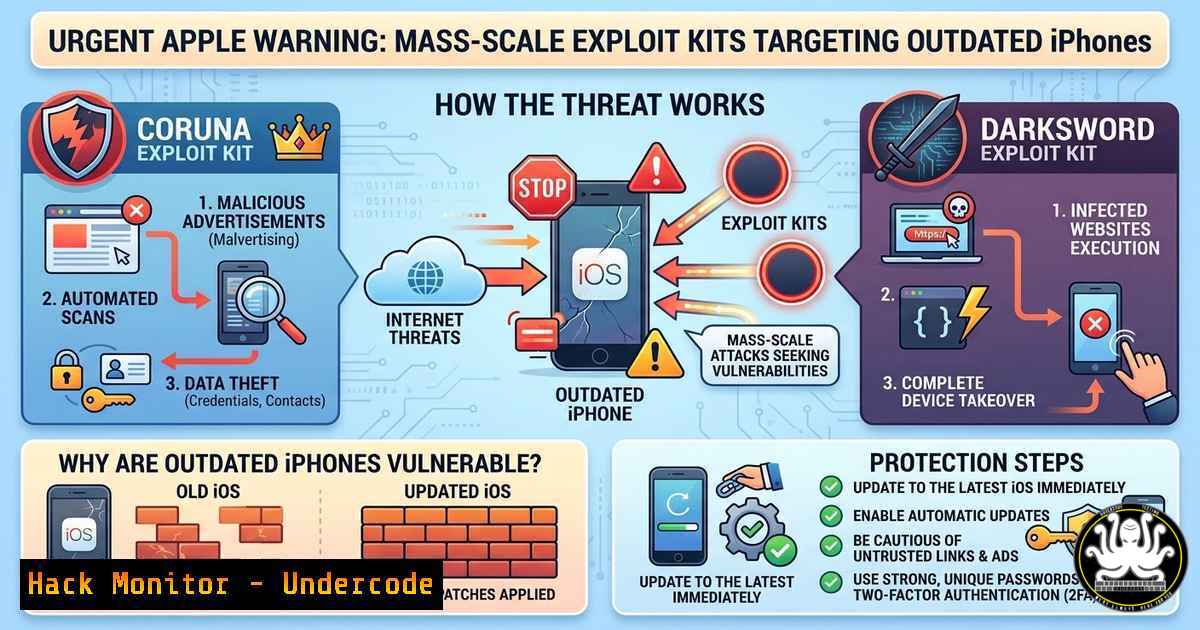
Apple has issued an urgent warning that two sophisticated exploit kits, Coruna and DarkSword, are being actively used in drive‑by download attacks against outdated iPhones. These kits weaponize known vulnerabilities that remain unpatched on devices running older iOS versions. When a user visits a compromised website, the exploit kit silently infects the device, potentially stealing sensitive data, credentials, and even taking complete control. This article breaks down the threat, shows you how to determine if you are at risk, and provides step‑by‑step technical guidance to protect and secure your iOS devices.
Learning Objectives:
- Understand the mechanics of the Coruna and DarkSword exploit kits and the vulnerabilities they target.
- Identify whether your iPhone is vulnerable and how to verify its iOS version.
- Implement immediate protective measures at the device, network, and enterprise levels.
- Detect signs of compromise and perform forensic checks for malicious profiles or certificates.
- Execute proper recovery steps if an infection is suspected.
You Should Know
1. Understanding the Exploit Kits: Coruna and DarkSword
Coruna and DarkSword are web‑based exploit kits distributed through compromised legitimate websites. They scan the visitor’s browser and device for specific, unpatched vulnerabilities—typically older CVEs affecting iOS WebKit or the kernel. Once a vulnerable device is detected, the kit delivers a payload that installs malware, spyware, or ransomware without any user interaction.
– Coruna is known to exploit flaws in Safari’s JavaScript engine, allowing remote code execution.
– DarkSword focuses on privilege escalation vulnerabilities, enabling the malware to break out of the iOS sandbox and access sensitive data.
Both kits are often updated to include new exploits as soon as patches are released, making unpatched devices an easy target.
How to use this information: Security teams should monitor threat intelligence feeds for indicators of compromise (IOCs) related to these kits and block known command‑and‑control (C2) domains at the firewall level.
- Checking Your iPhone’s iOS Version and Update Status
The first line of defense is ensuring your device runs the latest iOS. Follow these steps: - On your iPhone, go to Settings → General → About → iOS Version.
- Compare the version shown with the latest publicly available version (check Apple’s security updates page or your Software Update screen).
- If an update is available, go to Settings → General → Software Update and tap Download and Install.
- Enable automatic updates: Settings → General → Software Update → Automatic Updates → toggle on Download iOS Updates and Install iOS Updates.
For IT administrators managing multiple devices, use a Mobile Device Management (MDM) solution to enforce update policies and generate compliance reports. On macOS or Linux, you can also connect an iPhone and use `libimobiledevice` to check the version:
ideviceinfo -k ProductVersion
3. Mitigating Risk: Advanced Protection Measures
Beyond updating, adopt these layered security practices:
- Use a reputable VPN to encrypt web traffic and prevent DNS hijacking.
- Install content blockers (e.g., AdGuard, 1Blocker) to block malicious scripts.
- Disable unnecessary services like Bluetooth and Wi-Fi when not in use.
- Avoid clicking on suspicious links even in trusted apps like Messages or WhatsApp.
- For enterprises, configure DNS filtering (e.g., Cisco Umbrella) to block known malicious domains associated with Coruna and DarkSword.
On a Windows machine used for managing iOS devices, you can set up a simple firewall rule to block outbound traffic to suspicious IPs:
New-NetFirewallRule -DisplayName "Block DarkSword C2" -Direction Outbound -LocalPort Any -Protocol Any -RemoteAddress 192.0.2.0/24 -Action Block
(Replace with actual IOCs when available.)
4. Detecting Potential Compromise: Signs and Indicators
If your iPhone is infected, you might notice:
- Unusual battery drain or device heating.
- Unexpected spikes in cellular data usage.
- Frequent app crashes or unexplained pop‑ups.
- New profiles or certificates under Settings → General → VPN & Device Management.
To perform a deeper check, examine iOS analytics logs:
1. Go to Settings → Privacy & Security → Analytics & Improvements → Analytics Data.
2. Look for logs containing suspicious process names or frequent crash reports from system apps.
3. Use a tool like iMazing or 3uTools on a computer to extract and analyse these logs.
For network‑level detection, set up a packet capture on your router or use Wireshark with a filter for traffic to known malicious IPs:
ip.dst == 203.0.113.0/24 or http.request.uri contains "/exploit"
(Sample filter – adjust with actual IOCs.)
5. Network‑Level Protection: Using Firewalls and IDS
Organisations should deploy intrusion detection/prevention systems (IDS/IPS) to spot exploit kit activity. A Snort rule to detect DarkSword’s signature might look like:
alert tcp $HOME_NET any -> $EXTERNAL_NET $HTTP_PORTS (msg:"DarkSword Exploit Kit Payload"; flow:to_server,established; content:"/darksword.js"; http_uri; classtype:trojan-activity; sid:1000001; rev:1;)
On Linux, use `iptables` to block outbound connections to malicious IPs:
iptables -A OUTPUT -d 198.51.100.0/24 -j DROP
Regularly update blocklists from threat feeds.
- Forensic Analysis: Checking for Malicious Profiles and Certificates
Attackers often install rogue configuration profiles to intercept traffic or maintain persistence.
– On the device: Settings → General → VPN & Device Management. Remove any profiles you do not recognise.
– Check installed root certificates: Settings → General → About → Certificate Trust Settings. Untrusted certificates may appear here.
– For a more thorough examination, use a computer with `libimobiledevice` to list profiles:
ideviceprovision list
If a suspicious profile is found, remove it with:
ideviceprovision remove <profile-UUID>
7. Responding to an Infection: Recovery Steps
If you confirm or strongly suspect an infection, take immediate action:
1. Disconnect from Wi-Fi and cellular data to prevent further communication.
2. Backup important data (contacts, photos) to iCloud or a computer – but note that backups may also contain malware, so restore cautiously.
3. Erase all content and settings: Settings → General → Transfer or Reset iPhone → Erase All Content and Settings.
4. Set up the device as new (do not restore from a backup that might be compromised).
5. After setup, immediately update to the latest iOS and change all passwords.
For enterprise devices, IT should revoke and reissue certificates and enforce a fresh enrollment via MDM.
What Undercode Say
- Key Takeaway 1: Keeping iOS updated is the single most effective defense against exploit kits like Coruna and DarkSword. Apple’s public warning underscores the active exploitation of known vulnerabilities—patching closes the door.
- Key Takeaway 2: The sophistication of these kits highlights the need for a multi‑layered security approach. Beyond device updates, network monitoring, DNS filtering, and user education are essential to mitigate drive‑by downloads.
- Analysis: The rapid evolution of mobile exploit kits shows that attackers are investing heavily in targeting iOS, once considered more secure. The use of compromised websites as delivery vectors makes these threats particularly insidious—users have no warning. Enterprises must treat mobile devices as endpoints with the same rigor as desktops, enforcing strict update policies and deploying mobile threat defense solutions. Individuals should enable automatic updates and remain vigilant about the links they click, even from trusted sources. The fact that Apple issued a public alert suggests a significant uptick in attacks, possibly tied to nation‑state actors or large‑scale cybercrime campaigns. As iOS versions age, the pool of vulnerable devices grows, creating a lucrative target for exploit kit operators.
Prediction
In the coming months, we can expect a surge in exploit kits specifically tailored for outdated iOS versions that no longer receive security updates. Attackers will stockpile n‑day exploits and distribute them via compromised ad networks and popular websites. Apple may be forced to extend support for older devices or accelerate hardware upgrade cycles. Additionally, we may see increased collaboration between Apple and security researchers to rapidly disclose and patch vulnerabilities, as well as the integration of on‑device runtime protection in future iOS releases. Organisations will likely adopt stricter mobile device management policies and consider zero‑trust architectures that treat every device as potentially compromised.
▶️ Related Video (78% Match):
🎯Let’s Practice For Free:
IT/Security Reporter URL:
Reported By: Hackermohitkumar Warning – Hackers Feeds
Extra Hub: Undercode MoN
Basic Verification: Pass ✅


