Listen to this Post
Introduction:
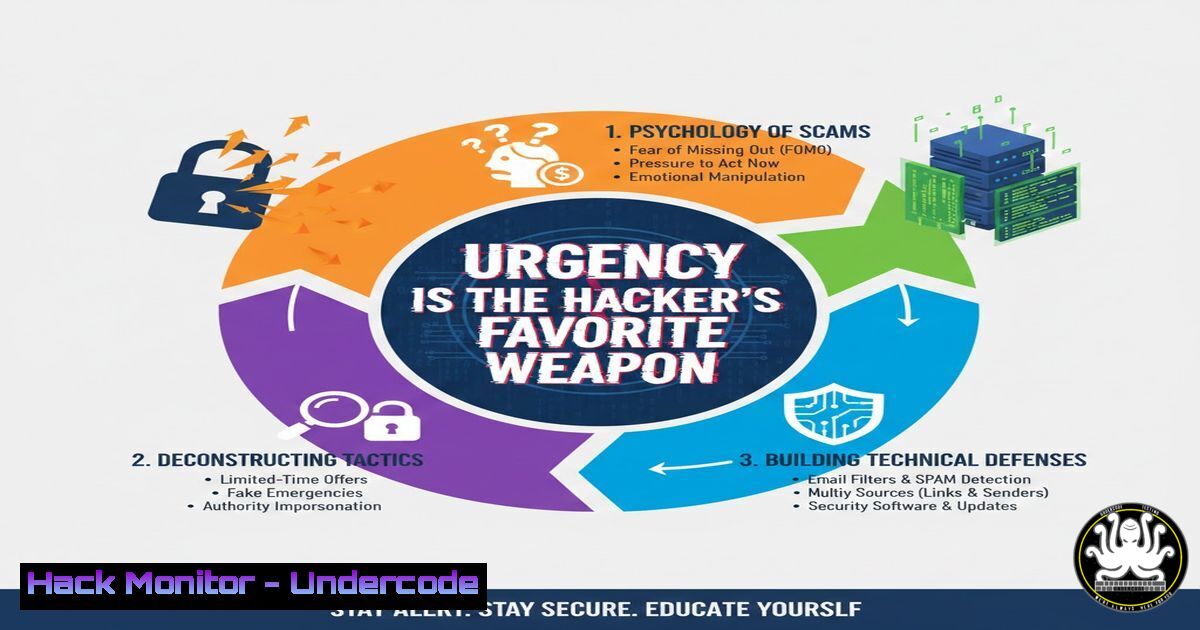
In the digital realm, urgency is rarely a symptom of legitimate business but a primary indicator of manipulation. Cyber attackers weaponize time pressure to short-circuit our logical thinking, exploiting the human stress response to bypass technical safeguards. This article moves beyond the warning to provide a technical and procedural framework for identifying, analyzing, and neutralizing threats that use urgency as their attack vector.
Learning Objectives:
- Understand the psychological principles (like scarcity and authority) that make urgent requests so effective.
- Learn practical, command-line and tool-based techniques to investigate suspicious emails and messages.
- Implement proactive email filtering, domain monitoring, and user training protocols to build organizational resilience.
You Should Know:
1. The Anatomy of an “Urgent” Phishing Email
A genuine alert from IT or leadership follows protocol; a scam manufactures crisis. Technically, these emails often contain masked links, spoofed sender addresses, and malicious attachments.
Step‑by‑step guide explaining what this does and how to use it.
Step 1: Examine Headers, Not Just the “From” Field. The display name can be forged. View the full email headers to see the true return-path.
In Gmail: Open email → Click three dots → “Show original”.
In Outlook: Double-click email → File → Properties → Internet headers.
Step 2: Hover Over EVERY Link. Before clicking, hover your cursor over any button or hyperlink. The true destination URL will appear in the bottom-left corner of your browser. Check for subtle misspellings (e.g., micr0soft.com), extra hyphens, or strange domains.
Step 3: Analyze Attachments Safely. Urgent requests for invoice payments often come with “invoice.zip” or “document.iso” files.
Do NOT open directly. Upload the file to a cloud sandbox like VirusTotal or Hybrid Analysis.
On a Linux Sec Analysis VM, you can examine a ZIP file’s contents without extracting: unzip -l suspicious.zip. For hashing: sha256sum suspicious.pdf.
2. Domain and Sender Spoofing: Technical Verification
Attackers impersonate legitimate domains. Technical verification can expose this.
Step‑by‑step guide explaining what this does and how to use it.
Step 1: Check Sender Policy Framework (SPF) Records. SPF lists authorized mail servers for a domain. A mismatch can indicate spoofing. Use command-line dig:
`dig TXT example.com | grep spf`
Step 2: Verify Domain Age. Scam domains are often newly created. Use whois:
`whois suspicious-domain.net | grep -i “creation date”`
Step 3: Analyze URL Structure with Online Tools. Use passive DNS replication tools like URLhaus or Cisco Talos Intelligence to check if a URL is already flagged for malware distribution.
- Hardening Your Email Environment (For Admins & Security-Conscious Users)
Proactive configuration drastically reduces the volume of urgent scam emails that reach the inbox.
Step‑by‑step guide explaining what this does and how to use it.
Step 1: Enforce DMARC Policy. DMARC (Domain-based Message Authentication, Reporting & Conformance) tells receiving servers what to do with emails that fail SPF or DKIM checks. A strong policy (p=reject) protects your domain from being spoofed and helps others reject spoofed emails.
Publish a DMARC DNS record: `v=DMARC1; p=reject; rua=mailto:[email protected];`
Step 2: Configure Aggressive Email Filtering Rules. Create rules to flag emails with urgency keywords.
In Microsoft 365 Defender: Create an Anti-spam policy → “Bulk email threshold” to 6 or lower. Create a mail flow rule that prepends subject lines with `[URGENCY-CHECK]` for emails containing words like “immediate action,” “payment overdue,” “account suspended” from external senders.
Step 3: Implement User Training Simulations. Use platforms like KnowBe4 or Microsoft Attack Simulation Training to send simulated phishing emails with “urgent” themes to your users. Track click rates and provide immediate, interactive training.
- The “Urgent” Tech Support Scam & System Hardening
These scams claim your computer is infected and urge you to install remote access software or run dubious commands.
Step‑by‑step guide explaining what this does and how to use it.
Step 1: Never Grant Unsolicited Remote Access. Legitimate IT will never call you out of the blue.
Step 2: Harden Your Remote Desktop Protocol (RDP). This is a common vector.
On Windows: Disable RDP if unused (Settings > System > Remote Desktop). If needed, change it from the default port 3389 via Registry (HKLM\System\CurrentControlSet\Control\Terminal Server\WinStations\RDP-Tcp\PortNumber) and ensure it’s behind a VPN with Network Level Authentication (NLA) enabled.
On Linux (for SSH): Disable password authentication, use SSH keys. `sudo nano /etc/ssh/sshd_config` → Set `PasswordAuthentication no` and PermitRootLogin no.
Step 3: Verify “Infection” Claims. Scammers use `eventvwr.msc` (normal system logs) or `tree C:\` to simulate scans. Know your real monitoring tools.
5. Incident Response: When Someone Clicks on “Urgent”
A rapid, structured response is critical to contain damage.
Step‑by‑step guide explaining what this does and how to use it.
Step 1: Immediate Isolation. Disconnect the affected device from the network (disable Wi-Fi/Ethernet).
Step 2: Credential Rotation. Immediately change passwords for any accounts the user accessed and their corporate email password, starting with email. Enable MFA if not present.
Step 3: Forensic Triage (Basic).
Windows: Check recent run commands via `shell:recent` and gci C:\Users\$USER\AppData\Roaming\Microsoft\Windows\Recent -Recurse.
Linux: Check shell history: cat ~/.bash_history. Look for suspicious downloads or connections.
Step 4: Report. Report the phishing attempt to your IT/Security team and forward the original email to `[email protected]` (US) or your national CERT.
What Undercode Say:
- Technical Vigilance Trumps Emotional Reactivity. The most sophisticated firewall is the pause between reading an urgent message and acting on it. Pair this human pause with technical verification skills.
- Defense is a Stack, Not a Single Tool. Resilience combines email authentication (DMARC), endpoint hardening, user conditioning via simulation, and a clear incident response playbook. Neglecting any layer creates an exploitable gap.
The analysis of urgency-based attacks reveals a fundamental clash between human psychology and system security. Attackers invest in understanding behavioral triggers more than zero-day exploits because it’s consistently profitable. The future of this tactic points towards hyper-personalization, using AI to mine LinkedIn profiles (like the source post’s context) to craft urgent requests from seemingly trusted colleagues or referencing real projects. Defensively, the countermeasure is a cultural and technical shift: fostering a “verify-first” culture where questioning urgency is encouraged, and deploying AI-powered email security that analyzes language patterns for manipulative content, not just malicious links. The “pause” must be engineered into both the human workflow and the technology stack.
Prediction:
Urgency-based social engineering will increasingly merge with deepfake audio and AI-generated video (“CEO fraud 2.0”), making real-time verification via secondary, pre-established channels non-negotiable. Simultaneously, regulatory frameworks will likely start mandating specific anti-impersonation technical controls like DMARC enforcement for critical industries, shifting this from best practice to compliance requirement. The arms race will move from the inbox to the communication platform itself (Slack, Teams), demanding security features and user awareness to evolve just as quickly.
▶️ Related Video (78% Match):
🎯Let’s Practice For Free:
IT/Security Reporter URL:
Reported By: Swatithecybergirl %F0%9D%90%82%F0%9D%90%B2%F0%9D%90%9B%F0%9D%90%9E%F0%9D%90%AB – Hackers Feeds
Extra Hub: Undercode MoN
Basic Verification: Pass ✅


