Listen to this Post
Introduction:
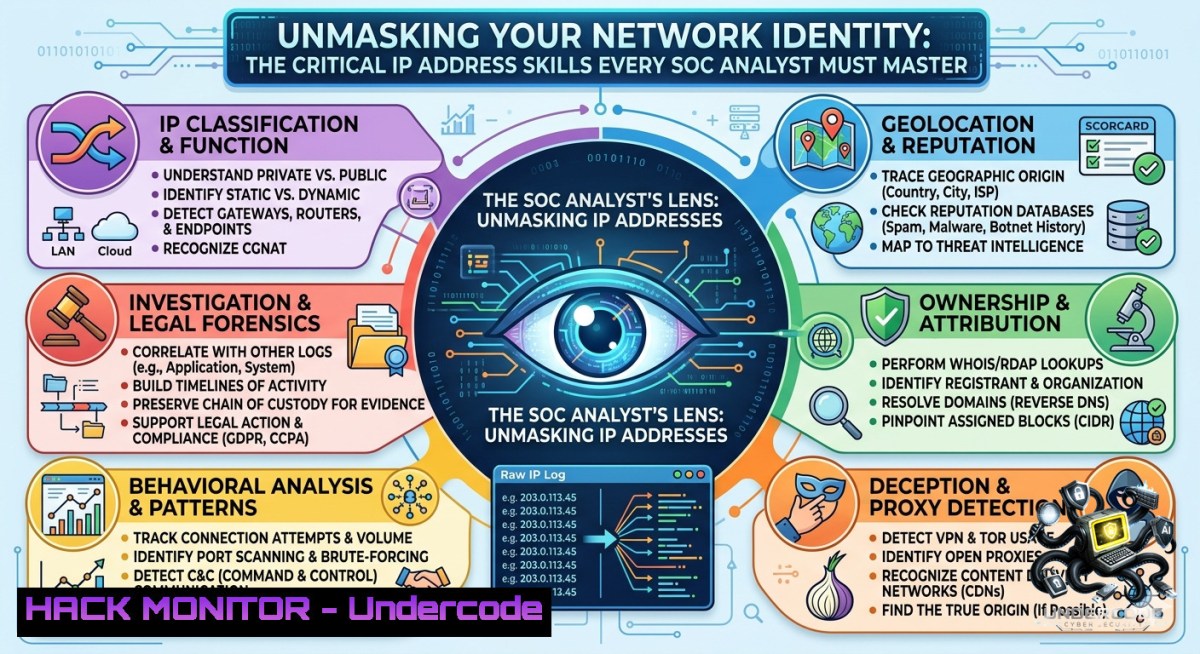
An Internet Protocol (IP) address is the digital fingerprint of every device connected to a network—essential for communication, routing, and security monitoring. For cybersecurity professionals, especially SOC analysts and blue teamers, the ability to quickly identify, interpret, and act upon IP address information is a foundational skill that underpins incident response, threat hunting, and network hardening.
Learning Objectives:
- Differentiate between private and public IP addresses and understand their roles in network segmentation and NAT traversal.
- Execute OS-specific command-line tools (Windows, Linux, macOS) to retrieve local and public IP addresses for troubleshooting and forensic analysis.
- Apply IP address knowledge to real-world security operations, including log correlation, access control list (ACL) configuration, and threat intelligence enrichment.
You Should Know:
- Finding Your Local IP Address: A Cross-Platform Command Guide
Understanding how to locate your device’s internal IP is the first step in network troubleshooting and security investigations. Below are verified commands for each major operating system.
Windows (Command Prompt or PowerShell):
ipconfig
Look for the “IPv4 Address” under your active network adapter (e.g., Ethernet or Wi-Fi). Example output: 192.168.1.100.
Linux (Terminal):
ip addr show
or (legacy):
ifconfig
Focus on the `inet` field for your interface (e.g., eth0, wlan0). Example: inet 192.168.1.100/24.
macOS (Terminal):
ipconfig getifaddr en0
For Wi-Fi, use en0; for Ethernet, en1. Alternatively, ifconfig en0 | grep inet.
Step-by-step guide:
Open the respective command-line interface, run the command, and identify the IPv4 address assigned by your local router or DHCP server. This private IP is used for internal communication only and cannot be routed on the public internet.
- Discovering Your Public IP Address: Methods for Anonymity and Verification
Your public IP is what the outside world sees. SOC analysts use public IP checks to verify VPN functionality, detect IP leaks, or identify the source of external attacks.
Using web-based services (any OS with curl or wget):
curl ifconfig.me
curl icanhazip.com
curl ipinfo.io/ip
Windows (PowerShell):
(Invoke-WebRequest -Uri "https://api.ipify.org").Content
Manual method: Search “What is my IP” in any web browser.
Step-by-step guide:
Run the curl command in a terminal or use the browser search. The returned IP is your public-facing address assigned by your ISP. For privacy, note that this IP can be geolocated and traced—essential knowledge when assessing threat actor infrastructure.
- Private vs. Public IP: The Firewall’s Best Friend
Private IP ranges (RFC 1918) are non-routable on the internet and are used inside local networks. Public IPs are globally unique and assigned by IANA. Understanding this distinction is critical for writing firewall rules and analyzing network logs.
Standard private IP ranges:
– `10.0.0.0 – 10.255.255.255` (Class A)
– `172.16.0.0 – 172.31.255.255` (Class B)
– `192.168.0.0 – 192.168.255.255` (Class C)
Check your routing table (Linux/macOS):
netstat -rn
Windows:
route print
Step-by-step guide:
Use the routing table to see default gateway (usually a private IP of your router). SOC analysts verify that outbound traffic passes through NAT (Network Address Translation), which maps private IPs to a public IP. If a public IP appears in an internal log where a private IP is expected, that may indicate a misconfiguration or a compromised device.
4. Advanced IP Reconnaissance for Threat Hunters
Active reconnaissance helps map network paths and validate suspicious IPs. These commands are standard during incident response.
Ping (test reachability):
ping 8.8.8.8
Traceroute (path discovery):
- Linux/macOS: `traceroute 8.8.8.8`
– Windows: `tracert 8.8.8.8`
DNS lookup (resolve domain to IP):
nslookup google.com
dig google.com
WHOIS (IP ownership and reputation):
whois 8.8.8.8
Step-by-step guide:
When investigating an alert (e.g., outbound connection to an unknown IP), run `whois` against that IP to identify its owner (cloud provider, ISP, etc.). Use `traceroute` to see intermediate hops—if a hop belongs to a known malicious ASN (Autonomous System Number), escalate accordingly.
5. Hardening Network Security with IP-Based Access Controls
Firewall rules that allow or block specific IP addresses are a primary defense layer. Below are examples for Windows and Linux.
Windows Defender Firewall (netsh):
Block an incoming IP:
netsh advfirewall firewall add rule name="Block_IP" dir=in action=block remoteip=203.0.113.45
Linux iptables:
Block an outgoing connection to a malicious IP:
sudo iptables -A OUTPUT -d 203.0.113.45 -j DROP
Allow only specific IP for SSH:
sudo iptables -A INPUT -p tcp --dport 22 -s 192.168.1.0/24 -j ACCEPT
sudo iptables -A INPUT -p tcp --dport 22 -j DROP
Step-by-step guide:
First, identify the IP to block via logs or threat intel. For Windows, use netsh with remoteip. For Linux, insert iptables rules (order matters). Always test connectivity afterward. In a SOC environment, these commands are used to isolate compromised endpoints or block C2 (command & control) IPs.
- IP Addresses in Incident Response: Log Analysis and Threat Correlation
Extracting and correlating IPs from logs is a daily SOC task. Use grep on Linux or findstr on Windows.
Extract all IPv4 addresses from a log file (Linux):
grep -Eo '([0-9]{1,3}.){3}[0-9]{1,3}' /var/log/auth.log
Windows (findstr with regex):
findstr /R "[0-9][0-9].[0-9][0-9].[0-9][0-9].[0-9][0-9]" security.log
Threat intelligence lookup (example using curl to VirusTotal API):
curl --request GET --url "https://www.virustotal.com/api/v3/ip_addresses/8.8.8.8" --header "x-apikey: YOUR_API_KEY"
Step-by-step guide:
After collecting suspicious IPs from logs, feed them into a threat intelligence platform (e.g., VirusTotal, AlienVault OTX). Check for malicious activity tags (C2, malware distribution). For internal IPs, cross-reference with DHCP logs to identify the hostname and user. This process forms the backbone of IP-based hunting.
What Undercode Say:
- Key Takeaway 1: Mastering IP fundamentals—including private/public addressing, command-line retrieval, and firewall controls—is non-1egotiable for any cybersecurity role, especially SOC analysts and blue team members.
- Key Takeaway 2: Hands-on proficiency with cross-platform networking commands (ipconfig, ifconfig, curl, traceroute) directly accelerates incident response and reduces mean time to resolution (MTTR).
Analysis (approx. 10 lines):
Undercode emphasizes that IP address literacy is often overlooked in favor of advanced tools, yet it remains the most frequently used skill in daily SOC operations. From identifying a rogue DHCP server to tracing a port scan back to its source, IP knowledge bridges the gap between raw logs and actionable intelligence. The ability to manually extract IPs with grep or findstr ensures analysts are not solely dependent on SIEM interfaces during outages. Furthermore, understanding NAT and private ranges prevents false positives when internal traffic appears to have “public” destinations. Firewall rule examples (iptables/netsh) demonstrate that IP controls are not just theoretical—they are immediate containment measures. Undercode advises that every junior analyst practice these commands in a home lab until they become muscle memory. The inclusion of threat intelligence API queries elevates basic IP lookup to proactive defense. Ultimately, without solid IP fundamentals, advanced certifications like CCNA or Security+ lose their practical edge.
Expected Output:
This article has provided verified command-line techniques for IP discovery, explained the private-public dichotomy, demonstrated firewall hardening, and mapped IP usage to real SOC workflows. By practicing these steps, readers will transform theoretical networking knowledge into operational cybersecurity capability.
Prediction:
- +1 Greater adoption of automated IP enrichment in open-source SIEMs (e.g., Wazuh, ELK) will lower the barrier for junior analysts to perform threat intelligence lookups directly from alert dashboards.
- -1 As IPv6 deployment accelerates, legacy IPv4-based logging and filtering tools may become inconsistent, forcing organizations to retrain staff and update detection rules, creating a temporary skills gap.
- +1 Hands-on IP command challenges will increasingly appear in cybersecurity interviews and practical exams (e.g., Blue Team Level 1, CompTIA Network+), raising the baseline competency of new hires.
- -1 Adversaries are already abusing dynamic IPs and CDN-proxied addresses to evade static IP blocklists; SOC teams must adopt behavioral and reputation-based models alongside IP controls.
- +1 Cloud-1ative networking (AWS VPC, Azure VNet) abstracts traditional IP management but still relies on the same CIDR and routing principles—knowledge from this article will seamlessly transfer to cloud security roles.
▶️ Related Video (80% Match):
🎯Let’s Practice For Free:
🎓 Live Courses & Certifications:
Join Undercode Academy for Verified Certifications
🚀 Request a Custom Project:
Secure, high-velocity infrastructure and disruptive technological engineering. Contact our engineering team for high-tier development and proprietary systems:
[email protected]
💎 Smart Architecture | 🛡️ Secure by Design | ⭐ Trusted by Thousands
IT/Security Reporter URL:
Reported By: Gude Venkata – Hackers Feeds
Extra Hub: Undercode MoN
Basic Verification: Pass ✅


