Listen to this Post
Introduction
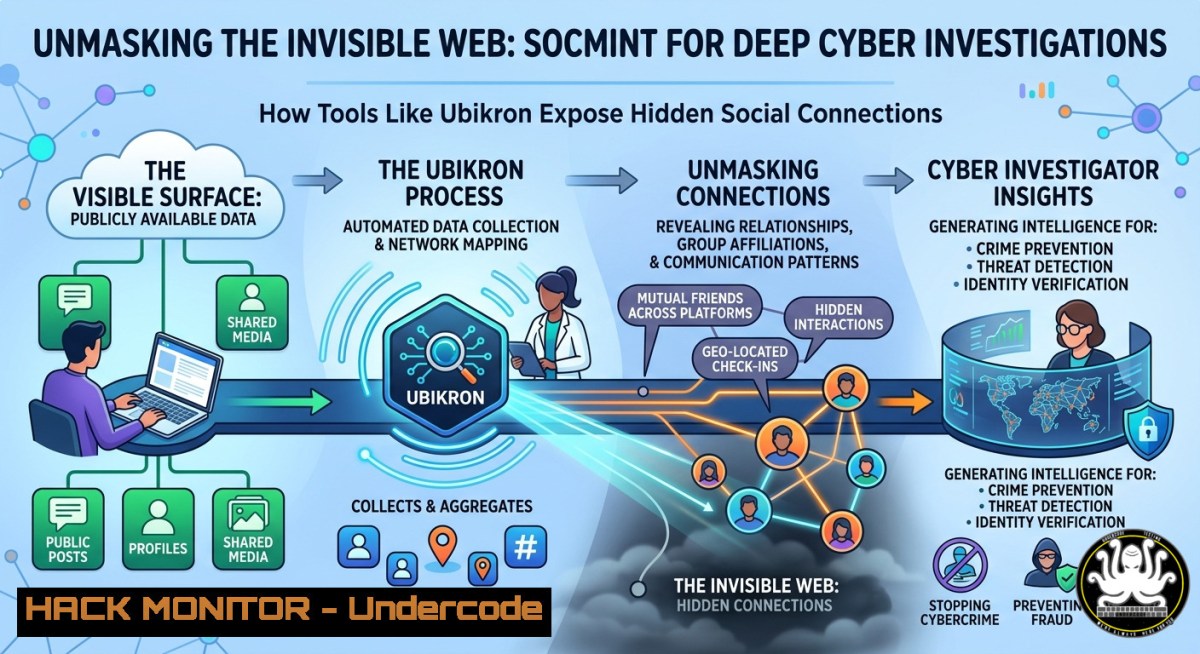
In the world of cyber threat intelligence, the most dangerous actors often leave the faintest digital footprints, deliberately avoiding direct connections that could expose their networks. Social Media Intelligence (SOCMINT), a specialized subset of OSINT, addresses this challenge by analyzing public data from platforms like Facebook, X (Twitter), and LinkedIn to uncover hidden relationships, alternate personas, and covert coordination that would otherwise remain invisible. By leveraging tools that automate entity extraction, link analysis, and graph visualization, investigators can pierce the veil of anonymity and map the true structure of adversarial social graphs.
Learning Objectives
- Understand the core principles of SOCMINT and how friend overlap analysis reveals hidden accounts and alternate identities through network topology and link analysis.
- Master the deployment and configuration of the Ubikron OSINT workbench, including its AI-assisted entity extraction, automated page capture, and graph-based investigation features.
- Implement practical Python-based entity extraction and graph database workflows to replicate Ubikron’s core functionality using open-source alternatives on both Linux and Windows.
You Should Know
- Friend Overlap Analysis: The Science of Uncovering Hidden Social Graphs
At its core, SOCMINT relies on the concept of the social graph—a network where nodes represent accounts or individuals and edges represent relationships such as friendships, follows, or interactions. Friend overlap analysis exploits inconsistencies in privacy settings: even if a user hides their friend list, their friends may have public lists, allowing investigators to reconstruct the hidden network through overlapping connections. This technique, popularized by tools like the one Kirby Plessas, OSC built using ChatGPT, works because people who share strong real-world ties often fail to fully isolate their networks across different personas, revealing themselves through shared contacts, reused communities, and overlapping behavioral patterns.
Step‑by‑step guide to conducting a manual friend overlap analysis:
- Identify a target account with at least partial visibility (public friends, followers, or interactions).
- Extract connection data using browser extensions or manual inspection, gathering friend lists, followers, tagged users, and commenters.
- Compare against other accounts by inputting multiple account identifiers into an overlap analysis tool to identify common connections and measure similarity.
- Look for key patterns—high overlap likely indicates the same person or close social group; repeated clusters suggest shared identity spaces like workplaces or neighborhoods.
- Pivot and expand by searching overlapping usernames on other platforms and repeating the process to build a larger network map.
Example Python code for extracting entities from web pages:
import requests
from bs4 import BeautifulSoup
import re

url = "https://example.com/target-profile"
response = requests.get(url)
soup = BeautifulSoup(response.text, 'html.parser')
text = soup.get_text()

Extract emails
emails = set(re.findall(r'[a-zA-Z0-9._%+-]+@[a-zA-Z0-9.-]+.[a-zA-Z]{2,}', text))
print("Emails:", emails)

Extract domains from links
domains = set()
for a in soup.find_all('a', href=True):
if 'http' in a['href']:
domain = a['href'].split('/')[bash] if '//' in a['href'] else None
if domain:
domains.add(domain)
print("Domains:", domains)
2. The Ubikron OSINT Workbench: Browser-Native Investigation Automation
Ubikron, built by Vortimo (founded by Roelof Temmingh, co-founder of SensePost and creator of Maltego), represents a third-generation OSINT workbench designed to run entirely within a Chromium-based browser. It automatically saves every page visited—including screenshots, full body text, and MHTML archives of infinite-scrolling feeds—while extracting entities such as emails, domains, crypto wallets, geocoordinates, aliases, and hashtags. A built-in AI assistant with Retrieval-Augmented Generation (RAG) allows investigators to query their entire collected dataset using natural language, summarise findings, and generate report drafts directly from the extension.
Step‑by‑step installation and configuration on Linux and Windows:
- Install the extension from the Chrome Web Store (ID:
edfkaefjonbohokoldemepfolefiplgd) for Chrome, Brave, Edge, or any Chromium-based browser. - Create an investigation project using the built-in editor to define tags and classify collected material.
- Configure recording settings to automatically save pages as text, screenshots, or MHTML, and set custom recording rules for specific domains.
- Browse normally—Ubikron captures everything silently in the background; use the one-click pause to stop recording when needed.
- Extract and enrich entities via the sidebar, which automatically detects patterns and sends them to intelligence sources like Epieos, OSINT Industries, Dehashed, and DomainTools.
- Query the AI assistant by asking natural language questions about your collected data (e.g., “Summarise all emails found in the last week” or “Show me connections between domains X and Y”).
- Export reports securely as PDFs or share projects with collaborators.
Linux and Windows commands for self-hosted Ubikron instance (advanced):
 Clone the self-hosted repository (Linux/macOS/WSL)
git clone https://github.com/ubikron/self-hosted
cd self-hosted

Install dependencies
pip install -r requirements.txt

Run the local server (default port 5000)
python app.py

Access the web interface at http://localhost:5000
3. Building Custom Link Analysis Graphs with Neo4j
Ubikron’s core innovation is its graph visualization—nodes (emails, names, URLs) linked to visited pages, allowing investigators to see connections that would otherwise remain hidden in raw data. This functionality can be replicated using Neo4j, a free graph database, combined with automated entity extraction scripts.
Step‑by‑step guide to building an investigation graph with open-source tools:
1. Install Neo4j Community Edition:
- Linux (Ubuntu/Debian): `wget -O – https://debian.neo4j.com/neotechnology.gpg.key | sudo apt-key add -` followed by
echo 'deb https://debian.neo4j.com stable 4.1' | sudo tee /etc/apt/sources.list.d/neo4j.list, thensudo apt update && sudo apt install neo4j. - Windows: Download the installer from neo4j.com and run the setup wizard.
- Install Python graph libraries:
pip install neo4j pandas networkx pyvis.
3. Create a connection script:
from neo4j import GraphDatabase
import re

uri = "bolt://localhost:7687"
driver = GraphDatabase.driver(uri, auth=("neo4j", "password"))

def create_graph(tx, source, target, relationship):
query = (
"MERGE (a:Entity {name: $source}) "
"MERGE (b:Entity {name: $target}) "
"MERGE (a)-[:CONNECTS {type: $rel}]->(b)"
)
tx.run(query, source=source, target=target, rel=relationship)

with driver.session() as session:
 Example: add connections from extracted data
session.execute_write(create_graph, "[email protected]", "malicious-domain.com", "email_domain")
- Run graph queries to find hidden connections, such as `MATCH (a:Entity)-[:CONNECTS2]-(b:Entity) RETURN a, b` to identify second-degree relationships.
4. Username Enumeration Across 400+ Platforms Using Sherlock
Sherlock, an open-source CLI tool maintained by the Sherlock Project, can check a username across more than 400 social networks and websites without requiring API keys or login credentials. It constructs expected profile URLs and observes HTTP responses to determine existence, making it ideal for footprinting and mapping alternate personas across platforms.
Step‑by‑step installation and usage:
1. Install Python 3.8+ on your system.
- Install Sherlock via pip: `pip install sherlock-project` or use `pipx install sherlock-project` for isolated installation.
- Run a basic username search:
sherlock targetusername—this checks all supported platforms and saves found URLs to a text file.
4. Use advanced options:
– `–print-found` to only show positive matches.
– `–csv` or `–xlsx` to export results in spreadsheet format.
– --proxy http://127.0.0.1:8080` to route requests through a proxy or Tor.sherlock –username-list usernames.json`.
- `--timeout 30` to adjust request timeout for slower networks.
5. Bulk username search via JSON file:
For Kali Linux users, Sherlock is available in the default repositories: sudo apt update && sudo apt install sherlock.
5. Automated SOCMINT Investigation with GhostLink and DeepDive
GhostLink is a multi-threaded OSINT tool that performs username enumeration across 100+ platforms while generating Google and Bing dorks for deeper investigation. For advanced network mapping, DeepDive (recently open-sourced) builds interactive 3D graphs that map connections between people, companies, money flows, and events, incorporating AI agents for live interrogation of the graph state.
Step‑by‑step setup for GhostLink:
 Clone the repository
git clone https://github.com/inayathussain786305/ghostlink.git
cd ghostlink

Install dependencies
pip install -r requirements.txt

Run a full deep scan with stealth mode
python3 ghostLink.py targetusername --deep --workers 24 --stealth --delay-min 0.5 --delay-max 1.5 --verbose

Generate search dorks for Google and Bing
 Dorks are automatically saved to [bash]<em>ghostlink_dorks</em>[bash].txt
Using DeepDive with local AI models:
DeepDive supports multiple AI providers including OpenAI, DeepSeek, Groq, Anthropic, or local Ollama instances, making it suitable for air-gapped investigations. To run it locally:
git clone https://github.com/Sinndarkblade/deepdive.git
cd deepdive
pip install -r requirements.txt
python deepdive.py --provider ollama --model llama3 --subject "target name or entity"
6. Windows-Specific OSINT Automation with 3TH1C4L Multi-Tool
For Windows users seeking a consolidated CLI environment, the 3TH1C4L Multi-Tool (written entirely in Python) provides OSINT username tracking, network scanners (IP, port, website info), and Discord investigation utilities.
Installation on Windows:
- Download the repository or clone it via `git clone https://github.com/RPxGoon/3TH1C4L-MultiTool.git`.
- Run `setup.bat` as administrator—this automatically installs Python and all dependencies.
- Launch the tool via `python main.py` and navigate the interactive menu for OSINT, networking, or Discord modules.
7. API Security and Cloud Hardening Considerations
When conducting SOCMINT investigations, many tools require API keys for enrichment services (e.g., Shodan, IPinfo, AbuseIPDB, VirusTotal, GreyNoise). Hardening these integrations is critical:
- Store API keys in environment variables or encrypted `.env` files, never in source code.
- Rotate keys regularly and use fine-grained permissions where supported.
- For cloud-based investigations, consider using a self-hosted Ubikron server with private data storage to keep collected intelligence off third-party infrastructure.
- Implement rate limiting and proxy rotation to avoid IP-based blocking when scanning multiple targets.
What Undercode Say
- Key Takeaway 1: SOCMINT transforms raw social media noise into actionable intelligence by focusing on relationship patterns rather than isolated data points. The most revealing connections are often those deliberately hidden—overlap analysis and graph visualization expose these hidden edges by exploiting inconsistencies in privacy settings and network structures.
-
Key Takeaway 2: Ubikron represents a paradigm shift from manual, fragmented OSINT workflows to an integrated, AI-assisted workbench that silently captures every piece of evidence while extracting relationships automatically. By combining browser-native automation with graph databases and AI-powered querying, it enables investigators to spend less time collecting data and more time analysing connections—the true value in any intelligence operation.
Expected Output
When properly executed, a SOCMINT investigation using these tools will produce:
1. A comprehensive list of discovered alternate accounts and associated usernames across multiple platforms.
2. An interactive graph visualization mapping relationships between entities, including second- and third-degree connections.
3. A timestamped, SHA-256 verified evidence archive with screenshots, MHTML files, and full-text search capabilities.
4. A structured investigation report summarising findings, including entity extraction results and AI-generated insights.
Prediction
As AI-powered OSINT tools like Ubikron become more accessible, two opposing trends will emerge: defenders will gain unprecedented ability to map adversarial networks and pre-empt coordinated disinformation campaigns, while malicious actors will adopt similar techniques to automate reconnaissance and identify high-value targets for social engineering. The arms race will shift toward detection evasion—adversarial actors will increasingly use ephemeral content, synthetic identities generated by AI, and cross-platform compartmentalization to fragment their social graphs. Meanwhile, SOCMINT platforms will evolve toward real-time, continuous monitoring with automated anomaly detection, flagging suspicious network behaviour as it occurs rather than after the fact. The organisations that invest early in integrated, graph-based intelligence workflows—rather than siloed, manual processes—will maintain a decisive advantage in this evolving landscape.
▶️ Related Video (74% Match):
🎯Let’s Practice For Free:
IT/Security Reporter URL:
Reported By: Logan Woodward – Hackers Feeds
Extra Hub: Undercode MoN
Basic Verification: Pass ✅


