Listen to this Post
Introduction:
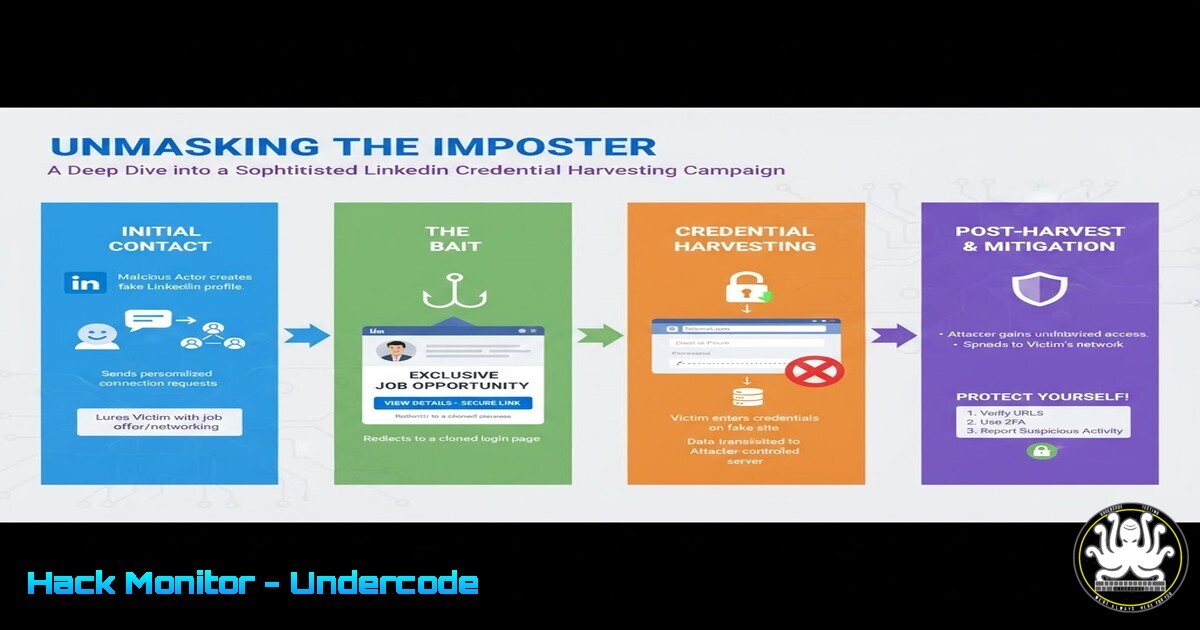
A sophisticated credential harvesting campaign has been strategically targeting LinkedIn users, leveraging the platform’s own messaging system to deploy fake job offers and impersonate real individuals. This attack bypasses traditional email filters by operating entirely within a trusted environment, posing a significant threat to professionals and organizations alike. Understanding the mechanics of this social engineering attack is crucial for developing effective defenses.
Learning Objectives:
- Deconstruct the anatomy of a multi-stage LinkedIn phishing attack.
- Learn commands and techniques to investigate and mitigate such threats.
- Implement proactive security measures for personal and enterprise social media accounts.
You Should Know:
1. The Bait: Deconstructing the Phishing Message
The attack begins with an InMail or connection request from a compromised or spoofed profile. The message typically contains an enticing job offer from a reputable company, creating a sense of urgency and opportunity. The core of the scam is a shortened or obfuscated link that redirects to a counterfeit LinkedIn login page. This fake page is a near-perfect replica, designed to harvest user credentials upon entry.
To investigate suspicious URLs from the command line, you can use `curl` to analyze the redirect chain without risking a browser visit.
Linux/macOS Command:
curl -I -L -s "https://suspicious-shortened-link.com" | grep -i "location|host"
Step-by-step guide:
1. Open your terminal.
- Type
curl -I -L -s "URL_HERE". The `-I` flag fetches only the HTTP headers, `-L` follows redirects, and `-s` silences the output. - Pipe the output to `grep -i “location\|host”` to filter and display only the redirect locations and final host.
- This will reveal the true destination of the link, often exposing a domain that is not linkedin.com.
2. The Hook: Analyzing the Fake Login Portal
The fake login portal is the critical component where credentials are stolen. It often uses SSL (https) to appear legitimate but is hosted on a compromised server or a newly registered domain. Security professionals can use tools to analyze the SSL certificate and domain registration.
Linux/macOS Command:
echo | openssl s_client -connect malicious-domain.com:443 -servername malicious-domain.com 2>/dev/null | openssl x509 -noout -issuer -dates
Step-by-step guide:
- This command initiates an SSL handshake with the malicious server.
2. `openssl s_client -connect` connects to the specified domain on port 443. - The output is piped to another `openssl x509` command to extract the certificate’s issuer and validity dates.
- Analyze the issuer. A certificate from a non-trusted or free CA, combined with a very recent creation date, is a major red flag.
3. Infrastructure Reconnaissance: Passive DNS Analysis
Once a malicious domain is identified, you can use passive DNS databases to see what other IP addresses are associated with that domain and vice-versa. This can reveal the attacker’s entire infrastructure.
Command (using `whois` and `dig`):
dig +short malicious-domain.com
whois $(dig +short malicious-domain.com) | grep -i "netname|country|org-name"
Step-by-step guide:
1. `dig +short malicious-domain.com` quickly returns the IP address the domain points to.
2. The `whois` command is then used on that IP address to query registration information.
3. `grep` filters the output for key fields like the network name, country, and organization.
4. Attackers often use the same IP block for multiple campaigns, so this can help in threat intelligence gathering.
4. Endpoint Forensics: Detecting Compromise on Windows
If credentials are entered, the attacker may gain access to the user’s LinkedIn account and use it for further attacks. On a corporate device, you can check for unusual network connections originating from the system.
Windows Command (PowerShell as Administrator):
Get-NetTCPConnection | Where-Object {$_.State -eq "Established"} | Select-Object LocalAddress, LocalPort, RemoteAddress, RemotePort, OwningProcess | Format-Table
Get-Process -Id <OwningProcess> | Select-Object ProcessName, Path
Step-by-step guide:
1. Run PowerShell as an Administrator.
- Execute `Get-NetTCPConnection` to list all active TCP connections.
- Filter for `Established` connections and format the output in a table.
- Note the `OwningProcess` PID for any suspicious connections to unknown remote IPs.
- Use `Get-Process -Id
` to identify the application responsible for the connection. -
Containment and Mitigation: Password Reset and Session Revocation
The immediate response to a credential theft incident is to lock out the attacker by changing the password and revoking active sessions.
Steps via LinkedIn (Manual Process):
- Go to LinkedIn.com -> Me -> Settings & Privacy.
- Navigate to Sign in & security -> Change password.
- After changing the password, go to Where you’re signed in and review all sessions. Sign out from all other sessions except your current one.
6. Proactive Defense: Hardening Account Security with 2FA
Enabling Two-Factor Authentication (2FA) is the most effective defense against credential harvesting, as a stolen password alone becomes useless.
Steps to Enable 2FA on LinkedIn:
- Go to Settings & Privacy -> Sign in & security.
2. Under Two-step verification, click Turn on.
- Choose to use an Authenticator App (more secure than SMS) and follow the setup prompts to link the app (e.g., Google Authenticator, Microsoft Authenticator).
-
Enterprise Defense: Blocking Malicious Domains at the Firewall
For organizations, preventing access to known malicious domains is a key network-level control. This can be done by updating proxy or firewall blocklists.
Example for a Network Administrator (Conceptual):
Tool: Squid Proxy ACL
Action: Add the identified malicious domain to the deny list in your Squid configuration.
acl malicious_domains dstdomain .malicious-domain.com .another-bad-domain.net
http_access deny malicious_domains
Step-by-step: After adding these lines to squid.conf, save the file and reconfigure or restart the Squid service. This will block all HTTP/HTTPS traffic from internal users to the attacker’s infrastructure.
What Undercode Say:
- Trust, but Verify. The most dangerous attacks exploit inherent trust in platforms like LinkedIn. Always verify the authenticity of a message through a secondary channel before clicking any link.
- The Password is Dead. This campaign proves that passwords alone are insufficient. Multi-factor authentication is no longer optional for any account of value, personal or professional.
This attack is a masterclass in social engineering, demonstrating a clear shift from broad, scattergun phishing to highly targeted, context-aware campaigns. The attackers’ choice of LinkedIn as a delivery mechanism is strategic; it bypasses corporate email security gateways and lands directly in a “trusted” inbox. The technical execution, from domain registration to page cloning, shows a level of preparation that makes the scam highly convincing. For defenders, this underscores the need for a layered security approach that combines technical controls like DNS filtering and 2FA with continuous user awareness training focused on identifying advanced social engineering tactics. The human layer is both the primary target and the last line of defense.
Prediction:
The success of this LinkedIn-centric attack will catalyze a new wave of impersonation and credential harvesting campaigns across other professional and social platforms, such as Slack, Microsoft Teams, and even industry-specific forums. We will see a rise in AI-generated, personalized lures that are virtually indistinguishable from genuine communication. Furthermore, attackers will increasingly use stolen credentials not just for espionage or further spamming, but for Business Email Compromise (BEC) and financial fraud, leveraging the inherent trust and authority associated with a victim’s professional identity. The future battleground will be the identity layer itself, fought with AI-powered attacks on one side and behavioral analytics and zero-trust frameworks on the other.
🎯Let’s Practice For Free:
IT/Security Reporter URL:
Reported By: Muhammad Thoriq – Hackers Feeds
Extra Hub: Undercode MoN
Basic Verification: Pass ✅


