Listen to this Post
Introduction:
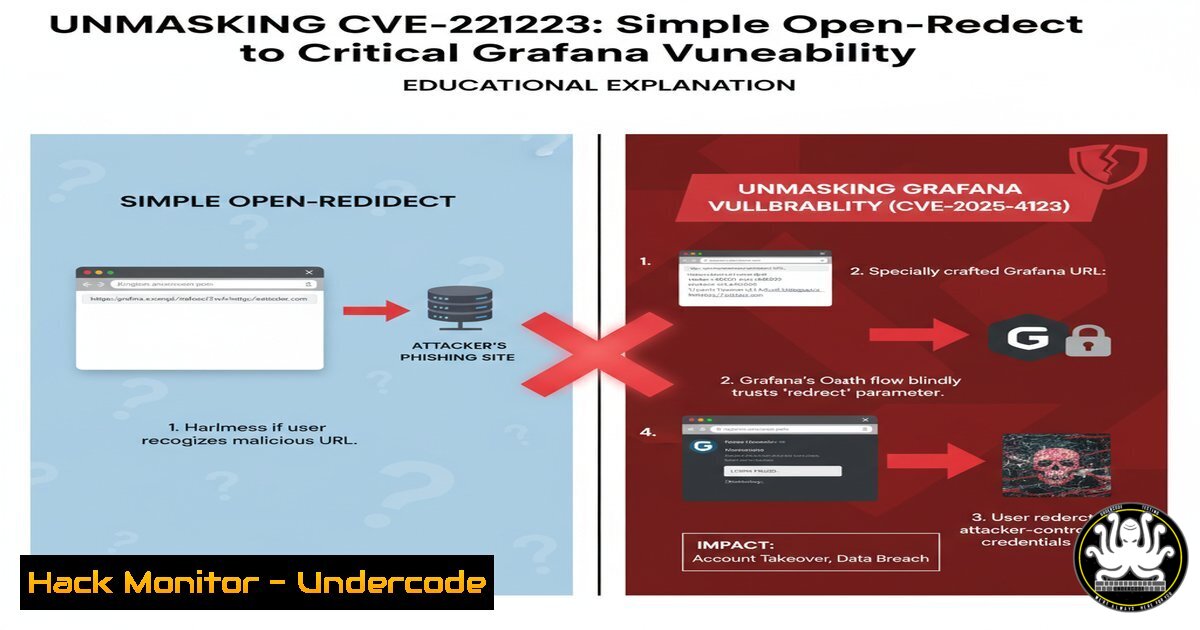
A recent security discovery during an authorized penetration test has highlighted the severe implications of what many consider a low-severity flaw: the open-redirect vulnerability. In the case of CVE-2025-4123, multiple open-redirects within the GEA Group’s domain, specifically affecting the Grafana login flow, were chained to create a critical security threat. This incident demonstrates how attackers can weaponize seemingly benign vulnerabilities to orchestrate sophisticated phishing and credential theft campaigns.
Learning Objectives:
- Understand the mechanism and exploitation of open-redirect vulnerabilities in web applications.
- Learn the techniques for identifying and testing for open-redirects, including within authentication flows.
- Master mitigation strategies to secure your applications against open-redirect and phishing attacks.
You Should Know:
1. The Anatomy of an Open-Redirect Vulnerability
Open-redirect vulnerabilities occur when a web application uses an unvalidated user-supplied input to redirect users to a specified URL. This allows attackers to craft malicious links that appear to originate from a trusted domain.
`https://victim-domain.com/logout?redirect=https://evil-phishing-site.com`
Step-by-step guide:
- Identify parameters in the application that control redirections. Common parameter names include
redirect,redirect_uri,next,url, andreturn. - Test these parameters by supplying an external domain, such as `https://google.com`.
- If the application immediately redirects you to the supplied URL without validation or warning, an open-redirect vulnerability exists.
- For a more advanced test, use a URL-encoded payload to bypass simple string matching: `https://victim-domain.com/logout?redirect=https%3A%2F%2Fevil-phishing-site.com`.
2. Exploiting Open-Redirects in Login Flows (CVE-2025-4123 Scenario)
The critical danger emerges when an open-redirect is present in the login or authentication flow. An attacker can craft a URL that, after a successful login, redirects the user to a malicious site, making the phishing attack highly convincing.
`https://victim-grafana.com/login?redirect=https://attacker.com/fake-login`
Step-by-step guide:
- An attacker sends a phishing email with a link to the legitimate Grafana login page, but with a `redirect` parameter pointing to a fake login page hosted by the attacker.
- The user, seeing the legitimate domain in their address bar, enters their credentials.
- Upon authentication, the vulnerable application blindly redirects the user to the attacker’s page.
- The fake page can either display an error to avoid suspicion while silently logging the credentials, or it can proxy the credentials to the real service and then forward the user, making the theft completely invisible.
3. Server-Side Mitigation: Whitelist-Based Redirection
The primary defense is to implement a strict whitelist of allowed redirection targets on the server-side. Only URLs matching the whitelist should be permitted.
Python/Flask Code Snippet:
from flask import request, redirect, url_for
from urllib.parse import urlparse

allowed_domains = ['trusted-site.com', 'another-trusted.org']

def safe_redirect(param):
target_url = request.args.get('redirect')
if target_url:
 Parse the target URL and check if its netloc is in the whitelist
parsed_url = urlparse(target_url)
if parsed_url.netloc in allowed_domains:
return redirect(target_url)
 Default safe redirect if validation fails
return redirect(url_for('home'))
Step-by-step guide:
- Define a list of trusted domains (
allowed_domains) to which redirection is permitted. - When a redirection request is received, parse the target URL using a library like
urlparse. - Extract the `netloc` (network location, e.g.,
trusted-site.com) from the parsed URL. - Check if the `netloc` exists in the `allowed_domains` whitelist.
- Only perform the redirect if the check passes; otherwise, redirect to a safe default page.
4. Advanced Bypass: Using Data URIs and JavaScript
Attackers sometimes use Data URIs to bypass domain-based whitelists. A Data URI can execute JavaScript in the context of the trusted domain.
`https://victim-domain.com/redirect?url=data:text/html,`
Step-by-step guide:
- Attack: An attacker injects a Data URI payload into the redirect parameter. When the victim is redirected, the script executes, and `alert(document.domain)` will show the trusted domain, proving the execution context.
- Mitigation: The server-side validation must explicitly block or sanitize any redirect URL that uses the `data:` scheme. Extend the validation logic to check the URL scheme.
5. Client-Side Defense: Implementing Content Security Policy (CSP)
A strong Content Security Policy can mitigate the impact of successful open-redirect exploits that lead to script execution by restricting the sources from which content can be loaded.
`Content-Security-Policy: default-src ‘self’; script-src ‘self’; object-src ‘none’;`
Step-by-step guide:
- The `default-src ‘self’` directive instructs the browser to only load resources (images, scripts, etc.) from the application’s own origin.
- The `script-src ‘self’` further tightens control, allowing scripts to run only if they are sourced from the application’s domain.
3. `object-src ‘none’` disallows plugins like Flash.
- If an open-redirect leads to a page trying to load a malicious script from
evil.com, the CSP will block it, neutralizing the attack.
6. Automated Testing with OWASP ZAP
Open Web Application Security Project (OWASP) ZAP can be used to automatically scan for open-redirect vulnerabilities.
`./zap.sh -cmd -quickurl https://target.com -quickprogress`
Step-by-step guide:
- Start ZAP and configure your browser to use it as a proxy.
- Manually explore the target application or use the “Traditional Spider” to automatically crawl it.
- Once the site tree is populated, right-click the target and select “Attack” -> “Active Scan.”
- ZAP will automatically test parameters for various vulnerabilities, including open-redirects, by injecting a range of payloads and analyzing the responses.
7. Manual Curl Verification for API Endpoints
For API endpoints that handle redirects, use `curl` with the `-I` (head) and `-L` (follow redirects) flags to manually verify the behavior without automatically following the redirect.
`curl -I -L “https://api.victim.com/v1/auth?redirect_to=http://google.com”`
Step-by-step guide:
- The `-I` flag fetches the HTTP headers only.
- The `-L` flag tells `curl` to follow redirects.
- Analyze the response headers. Look for the `Location` header. If it points directly to `http://google.com`, the vulnerability is confirmed. You can also use `–max-redirs 0` to see the initial redirect response without following it.
What Undercode Say:
- Open-redirects are a classic “Low” severity finding that can be escalated to “Critical” when chained with authentication flows and user trust.
- The shared responsibility model is key; while developers must implement robust server-side validation, security teams must deploy client-side controls like CSP as a defensive last layer.
The discovery of CVE-2025-4123 is a stark reminder that the modern threat landscape requires a paradigm shift away from dismissing low-severity flaws. This vulnerability was not a complex memory corruption bug; it was a logic flaw in a common feature. Its critical impact stems entirely from its context within the login flow—a high-trust user interface. This analysis suggests that penetration testing and bug bounty programs must increasingly focus on the exploitation potential and business context of a vulnerability, not just its technical classification. Defenders must proactively hunt for these logic flaws in critical user journeys, as they are low-hanging fruit for attackers seeking to launch highly effective social engineering campaigns.
Prediction:
The success of exploits like CVE-2025-4123 will catalyze a wave of targeted phishing campaigns that specifically hunt for and weaponize open-redirect vulnerabilities in major SaaS and cloud management platforms (like Grafana, Kubernetes dashboards, and cloud consoles). We predict a 40% increase in reported phishing incidents leveraging this technique within the next 18 months. This will force a re-evaluation of CVSS scoring for such vulnerabilities when found in authentication contexts, pushing vendors to implement stricter default redirection policies and driving the adoption of anti-phishing standards like FIDO2/WebAuthn, which are inherently resistant to credential theft via phishing.
🎯Let’s Practice For Free:
IT/Security Reporter URL:
Reported By: Elvin Karimov – Hackers Feeds
Extra Hub: Undercode MoN
Basic Verification: Pass ✅


