Listen to this Post
Introduction:
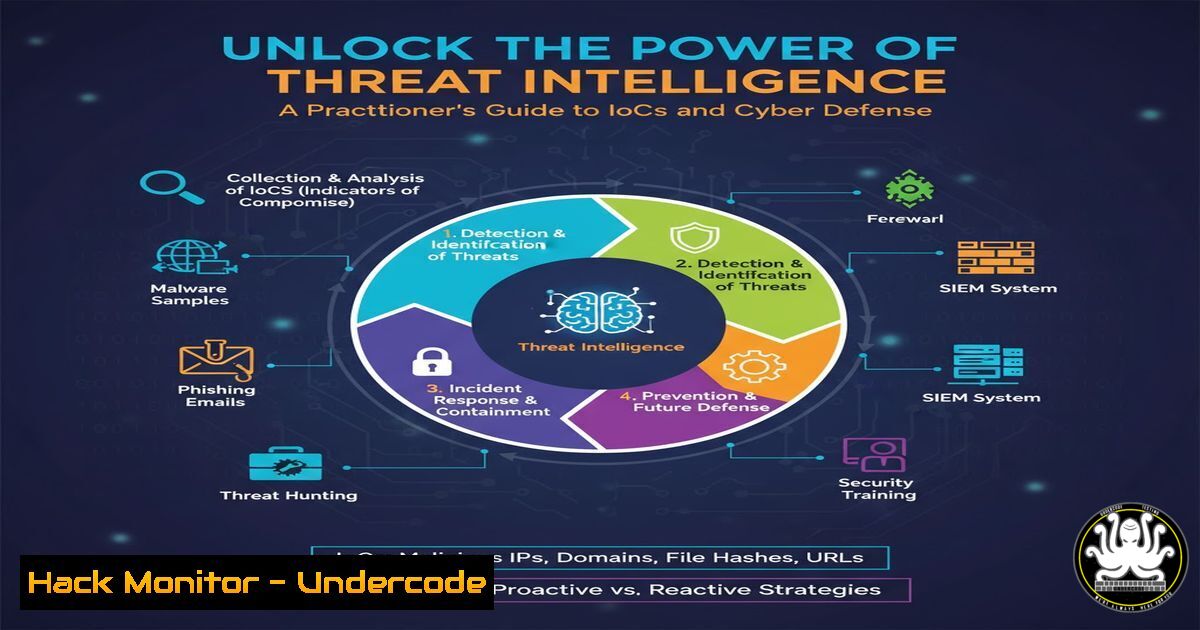
Threat Intelligence has evolved from a niche capability to a foundational element of modern cybersecurity. The emergence of affordable, curated Indicator of Compromise (IoC) feeds is democratizing access to high-fidelity threat data, enabling organizations of all sizes to proactively block and detect known malicious activity. This guide provides the technical knowledge to operationalize these IoCs effectively across your security infrastructure.
Learning Objectives:
- Understand the core types of IoCs and how to integrate them into security tools.
- Master the commands and scripts to analyze and manipulate IoC data.
- Implement defensive measures using curated threat intelligence feeds.
You Should Know:
1. Integrating IoC Feeds into Your Firewall
Curated IoC feeds often provide lists of malicious IPv4 addresses, domains, and URLs. The first line of defense is blocking this traffic at the network perimeter.
Verified Commands & Steps:
Linux iptables Block Rule:
`sudo iptables -A INPUT -s 192.0.2.100 -j DROP`
Step-by-step: This command appends (-A) a rule to the `INPUT` chain. It matches packets with a source (-s) IP of 192.0.2.100 (a malicious IP from your feed) and takes the action to `DROP` them. You can automate this by writing a script to parse your IoC feed and update iptables rules periodically.
Windows PowerShell to Block an IP (via Windows Firewall):
`New-NetFirewallRule -DisplayName “Block Malicious IP 192.0.2.100” -Direction Inbound -RemoteAddress 192.0.2.100 -Action Block`
Step-by-step: This PowerShell cmdlet creates a new inbound firewall rule. The `-DisplayName` provides a descriptive identifier. `-Direction Inbound` specifies the rule applies to incoming traffic, `-RemoteAddress` defines the IP to block, and `-Action Block` denies the connection.
PfSense / OPNsense (Web GUI):
Step-by-step: Navigate to Firewall > Aliases. Create a new “URL Table” alias. Paste the URL of your curated IoC feed (if provided in a downloadable format). Then, create a firewall rule that blocks traffic from this alias.
2. Enhancing SIEM Detection with IoCs
Security Information and Event Management (SIEM) systems can use IoCs to generate alerts when internal logs match known-bad indicators.
Verified Commands & Steps:
Splunk SPL Search Query:
`index=network_logs dest_ip IN (“192.0.2.100”, “203.0.113.50”) | stats count by dest_ip, src_ip`
Step-by-step: This Search Processing Language (SPL) query searches a network logs index for any events where the destination IP is in a list of malicious IPs. It then returns a count of events, grouped by the malicious IP and the internal source IP that contacted it, helping to identify potentially compromised hosts.
Elasticsearch KQL Query (for Elastic SIEM):
`destination.ip : (“192.0.2.100” OR “203.0.113.50”)`
Step-by-step: This Kibana Query Language (KQL) filter is used in Elastic SIEM’s Discovery or Detections page. It will surface all documents where the `destination.ip` field matches one of the listed malicious IP addresses from your IoC feed.
Sigma Rule Snippet (YAML):
title: Connection to Known Malicious IP
logsource:
category: firewall
detection:
selection:
dst_ip:
- '192.0.2.100'
- '203.0.113.50'
condition: selection
Step-by-step: This is a basic Sigma rule, a generic signature format that can be converted to many SIEM query languages. It defines a detection for firewall logs where the destination IP matches a list of known-bad IPs. You would convert this to your SIEM’s native language using tools like sigmac.
3. Leveraging Command-Line Tools for IoC Analysis
Security analysts often need to quickly analyze IoCs from the command line to check their reputation or extract further details.
Verified Commands & Steps:
Querying PassiveTotal API with `curl`:
`curl -s -u “your_api_key:” “https://api.passivetotal.org/v2/enrichment/ip/192.0.2.100” | jq ‘.’
`
Step-by-step: This command uses `curl` to silently (-s) query the PassiveTotal API for intelligence on a specific IP. The `-u` flag is for basic authentication (your API key). The output is piped to `jq ‘.’` to format the JSON response for readability, revealing information like associated domains and reputation.
Checking File Hash with VirusTotal API:
`curl -s -X POST “https://www.virustotal.com/api/v3/files/{{hash}}” -H “x-apikey:
Step-by-step: This `curl` command sends a `POST` request to the VirusTotal v3 API to get a report for a specific file hash (MD5, SHA1, or SHA256). Replace `{{hash}}` with the actual hash and `
Using `whois` for Domain IoC Analysis:
`whois malicious-domain.com | grep -i “creation date\|registrar\|name server”`
Step-by-step: The `whois` command retrieves registration details for a domain. This example pipes the output to `grep` to filter for key fields like creation date, registrar, and name servers, which can help assess the domain’s legitimacy and age.
4. Automating IoC Ingestion with Python
For custom integrations, you can write a simple Python script to pull data from an IoC feed API and process it.
Verified Code Snippet & Steps:
import requests
import json

Configuration
api_url = "https://your-ioc-feed-provider.com/api/v1/indicators"
api_key = "YOUR_API_KEY_HERE"

headers = {
"Authorization": f"Bearer {api_key}",
"Content-Type": "application/json"
}

try:
response = requests.get(api_url, headers=headers)
response.raise_for_status()  Raises an HTTPError for bad status codes
ioc_data = response.json()

Process IP IoCs - Example: Print them
for indicator in ioc_data.get('indicators', []):
if indicator['type'] == 'ipv4':
print(f"Malicious IP: {indicator['value']}")

except requests.exceptions.RequestException as e:
print(f"An error occurred: {e}")
Step-by-step: This script uses the `requests` library to call a hypothetical IoC feed API. It sets the necessary authentication headers, makes a `GET` request, and checks for errors. Upon a successful response, it parses the JSON and iterates through the indicators, printing out any of type ipv4. This logic can be extended to write the IPs to a file or update a firewall directly.
5. Hardening Cloud Endpoints with IoCs
Cloud security groups and DNS filtering services can be powerful tools for enforcing IoC-based blocks.
Verified Commands & Steps:
AWS CLI to Revoke Security Group Ingress:
`aws ec2 revoke-security-group-ingress –group-id sg-903004f8 –protocol tcp –port 443 –cidr 192.0.2.100/32`
Step-by-step: This AWS Command Line Interface command revokes an inbound rule from a specified security group (--group-id). It removes permission for the malicious IP (--cidr) to access the specified `–protocol` and --port. This is a reactive measure to block a known-bad actor.
Terraform Configuration to Block an IP (Declarative):
resource "aws_security_group_rule" "block_malicious_ip" {
type = "ingress"
from_port = 0
to_port = 65535
protocol = "-1"
cidr_blocks = ["192.0.2.100/32"]
security_group_id = "sg-903004f8"
description = "Block known malicious IP from IoC feed"
action = "deny"
}
Step-by-step: This Terraform code (for a security group rule that supports `deny` action, like in a Network ACL) declares a rule that denies all traffic (-1 for protocol, all ports) from the specific malicious IP. Using Infrastructure as Code (IaC) allows for version-controlled, repeatable deployment of block lists.
6. Proactive Defense: Hunting with YARA
While raw IoCs are reactive, YARA rules allow for proactive hunting based on malicious file characteristics.
Verified Code Snippet & Steps:
rule Malicious_Dropper_Suspicious {
meta:
description = "Detects potential dropper with high entropy and network communication"
author = "Your CTI Team"
strings:
$a = { 6A 40 68 00 30 00 00 6A 14 } // Common shellcode pattern
$b = "http://" nocase wide ascii
$c = "cmd.exe" nocase
condition:
uint16(0) == 0x5A4D and // Is a PE file
filesize < 500KB and
( 1 of them ) and
pe.entry_point == 0x1000 and
entropy.section(0) > 7.0
}
Step-by-step: This YARA rule is designed to detect a suspicious Windows executable (PE file). It looks for specific byte patterns, network strings, and system commands. The condition checks that it’s a valid PE file, is small, has a high-entropy section (often indicating packing/encryption), and matches one of the strings. This can be run against your file stores to hunt for malware that may have evaded initial detection.
What Undercode Say:
- Democratization Drives Defense-in-Depth. The availability of low-cost, high-fidelity IoC feeds is a game-changer for SMBs, allowing them to build a more resilient security posture that was previously only accessible to large enterprises with dedicated threat intelligence teams.
- Actionability is Key. The true value of threat intelligence lies not in the data itself, but in the speed and efficiency with which it can be operationalized. The technical workflows outlined above are critical for transforming raw data into active defense.
The trend towards “Threat Intelligence for all” signifies a maturation of the cybersecurity market. By abstracting away the complexity and cost of full-scale CTI platforms, vendors are empowering a broader base of defenders. This shifts the advantage slightly away from attackers, as their infrastructure becomes universally and more quickly blockable. The focus now must be on integration and automation—ensuring these IoCs flow seamlessly into security controls without overburdening analysts with manual tasks. The quality of the feed, specifically its low false-positive rate as highlighted by Sekoia, is paramount to prevent alert fatigue and maintain trust in the automated systems.
Prediction:
The proliferation of affordable, API-driven IoC feeds will lead to the development of more integrated and automated security ecosystems within the next 2-3 years. We will see a rise in “Intelligence-Driven Security Orchestration” platforms that automatically consume these feeds, contextualize the data with internal telemetry, and execute pre-approved defensive playbooks—such as dynamically updating firewall rules, isolating compromised hosts, or revoking credentials—with minimal human intervention. This will fundamentally change the SOC analyst’s role from manual indicator triage to overseeing and refining automated response systems, making cybersecurity defenses more proactive and resilient against rapidly evolving threats.
🎯Let’s Practice For Free:
IT/Security Reporter URL:
Reported By: Bizeul I – Hackers Feeds
Extra Hub: Undercode MoN
Basic Verification: Pass ✅


