Listen to this Post
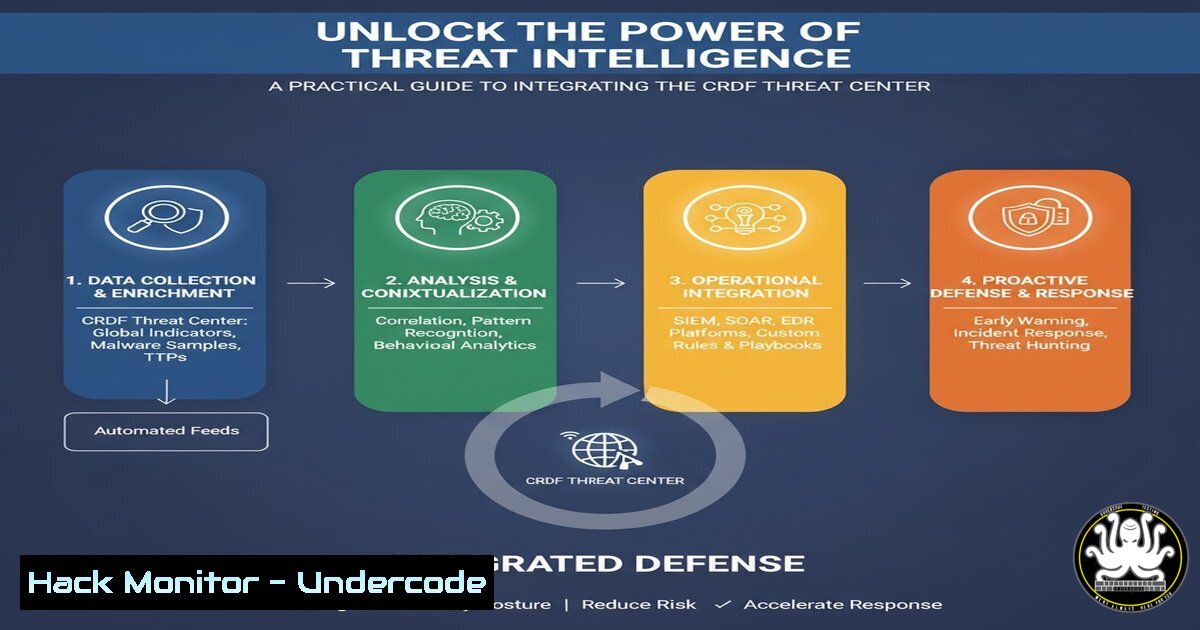
Introduction:
Cyber Threat Intelligence (CTI) has evolved from a niche concept to a foundational element of modern cybersecurity. The ability to proactively block known malicious entities, such as the 28 million URLs housed in the CRDF Threat Center, can significantly reduce an organization’s attack surface. This article provides a hands-on guide for security professionals and system administrators to operationalize this intelligence, moving from a raw data feed to active enforcement within their security infrastructure.
Learning Objectives:
- Understand the methods for acquiring and parsing large-scale CTI feeds from sources like the CRDF Threat Center.
- Master the techniques for integrating malicious URL and IP lists into common security tools and network controls.
- Develop automated workflows to keep your defensive measures updated with the latest threat data.
You Should Know:
1. Acquiring and Parsing the CTI Feed
Before integration, you must obtain and understand the data. The CRDF Threat Center and similar platforms often provide data via downloadable lists or APIs.
Command/Code:
 Download the threat intelligence list using wget
wget -O crdf_threat_list.txt https://threatcenter.crdf.fr/api/feed/malicious_urls

Inspect the first few lines of the downloaded file to understand its format
head -n 5 crdf_threat_list.txt

Count the total number of entries (e.g., URLs, IPs) in the list
wc -l crdf_threat_list.txt
Step-by-step guide:
The first step is data acquisition. Using `wget` or curl, you can programmatically download the latest threat feed. Once downloaded, use commands like head, tail, and `wc` to inspect the file. Understanding the format (e.g., one entry per line, CSV, JSON) is critical for the next steps. This raw list is your primary weapon against known-bad actors on the internet.
- Integrating with Linux Firewall (iptables) for IP Blocking
If your feed contains IP addresses, you can block them at the network layer using iptables, creating a powerful, host-based blocklist.
Command/Code:
 Create a new iptables chain for managing blocked IPs
sudo iptables -N BLOCKLIST

Iterate through a file of malicious IPs and add DROP rules to the chain
while read -r ip; do sudo iptables -A BLOCKLIST -s "$ip" -j DROP; done < malicious_ips.txt

Insert a rule in the INPUT chain to jump to the BLOCKLIST chain
sudo iptables -I INPUT -j BLOCKLIST

Save the iptables rules to persist after reboot (method varies by OS)
sudo iptables-save | sudo tee /etc/iptables/rules.v4
Step-by-step guide:
This method creates a dedicated iptables chain named BLOCKLIST. A script reads a text file containing malicious IP addresses (malicious_ips.txt) and appends a `DROP` rule for each one to this chain. Finally, the `INPUT` chain is modified to jump to the `BLOCKLIST` chain, ensuring all incoming packets are checked against your blocklist. This provides a robust, kernel-level defense.
3. Leveraging Windows Firewall with Advanced Security
Windows systems can similarly be hardened using PowerShell to block malicious IPs via the built-in firewall.
Command/Code:
 Create a new Windows Firewall rule to block a specific IP range
New-NetFirewallRule -DisplayName "Block Malicious IP 192.168.1.100" -Direction Inbound -RemoteAddress 192.168.1.100 -Action Block

To block a list from a file, use a PowerShell loop
$BadIPs = Get-Content -Path "C:\threat_intel\malicious_ips.txt"
foreach ($ip in $BadIPs) {
New-NetFirewallRule -DisplayName "Block Malicious IP $ip" -Direction Inbound -RemoteAddress $ip -Action Block
}
Step-by-step guide:
Windows PowerShell provides the `NetSecurity` module for managing the firewall. The `New-NetFirewallRule` cmdlet is used to create inbound block rules. By reading a list of IPs from a file and iterating over them with a `foreach` loop, you can dynamically build a comprehensive blocklist. This is highly effective for securing individual Windows servers and workstations.
4. Integrating Threat Feeds into Suricata IDS/IPS
Suricata, a high-performance Intrusion Detection and Prevention System, can use external IP and domain lists to enhance its detection capabilities.
Command/Code:
 In your suricata.yaml file, define an external variable list
vars:
address-groups:
HOME_NET: "[192.168.1.0/24, 10.0.0.0/8]"
EXTERNAL_NET: "!$HOME_NET"
BAD_IPS: "file:///etc/suricata/rules/malicious_ips.txt"

Create a custom Suricata rule using the defined variable list
alert ip any any -> $HOME_NET any (msg:"ET BADIP Traffic from Known Malicious IP"; flow:established,to_server; sid:1000001; rev:1;)
Step-by-step guide:
This configuration elevates your CTI from simple blocking to intelligent detection. By defining a `BAD_IPS` variable that points to your downloaded threat list in suricata.yaml, you can then write custom rules that trigger alerts or block traffic when communication is attempted with these IPs. This provides deep visibility into potentially malicious communication flows that other methods might miss.
5. Automating DNS Sinkholing with Pi-hole
Pi-hole, a network-wide ad blocker, can be repurposed as a DNS sinkhole to prevent devices on your network from resolving known malicious domains.
Command/Code:
 Add a domain to the Pi-hole blocklist manually
pihole -b malicious-domain.com

Automate by adding a list of domains directly to the blocklist file
sudo cp malicious_domains.txt /etc/pihole/maliciouslist.txt
sudo sqlite3 /etc/pihole/gravity.db "INSERT INTO adlist (address, enabled, comment) VALUES ('file:///etc/pihole/maliciouslist.txt', 1, 'CRDF Threat Feed');"

Update Pi-hole's gravity database to incorporate the new list
pihole -g
Step-by-step guide:
DNS sinkholing is a highly effective containment strategy. By configuring Pi-hole to return a non-routable address (like 0.0.0.0) for malicious domains, you neuter the threat. The process involves adding domains to a blocklist and then updating Pi-hole’s “gravity” database, which compiles all blocklist sources. Automating the download and integration of the CTI feed ensures your sinkhole is always current.
6. Configuring WAF Blocklists with ModSecurity
Web Application Firewalls like ModSecurity can be configured to block requests originating from or destined for known malicious IPs.
Command/Code:
 Inside your ModSecurity configuration or a .conf file
SecCollectionTimeout 3600
SecRule IP:bf "@eq 1" "id:1001,phase:1,deny,status:403,msg:'Access from known malicious IP'"

Script to populate the collection (run via cron)
!/bin/bash
while read ip; do
echo "SecRule REMOTE_ADDR \"@ipMatch $ip\" \"id:1002,phase:1,pass,nolog,setvar:ip.bf=1,expirevar:ip.bf=3600\""
done < malicious_ips.txt > /etc/apache2/modsecurity/rules/malicious_ip_rules.conf

Reload Apache to apply the new rules
systemctl reload apache2
Step-by-step guide:
This advanced technique uses ModSecurity’s persistent collection storage to create a temporary blocklist. A script generates rules that, when a request comes from a malicious IP, set a flag in memory. A separate rule (id:1001) checks for this flag and denies the request. The `expirevar` directive automatically removes the IP from the blocklist after an hour, but the cron job will re-add it if it’s still in the feed, keeping the memory footprint manageable.
- Automating the Entire Workflow with a Cron Job
To ensure your defenses are always using the latest intelligence, fully automate the download and integration process.
Command/Code:
!/bin/bash
 Script: update_threat_intel.sh

<ol>
<li>Download the latest list
wget -O /opt/threat_intel/crdf_latest.txt https://threatcenter.crdf.fr/api/feed/malicious_urls</p></li>
<li><p>Extract and format IPs/Domains (example: extract IPs)
grep -oE '[0-9]{1,3}.[0-9]{1,3}.[0-9]{1,3}.[0-9]{1,3}' /opt/threat_intel/crdf_latest.txt > /opt/threat_intel/malicious_ips.txt</p></li>
<li><p>Integrate with Pi-hole
sudo cp /opt/threat_intel/malicious_ips.txt /etc/pihole/maliciouslist.txt
pihole -g</p></li>
<li><p>Integrate with iptables (flush and reload)
sudo iptables -F BLOCKLIST
while read -r ip; do sudo iptables -A BLOCKLIST -s "$ip" -j DROP; done < /opt/threat_intel/malicious_ips.txt</p></li>
<li><p>Reload Suricata rules (if using)
suricatasc -c reload-rules

Add this script to cron to run daily
crontab -e
0 2    /opt/threat_intel/update_threat_intel.sh > /dev/null 2>&1
Step-by-step guide:
This bash script encapsulates the entire operational lifecycle of your CTI. It downloads the latest feed, parses it for the required data (IPs in this case), and then propagates that data to your various defensive tools (Pi-hole, iptables). By scheduling this script with a cron job to run daily, you create a fully automated defense system that continuously adapts to the evolving threat landscape without manual intervention.
What Undercode Say:
- The democratization of high-quality CTI, like the CRDF feed, represents a major shift, empowering organizations of all sizes to implement defenses previously available only to those with large budgets.
- The true value of CTI is not in the data itself, but in the automated, integrated systems that translate that data into actionable security controls.
The availability of a feed containing 28 million malicious URLs is a game-changer, but its power is entirely dependent on implementation. The technical barrier for integrating this intelligence has been significantly lowered through scripting and open-source tools. This moves the battlefield from intelligence acquisition to engineering and automation. Organizations that master the operationalization of CTI, seamlessly weaving it into their network fabric, firewalls, and endpoint controls, will establish a formidable proactive defense. The focus is no longer on “if” you have threat intelligence, but on “how effectively” your systems can consume and act upon it in near real-time.
Prediction:
The widespread availability and easy integration of massive CTI feeds will force a fundamental change in attacker behavior. As blocking known-bad indicators becomes a baseline security practice, we predict a surge in the use of fast-flux networks, domain generation algorithms (DGAs), and compromised “bulletproof” hosting to rapidly cycle through infrastructure. This will, in turn, accelerate the adoption of behavioral AI and anomaly-based detection systems that complement static IOC blocking. The future cybersecurity battleground will be a race between automated defense systems updating their blocklists and attacker systems automating the creation of new, previously unknown malicious endpoints.
🎯Let’s Practice For Free:
IT/Security Reporter URL:
Reported By: Xavier Pestel – Hackers Feeds
Extra Hub: Undercode MoN
Basic Verification: Pass ✅


