
Listen to this Post
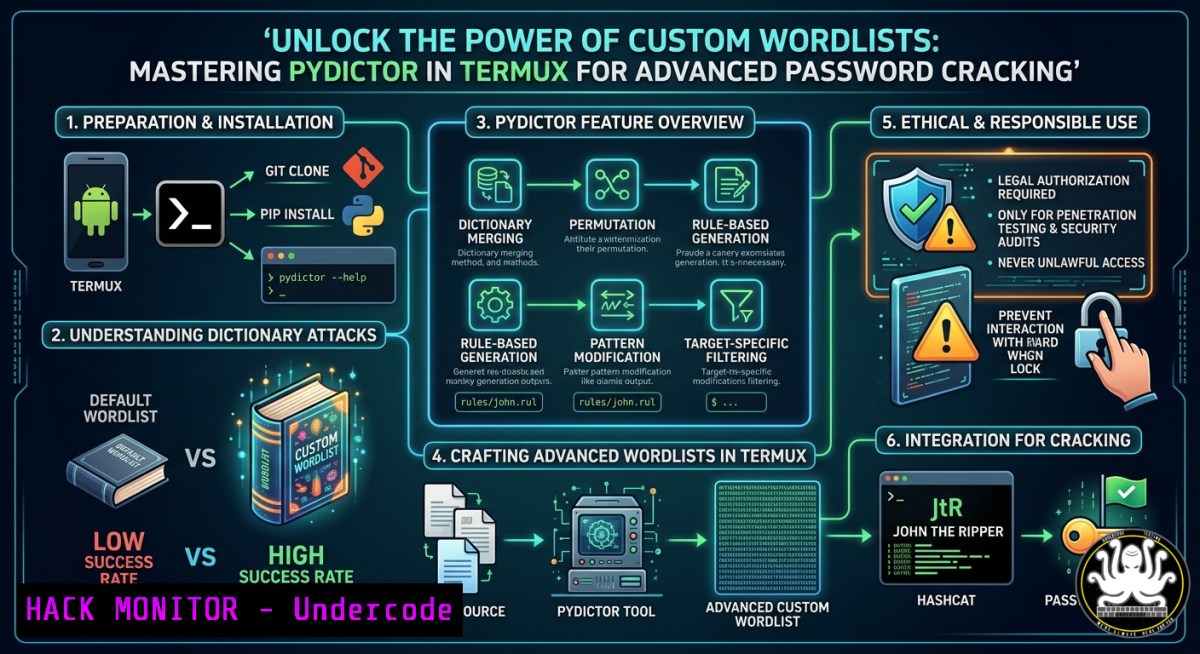
Introduction:
Password-based attacks remain one of the most common vectors for system compromise, and the effectiveness of brute-force or dictionary attacks hinges entirely on the quality of the wordlist used. Pydictor, a powerful Python-based wordlist generator, enables security professionals to create highly customized password dictionaries leveraging patterns, permutations, social-engineering data, and encoded outputs directly within Termux on Android devices. This article provides a technical deep dive into installing, configuring, and exploiting Pydictor’s capabilities for ethical hacking, penetration testing, and defensive security assessments.
Learning Objectives:
- Install and configure Pydictor in Termux (Linux environment) and understand its dependency management.
- Generate custom wordlists using multiple modes: custom characters, pattern-based rules, permutation attacks, and social-engineering templates.
- Apply generated wordlists in real-world password cracking scenarios and implement defensive countermeasures against such attacks.
You Should Know:
1. Setting Up Termux and Installing Pydictor
Pydictor runs on Python 3 and is designed for Linux-based terminals, making Termux the ideal mobile penetration testing environment. Below is a step-by-step guide to install and verify the tool.
Step-by-step guide:
- Update Termux packages: `pkg update && pkg upgrade -y`
– Install Python, Git, and pip: `pkg install python git python-pip -y`
– Clone the Pydictor repository: `git clone https://github.com/LandGrey/pydictor.git`
– Navigate to the tool’s directory: `cd pydictor` - Install required Python dependencies: `pip install -r requirements.txt`
– Verify installation: `python pydictor.py -h`Expected output shows the help menu with all generation modes (e.g.,
--conf,--base,--extend,--encode). On Windows, you can run Pydictor using Python from PowerShell or WSL after cloning the repo similarly.
2. Generating Wordlists with Custom Characters and Lengths
Custom character sets allow you to focus on likely password compositions (e.g., alphanumeric + symbols). Use the `–conf` mode to define character ranges and length boundaries.
Step-by-step guide:
- Create a configuration file (e.g.,
myrules.conf) usingnano myrules.conf:@char_set = abcdefghijklmnopqrstuvwxyz0123456789!@$% @min_len = 6 @max_len = 8
- Run Pydictor: `python pydictor.py –conf myrules.conf –output /sdcard/custom_wordlist.txt`
– For quick oneliner without file: `python pydictor.py -base L?l?d?s –len 6 8 -o /sdcard/quick.txt` (L=uppercase, l=lowercase, d=digit, s=special)
This generates every combination of length 6 to 8 from the defined set. Use cases include internal audits where password policy is known. On Windows, same commands work after replacing `/sdcard/` with C:\wordlists\.
- Social Engineering Based Wordlists (Leet Speak, Dates, Names)
Pydictor excels at creating wordlists from personal information (target’s name, birthdate, pet names) – essential for social-engineering penetration tests. Use the `–extend` mode with `–shred` (shuffle) and `–leet` (replace letters with numbers/symbols).
Step-by-step guide:
- Create a `person.txt` file with one piece of info per line:
John
Doe
1990
Password
- Generate base permutations: `python pydictor.py -extend person.txt –level 2 –shred –leet 2 -o john_doe_list.txt`
– `–level 2` combines up to 2 items (e.g., John1990)
– `–leet 2` applies moderate leet substitution (a→4, e→3, o→0) - For date-based patterns: `python pydictor.py –base d –len 8 8 –date 19900101 20001231` (all dates in that range as 8-digit strings)
This technique is frequently used in red team engagements against corporate logins. Defenders should implement password blacklists and multi-factor authentication.
4. Combining Wordlists with Permutation and Hybrid Modes
Pydictor can merge multiple wordlists and apply permutation rules (prefix, suffix, capitalization, reversal). The `–hybrid` mode is powerful for creating variations of an existing list.
Step-by-step guide:
- Suppose you have a base wordlist `common.txt` (e.g., from SecLists). Generate hybrid mutations:
`python pydictor.py -hybrid common.txt –permutation capitalize,reverse,append1,prepend_ –output hybrid.txt`
– `append1` adds ‘1’ to each word
– `prepend_` adds underscore at start
– Combine two lists with Cartesian product: `python pydictor.py -product list1.txt list2.txt -o product.txt`
– Use `–regex` mode for pattern-based generation: `python pydictor.py –regex “[A-Z][a-z]{3}[0-9]{2}” -o regex.txt` (e.g., “John99”)
These modes simulate advanced password cracking tools like Hashcat’s rule engine and are critical for testing password strength policies. On Linux, you can pipe output directly to hashcat: `python pydictor.py -base d –len 6 6 | hashcat -m 0 target.hash`
5. Encoding, Compression, and Advanced Output Formats
For evasion or specialized attacks, Pydictor supports Base64, MD5, SHA1/256 encoding, and output compression. This is useful when attacking encoded authentication tokens or API keys stored in hashed forms.
Step-by-step guide:
- Generate wordlist and encode each line with Base64: `python pydictor.py -base L?l –len 4 4 –encode b64 -o encoded.txt`
– For hash precomputation (e.g., rainbow table generation): `python pydictor.py -base d –len 5 5 –encode md5 -o md5_hashes.txt`
– Compress output to reduce storage: `python pydictor.py –conf custom.conf –gzip -o compressed.gz`
– Split large wordlists into chunks: `python pydictor.py –conf large.conf –split 100M`Security analysts can use encoded wordlists to fuzz API endpoints expecting Base64-encoded payloads. Defenders must ensure API rate limiting, request signing, and non-standard encoding to mitigate such enumeration.
6. Mitigating Wordlist-Based Attacks (Defensive Hardening)
Understanding how attackers use Pydictor helps you defend your infrastructure. Implement these countermeasures on Linux and Windows systems.
Step-by-step guide (Linux):
- Enforce password complexity and length: edit `/etc/security/pwquality.conf` (minlen=12, difok=3, maxrepeat=2)
- Implement account lockout after failed attempts using
fail2ban:sudo apt install fail2ban sudo nano /etc/fail2ban/jail.local Add: [bash] enabled=true maxretry=3 bantime=3600 sudo systemctl restart fail2ban
- Use `haveged` to increase entropy for password generation.
Windows:
- Set Group Policy: “Account lockout threshold” = 3, “Reset account lockout counter” = 30 min.
- Enable SmartLockout in Azure AD or on-prem AD to block brute-force.
- Deploy Microsoft Defender for Identity to detect password spray attacks.
Additionally, deploy a password filter DLL or Azure AD Password Protection to block common wordlist entries.
What Undercode Say:
- Key Takeaway 1: Pydictor is not just a wordlist generator – it’s a social-engineering reconnaissance tool that transforms minimal personal data (name, birth year) into thousands of plausible passwords. Red teams must pair it with OSINT collection for maximum effectiveness.
- Key Takeaway 2: The most overlooked defense against custom wordlists is not just password length, but the prohibition of predictable patterns (e.g.,
NameYear!) and the enforcement of random passphrases. Tools like Pydictor expose exactly why “complexity” rules are insufficient without entropy checks.
Analysis: The post highlights a shift from static rockyou.txt dictionaries to dynamic, context-aware generation. Attackers no longer need massive precomputed lists; they can generate targeted wordlists on the fly within Termux on a mobile device. This democratizes sophisticated password attacks but also raises the bar for defenders – requiring behavioral detection, MFA, and real-time anomaly monitoring. Organizations should conduct periodic internal password audits using Pydictor against their own hashed password stores to identify weak credentials. The integration with encoding modes also signals a growing trend of attacking encoded tokens (JWT, API keys) that are often base64-encoded but not truly random.
Prediction:
As AI-driven password cracking (e.g., PassGAN) merges with rule-based generators like Pydictor, future attacks will combine deep learning pattern recognition with real-time social engineering data scraped from public profiles and data breaches. This will render traditional password policies obsolete within 3–5 years. The industry will accelerate toward passwordless authentication (FIDO2, WebAuthn) and behavioral biometrics. However, for legacy systems, we will see a rise in “dynamic salting” and per-user password policies that analyze character distribution entropy at login time. For Termux and mobile pentesting, expect containerized wordlist generators that hook directly into cloud-based OSINT APIs, making mobile devices the ultimate on-site assessment tool for physical social-engineering engagements.
▶️ Related Video (80% Match):
🎯Let’s Practice For Free:
IT/Security Reporter URL:
Reported By: Syed Muneeb – Hackers Feeds
Extra Hub: Undercode MoN
Basic Verification: Pass ✅


