Listen to this Post
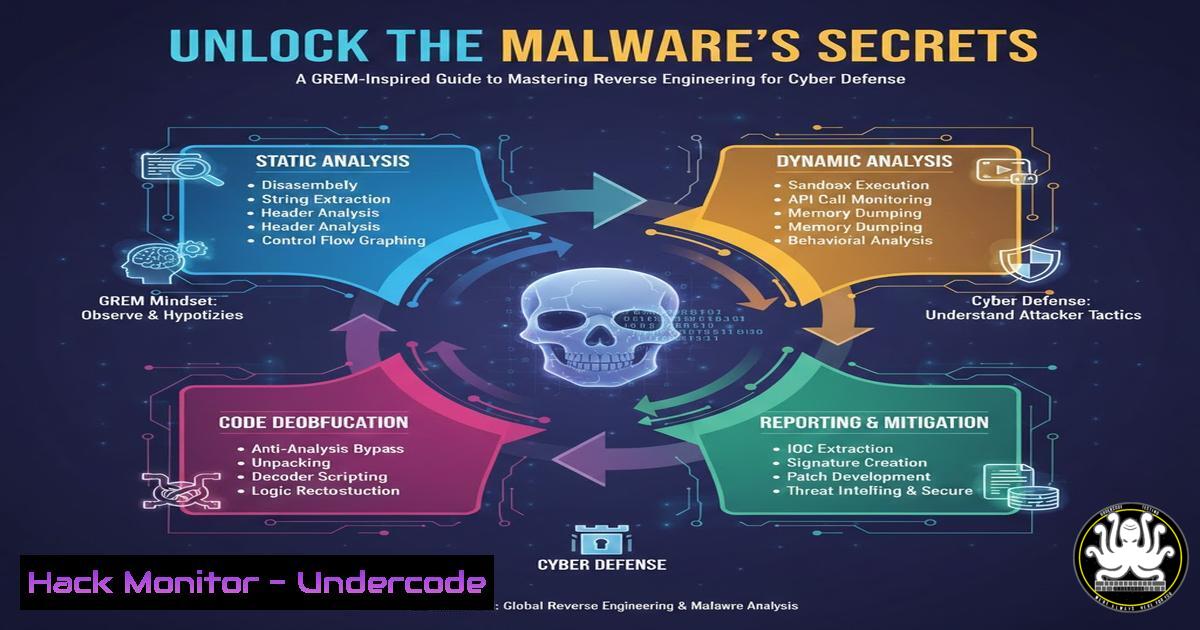
Introduction:
The GIAC Reverse Engineering Malware (GREM) certification represents a pinnacle of practical cybersecurity expertise, equipping professionals with the skills to dissect malicious software and understand its inner workings. In an era of advanced persistent threats and polymorphic code, the ability to reverse engineer malware is critical for developing effective detection rules, understanding attacker tradecraft, and crafting robust mitigations. This article translates the core competencies of GREM into actionable technical knowledge for security engineers and analysts.
Learning Objectives:
- Understand the fundamental tools and methodologies for static and dynamic malware analysis.
- Learn practical commands and techniques to analyze suspicious binaries in Windows and Linux environments.
- Develop the skills to extract key indicators of compromise (IOCs) and understand malware functionality for improved incident response.
You Should Know:
1. Setting Up Your Isolated Malware Analysis Lab
Before analyzing any potentially hostile binary, a safe, isolated laboratory is non-negotiable. This environment prevents accidental infection of production or personal systems.
Step-by-Step Guide:
- Choose Your Base System: Use a virtualization platform like VMware Workstation or VirtualBox. The host machine should have its network adapters for the VMs disabled by default.
- Create Analysis VMs: Set up at least two virtual machines:
Windows VM (Fluent/7/10): Use a legal copy from Microsoft’s evaluation center. Install common analysis tools: Process Monitor, Process Explorer, TCPView, Autoruns, and a debugger like x64dbg.
Linux VM (REMnux or Fluent Ubuntu): REMnux is a Linux toolkit for malware analysis. Install it or manually add tools likeradare2,Ghidra,strings,objdump, andVolatility. - Isolate the Network: Configure the VMs in a “Host-Only” or “Internal Network” mode in your hypervisor. This allows the VMs to communicate with each other but provides no route to the internet. Tools like INetSim or FakeNet-NG can be installed on the Linux VM to simulate network services for the malware to interact with.
- Take Snapshots: Before any analysis session, take a clean snapshot of your VMs. Revert to this snapshot after each analysis to ensure a pristine environment.
2. Initial Triage: Static Analysis Fundamentals
Static analysis involves examining the malware without executing it. The goal is to gather initial IOCs and understand the file’s structure.
Step-by-Step Guide:
1. File Hashing: Generate unique identifiers.
Command (Linux): `md5sum suspicious_file.exe` `sha256sum suspicious_file.exe`
Command (Windows PowerShell): `Get-FileHash -Algorithm SHA256 .\suspicious_file.exe`
- Strings Extraction: Search for human-readable text, which may reveal URLs, IPs, registry keys, or function names.
Command (Linux): `strings suspicious_file.exe | less`
Tip: Pipe to `grep` for specific terms: `strings malware.bin | grep -i “http\|regedit\|cmd.exe”`
3. Examine File Headers & Imports: Use `PEview` (Windows) or objdump/radare2 (Linux) to inspect the Portable Executable (PE) header. Look at the Import Address Table (IAT) to see which Windows DLLs and functions (e.g., WriteProcessMemory, URLDownloadToFile) the malware uses, hinting at its capabilities.
Command (Linux): `objdump -p suspicious_file.exe | head -50`
3. Dynamic Analysis: Observing Malware in Action
Dynamic analysis involves running the malware in a controlled environment to observe its behavior.
Step-by-Step Guide:
- Baseline & Monitor: On your isolated Windows VM, start your monitoring tools (ProcMon, ProcExp) and set filters. Then, execute the malware.
2. Key Behaviors to Track:
Process Creation: Does it spawn cmd.exe, powershell.exe, or child processes?
File System Activity: What files does it create, modify, or delete? (Look in %Temp%, %AppData%).
Registry Modifications: Does it create persistence via Run keys or services?
Network Activity: Use TCPView or Wireshark (on your Linux gateway) to see if it attempts to connect to C2 servers.
3. API Monitoring: Tools like `API Monitor` can log all Windows API calls made by the malware, providing a granular view of its actions.
4. Memory Forensics with Volatility
Advanced malware often hides in memory. The Volatility Framework allows you to analyze a memory dump from an infected system.
Step-by-Step Guide:
- Acquire Memory: Use a tool like `DumpIt` or the VM’s snapshot memory file.
- Profile Identification: First, identify the correct OS profile.
Command: `volatility -f memory.dump imageinfo`
3. Key Analysis Commands:
List processes: `volatility -f memory.dump –profile=Win10x64 pslist`
Check for hidden/rootkit processes: `volatility -f memory.dump –profile=Win10x64 psscan`
Dump a suspicious process for further analysis: `volatility -f memory.dump –profile=Win10x64 procdump -p
Scan for network connections: `volatility -f memory.dump –profile=Win10x64 netscan`
5. Disassembly and Debugging: The Core of Reversing
This is the heart of GREM—using a disassembler and debugger to understand the malware’s logic.
Step-by-Step Guide:
- Static Disassembly: Load the binary into Ghidra or IDA Pro. Analyze the `main` or `DllMain` function. Ghidra’s decompiler will generate pseudo-C code, making logic easier to follow.
- Identify Key Functions: Look for loops, string decryption routines, and network communication functions.
- Dynamic Debugging: Use x64dbg or OllyDbg to step through the code.
Set breakpoints on critical API calls like `CreateProcess` orsend.
Observe the values in registers and the stack at these breakpoints to understand function arguments (e.g., a URL being passed toURLDownloadToFile).
Modify register flags (e.g., the Zero Flag) to potentially alter execution paths during analysis.
6. Building Detection Signatures
The ultimate goal of analysis is to improve defense. Translate your findings into detection logic.
Step-by-Step Guide:
- Extract IOCs: Compile hashes, network IPs/domains, file paths, and unique strings.
- Create YARA Rules: Write rules to detect the malware family based on its code.
rule APT_Suspicious_Loader { meta: author = "Analyst" description = "Detects suspicious loader via API imports and string" strings: $a = "VirtualAlloc" wide $b = "CreateRemoteThread" wide $c = {6A 00 68 00 10 00 00 6A 00} $s1 = "Mozilla/5.0 (compatible; MSIE 10.0; Windows NT 6.1; Trident/6.0)" ascii condition: all of ($a, $b) and $s1 and uint16(0) == 0x5A4D } - Craft SIEM/SOAR Alerts: Use the observed behaviors (e.g., “process spawning `rundll32.exe` from a temp directory followed by an outbound HTTP POST”) to build high-fidelity alerts in tools like Splunk or Elastic SIEM.
What Undercode Say:
- Practical Skill Over Theory: GREM’s value lies in forcing hands-on practice with real-world tools and techniques, not just theoretical knowledge. Setting up a lab and breaking malware is irreplaceable.
- The Analyst’s Mindset: The certification fosters a systematic, curious mindset—always asking “what does this code do?”—which is more valuable than memorizing any single tool’s commands.
The GREM journey formalizes the critical link between deep technical reverse engineering and actionable defensive security. It moves practitioners from simply identifying that an infection occurred to understanding precisely how it occurred, what its capabilities are, and where its weaknesses lie. This knowledge is what transforms a reactive security team into a proactive one, capable of anticipating adversary tactics and building more resilient systems.
Prediction:
As malware continues to evolve in sophistication—using techniques like code obfuscation, legitimate software abuse (Living-off-the-Land), and fileless execution—the demand for GREM-level skills will surge. The future of threat detection will increasingly rely on analysts who can automate reverse engineering insights into AI-driven detection models and next-gen EDR platforms. Furthermore, the principles of reverse engineering will become foundational for developing and securing AI systems themselves, as understanding the “black box” of both malicious and benign AI models will be paramount.
▶️ Related Video (80% Match):
🎯Let’s Practice For Free:
IT/Security Reporter URL:
Reported By: Mounish Kandumalla – Hackers Feeds
Extra Hub: Undercode MoN
Basic Verification: Pass ✅


