Listen to this Post
Introduction:
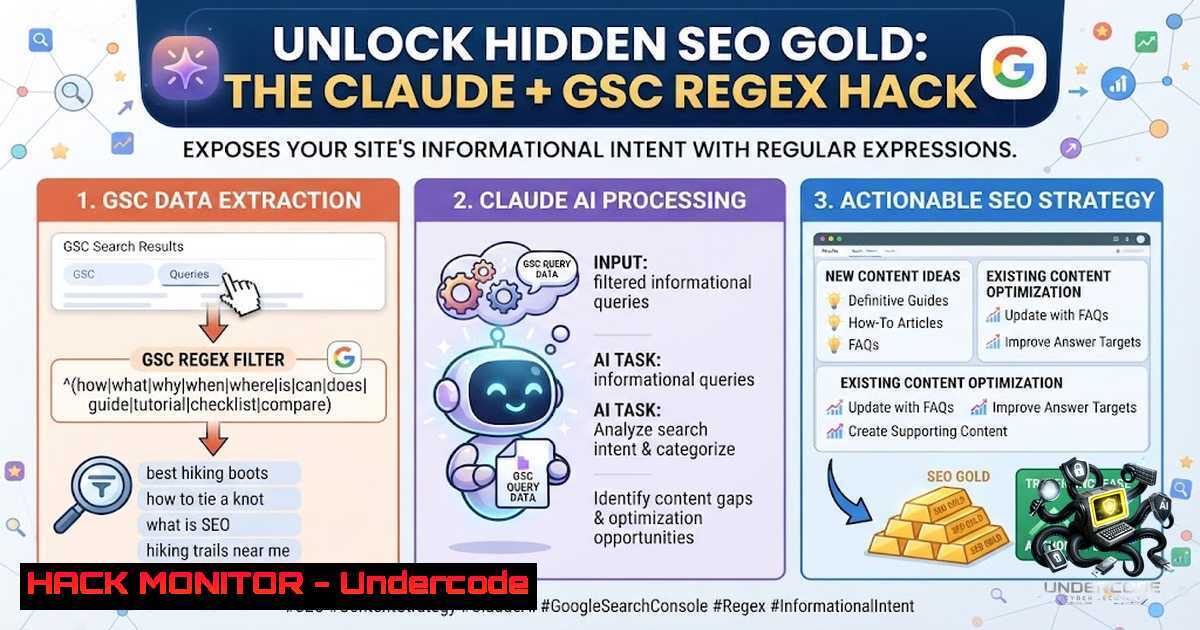
In the digital marketing and SEO landscape, understanding user intent is the cornerstone of effective content strategy. Google Search Console (GSC) provides a wealth of data on how users find your site, but the raw performance report often contains a noisy mix of transactional, navigational, and informational queries. By combining GSC’s regex filtering capabilities with Claude’s advanced natural language processing, you can systematically extract, group, and analyze informational-intent queries—uncovering exactly what your audience wants to learn. This guide walks you through a powerful, AI-driven workflow to transform raw search data into actionable content intelligence, while also exploring the cybersecurity and technical implications of this approach.
Learning Objectives:
- Master the use of regex filters in Google Search Console to isolate informational-intent search queries.
- Learn how to export and structure GSC data for AI-powered analysis using Claude.
- Understand how to interpret Claude’s topic clustering output to inform content strategy, identify gaps, and prioritize high-impact informational topics.
- Explore the technical and cybersecurity considerations of handling search query data, including automation via the GSC API and data privacy.
You Should Know:
- Filtering Informational Intent with Regex in Google Search Console
The first step in this workflow is to isolate informational queries from the broader search performance data. Google Search Console allows you to apply regex filters to the “Queries” dimension, enabling you to match patterns that indicate a user is seeking knowledge rather than a specific product or brand.
Step‑by‑Step Guide:
- Navigate to Performance: Log in to Google Search Console and select “Performance” from the left-hand menu, then choose “Search results”.
- Set Your Date Range: Select a meaningful timeframe—typically the last 3 to 6 months—to gather a statistically significant sample of query data.
- Add a Regex Filter: Click the “+ New” button, choose “Query” from the dropdown, and select “Custom (regex)” from the filter options.
- Apply the Informational Intent Regex: Paste the following regex pattern into the field:
.\b(how to|guide|tutorial|step by step|tips|tricks|ways to|best way to|learn|help|explain|understand|instruction|methods|examples|meaning of|definition)\b
This pattern captures a wide range of informational query starters. For more granular control, you can use a pattern like
(what|how|why|guide|tutorial|explain|definition|example|best way to|steps to|tips for|reasons why|benefits of|difference between). - Sort and Review: Sort the filtered results by “Impressions” to see which informational topics are most frequently surfacing for your site. This gives you a prioritized list of what your audience is actively searching for.
Technical Note on RE2 Syntax: Google Search Console uses the RE2 regex engine, which does not support lookaheads or backreferences. The pattern provided uses standard word boundaries (\b) and alternation (|), which are fully supported.
2. Exporting and Preparing Your Data for Claude
Once you have your filtered list, the next step is to export the data in a format that Claude can process effectively.
Step‑by‑Step Guide:
- Export the CSV: In the Performance report, click the “Export” button and select “Download CSV”. Ensure your export includes the following columns: Queries, Impressions, Clicks, CTR, and Average Position.
- Review the Data: Open the CSV file to verify the data is clean. The export from GSC typically includes the query strings and their associated metrics.
- Prepare Your Claude excels at analyzing structured data, but the quality of the output depends heavily on the prompt. Use a specific, detailed prompt to guide the analysis. The prompt provided in the original post is a solid starting point:
> “This is a GSC export of informational-intent queries with queries, impressions, clicks, CTR, and average position. Group similar queries into clear informational topics and summarize each topic with example queries, impressions, clicks, CTR, average position, and a Why Review note based only on those metrics. Keep the output focused on the main topics only. Use Other / Long-tail only for genuinely small leftover topics, and do not fold high-impression or clearly distinct topics into Other. Keep topics specific and readable, and do not merge unrelated topics just because they are low volume. Return only one topic summary table with these columns: Topic | Example Queries | Impressions | Clicks | CTR | Avg Position | Why Review. Do not add extra sections.” - Upload to Claude: Upload the CSV file directly to Claude (or paste the data) along with your prompt. Claude will process the data and return a structured topic summary table.
-
Automating GSC Data Extraction with Python and the API
For power users and cybersecurity professionals, manually exporting CSVs is inefficient and introduces version control risks. Automating data extraction using the Google Search Console API is a more robust, secure, and scalable approach.
Step‑by‑Step Guide:
- Enable the API: Go to the Google Cloud Console, create a new project (or select an existing one), and enable the “Search Console API” from the library.
- Set Up Authentication: Create OAuth 2.0 credentials (Client ID and Client Secret) for a desktop application. Download the `client_secret.json` file.
- Install the Google Client Library: Use pip to install the necessary Python libraries:
pip install --upgrade google-api-python-client google-auth-oauthlib
- Write the Extraction Script: The following Python script authenticates with the API, queries search analytics data for a specified property and date range, and exports the results to a CSV file.
import pandas as pd
from google.oauth2.credentials import Credentials
from google_auth_oauthlib.flow import InstalledAppFlow
from googleapiclient.discovery import build
import os

SCOPES = ['https://www.googleapis.com/auth/webmasters.readonly']
SITE_URL = 'https://your-site.com/'  Replace with your property URL

def authenticate_gsc():
"""Authenticate and return the Search Console service object."""
flow = InstalledAppFlow.from_client_secrets_file('client_secret.json', SCOPES)
creds = flow.run_local_server(port=0)
return build('searchconsole', 'v1', credentials=creds)

def fetch_gsc_data(service, start_date, end_date):
"""Fetch search analytics data for the given date range."""
request = {
'startDate': start_date,
'endDate': end_date,
'dimensions': ['query'],
'rowLimit': 5000,  Adjust as needed
'aggregationType': 'auto'
}
response = service.searchanalytics().query(siteUrl=SITE_URL, body=request).execute()
return response.get('rows', [])

def save_to_csv(rows, filename='gsc_data.csv'):
"""Save the fetched data to a CSV file."""
data = []
for row in rows:
data.append({
'Query': row['keys'][bash],
'Clicks': row['clicks'],
'Impressions': row['impressions'],
'CTR': row['ctr'],
'Position': row['position']
})
df = pd.DataFrame(data)
df.to_csv(filename, index=False)
print(f"Data saved to {filename}")

if <strong>name</strong> == '<strong>main</strong>':
service = authenticate_gsc()
 Fetch data for the last 3 months
fetch_gsc_data(service, '2026-04-12', '2026-07-12')
5. Run the Script: Execute the script. It will open a browser window for you to log in and authorize access. Once authenticated, it will download the data and save it as a CSV file.
Security Consideration: When automating data extraction, ensure that your `client_secret.json` file is stored securely and not committed to version control. Use environment variables or a secrets manager for production deployments.
- Analyzing the Output: From Topics to Actionable Strategy
Claude’s topic summary table provides a high-level view of your informational content landscape. The “Why Review” column is particularly valuable, as it offers a data-driven rationale for why each topic cluster is performing the way it is.
Step‑by‑Step Guide:
- Review the Topic Clusters: Examine the topics Claude has identified. Look for clusters with high impressions but low CTR—these represent opportunities to improve your title tags and meta descriptions to better match searcher intent.
- Identify Content Gaps: Compare the topics Claude has surfaced against your existing content inventory. Are there high-impression topics for which you have no dedicated content? These are prime candidates for new articles or guides.
- Prioritize by Business Impact: Not all informational topics are equally valuable. Prioritize topics that align with your business goals and have the potential to drive qualified traffic or leads.
- Monitor Position Trends: Pay attention to the “Avg Position” metric. Topics where you rank on page 2 (positions 11-20) may benefit from on-page optimization or additional backlinks to push them onto page 1.
- Iterate and Refine: This is not a one-time exercise. Run this analysis quarterly to track changes in search intent, identify emerging topics, and measure the impact of your content updates.
-
Cybersecurity Implications: Protecting Your Search Data and Infrastructure
While this workflow focuses on SEO, it has important cybersecurity dimensions. Search query data can reveal sensitive information about your users, your content strategy, and even potential vulnerabilities.
Key Security Considerations:
- Data Privacy: Search queries may contain personally identifiable information (PII) or sensitive search terms. Treat GSC exports with the same level of care as any other customer data. Ensure that CSV files are stored securely and access is restricted to authorized personnel.
- API Key Management: When using the GSC API, protect your OAuth credentials and API keys. Use Google Cloud’s IAM to enforce least-privilege access.
- Monitoring for Anomalies: Unusual patterns in search queries—such as a sudden spike in queries containing SQL injection patterns or suspicious long strings—can be an early indicator of a security issue, such as a compromised site or a spam attack. Regularly review your GSC query data for anomalies.
- Claude Data Handling: When uploading data to Claude, be aware of Anthropic’s data privacy policies. For sensitive data, consider using Claude’s enterprise tier, which offers enhanced privacy controls and audit logs.
Linux Command for Log Analysis: If you suspect malicious activity, you can use Linux command-line tools to analyze your web server logs for patterns matching the suspicious queries. For example, to search for SQL injection attempts in your Apache access logs:
grep -E "(select|union|insert|drop|alter|exec)" /var/log/apache2/access.log | awk '{print $1, $7}' | sort | uniq -c | sort -1r
This command extracts IP addresses and requested URLs that contain common SQL keywords, helping you identify potential attack sources.
6. Advanced Claude Prompts for Deeper Analysis
The basic prompt provided in the original post is effective, but you can extend it for more sophisticated analysis.
Advanced Prompt Variations:
- Competitor Gap Analysis: “For each topic cluster identified, suggest 5 potential subtopics or questions that are not adequately covered by the current top-ranking pages. Base your suggestions on the search intent implied by the queries in each cluster.”
- Content Refresh Recommendations: “For each topic cluster, analyze the ‘Avg Position’ and ‘CTR’ metrics. Identify clusters where the position is declining or the CTR is below the site average, and provide specific recommendations for updating or improving the existing content.”
- Predictive Modeling: “Based on the impression and click trends in this dataset, forecast which informational topics are likely to grow in importance over the next 6 months. Provide a rationale for each prediction.”
What Undercode Say:
- Key Takeaway 1: The combination of GSC regex filtering and Claude’s natural language processing creates a powerful, accessible workflow for extracting deep insights from search data. This democratizes advanced SEO analysis, making it available to marketers and analysts without specialized data science skills.
- Key Takeaway 2: The “Why Review” column in Claude’s output is the critical differentiator. It moves beyond simple data aggregation to provide interpretative analysis, helping users understand not just what is happening, but why it matters. This shifts the focus from reporting to actionable strategy.
Analysis:
The GSC + Claude hack represents a significant shift in how SEO professionals can leverage AI. Traditionally, analyzing GSC data required manual sorting, pivot tables, and subjective grouping—a time-consuming and error-prone process. By automating the grouping and summarization with Claude, this workflow reduces analysis time from hours to minutes. However, the effectiveness of the output is still highly dependent on the quality of the input prompt. Vague or poorly structured prompts will yield vague or irrelevant results. Furthermore, while Claude excels at pattern recognition, human judgment is still required to validate the insights and translate them into a cohesive content strategy. The cybersecurity angle is often overlooked; search query data is a rich source of business intelligence and should be protected accordingly. Organizations should implement clear data governance policies for GSC exports and API usage.
Prediction:
- +1 The integration of LLMs like Claude with SEO workflows will become standard practice within 12-18 months, moving from a “hack” to a core capability of enterprise SEO platforms.
- +1 Regex-based intent filtering will be supplemented or replaced by AI-powered intent classification directly within GSC, as Google continues to integrate generative AI into its tools.
- -1 As more organizations adopt this workflow, the competitive advantage will diminish, shifting the focus from data extraction to the quality of strategic execution.
- -1 The increased reliance on AI for data analysis will create new risks related to data privacy and vendor lock-in, requiring organizations to carefully evaluate their AI service providers’ security and compliance postures.
▶️ Related Video (72% Match):
🎯Let’s Practice For Free:
🎓 Live Courses & Certifications:
Join Undercode Academy for Verified Certifications
🚀 Request a Custom Project:
Secure, high-velocity infrastructure and disruptive technological engineering. Contact our engineering team for high-tier development and proprietary systems:
[email protected]
💎 Smart Architecture | 🛡️ Secure by Design | ⭐ Trusted by Thousands
IT/Security Reporter URL:
Reported By: Seoindiasanga Claude – Hackers Feeds
Extra Hub: Undercode MoN
Basic Verification: Pass ✅


