Listen to this Post
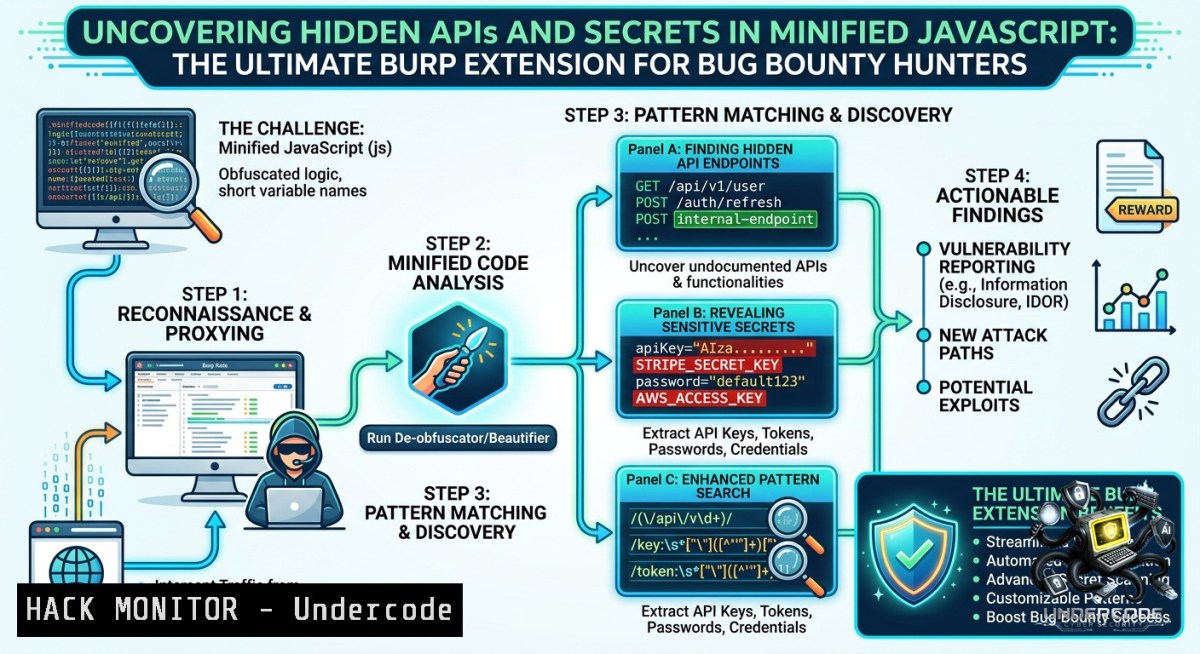
Introduction:
Modern web applications heavily rely on JavaScript, often shipping minified or obfuscated bundles that conceal API endpoints, internal emails, hardcoded secrets, and unreferenced files. Security testers and bug bounty hunters need efficient ways to deobfuscate this noise and extract actionable intelligence without drowning in false positives. A dedicated Burp Suite extension, designed for JS-rich targets, automates the discovery of hidden attack surfaces by parsing minified scripts and surfacing high-value leads such as API routes, development artifacts, and credentials.
Learning Objectives:
– Automate the extraction of endpoints, secrets, and internal references from minified JavaScript using a Burp extension.
– Combine the extension with manual CLI techniques (Linux/Windows) for deeper reconnaissance and validation.
– Apply step‑by‑step methodologies to harden API security by understanding how attackers discover and exploit exposed JS artifacts.
You Should Know:
1. Installing and Configuring the Burp Extension for JavaScript Analysis
This extension (available at https://lnkd.in/eRk-VkKS) integrates into Burp Suite’s Extender tab, intercepting JS responses and passively scanning for patterns like API paths, email addresses, AWS keys, and developer notes.
Step‑by‑step guide:
– Download the JAR or Python file from the repository (or use the BApp Store if listed).
– In Burp Suite, go to Extender → Add → select the extension file.
– Navigate to the extension’s configuration tab (e.g., “JS Miner” or “Burp JS Scanner”).
– Enable options: “Extract endpoints (/api/, /v1/, /graphql)”, “Regex for emails”, “Check for high-entropy strings (secrets)”.
– Set scope to include your target domains.
– Browse the target application – the extension automatically logs findings under Target → Site map or a dedicated “JS Findings” tab.
For Windows: Ensure Java is updated, and Burp runs with adequate heap memory (`-Xmx4G`).
For Linux: Use `ps aux | grep burp` to verify memory settings.
2. Manual JavaScript Reconnaissance – Command Line Power
While the Burp extension automates collection, manual CLI validation avoids missing edge cases. Use these commands on extracted JS files (saved via Burp’s “Save item” or `wget`/`curl`).
Linux / macOS commands:
 Pretty-print minified JS (requires npm install -g js-beautify)
js-beautify script.js > beautified.js

 Extract all URLs/endpoints with grep
grep -oP 'https?://[^"'\'' ]+' beautified.js | sort -u

 Find API paths (common prefixes)
grep -E '"/api/|"/v[0-9]+/|/graphql' beautified.js

 Detect hardcoded secrets (AWS keys, tokens)
grep -E 'AKIA[0-9A-Z]{16}|sk-live-[a-zA-Z0-9]{20,}' beautified.js

 Discover email addresses
grep -E '[a-zA-Z0-9._%+-]+@[a-zA-Z0-9.-]+\.[a-zA-Z]{2,}' beautified.js
Windows (PowerShell) equivalents:
 Select-String works like grep
Select-String -Pattern "https?://[^""' ]+" .\script.js | % { $_.Matches.Value } | Sort-Object -Unique

 Find API paths
Select-String -Pattern '"/api/|"/v\d+/|/graphql"' .\script.js

 Secrets pattern
Select-String -Pattern "AKIA[0-9A-Z]{16}|sk-live-[a-zA-Z0-9]{20,}" .\script.js
Use `curl` or `Invoke-WebRequest` to test discovered endpoints for access control bypasses.
3. Extracting Endpoints and Secrets with LinkFinder & JSFScan
The Burp extension may incorporate tools like LinkFinder. Alternatively, run them separately for deeper recursion.
Installation (Linux/macOS/WSL):
git clone https://github.com/GerbenJavado/LinkFinder.git
cd LinkFinder
pip install -r requirements.txt
Extract endpoints from a JS file:
python linkfinder.py -i beautified.js -o cli
For entire domain crawling (JSFScan.sh):
git clone https://github.com/KathanP19/JSFScan.sh
cd JSFScan.sh
chmod +x JSFScan.sh
./JSFScan.sh -u https://target.com -o output.txt
These tools recursively fetch all JS files, extract endpoints, and highlight potential secrets. Compare results with the Burp extension’s output to validate coverage.
4. API Fuzzing and Parameter Discovery Using Burp Intruder
Once the extension identifies endpoints (e.g., `/api/user/123`, `/api/export`), use Burp Intruder to discover hidden parameters and exploit IDOR or injection flaws.
Step‑by‑step:
– Send a discovered endpoint (e.g., `GET /api/user/123`) to Intruder.
– Set payload position on parameter values (e.g., `123`) or on path segments.
– Load wordlists: `SecLists/Discovery/Web-Content/api-words.txt`, `raft-large-words.txt`.
– Add Grep – Extract for response patterns like `”success”:true` or `error` messages.
– Run attack and sort by response length or status codes.
For POST endpoints with JSON bodies:
– Switch to “Attack type: Pitchfork” or “Cluster bomb”.
– Use extension’s extracted schema hints (e.g., `{“user_id”: 1, “role”: “user”}`) to fuzz `role` to `admin`.
Example payload to test privilege escalation:
{"user_id": 1, "role": "admin"}
Monitor for 200 OK with elevated data.
5. Mitigating Obfuscation – Techniques to Bypass Minification
Attackers often obfuscate JS further to hide API logic. Use these countermeasures during a pentest:
– Deobfuscate with `unjs` or `de4js` (online or CLI):
npm install -g unjs
unjs obfuscated.js > deobfuscated.js
– AST manipulation: Use `js-beautify` with `–indent-size 2` to improve readability.
– Runtime inspection: Override JavaScript functions via browser devtools to log API calls.
Open Chrome DevTools → Sources → Overrides → load the JS file and add `console.log` before each fetch/XHR.
For Windows: Use `node.exe` and the same npm packages.
For Linux: Combine `js-beautify` with `grep` pipelines to iteratively reduce noise.
Command to recursively find all JS files from a domain and run endpoint extraction:
waybackurls target.com | grep -E '\.js$' | while read url; do curl -s $url | js-beautify | grep -oP '"/api/[^"']+' >> endpoints.txt; done
6. Hardening API Security Against JavaScript Discovery
Developers can prevent these exposures by:
– Avoiding hardcoded secrets – use environment variables.
– Implementing API gateways that require authentication for every endpoint, even internal ones.
– Obfuscating only sensitive logic, but not relying on obscurity as a security control.
– Using Content Security Policy (CSP) to restrict script loading from untrusted sources.
Checklist for defenders:
– Run the Burp extension against your own staging environment.
– Review all endpoints found – remove unused or development routes.
– Scan for regex matches of `AKIA`, `–BEGIN RSA PRIVATE KEY–`, `sk_test_`.
– Use `gitleaks` or `trufflehog` on your repo to detect secrets before they reach production.
What Undercode Say:
– Key Takeaway 1: Burp extensions that focus on JS parsing dramatically reduce manual effort, turning hours of source code review into minutes of automated endpoint collection – a force multiplier for bug bounty hunters.
– Key Takeaway 2: No single tool catches everything. Combining the Burp extension with CLI commands (`grep`, `linkfinder`) and manual runtime inspection ensures maximum coverage and minimizes false negatives from minification quirks.
Analysis: The post highlights a practical gap in traditional API testing – minified JavaScript is often ignored or partially reviewed. By leveraging automation within Burp Suite, testers can surface “hidden” attack surfaces that developers mistakenly left in client‑side code. The extension’s ability to extract internal emails and secrets adds another layer of intelligence, potentially leading to subdomain takeovers or credential reuse. However, over‑reliance on passive extraction may miss dynamically loaded endpoints (e.g., via `eval`). Therefore, a hybrid approach (extension + active CLI/ browser debugging) remains the gold standard. For defenders, this serves as a wake‑up call: audit every JS file in production as if an attacker already has it.
Expected Output:
The Burp extension for JS-rich targets, combined with manual recon commands and best practices, enables security professionals to efficiently map API attack surfaces, discover sensitive data leaks, and validate fixes – all while reducing noise from minified code.
Prediction:
+1 Increased adoption of AI‑assisted static analysis within Burp extensions will soon predict unreachable endpoints by modeling JavaScript control flow, making discovery even more proactive.
+N As more testers use these tools, developers will shift toward server‑side rendering and aggressive CSP policies, reducing client‑side JavaScript leakage but also creating new challenges for dynamic analysis.
+1 Bug bounty platforms will likely integrate similar JS scanning into their automated pre‑screening, raising the baseline for submissions and forcing hunters to develop even deeper customization.
+N Attackers will also weaponize these techniques, leading to a short‑term rise in API‑driven breaches before defensive automation catches up.
▶️ Related Video (76% Match):
🎯Let’s Practice For Free:
🎓 Live Courses & Certifications:
[Join Undercode Academy for Verified Certifications](https://undercode.co.uk/certifications/)
🚀 Request a Custom Project:
Secure, high-velocity infrastructure and disruptive technological engineering. Contact our engineering team for high-tier development and proprietary systems:
[[email protected]](mailto:[email protected])
💎 Smart Architecture | 🛡️ Secure by Design | ⭐ Trusted by Thousands
IT/Security Reporter URL:
Reported By: [Omar Aljabr](https://www.linkedin.com/posts/omar-aljabr_bugbounty-recon-javascript-share-7469395197760724992-aU5G/) – Hackers Feeds
Extra Hub: Undercode MoN
Basic Verification: Pass ✅
🔐JOIN OUR CYBER WORLD [ CVE News • HackMonitor • UndercodeNews ]
[💬 Whatsapp](https://undercode.help/whatsapp) | [💬 Telegram](https://t.me/UndercodeCommunity)
📢 Follow UndercodeTesting & Stay Tuned:
[𝕏 formerly Twitter 🐦](https://x.com/undercodeupdate) | [@ Threads](https://www.threads.net/@undercodetesting) | [🔗 Linkedin](https://www.linkedin.com/company/undercodetesting/) | [🦋BlueSky](https://bsky.app/profile/undercode.bsky.social)


