Listen to this Post
Introduction:
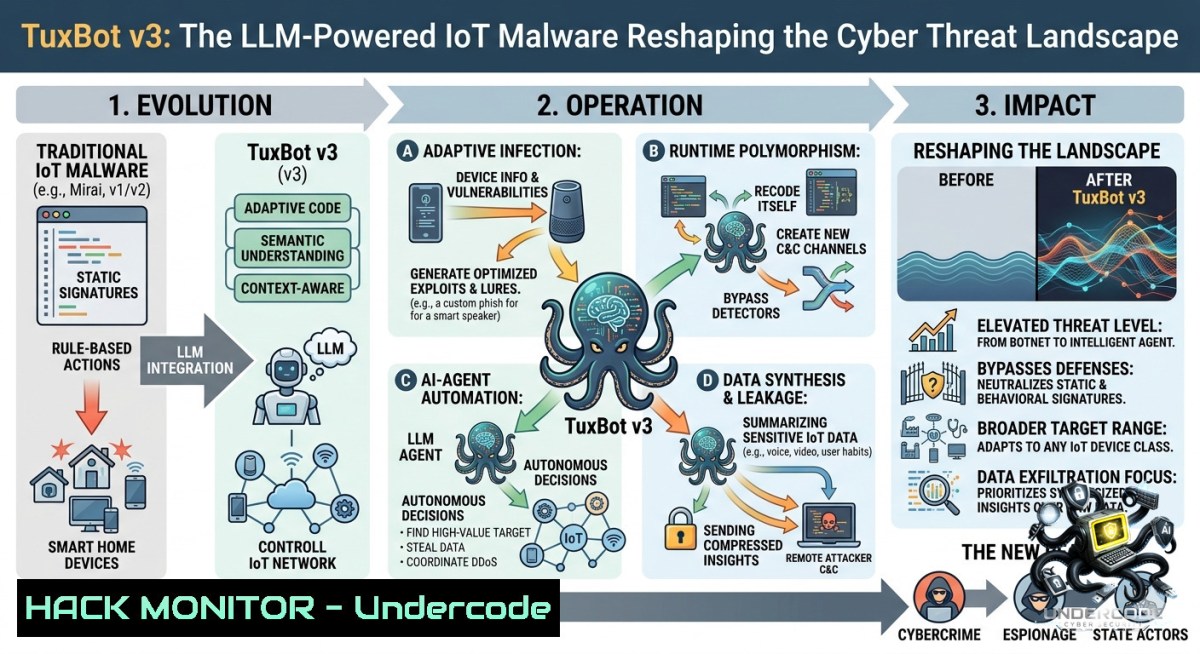
The convergence of IoT botnets and artificial intelligence has given rise to a new generation of sophisticated malware. The latest discovery by Palo Alto Networks Unit 42 reveals TuxBot v3, an IoT malware framework tied to the infamous AISURU/Keksec threat group, which now leverages Large Language Models (LLMs) to port exploits and generate malicious code, marking a significant evolution in automated cyber weaponry.
Learning Objectives:
– Understand the architecture and capabilities of the TuxBot v3 malware framework, including its encrypted C2 communication and Domain Generation Algorithm (DGA).
– Identify the 30+ exploit targets and 1,496 credential pairs used by the botnet for propagation.
– Learn practical detection, analysis, and mitigation techniques for IoT malware, including command-line forensics and network monitoring.
You Should Know:
1. TuxBot v3 Architecture and C2 Communication
TuxBot v3 represents a significant evolution in IoT malware, functioning as both a botnet agent and a command-and-control (C2) framework. The malware self-identifies as “Akiru” and is directly tied to the AISURU/Keksec threat group, known for operating multiple botnets for DDoS attacks and cryptocurrency mining.
Step-by-Step Guide to Analyzing TuxBot’s Network Behavior:
This guide explains how to detect TuxBot’s encrypted C2 traffic and DGA patterns.
Linux Commands for Network Monitoring:
 Monitor outgoing connections for suspicious C2 traffic
sudo tcpdump -i eth0 'tcp port 443 or tcp port 8001' -1 -c 100

 Analyze DNS queries for DGA patterns (look for random-looking domains)
sudo tcpdump -i eth0 'udp port 53' -1 | grep -E '[a-z0-9]{16,}\.com|\.net|\.org'

 Check for established connections to known malicious IPs
netstat -tunap | grep ESTABLISHED | awk '{print $5}' | cut -d: -f1 | sort | uniq -c | sort -1r
Windows Commands for Network Forensics:
 Monitor active network connections
netstat -ano | findstr ESTABLISHED

 Check DNS cache for suspicious domains
ipconfig /displaydns | findstr "Record Name"

 Capture network traffic for analysis (requires admin)
netsh trace start capture=yes tracefile=C:\temp\netcap.etl maxsize=100
DGA Detection Script (Python):
import re
import dns.resolver

def is_dga_domain(domain):
 Check for high entropy or long random strings
entropy = len(set(domain)) / len(domain)
if entropy > 0.7 and len(domain) > 15:
return True

 Check for unusual character patterns
if re.search(r'[a-z0-9]{16,}\.(com|net|org)', domain):
return True
return False

 Example: Monitor for DGA domains
domains_to_check = ["x7k3p9q2r5t8y1w4.com", "google.com"]
for domain in domains_to_check:
if is_dga_domain(domain):
print(f"Suspicious DGA domain detected: {domain}")
How to Use: Run the network monitoring commands to capture real-time traffic. The DGA detection script can be integrated into SIEM systems to identify algorithmically generated domains characteristic of TuxBot’s C2 infrastructure.
2. Exploit Arsenal and Credential Exploitation
TuxBot v3 comes equipped with over 30 exploit targets and a built-in dictionary of 1,496 credential pairs, enabling automated propagation across vulnerable IoT devices. The malware scans for open ports and attempts to brute-force common default credentials.
Step-by-Step Guide to Credential Hardening:
Linux Commands to Check for Weak Configurations:
 Check for default SSH configurations that may be vulnerable
grep -E "PermitRootLogin|PasswordAuthentication" /etc/ssh/sshd_config

 Audit users with weak or default passwords
sudo john /etc/shadow --format=crypt --wordlist=/usr/share/wordlists/fasttrack.txt

 Scan for open ports commonly targeted by TuxBot (23, 2323, 80, 8080, 443)
sudo nmap -p 23,2323,80,8080,443,8001,5555 localhost
Windows Commands for Hardening:
 Check for default admin accounts
Get-LocalUser | Where-Object {$_.Enabled -eq $true} | Format-Table Name, PasswordRequired

 Audit RDP configuration (port 3389)
Get-ItemProperty -Path "HKLM:\System\CurrentControlSet\Control\Terminal Server" -1ame "fDenyTSConnections"

 Check for Telnet service (often enabled on IoT devices)
Get-Service -1ame "Telnet" | Select-Object Name, Status
Common Default Credentials Used by TuxBot (Partial List):
root:root admin:admin admin:password
root:12345 admin:12345 root:default
admin: root:toor ubuntu:ubuntu
pi:raspberry support:support user:user
Mitigation Steps:
1. Change all default credentials immediately upon device installation.
2. Implement rate-limiting for SSH and Telnet login attempts.
3. Disable Telnet entirely and use SSH with key-based authentication.
4. Implement network segmentation to isolate IoT devices from critical infrastructure.
3. LLM-Assisted Malware Development
The most concerning aspect of TuxBot v3 is its use of Large Language Models to port exploits and generate code. This represents a paradigm shift in malware development, lowering the barrier for threat actors to create sophisticated, cross-platform malware.
Indicators of LLM-Generated Malware:
– Consistent commenting style and variable naming conventions
– Unusual function structures that resemble AI-generated code
– Presence of “as an AI language model” artifacts (though typically stripped)
– Lack of optimization typical of human-written assembly
Python Script to Detect Code Patterns Associated with LLM Generation:
import re

def analyze_code_patterns(file_path):
with open(file_path, 'r') as file:
content = file.read()

indicators = {
'numbered_explanations': len(re.findall(r'^\d+\.\s', content, re.MULTILINE)),
'verbose_comments': len(re.findall(r' [A-Z][a-z]+ [a-z]+ [a-z]+', content)),
'unusual_variable_names': len(re.findall(r'[a-z]{15,}', content)),
'consistent_function_headers': len(re.findall(r'def [a-z]+_[a-z]+\([^)]\):', content))
}

print(f"LLM code indicators: {indicators}")
if sum(indicators.values()) > 50:
print("SUSPICIOUS: Code may be LLM-generated")
return indicators

 Usage
analyze_code_patterns("suspicious_binary.c")
The developer’s use of an LLM left traces in some files, providing researchers with unique forensic artifacts to identify TuxBot v3 variants.
4. Detection and Forensics
Early detection of TuxBot v3 infections requires a multi-layered approach combining network monitoring, endpoint detection, and behavioral analysis.
Linux Forensics Commands:
 Check for unusual processes
ps aux | grep -E "\./|\.sh|bash|python" | grep -v grep

 Examine crontab for persistence
crontab -l
sudo cat /etc/crontab

 Check for suspicious systemd services
systemctl list-units --type=service --all | grep -E "tux|bot|scan"

 Search for known TuxBot file indicators
find / -1ame "tux" -type f 2>/dev/null
find / -1ame "akiru" -type f 2>/dev/null

 Examine network connections for C2 beacons
ss -tunap | grep -E "ESTABLISHED|SYN_SENT" | awk '{print $5}' | cut -d: -f1 | sort | uniq -c | sort -1r
Windows Forensics Commands:
 Check for suspicious scheduled tasks
Get-ScheduledTask | Where-Object {$_.TaskName -like "tux" -or $_.TaskName -like "bot"}

 Examine autoruns for persistence
Get-CimInstance Win32_StartupCommand | Select-Object Name, Command, Location

 Check Windows Defender logs for detected threats
Get-MpThreatDetection | Select-Object -First 20

 Search for suspicious PowerShell activity
Get-WinEvent -LogName "Windows PowerShell" | Where-Object {$_.Message -like "download" -or $_.Message -like "invoke"}
5. Exploit Analysis and Mitigation
TuxBot v3 targets over 30 vulnerabilities across various IoT devices, including routers, cameras, and DVRs. The malware also uses DNS-over-TLS (DoT) to hide C2 communication, evading traditional network monitoring tools.
Vulnerability Scanning and Mitigation:
 Scan for known exploited CVEs (requires Nmap and vulners script)
nmap -sV --script vulners --script-args mincvss=7.0 target_ip

 Example: Check for CVE-2021-35394 (RCE in certain IoT devices)
nmap -p 80 --script http-vuln-cve2021-35394 target_ip

 Check for open Telnet and weak SSH configurations
nmap -p 23,22 --script telnet-brute,ssh-brute target_ip
Network-level Mitigation:
 Block known malicious ports at the firewall level (iptables)
sudo iptables -A INPUT -p tcp --dport 23 -j DROP
sudo iptables -A INPUT -p tcp --dport 2323 -j DROP
sudo iptables -A INPUT -p tcp --dport 8001 -j DROP

 Rate-limit SSH connections
sudo iptables -A INPUT -p tcp --dport 22 -m state --state NEW -m recent --set
sudo iptables -A INPUT -p tcp --dport 22 -m state --state NEW -m recent --update --seconds 60 --hitcount 4 -j DROP
API Security Hardening (for cloud-connected IoT devices):
 Implement API rate limiting and authentication checks
from flask import Flask, request, jsonify
from functools import wraps
import time

app = Flask(__name__)

 Rate limiting decorator
def rate_limit(max_calls=10, time_window=60):
def decorator(f):
calls = {}
@wraps(f)
def wrapped(args, kwargs):
now = time.time()
ip = request.remote_addr
if ip in calls:
calls[bash] = [t for t in calls[bash] if now - t < time_window]
if len(calls[bash]) >= max_calls:
return jsonify({"error": "Rate limit exceeded"}), 429
calls[bash].append(now)
else:
calls[bash] = [bash]
return f(args, kwargs)
return wrapped
return decorator

@app.route('/api/device/command', methods=['POST'])
@rate_limit(max_calls=5, time_window=60)
def device_command():
auth_token = request.headers.get('Authorization')
if not auth_token or not validate_token(auth_token):
return jsonify({"error": "Unauthorized"}), 401
 Process command...
return jsonify({"status": "success"})
What Undercode Say:
– The integration of LLMs into malware development is a game-changer, enabling threat actors to rapidly port exploits and generate new variants, outpacing traditional signature-based detection.
– Organizations must adopt a zero-trust architecture for IoT devices, implementing network segmentation, continuous monitoring, and automated patch management to defend against botnets like TuxBot v3.
Prediction:
– +1: The use of LLMs in cyberattacks will accelerate the development of AI-powered defense systems, leading to more sophisticated automated threat hunting and incident response tools. This will create a new arms race between offensive and defensive AI capabilities.
– -1: As LLM-assisted malware development becomes more accessible, the volume and velocity of IoT malware variants will increase exponentially, overwhelming traditional security teams and leading to more widespread botnet infections unless defensive AI capabilities mature at a commensurate pace.
– -1: The 30+ exploits and 1,496 credential pairs in TuxBot v3 represent a significant expansion of the attack surface for IoT devices, which often remain unpatched for years. This could lead to a surge in DDoS attacks capable of reaching the previously recorded 11.5 Tbps scale seen with the AISURU botnet.
▶️ Related Video (86% Match):
🎯Let’s Practice For Free:
🎓 Live Courses & Certifications:
[Join Undercode Academy for Verified Certifications](https://undercode.co.uk/certifications/)
🚀 Request a Custom Project:
Secure, high-velocity infrastructure and disruptive technological engineering. Contact our engineering team for high-tier development and proprietary systems:
[[email protected]](mailto:[email protected])
💎 Smart Architecture | 🛡️ Secure by Design | ⭐ Trusted by Thousands
IT/Security Reporter URL:
Reported By: [Tuxbot UgcPost](https://www.linkedin.com/posts/tuxbot-ugcPost-7465815669218013184-UAcT/) – Hackers Feeds
Extra Hub: Undercode MoN
Basic Verification: Pass ✅
🔐JOIN OUR CYBER WORLD [ CVE News • HackMonitor • UndercodeNews ]
[💬 Whatsapp](https://undercode.help/whatsapp) | [💬 Telegram](https://t.me/UndercodeCommunity)
📢 Follow UndercodeTesting & Stay Tuned:
[𝕏 formerly Twitter 🐦](https://x.com/undercodeupdate) | [@ Threads](https://www.threads.net/@undercodetesting) | [🔗 Linkedin](https://www.linkedin.com/company/undercodetesting/) | [🦋BlueSky](https://bsky.app/profile/undercode.bsky.social)


