Listen to this Post
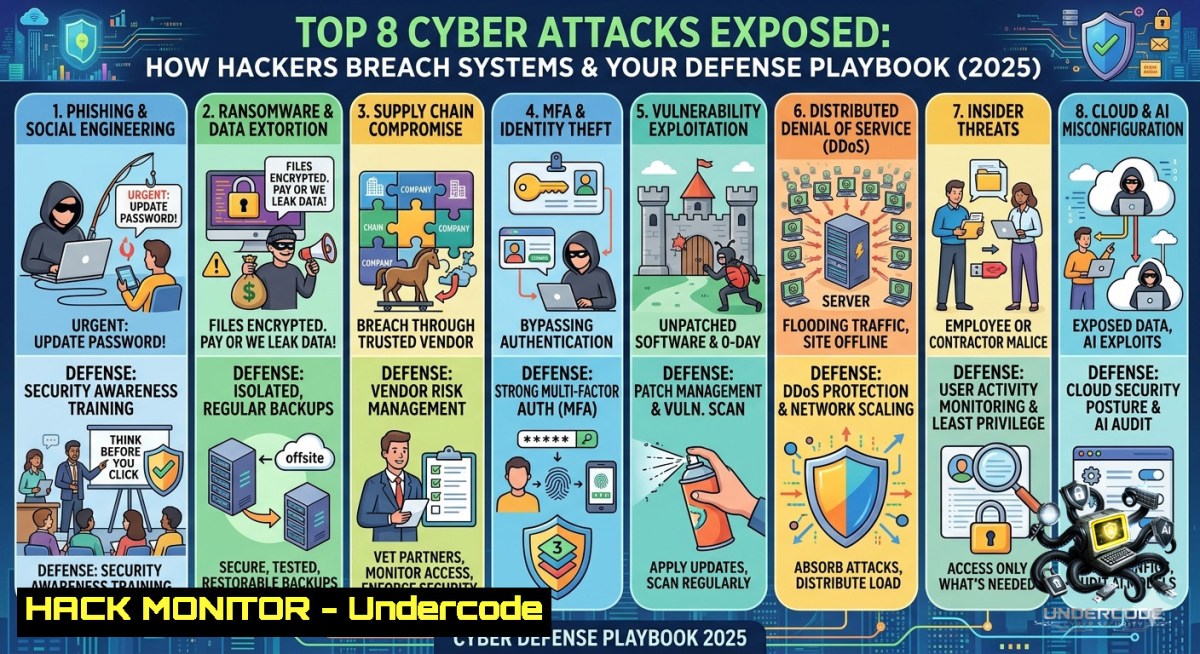
Introduction:
Cyber threats are no longer just a concern for large enterprises—every user, developer, and IT professional faces an evolving landscape of attack techniques. From phishing emails that bypass spam filters to zero‑day exploits that strike before patches exist, understanding these eight common but dangerous attack vectors is the first step toward building a resilient defense.
Learning Objectives:
- Identify the mechanics behind phishing, ransomware, DoS, MitM, SQLi, XSS, zero‑day exploits, and DNS spoofing.
- Implement practical mitigation strategies using native OS commands and open‑source tools.
- Apply step‑by‑step hardening techniques for networks, web applications, and endpoints.
You Should Know
1. Phishing Attack – Simulate, Detect, and Train
Phishing remains the 1 initial access vector. Attackers craft convincing emails or fake login pages to steal credentials or deploy malware. Defending requires both technical controls and user awareness.
Step‑by‑step guide to simulate a phishing campaign (using GoPhish on Linux):
1. Install GoPhish: `sudo apt update && sudo apt install gophish -y` (or download from GitHub).
2. Start the service: `sudo gophish` (default listens on port 3333).
3. Access the admin panel at `https://your-ip:3333` (default credentials: admin/gophish).
4. Create a Sending Profile (SMTP server, e.g., your internal mail relay).
5. Design a Landing Page that mimics a legitimate login portal (use “capture credentials” toggle).
6. Launch an Email Template with a spoofed “password expired” message.
7. Start a Campaign and monitor who clicks or submits data.
8. Remediate: Block malicious domains via DNS filtering; enforce MFA; conduct user training for red flags.
Windows command to check for suspicious scheduled tasks (common phishing persistence):
schtasks /query /fo LIST /v | findstr /i "unknown"
2. Ransomware – Backup & Block Execution
Ransomware encrypts files and demands payment. Modern variants also exfiltrate data for double extortion. Prevention hinges on immutable backups and application control.
Step‑by‑step guide to create immutable backups on Linux (using `restic` with cloud storage):
1. Install restic: `sudo apt install restic -y`.
- Initialize a repository (e.g., AWS S3):
restic -r s3:mybucket/backup init.
3. Set password via `export RESTIC_PASSWORD=strongpass`.
- Create a backup of critical directories:
restic -r s3:mybucket/backup backup /etc /home /var/www. - Automate with cron: `crontab -e` →
0 2 /usr/bin/restic -r s3:mybucket/backup backup /data. - Enforce immutability: use S3 Object Lock or `restic` forget with
--keep-daily 7 --keep-weekly 4. - On Windows, enable Controlled Folder Access (Microsoft Defender):
`Set-MpPreference -EnableControlledFolderAccess Enabled` (PowerShell as Admin).
- Test recovery:
restic -r s3:mybucket/backup restore latest --target /restore.
3. Denial‑of‑Service (DoS) – Rate Limiting & Filtering
DoS attacks flood resources (CPU, memory, bandwidth) to make services unavailable. Layer 7 (HTTP floods) and volumetric (DNS amplification) variants require different countermeasures.
Step‑by‑step guide to mitigate SYN flood using iptables on Linux:
1. Enable SYN cookies to prevent connection table exhaustion:
`sudo sysctl -w net.ipv4.tcp_syncookies=1` (make permanent in `/etc/sysctl.conf`).
2. Limit incoming SYN packets per source IP:
`sudo iptables -A INPUT -p tcp –syn -m limit –limit 1/s -j ACCEPT`
3. Drop excess SYN packets:
`sudo iptables -A INPUT -p tcp –syn -j DROP`
4. For HTTP flood, use `mod_evasive` with Apache or `rate limit` middleware in Nginx:
`limit_req_zone $binary_remote_addr zone=mylimit:10m rate=5r/s;`
- Windows Server: Enable SYN attack protection via registry:
`reg add “HKLM\SYSTEM\CurrentControlSet\Services\Tcpip\Parameters” /v SynAttackProtect /t REG_DWORD /d 1 /f` - Man‑in‑the‑Middle (MitM) – Enforce Encryption & Detect ARP Spoofing
MitM attacks intercept communication between two parties, often on unencrypted Wi-Fi or via ARP poisoning. Full encryption and network monitoring are essential.
Step‑by‑step guide to detect ARP spoofing with `arpwatch` on Linux:
1. Install arpwatch: `sudo apt install arpwatch -y`.
- Monitor an interface (e.g., eth0):
sudo arpwatch -i eth0. - Check logs for MAC‑to‑IP changes:
sudo cat /var/log/arpwatch.log. - Manually inspect ARP table: `arp -a` (Linux) or `arp -a` (Windows).
5. Prevent static ARP entries for critical gateways:
`sudo arp -s 192.168.1.1 00:11:22:33:44:55` (Linux temporary; Windows: netsh interface ipv4 set neighbors "Ethernet" "192.168.1.1" "00-11-22-33-44-55").
6. For Wi‑Fi, enforce WPA3‑Enterprise and certificate‑based 802.1X. Always verify HTTPS (padlock icon) and avoid “HTTP” sites.
- SQL Injection – Test with SQLmap and Fix with Parameterized Queries
SQLi allows attackers to manipulate database queries, leading to data theft or destruction. The primary fix is never trusting user input.
Step‑by‑step guide to test a vulnerable parameter (ethical use only):
1. Install SQLmap (Kali Linux pre‑installed): sudo apt install sqlmap -y.
2. Target a login form: sqlmap -u "http://test.com/page?id=1" --dbs.
3. Enumerate tables: sqlmap -u "http://test.com/page?id=1" -D database_name --tables.
4. Dump data responsibly only on authorized systems.
- Remediation – Parameterized queries in Python (safe example):
import sqlite3 conn = sqlite3.connect("db.sqlite") cursor = conn.cursor() user_id = "1 OR 1=1" malicious input cursor.execute("SELECT FROM users WHERE id = ?", (user_id,)) - Use stored procedures and escape inputs; deploy a Web Application Firewall (WAF) like ModSecurity.
-
DNS Spoofing – Harden Resolvers and Use DNSSEC
Attackers corrupt DNS responses to redirect users to malicious sites (pharming). Local DNS cache poisoning can be mitigated via encryption and validation.
Step‑by‑step guide to secure DNS resolution on Linux and Windows:
1. On Linux, edit `/etc/systemd/resolved.conf` and set:
DNS=1.1.1.1 9.9.9.9
DNSSEC=yes
DNSOverTLS=yes
2. Restart: `sudo systemctl restart systemd-resolved`.
- Verify DNSSEC status:
resolvectl status | grep DNSSEC. - On Windows, configure DNS over HTTPS via PowerShell:
`Set-DnsClientServerAddress -InterfaceAlias “Ethernet” -ServerAddresses (“1.1.1.1″,”9.9.9.9”)`
then enable DoH in registry:
`reg add “HKLM\SYSTEM\CurrentControlSet\Services\Dnscache\Parameters” /v EnableAutoDoh /t REG_DWORD /d 2 /f`
5. Monitor suspicious DNS queries using `nslookup` or `dig` (Linux):
`dig google.com +dnssec`
- Deploy a local DNS sinkhole (Pi‑hole) to block known malicious domains.
What Undercode Say
- Phishing and zero‑day exploits remain the most underestimated attack types. Organizations often invest heavily in perimeter firewalls while ignoring user education and rapid patch deployment. Phishing success rates consistently exceed 30% in simulated tests, yet many still rely on basic spam filters.
- Defense requires layered, actionable controls. A single mitigation—like MFA or backups—is insufficient. The combination of user training (phishing), immutable backups (ransomware), rate limiting (DoS), and encryption (MitM) creates overlapping protection.
- Attackers reuse known techniques because they work. SQL injection and XSS have been documented for over 20 years, but poor coding practices persist. Automated scanning (SQLmap, OWASP ZAP) should be part of every CI/CD pipeline.
- DNS spoofing is the silent redirection threat. With the rise of rogue access points and ISP‑level manipulation, DNSSEC and DoH are no longer optional for financial or healthcare sectors.
- Proactive “red team” mindset beats reactive fixes. Running regular attack simulations (phishing campaigns, SQLi tests, ARP spoofing drills) hardens both technical and human defenses.
Analysis (10 lines):
The eight attacks listed share a common theme: they exploit either trust (phishing, MitM), unpatched flaws (zero‑day, SQLi), or resource exhaustion (DoS). Modern cyber kill chains often combine multiple types—e.g., phishing delivers ransomware, which then uses DNS spoofing for C2 communication. Defenders must move beyond isolated fixes. For example, a robust backup strategy (against ransomware) is useless if an attacker first phishes admin credentials and disables backup services. Similarly, a WAF blocks SQLi but does nothing for zero‑day exploits in third‑party libraries. The most effective posture integrates asset inventory, continuous vulnerability scanning, endpoint detection and response (EDR), and user behavior analytics. Finally, compliance frameworks (NIST, ISO 27001) now explicitly require mitigation for each of these eight attack families—ignoring any one leaves a gap.
Prediction
- -1 AI‑generated phishing will become nearly indistinguishable from legitimate corporate communications, raising successful click rates above 50% by 2026. Traditional email filters will fail, forcing adoption of behavioral‑based detection and real‑time URL sandboxing.
- +1 Zero‑day exploit commercialization will drive faster bug bounty adoption and automated patch pipelines. Companies using AI‑driven vulnerability prioritization (e.g., EPSS) will reduce median patch times from 30 days to under 48 hours.
- -1 DNS spoofing will see a resurgence as attackers target encrypted DNS tunnels (DoH) to bypass traditional monitoring, requiring organizations to deploy out‑of‑band DNS validation and certificate pinning.
- +1 The rising cost of ransomware insurance (up 300% in two years) will force small businesses to finally implement immutable, offline backups—dramatically reducing ransom payments.
- -1 SQL injection will remain in the OWASP Top 10 for the next five years due to legacy enterprise systems and poorly maintained APIs. API security gateways with automatic parameterization will become a standard cloud component.
▶️ Related Video (80% Match):
🎯Let’s Practice For Free:
🎓 Live Courses & Certifications:
Join Undercode Academy for Verified Certifications
🚀 Request a Custom Project:
Secure, high-velocity infrastructure and disruptive technological engineering. Contact our engineering team for high-tier development and proprietary systems:
[email protected]
💎 Smart Architecture | 🛡️ Secure by Design | ⭐ Trusted by Thousands
IT/Security Reporter URL:
Reported By: Cybersecurity Cyberattacks – Hackers Feeds
Extra Hub: Undercode MoN
Basic Verification: Pass ✅


