
Listen to this Post
Introduction:
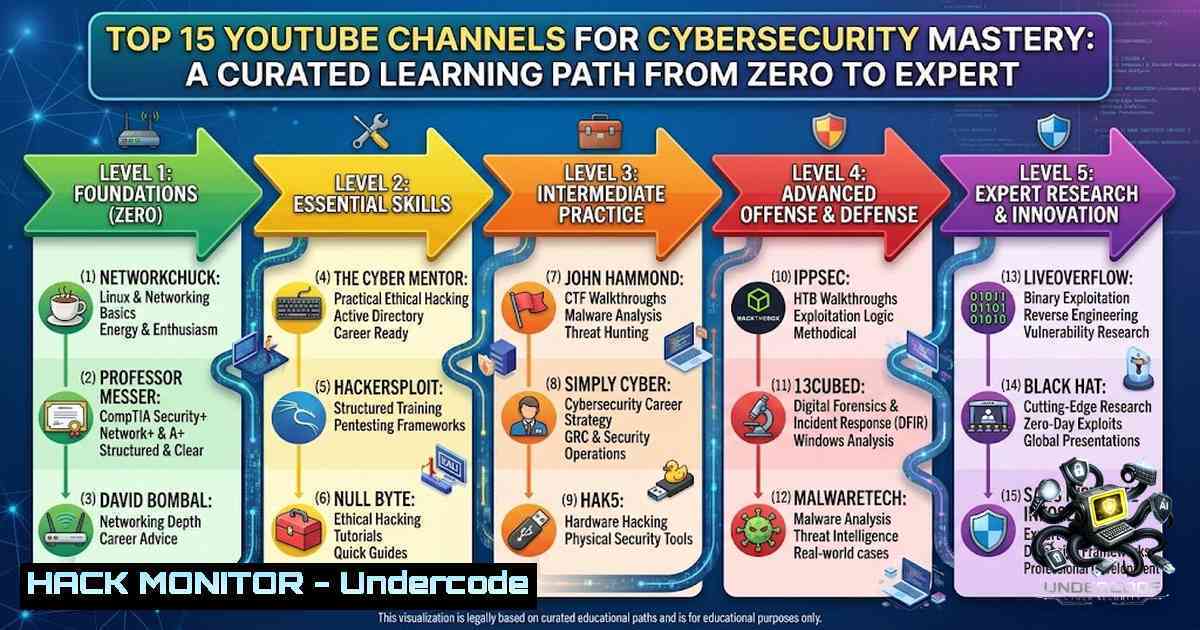
In the rapidly evolving landscape of digital threats, continuous skill development is not just an advantage; it is a necessity for survival in the cybersecurity domain. While academic degrees and expensive bootcamps provide structured knowledge, the sheer volume of free, high-quality educational content available on platforms like YouTube has democratized access to advanced technical training. This article distills a community-vetted list of the most effective YouTube channels for cybersecurity, penetration testing, and IT, offering a strategic roadmap to transform passive viewing into active, practical skill acquisition. By leveraging these resources, learners can systematically build competencies in everything from Linux fundamentals to advanced exploitation techniques, mirroring the hands-on approach of professional penetration testers and security analysts.
Learning Objectives & Secrets:
- Objective 1: Build a Foundational Security Mindset. Understand core networking concepts, operating system internals, and the CIA triad by following structured playlists from beginner-focused educators like Professor Messer and NetworkChuck.
- Objective 2 Secret Tip: Move beyond “watch-and-forget” by setting up a home lab (using VirtualBox or VMware) to replicate every command and attack demonstrated in TCM or IppSec videos, ensuring muscle memory for tool syntax and methodology.
- Objective 3 Secret Tip: Specialize early by following the “Bug Bounty” track (TechChip → TCM → LiveOverflow) while simultaneously maintaining a “Blue Team” perspective (13Cubed → Simply Cyber) to understand both sides of the security coin, a key differentiator for senior roles.
You Should Know:
1. Strategic Channel Selection & Categorization
The list of 15 channels provided offers a rich tapestry of expertise, but attempting to consume all of them will lead to information overload. The curated breakdown allows for targeted learning based on career goals.
- For Network & Systems Basics: NetworkChuck and Professor Messer are the starting points. NetworkChuck excels at making complex topics (like subnetting or setting up a home firewall) fun, while Professor Messer provides the deep, exam-focused dives necessary for certifications like CompTIA Security+.
- For Offensive Security & Pentesting: The path is clear: start with The Cyber Mentor (TCM) for structured penetration testing methodologies, transition to HackerSploit for tool-specific deep dives (Metasploit, Nmap), and finally analyze IppSec’s Hack The Box walkthroughs to understand real-world exploitation chains and reporting.
- For Specialized Domains: For malware analysis and reverse engineering, John Hammond and LiveOverflow provide unparalleled practical CTF (Capture The Flag) walkthroughs. For digital forensics and incident response (DFIR), 13Cubed is a must-watch, focusing on Windows artifact analysis and memory forensics.
2. Setting Up Your Learning Environment (Linux Focus)
To maximize the value of these channels, you must have a fully functional lab environment. The following commands and steps are essential for setting up a Kali Linux or Parrot OS virtual machine, the primary tools used by channels like HackerSploit and Bitten Tech.
- Step 1: Virtual Machine Installation.
Download VirtualBox from Oracle and install it on your Windows or Linux host. Download the Kali Linux ISO file. - On Windows, after installation, create a new VM with `2048 MB` RAM and a `30 GB` virtual hard drive.
- Step 2: Update Package Repositories.
Once booted into Kali, open a terminal and update the system to ensure you have the latest tools, crucial for following recent tutorials.sudo apt update && sudo apt upgrade -y sudo apt install git python3-pip build-essential -y
- Step 3: Installing Core Reconnaissance Tools.
While Kali is pre-installed with many tools, ensuring you have the latest versions of tools like `nmap` and `gobuster` is vital.sudo apt install nmap gobuster ffuf -y
What this does: This installs a network scanner, a directory brute-forcing tool for web applications, and a fast web fuzzer.
3. Practical Web Security & API Testing
Following TechChip or LiveOverflow requires a robust understanding of web vulnerabilities. You should set up a vulnerable application like OWASP Juice Shop or Damn Vulnerable Web Application (DVWA) to practice.
- Step 1: Installing Docker (the standard deployment method).
sudo apt install docker.io docker-compose -y
sudo systemctl start docker
sudo systemctl enable docker
- Step 2: Deploying a Vulnerable Target.
git clone https://github.com/OWASP/owasp-mstg.git
Alternatively, for a simple setup, use:
sudo docker run -d -p 3000:3000 bkimminich/juice-shop
What this does: This runs a local, intentionally insecure web application on your machine at `http://localhost:3000`. You can now practice SQL Injection, XSS, and IDOR (Insecure Direct Object References) as shown in the tutorials.
- Step 3: Utilizing Burp Suite for Interception.
Fire up Burp Suite Community Edition. Set your browser proxy to127.0.0.1:8080. Capture the request to Juice Shop and practice fuzzing the login parameters.
4. Enhancing Network Security Posture
While offensive skills are exciting, understanding defense is critical. Taking inspiration from Professor Messer’s Network+ content, you should configure basic firewall rules on a Linux server.
- Step 1: Checking Firewall Status.
sudo ufw status verbose
- Step 2: Setting up Default Policies.
sudo ufw default deny incoming
sudo ufw default allow outgoing
- Step 3: Allowing Essential Services.
sudo ufw allow 22/tcp  SSH
sudo ufw allow 80/tcp  HTTP
sudo ufw allow 443/tcp  HTTPS
sudo ufw enable
What this does: This configures a host-based firewall (Uncomplicated Firewall) to block unauthorized access attempts while maintaining connectivity for web servers.
5. Active Reconnaissance Methodology (IppSec Style)
IppSec teaches a systematic approach to enumeration. This involves scanning for open ports and services.
- Step 1: External Port Scan.
nmap -sC -sV -Pn -p- -T4 <target_ip> -oA initial_scan
Flags Breakdown: `-sC` runs default scripts, `-sV` attempts service version detection, `-Pn` skips host discovery (treats the host as online), `-p-` scans all 65535 ports, and `-oA` outputs in all formats.
- Step 2: Enumerating SMB Shares.
If port 445 is open, enumeration often follows the use ofsmbclient.smbclient -L \\<target_ip> -1
What this does: This attempts to list anonymous shares, a common misconfiguration that can lead to data leaks.
6. Cloud Hardening & Azure/AD Security
Content from Simply Cyber often focuses on cloud and identity. Securing Active Directory or Azure is paramount. Auditing user permissions can often be done with the following Linux tools against a Kerberos environment.
- Step 1: Installing Realm & Kerberos Tools.
sudo apt install realmd adcli sssd libpam-sss
- Step 2: Enumerating Domain Controllers.
nmap -p 88 --open -T4 <subnet>
What this does: This scans for open Kerberos ports (88), indicating a potential Domain Controller.
What Undercode Say:
- Key Takeaway 1: The “watch-2-3-channels” rule is non-1egotiable. The process of moving from a generalist viewer to a specialist practitioner requires deep dives rather than broad consumption. Stick to a playlist until completion.
- Key Takeaway 2: The “Practice Lab” is the differentiating factor. Without executing the commands, you are merely consuming entertainment, not education. The transition from “knowledge” to “skill” occurs exclusively in the terminal.
Analysis:
The curation by Nitish Mukhiya highlights a fundamental shift in cybersecurity education: the rise of the creator-educator. Unlike static textbooks, these channels provide current attack techniques (e.g., container escapes, cloud privilege escalation) often seen in recent CVEs. The categorization of Hinglish vs. English channels underscores the global nature of the talent pool and the lowering of language barriers in tech education. However, the risk remains that novice learners may develop “tool-dependency” without understanding underlying protocols (e.g., using Metasploit for exploitation without understanding the buffer overflow). This is mitigated by channels like Computerphile and LiveOverflow, which emphasize the “why” behind the “how.”
Prediction:
- +1: The democratization of knowledge through these creators will exacerbate the “skills vs. certificates” debate, leading hiring managers to prioritize practical portfolio projects (e.g., Hack The Box write-ups) over formal certifications, speeding up the hiring process for self-taught talent.
- +1: As generative AI tools become integrated into these training pipelines (e.g., John Hammond’s use of AI for malware deobfuscation), we will see a surge in “Hybrid Analysts” who can perform complex forensics with AI assistance, making Tier 1 SOC analysts 30% more efficient by 2027.
- -1: The ease of access to these advanced exploitation tutorials will inevitably lead to a higher volume of script-kiddie activity. As more individuals watch IppSec’s videos without understanding the ethics, there will be a parallel increase in automated attack attempts, forcing defensive tools (like EDRs) to become more aggressive and heuristic-based to counter the saturation of common exploitation techniques.
▶️ Related Video (78% Match):
🎯Let’s Practice For Free:
🎓 Live Courses & Certifications:
Join Undercode Academy for Verified Certifications
🚀 Request a Custom Project:
Secure, high-velocity infrastructure and disruptive technological engineering. Contact our engineering team for high-tier development and proprietary systems:
[email protected]
💎 Smart Architecture | 🛡️ Secure by Design | ⭐ Trusted by Thousands
IT/Security Reporter URL:
Reported By: https://lnkd.in/p/dC4VEfAt – Hackers Feeds
Extra Hub: Undercode MoN
Basic Verification: Pass ✅


