Listen to this Post
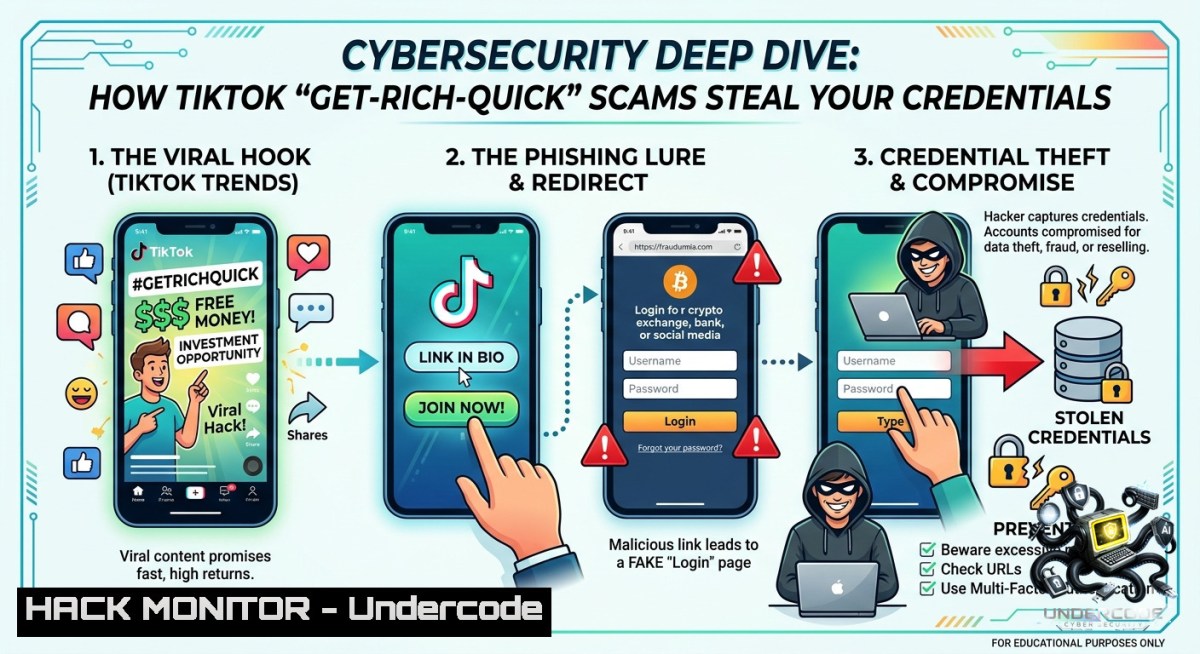
Introduction:
Viral TikTok challenges promising “easy money,” “instant PayPal transfers,” or “crypto giveaways” are often baited hooks for credential harvesting, infostealer malware, and session hijacking. These attacks exploit human psychology – urgency, social proof, and FOMO – to bypass technical controls. Understanding the tactics, indicators of compromise (IoCs), and defensive commands is critical for security professionals and everyday users alike.
Learning Objectives:
– Identify malicious URL patterns and social engineering lures common in TikTok “get-rich-quick” campaigns.
– Execute OSINT and forensic commands (Linux/Windows) to analyze suspicious links, domains, and downloaded payloads.
– Implement browser hardening, sandboxing, and incident response steps to contain and recover from scam‑induced compromises.
You Should Know:
1. Deconstructing the Malicious TikTok Link: OSINT and URL Analysis
Attackers hide phishing pages behind URL shorteners or deceptive domains (e.g., `paypa1-verify[.]com`). The provided TikTok post URL (`https://www. .com/posts/…`) is suspicious – note the space, likely a deliberate obfuscation or typo. Real scam links often mimic legitimate services.
Step‑by‑step guide to analyze a suspicious link:
Linux / macOS commands:
 Expand shortened URL (if any) and follow redirects
curl -Ls -o /dev/null -w "%{url_effective}\n" "http://bit.ly/suspicious"

 Check domain reputation
whois example.com | grep -i "creation\|registrar\|name server"
dig +short example.com
nslookup example.com

 Check against threat intelligence feeds (requires API key)
curl -s "https://virustotal.com/api/v3/domains/example.com" -H "x-apikey: YOUR_KEY"
Windows PowerShell:
 Resolve IP and perform reverse DNS
Resolve-DnsName example.com | Select-Object IPAddress, NameHost
(Invoke-WebRequest -Uri "http://short.url" -MaximumRedirection 0).Headers.Location
What to look for:
– Creation date less than 30 days ago.
– Registrar from cheap providers (Namecheap, GoDaddy) with hidden WHOIS.
– SSL certificate issued to a different entity (use `openssl s_client -connect example.com:443`).
2. Sandboxing TikTok App and Malicious Payloads
Never click such links on a production device. Use isolated environments to capture network traffic and file system changes.
Step‑by‑step guide (Android emulator + Burp Suite):
1. Install Android Studio, create an AVD (API 30+).
2. Configure Burp Suite as a proxy (listener on 127.0.0.1:8080).
3. Install CA certificate on the emulator via `adb push cacert.cer /sdcard/` and install from settings.
4. Launch TikTok or open the scam link inside the emulator’s browser.
5. Capture HTTP/S requests – look for POST to `/login`, `token`, `api/graphql`.
Linux commands to monitor process and file creation:
 Monitor real-time file changes in Downloads directory
inotifywait -m ~/Downloads -e create -e modify

 Capture network traffic of the emulator (find its IP via `adb shell ip addr`)
sudo tcpdump -i eth0 host 192.168.1.100 -w scam_traffic.pcap
Windows equivalent (Sysinternals ProcMon):
 Launch Process Monitor, filter by process name "emulator.exe" or "chrome.exe"
procmon.exe /AcceptEula /Quiet /Minimized /BackingFile scam_log.pml
3. Detecting Info‑Stealer Malware (Windows & Linux)
Many “get‑rich‑quick” campaigns drop RedLine, Vidar, or Raccoon stealers disguised as “crypto wallet crackers” or “PayPal generators”.
Step‑by‑step guide – manual triage:
Linux:
 Find recently created executable files in /tmp or ~/.cache
find /tmp -type f -executable -ctime -1 -ls
 Check for unusual outbound connections
sudo netstat -tunap | grep ESTABLISHED
 Scan with ClamAV (update first)
sudo freshclam && clamscan -r --bell -i ~/Downloads/
Windows (PowerShell as Admin):
 List recent downloads and their digital signatures
Get-ChildItem "$env:USERPROFILE\Downloads" -Recurse | Where-Object {$_.LastWriteTime -gt (Get-Date).AddDays(-1)} | Get-AuthenticodeSignature

 Detect persistence via scheduled tasks
Get-ScheduledTask | Where-Object {$_.TaskPath -1otlike "Microsoft"} | Select-Object TaskName, State

 Check for unusual outbound connections (local and remote ports)
Get-1etTCPConnection | Where-Object {$_.State -eq "Established" -and $_.RemotePort -1e 443 -and $_.RemotePort -1e 80}
Mitigation: Immediately disconnect from network, kill suspicious processes (`taskkill /PID xxxx /F`), and run a full Defender scan (`Start-MpScan -ScanType FullScan`).
4. Browser Hardening Against Drive‑By Downloads and Phishing
Scam links often use drive‑by downloads or fake CAPTCHAs that copy clipboard malware.
Step‑by‑step hardening (Chromium / Firefox):
1. Disable automatic downloads: Chrome → Settings → Privacy and Security → Site Settings → Automatic downloads → Block.
2. Enable HTTPS‑Only Mode in Firefox (Settings → Privacy & Security → HTTPS‑Only Mode).
3. Use uBlock Origin (medium mode) – block third‑party scripts and iframes by default.
4. Configure DNS filtering: Change to Cloudflare Gateway (1.1.1.2 – blocks malware) or Quad9 (9.9.9.9).
Linux command to apply system‑wide DNS blocking:
 Edit /etc/resolv.conf (or use systemd-resolved)
sudo nano /etc/resolv.conf
nameserver 9.9.9.9
nameserver 149.112.112.112

 Flush DNS cache
sudo systemd-resolve --flush-caches
Windows PowerShell (set DNS via registry):
$interface = (Get-1etAdapter | Where-Object {$_.Status -eq "Up"}).InterfaceIndex
Set-DnsClientServerAddress -InterfaceIndex $interface -ServerAddresses ("9.9.9.9", "149.112.112.112")
5. Incident Response for Compromised Accounts (Credential Harvesting)
If a user entered credentials into a fake “TikTok payout” form, attackers will use them within minutes.
Step‑by‑step containment:
1. Rotate credentials immediately – use a clean device, change passwords for email, TikTok, any financial services.
2. Revoke session tokens – most platforms have “Log out all devices” in security settings.
3. Check for email forwarding rules – attackers often add stealthy filters.
Microsoft 365 (PowerShell):
Get-Mailbox -ResultSize Unlimited | Get-InboxRule | Select-Object Name, Description, ForwardTo
4. Enable MFA (TOTP or hardware key) – SMS MFA is vulnerable to SIM swapping.
5. Monitor for API abuse – check TikTok developer apps connected to the account (Settings → Apps and websites). Revoke any unknown.
Linux command to check for unauthorized SSH keys (if the same password was reused):
cat ~/.ssh/authorized_keys | awk '{print $3, $1}'  List key comments and types
 Remove any unknown entry manually
What Undercode Say:
– Key Takeaway 1: TikTok’s “get‑rich‑quick” posts are not harmless entertainment – they are the delivery mechanism for infostealers and phishing kits that bypass traditional email filters.
– Key Takeaway 2: Defenders must treat social media lures as a primary initial access vector. Sandboxing, URL intelligence, and browser hardening are non‑negotiable controls.
– Analysis: The attack chain is deceptively simple: viral short video → shortened link → fake landing page → credential/malware drop. What makes it effective is the algorithmic amplification. TikTok’s recommendation engine can push a scam video to millions within hours, far outpacing takedown efforts. From a SOC perspective, hunting for domains registered within 24 hours of a trending hashtag (e.g., FreeMoney, PayPalGlitch) yields high‑fidelity IoCs. Moreover, the intersection of Gen Z users (low security awareness) and high‑value crypto/financial targets creates a perfect storm. We are seeing adversary‑in‑the‑middle (AiTM) phishing kits tailored specifically to TikTok’s OAuth flow – allowing session cookie theft even with MFA. Defensive AI must now parse video captions and QR codes, not just URLs.
Expected Output:
Prediction:
– -1 The rise of AI‑generated deepfake testimonials will turbocharge TikTok scams, making it impossible to distinguish real user content from synthetic endorsements without cryptographic provenance.
– -1 Most organizations are unprepared for this vector – corporate credentials leaked via personal TikTok use will lead to supply chain breaches at scale by 2026.
– +1 However, pressure from regulators and cybersecurity startups will push social platforms to adopt real‑time URL scanning and mandatory threat intelligence sharing, reducing the window of abuse from days to hours.
– +1 Offensive security training that includes social media lures will become standard in red team engagements, closing the awareness gap.
🎯Let’s Practice For Free:
🎓 Live Courses & Certifications:
[Join Undercode Academy for Verified Certifications](https://undercode.co.uk/certifications/)
🚀 Request a Custom Project:
Secure, high-velocity infrastructure and disruptive technological engineering. Contact our engineering team for high-tier development and proprietary systems:
[[email protected]](mailto:[email protected])
💎 Smart Architecture | 🛡️ Secure by Design | ⭐ Trusted by Thousands
IT/Security Reporter URL:
Reported By: [The Get](https://www.linkedin.com/posts/the-get-rich-quick-hacks-on-tiktok-almost-share-7468262452950884352-0NCG/) – Hackers Feeds
Extra Hub: Undercode MoN
Basic Verification: Pass ✅
🔐JOIN OUR CYBER WORLD [ CVE News • HackMonitor • UndercodeNews ]
[💬 Whatsapp](https://undercode.help/whatsapp) | [💬 Telegram](https://t.me/UndercodeCommunity)
📢 Follow UndercodeTesting & Stay Tuned:
[𝕏 formerly Twitter 🐦](https://x.com/undercodeupdate) | [@ Threads](https://www.threads.net/@undercodetesting) | [🔗 Linkedin](https://www.linkedin.com/company/undercodetesting/) | [🦋BlueSky](https://bsky.app/profile/undercode.bsky.social)


