Listen to this Post
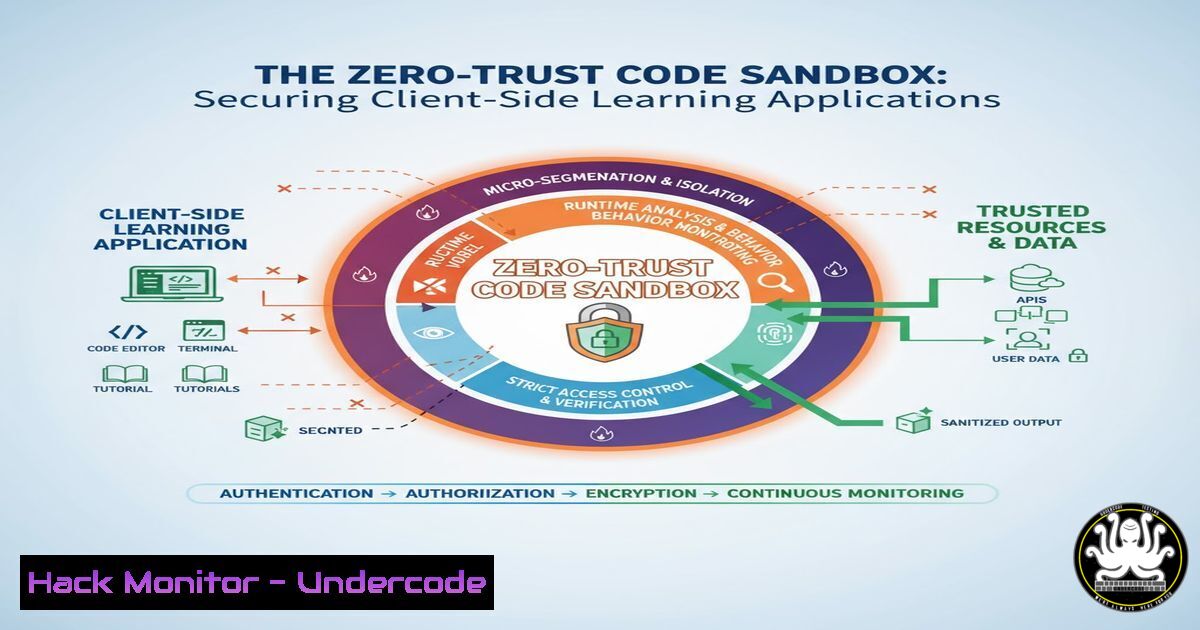
Introduction:
The proliferation of client-side, single-page applications (SPAs) for education and training introduces a unique set of cybersecurity challenges. While tools like WebLen offer incredible accessibility for learning web development, their very architecture—relying on client-side rendering, hash-based routing, and local storage—creates a threat landscape that developers and administrators must proactively address. This article deconstructs the security posture of modern learning platforms and provides actionable hardening techniques.
Learning Objectives:
- Understand the OWASP Top 10 vulnerabilities specific to Client-Side JavaScript SPAs.
- Implement secure coding practices to prevent XSS, data exposure, and client-side logic flaws.
- Harden the application deployment pipeline and configuration for production environments.
You Should Know:
1. Mitigating Client-Side XSS in Dynamic Content Rendering
SPAs that render content from external JavaScript files (e.g., lessons.js) are prime targets for Cross-Site Scripting (XSS) if the data is compromised.
Verified Code Snippet (JavaScript – Content Sanitization):
// A basic HTML sanitizer function to prevent XSS
function sanitizeHTML(str) {
const div = document.createElement('div');
div.textContent = str;
return div.innerHTML;
}

// Safe rendering of dynamic content
const lessonContent = fetchLessonContent(lessonId);
document.getElementById('contentArea').innerHTML = sanitizeHTML(lessonContent);
Step-by-step guide:
- Never use `innerHTML` with untrusted data: Directly injecting user or external data into `innerHTML` is a critical vulnerability.
- Create a Sanitization Function: The `sanitizeHTML` function uses the `textContent` property to automatically escape any HTML tags in the input string. When this escaped string is assigned to
innerHTML, it is displayed as plain text, not executed as code. - Use Before Rendering: Always pass any dynamic content (from APIs, files, or user input) through this sanitizer before inserting it into the DOM. For more robust sanitization, use a library like DOMPurify.
2. Securing Client-Side Storage for Themes and Preferences
Using `localStorage` for non-sensitive data like UI themes is common, but developers must ensure no sensitive information is accidentally stored.
Verified Command (Browser Developer Console – Audit localStorage):
// Run in browser console to audit all localStorage keys
for (let i = 0; i < localStorage.length; i++) {
const key = localStorage.key(i);
console.log(<code>Key: ${key}, Value: ${localStorage.getItem(key)}</code>);
}
Step-by-step guide:
- Audit Existing Data: Run this command in the browser’s developer console during testing to list every item in
localStorage. - Identify Sensitive Data: Look for any keys that might contain user identifiers, session tokens, or API keys. These should never be stored in `localStorage` due to its accessibility via JavaScript, which makes it vulnerable to XSS.
- Enforce a Whitelist: In your code, strictly control what gets saved. Only persist non-critical UI preferences. For session data, use `sessionStorage` or secure, HTTP-only cookies.
-
Content Security Policy (CSP) Header for Static Sites
A strong CSP is the most effective defense against XSS for static sites deployed on platforms like Vercel. It tells the browser which sources of content are trusted.
Verified Code Snippet (CSP Header for Vercel – vercel.json):
{
"headers": [
{
"source": "/(.)",
"headers": [
{
"key": "Content-Security-Policy",
"value": "default-src 'self'; script-src 'self' 'unsafe-inline'; style-src 'self' 'unsafe-inline'; img-src 'self' data: https:; font-src 'self'; connect-src 'self'; object-src 'none'; base-uri 'self';"
}
]
}
]
}
Step-by-step guide:
- Create
vercel.json: Place this file in your project’s root directory. - Deconstruct the Policy: This policy only allows resources to be loaded from the application’s own origin (
'self'). It blocks all plugins (object-src 'none'). The `’unsafe-inline’` directives for style and script are often necessary for SPAs but should be removed as the app matures by using hashes or nonces. - Deploy and Test: After deployment, check the browser’s console for any CSP violation errors and adjust the policy accordingly. Use a reporting service to monitor violations.
4. Hardening the Web Application Manifest (`site.webmanifest`)
The PWA manifest defines how your app appears and behaves. A misconfigured manifest can lead to UI spoofing or phishing.
Verified Code Snippet (Secure `site.webmanifest`):
{
"name": "WebLen - Secure Learning",
"short_name": "WebLen",
"start_url": "/",
"display": "standalone",
"theme_color": "000000",
"background_color": "ffffff",
"scope": "/",
"icons": [...]
}
Step-by-step guide:
- Set a Restricted
scope: The `”scope”: “/”` ensures the PWA’s control is limited to your application’s origin. This prevents it from being associated with other, potentially malicious, domains. - Use Absolute Paths for
start_url: Using `/` instead of `./` or other relative paths prevents hijacking if the app is somehow served from an unexpected context. - Validate Icons: Ensure all icons referenced in the manifest are hosted on your secure origin and are not pulled from an external, unvetted source.
5. Validating and Securing the Sandbox Environment
A live code sandbox is a powerful feature but a significant security risk. The validator must execute untrusted code in a completely isolated environment.
Verified Command (Node.js – Isolated VM for Sandbox Validation):
const { VM } = require('vm2'); // A secure VM module

function validateUserCode(code) {
const vm = new VM({
timeout: 1000,
sandbox: {},
eval: false,
wasm: false,
fixAsync: true
});

try {
const result = vm.run(code);
return { success: true, result };
} catch (err) {
return { success: false, error: err.message };
}
}
Step-by-step guide:
- Use a Specialized Library: Never use `eval()` or the native Node.js `vm` module. Use `vm2` which is specifically designed to run untrusted code.
- Configure Strict Constraints: The VM is configured with a short `timeout` to prevent infinite loops, an empty `sandbox` to prevent access to global objects, and disabled
eval/wasmto block powerful escape avenues. - Execute and Return: Run the user’s code within this locked-down VM. Only return the serializable result, never the VM instance itself.
6. API and Data Integrity Verification
If the SPA fetches lesson data from an external source, it must verify the integrity and authenticity of that data to prevent supply-chain attacks.
Verified Command (JavaScript – Subresource Integrity):
<!-- When including an external lessons.js script -->
<script src="https://cdn.example.com/lessons.js"
integrity="sha384-oqVuAfXRKap7fdgcCY5uykM6+R8GqS14MI/Ne6e6c6e6c6e6c6e6c6e6c6e6c6e6c"
crossorigin="anonymous"></script>
Step-by-step guide:
- Generate SRI Hash: Use tools like `openssl dgst -sha384 -binary lessons.js | openssl base64 -A` to generate the integrity hash for your static resource.
- Include the Hash: Add the `integrity` attribute with the `sha384-` prefix and the generated hash to your `