Listen to this Post
Introduction:
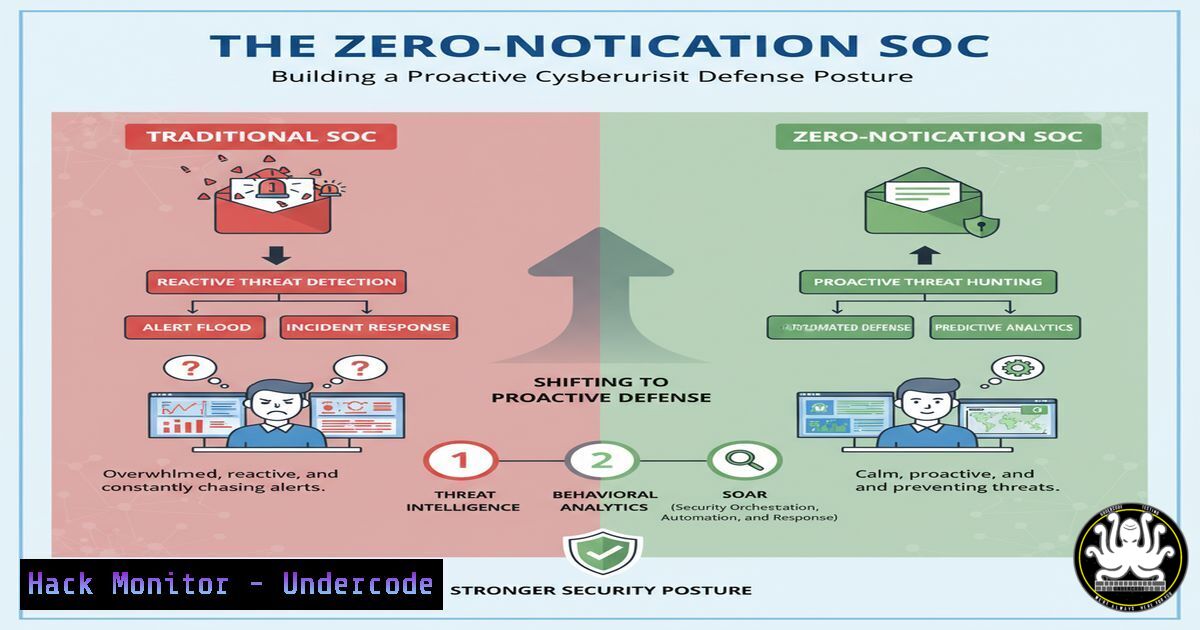
In an era of relentless cyber threats, the ideal Security Operations Center (SOC) is not one flooded with alerts, but one characterized by strategic silence. This “zero-notification” state represents a mature security posture where automation, robust hardening, and deep visibility prevent incidents before they generate noise. Achieving this requires a shift from reactive monitoring to proactive system fortification.
Learning Objectives:
- Understand the core principles of system hardening for Linux and Windows environments.
- Master essential commands for auditing, monitoring, and securing critical assets.
- Implement automated scripts to enforce security policies and detect anomalies.
You Should Know:
1. Linux System Hardening Audit
A comprehensive audit is the first step towards a silent SOC. This script checks for common misconfigurations.
!/bin/bash
 hardening_audit.sh
echo "=== Kernel Parameters ==="
sysctl net.ipv4.ip_forward | grep 0$
sysctl kernel.dmesg_restrict | grep 1$
echo "=== File Permissions ==="
find / -name ".htpasswd" -o -name ".pem" -type f 2>/dev/null | xargs ls -la
echo "=== User Audit ==="
awk -F: '($3 == 0) {print $1}' /etc/passwd
echo "=== SSH Configuration ==="
grep -i "PermitRootLogin|PasswordAuthentication" /etc/ssh/sshd_config
Step-by-step guide:
1. Save the script as `hardening_audit.sh`.
2. Make it executable: `chmod +x hardening_audit.sh`.
3. Run it with sudo privileges: `sudo ./hardening_audit.sh`.
- The script outputs critical security settings: it checks if IP forwarding is disabled (a host-based firewall may enable it, but it should be intentional), ensures kernel messages are restricted, locates sensitive files like SSL certificates, lists all UID 0 users, and audits SSH daemon settings. Review each output against your security policy.
2. Windows Event Log Triage for Threat Hunting
A quiet SOC actively hunts. This PowerShell command extracts process creation events, a key source of evidence for malicious activity.
 PowerShell command to query Security log for process creation (Event ID 4688)
Get-WinEvent -FilterHashtable @{LogName='Security'; ID=4688; StartTime=(Get-Date).AddHours(-24)} | Select-Object TimeCreated, @{Name="NewProcess";Expression={$_.Properties[bash].Value}} | Format-Table -Wrap
Step-by-step guide:
1. Open PowerShell as an Administrator.
- Execute the command. It queries the Security event log from the last 24 hours.
- The output lists the time and name of every process that started. Look for unusual locations (e.g., Temp folders), unrecognized names, or spawned child processes from legitimate applications that could indicate code injection.
3. Network Segmentation Verification with Nmap
Silence is achieved by segmenting the network. Verify that only authorized ports are open on critical servers.
 Nmap command to perform a TCP SYN scan on a target subnet
nmap -sS -T4 -p- 192.168.1.0/24 -oA network_scan_$(date +%Y%m%d)
Step-by-step guide:
- Install nmap: `sudo apt-get install nmap` (Linux) or download from nmap.org (Windows).
- Run the command, replacing `192.168.1.0/24` with your target subnet. `-sS` specifies a stealth SYN scan, `-T4` sets the timing for a faster scan, `-p-` scans all 65,535 ports, and `-oA` outputs results in all formats with a date stamp.
- Compare the results against your known asset inventory and expected service map. Any unexpected open ports require immediate investigation.
4. API Security Testing with curl
APIs are prime targets. Basic command-line testing can reveal common vulnerabilities like missing authentication or insecure data exposure.
 Testing an API endpoint for access control and data exposure
curl -H "Authorization: Bearer <VALID_TOKEN>" https://api.example.com/v1/users
curl -X PUT https://api.example.com/v1/users/123 -d '{"role":"admin"}'  Test for IDOR
Step-by-step guide:
- Use the first `curl` command with a valid token to test if the endpoint is properly protected. A 200 OK without a token is a critical flaw.
- The second command attempts a privilege escalation by changing the role of user 123 to “admin.” This tests for Insecure Direct Object Reference (IDOR). Replace the URL and data payload with values relevant to your API.
- Always perform these tests in a development or staging environment, never production.
5. Cloud Infrastructure Hardening (AWS S3)
Misconfigured cloud storage is a leading cause of data breaches. Use AWS CLI to audit S3 bucket policies.
 AWS CLI commands to check S3 bucket public access and encryption
aws s3api get-bucket-policy --bucket YOUR-BUCKET-NAME --query Policy --output text | jq .
aws s3api get-bucket-encryption --bucket YOUR-BUCKET-NAME
Step-by-step guide:
- Ensure the AWS CLI is installed and configured with appropriate credentials.
2. Replace `YOUR-BUCKET-NAME` with the actual bucket name.
- The first command retrieves the bucket policy. Use `jq` to format the JSON output and look for principals set to
"", which indicates public access. - The second command checks if default encryption is enabled. An error indicates it is not, which is a severe misconfiguration.
6. Vulnerability Mitigation: Patch Management Script
Automating patch management is fundamental to maintaining silence. This script automates updates for a Debian-based system.
!/bin/bash
 automated_patch.sh
LOG_FILE="/var/log/patch_$(date +%Y%m%d).log"
apt-get update >> $LOG_FILE 2>&1
 List upgradable packages for review
apt list --upgradable >> $LOG_FILE
 Uncomment the line below to perform the actual upgrade (use with caution)
 apt-get upgrade -y >> $LOG_FILE 2>&1
echo "Patch log saved to: $LOG_FILE"
Step-by-step guide:
- Save the script as `automated_patch.sh` and make it executable.
- Run it with sudo:
sudo ./automated_patch.sh. Initially, the script only lists available updates. - Review the log file to assess the impact of the updates.
- Once tested in a non-production environment, uncomment the `apt-get upgrade -y` line to automate the patching process. Schedule it via cron for regular execution.
7. Incident Response: Memory Capture for Forensic Analysis
When a notification does occur, you need evidence. Capturing memory is a critical first step.
 Using LiME (Linux Memory Extractor) to capture RAM
 First, build the LiME kernel module for your specific kernel version.
git clone https://github.com/504ensicsLabs/LiME.git
cd LiME/src
make
 Load the module to capture memory to a remote server or local file.
sudo insmod lime-$(uname -r).ko "path=/tmp/memdump.lime format=lime"
Step-by-step guide:
- Install the kernel headers for your system:
sudo apt-get install linux-headers-$(uname -r). - Clone the LiME repository and navigate to its `src` directory.
- Run `make` to compile the module. The resulting `.ko` file will be named for your kernel version.
- Use `insmod` to load the module, specifying the output path. This creates a forensically sound memory image for later analysis with tools like Volatility.
What Undercode Say:
- Proactivity is Paramount: The goal is not to filter out alerts, but to build systems so resilient that the alerts never generate in the first place. This requires deep technical control over the environment.
- Automation is Non-Negotiable: Manual processes cannot scale to meet modern threats. Security must be baked into the infrastructure through automated scripts and configuration management.
The concept of a “zero-notification SOC” is not a fantasy but a strategic objective. It signifies a transition from a frantic, reactive stance to one of calculated control. This level of maturity is achieved by relentlessly focusing on the fundamentals: hardening systems, segmenting networks, and automating compliance. The commands and scripts provided are the building blocks of this philosophy. They represent actionable steps that, when implemented consistently across an enterprise, reduce the attack surface to a point where genuine threats are rare and can be dealt with deliberately, rather than in a state of panic. It is the difference between being a victim of circumstance and the master of your domain.
Prediction:
The future of cybersecurity will be dominated by AI-driven offensive capabilities, making manual defense utterly obsolete. The “zero-notification” posture will evolve from a best practice to a survival necessity. Organizations that fail to invest in deep automation and AI-powered defensive systems will find themselves constantly overwhelmed by attacks that move at machine speed, effectively rendering their SOCs deaf and blind. The gap between security-mature and immature organizations will widen into a chasm, determining not just competitive advantage but ultimate survivability in the digital landscape.
🎯Let’s Practice For Free:
IT/Security Reporter URL:
Reported By: Billy Baheux – Hackers Feeds
Extra Hub: Undercode MoN
Basic Verification: Pass ✅


