Listen to this Post
Introduction:
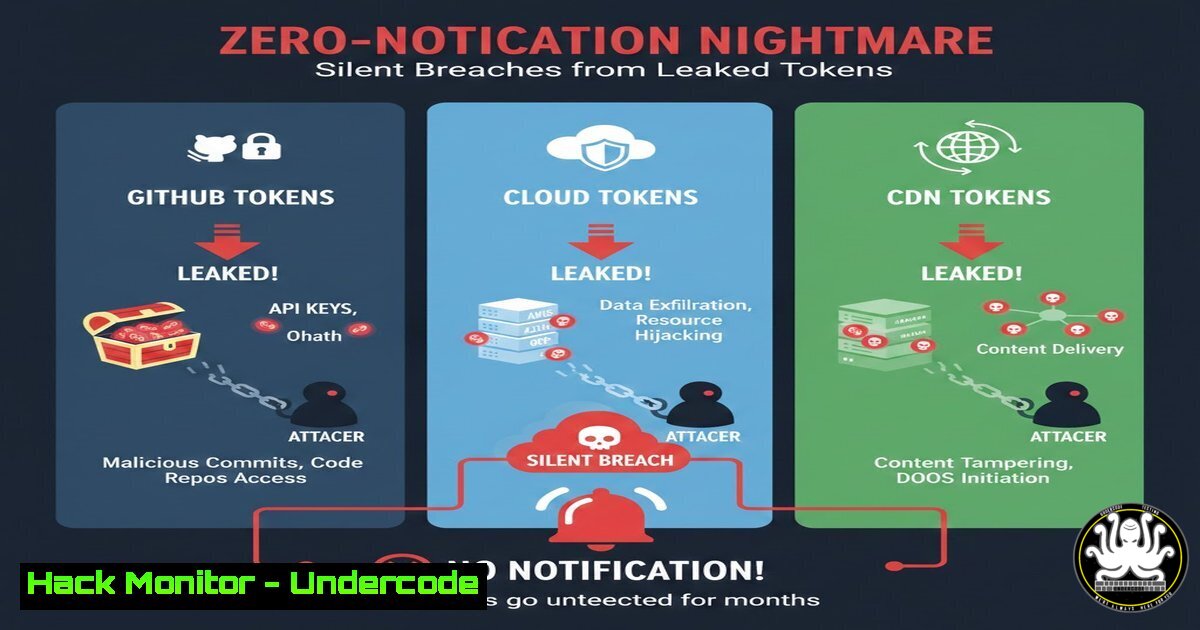
A recent security report triaged on HackerOne highlights a critical and increasingly common attack vector: the exposure of weak credentials and, more importantly, non-human identities like cloud and CDN tokens. Unlike a simple password leak, compromised tokens can grant attackers persistent, privileged access to core infrastructure without triggering a single alert, leading to a “zero-notification” breach where data exfiltration and system manipulation occur silently. This incident underscores the urgent need for organizations to shift their security posture beyond user passwords and toward the holistic management of all digital credentials.
Learning Objectives:
- Understand the critical differences between weak user credentials and leaked API tokens/keys.
- Learn how to detect and revoke compromised cloud and CDN tokens in major platforms.
- Implement hardening strategies for GitHub repositories and CI/CD pipelines to prevent credential leakage.
You Should Know:
- The Anatomy of a Modern Credential Leak: Beyond Passwords
The traditional “weak password” problem has evolved. While a leaked GitHub password is dangerous, the real threat in modern development environments lies in the exposure of automated tokens and keys. A weak GitHub password might give an attacker access to a repository, but a leaked cloud token (e.g., an AWS IAM Key or a GCP Service Account Key) can provide direct, API-driven access to your cloud infrastructure. Similarly, a compromised CDN token can allow an attacker to purge or inject malicious content into your website, affecting every user. The initial post mentions a triaged HackerOne report, which typically involves an external researcher finding these secrets in a public GitHub commit—a common source of such leaks.
Step‑by‑step guide explaining what this does and how to use it.
Step 1: Identify the Secret Type. Determine what was leaked. Was it a password, an API key, a JSON key file, or a token?
Step 2: Assess the Scope. A GitHub token might have read/write access to code. An AWS Access Key ID (e.g., AKIAIOSFODNN7EXAMPLE) needs to be checked for permissions. Use the following command with the AWS CLI to list the user or role associated with a key (after it’s been revoked):
`aws iam get-access-key-info –access-key-id AKIAIOSFODNN7EXAMPLE`
Step 3: Immediate Revocation. The moment a leak is confirmed, the credential must be revoked immediately.
2. GitHub Security Hardening: Preventing the First Leak
GitHub is often the source of credential leaks, not just the target. Developers accidentally commit configuration files containing secrets to public repositories. Hardening your GitHub security posture is the first line of defense.
Step‑by‑step guide explaining what this does and how to use it.
Step 1: Enable and Enforce Two-Factor Authentication (2FA). This is non-negotiable for all accounts, especially those with write access.
Step 2: Use Personal Access Tokens (Fine-grained) over Passwords. For automated scripts and CI/CD, use fine-grained Personal Access Tokens with the minimum required permissions instead of passwords.
Step 3: Implement Pre-commit Hooks with Secret Scanning. Use tools like `git-secrets` or `TruffleHog` to scan every commit for high-entropy strings and known secret patterns before it’s pushed.
Installation and use of `git-secrets`:
git secrets --install
git secrets --register-aws
git secrets --scan -r .  Scans the entire repository
Step 4: Leverage GitHub’s Built-in Security Features. Enable GitHub’s native secret scanning for partners and push protection for all repositories to block commits containing known secret formats.
3. Emergency Response: Revoking Compromised Cloud Tokens
When a cloud token is leaked, time is of the essence. Attackers use automated tools to find and utilize these tokens within minutes.
Step‑by‑step guide explaining what this does and how to use it.
For AWS IAM User Keys:
Step 1: Identify the IAM User. Use the AWS CLI or Console to find which IAM user the compromised key belongs to.
Step 2: Immediately Deactivate the Key. This can be done via the AWS Management Console under IAM > Users > Security Credentials, or via the CLI:
`aws iam update-access-key –user-name
Step 3: Delete the Key and Investigate. After deactivation, investigate the user’s CloudTrail logs for any unauthorized activity, then delete the key.
For Google Cloud Service Account Keys:
Step 1: Navigate to IAM & Admin > Service Accounts in the Google Cloud Console.
Step 2: Select the relevant service account and click on “Keys.”
Step 3: Delete the specific compromised key. There is no “deactivate” function; deletion is immediate.
4. Securing Your Content Delivery Network (CDN)
A leaked CDN token, such as for AWS CloudFront or a similar service, can be used to disrupt service availability or distribute malware.
Step‑by‑step guide explaining what this does and how to use it.
Step 1: Identify the Token Type. Is it a signed URL token or a signed cookie key pair?
Step 2: Immediate Key Rotation. The most effective response is to rotate the key pair used for signing. This will invalidate all previously generated signed URLs and cookies.
For AWS CloudFront: Go to the CloudFront console, select “Key Management,” and create a new key group with a new active key. Update your distributions to use the new key group.
Step 3: Monitor CDN Logs. Scrutinize your CDN access logs for a surge in errors (e.g., `403 Forbidden` after key rotation) or unusual traffic patterns from suspicious IPs around the time of the leak.
5. Proactive Defense: Implementing Automated Secret Scanning
Waiting for a HackerOne report is reactive. Proactive organizations continuously scan their public and private codebases for accidentally committed secrets.
Step‑by‑step guide explaining what this does and how to use it.
Step 1: Integrate Scanning into CI/CD. Use tools like `TruffleHog` or `Gitleaks` in your pipeline to fail builds that contain potential secrets.
Example using `Gitleaks` in a GitHub Action:
- name: Scan for secrets
uses: gitleaks/gitleaks-action@v2
env:
GITHUB_TOKEN: ${{ secrets.GITHUB_TOKEN }}
Step 2: Scan Git History. A one-time scan of your entire repository’s history is crucial to find old, buried secrets.
`gitleaks detect –source /path/to/repo -v`
Step 3: Use Cloud-Native Monitoring. Services like AWS GuardDuty can now monitor CloudTrail logs for API calls made using leaked keys and will generate a finding.
- The Principle of Least Privilege: Minimizing the Blast Radius
The impact of a leaked token is directly proportional to its permissions. A token with admin rights is a catastrophe; a token with read-only access to a single S3 bucket is a contained incident.
Step‑by‑step guide explaining what this does and how to use it.
Step 1: Audit Existing Permissions. Regularly review IAM policies and GitHub permissions. Ask: “Does this service/token need this much access to function?”
Step 2: Implement Role-Based Access Control (RBAC). In cloud environments, assign permissions to roles (e.g., an EC2 instance role) rather than using long-term user keys wherever possible.
Step 3: Use Conditional IAM Policies. Restrict access based on IP range, MFA presence, or specific resource tags to further reduce risk.
Example AWS IAM policy condition:
"Condition": {
"IpAddress": {
"aws:SourceIp": "192.0.2.0/24"
}
}
What Undercode Say:
- The “Human Firewall” is No Longer Enough. While training users on strong passwords is important, the most damaging leaks now come from machine identities (tokens, keys). Security strategy must pivot to protect these non-human credentials with the same, if not greater, intensity.
- Speed of Response Defines the Cost of a Breach. The time between a credential leak and its revocation is the window of opportunity for an attacker. Automated detection and pre-planned revocation procedures are critical to shrinking this window to minutes, not hours or days.
This incident is a classic example of the expanding attack surface in a DevOps-driven world. The integration of GitHub, cloud platforms, and CDNs creates a chain of trust that is only as strong as its weakest link—often a single, over-privileged token checked into a public repo. The fact that this was a triaged report on HackerOne suggests it was a valid finding, meaning these leaked credentials were live and exploitable. This moves the problem from a theoretical risk to a tangible, operational failure. The focus must be on creating a resilient system where a single mistake does not lead to a total compromise, enforced by robust automation and strict adherence to the principle of least privilege.
Prediction:
The frequency and severity of attacks stemming from leaked machine identities will intensify, driven by the increasing complexity of cloud-native architectures and DevOps toolchains. We will see a rise in sophisticated supply-chain attacks where attackers use a single leaked cloud token not just to steal data, but to poison CI/CD pipelines and inject malware directly into software builds, distributing the attack to thousands of downstream customers. This will force a industry-wide adoption of secretless authentication technologies like OIDC and managed identities, moving security from credential management to identity-centric, context-aware authorization.
🎯Let’s Practice For Free:
IT/Security Reporter URL:
Reported By: Geologist 009258228 – Hackers Feeds
Extra Hub: Undercode MoN
Basic Verification: Pass ✅


