Listen to this Post
Introduction:
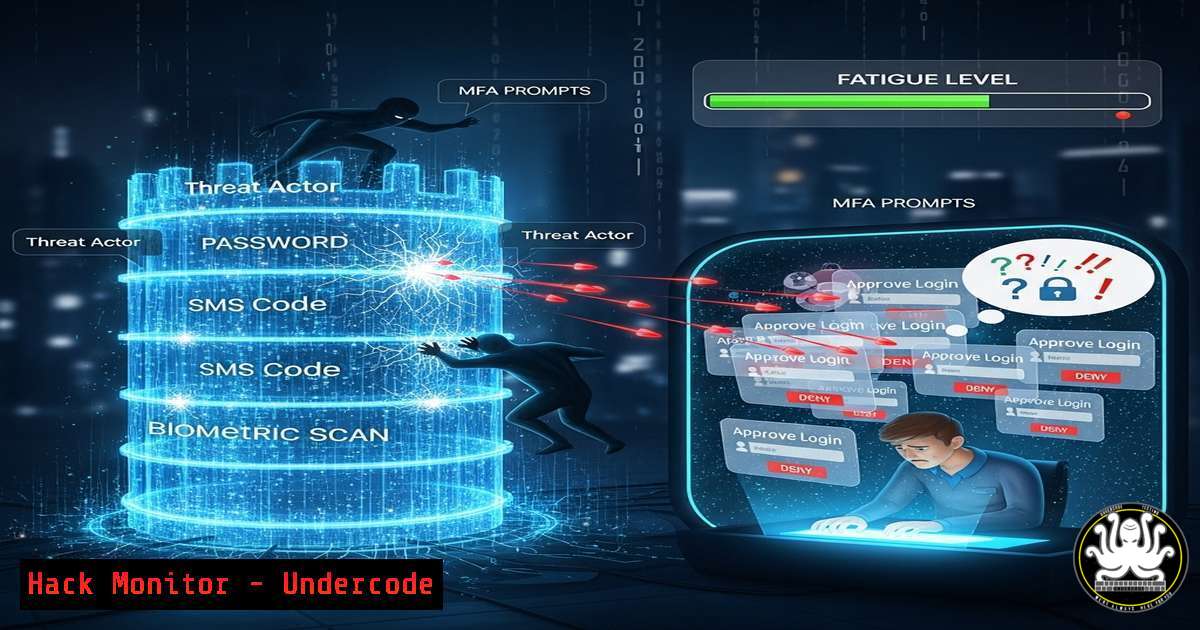
Multi-Factor Authentication (MFA) was long considered the ultimate shield against unauthorized access, but a new social engineering technique known as “MFA fatigue” is systematically breaking this defense. This attack exploits human psychology rather than technical flaws, bombarding users with push notifications until they succumb to approval fatigue, granting attackers the keys to the kingdom. Understanding and mitigating this threat is now critical for every organization relying on MFA for security.
Learning Objectives:
- Understand the mechanics and psychology behind MFA fatigue attacks.
- Implement technical controls within Microsoft Entra ID (Azure AD) and Okta to mitigate attack success.
- Develop user awareness and incident response protocols specific to this threat vector.
You Should Know:
1. The Anatomy of an MFA Bombing Campaign
Attackers use automated tools to repeatedly trigger MFA push notifications to a victim’s authenticator app after obtaining their credentials via phishing or a data breach.
` Example of a script logic an attacker might use (for educational purposes only)
import requests
Hypothetical API endpoint for a vulnerable auth system (obfuscated)
auth_endpoint = “https://auth.victim-domain.com/api/login”
credentials = {‘username’: ‘target_user’, ‘password’: ‘St0l3nP@ssw0rd!’}
while True:
response = requests.post(auth_endpoint, data=credentials)
if “MFA_required” in response.text:
print(“[+] MFA Push Notification Sent to target_user’s device.”)
Script continues to loop, spamming notifications
`
Step-by-step guide:
This pseudo-code demonstrates the simplicity of the attack. The attacker continuously posts the stolen credentials to the login endpoint. Each request triggers the identity provider (e.g., Azure AD) to send a push notification to the user’s registered device. The attack relies on volume and persistence, often occurring late at night to increase the chance of user irritation or confusion leading to an accidental approval.
- Hardening Microsoft Entra ID (Azure AD) Against Fatigue Attacks
Microsoft provides built-in features to protect against these attacks through Conditional Access and Authentication Context.` PowerShell to configure Number of sign-ins required before prompting for MFA (part of Conditional Access)
This requires the AzureAD module: Install-Module AzureADPreview
Connect-AzureAD
Define a new Conditional Access policy (conceptual)
$conditions = New-Object -TypeName Microsoft.Open.MSGraph.Model.ConditionalAccessConditionSet
$conditions.Applications = @{
IncludeApplications = “All”
}
$conditions.Users = @{
IncludeUsers = “All”
}
The key is configuring sign-in frequency and requiring reauthentication for high-risk events.
`
Step-by-step guide:
- Navigate to the Microsoft Entra admin center > Protection > Conditional Access.
- Create a new policy named “Require MFA for risky sign-in”.
- Under Users or workload identities, select All users.
- Under Cloud apps or actions, select All cloud apps.
- Under Conditions, configure Sign-in risk to High and Medium.
- Under Grant, select Grant access and Require multifactor authentication.
- Enable the policy and set it to Report-only initially to monitor impact.
3. Leveraging Microsoft Authenticator’s Built-In Number Matching
Number matching is a critical defense, requiring the user to type a number displayed on their login screen into the Authenticator app, preventing accidental approvals.
` Azure AD PowerShell to check and enforce authentication strengths (conceptual)
Check current authentication method strengths
Get-MgPolicyAuthenticationStrengthPolicy
Create a new authentication strength policy that requires number matching
$newPolicy = New-MgPolicyAuthenticationStrengthPolicy -DisplayName “MFA with Number Matching” -Description “Requires number match for MFA approvals.”
`
Step-by-step guide:
- In the Microsoft Entra admin center, go to Security > Authentication methods > Microsoft Authenticator.
2. Click Configure.
- For All users or selected groups, enable Require number matching for push notifications. This setting forces the user to confirm a numeric code, effectively neutralizing blind MFA spam.
4. Configuring Okta to Thwart Verification Spam
Okta administrators can leverage Okta Verify with similar number matching and adjust sign-on policies to introduce rate-limiting.
` Okta API call to update a Sign-On Policy rule (example using Okta’s REST API)
PUT /api/v1/policies/{policyId}
{
“type”: “OKTA_SIGN_ON”,
“name”: “MFA Rate Limit Rule”,
“conditions”: {
“people”: { “groups”: { “include”: [“ALL_USERS”] } }
},
“actions”: {
“signon”: {
“access”: “ALLOW”,
“requireFactor”: true,
“factorPromptMode”: “DEVICE”,
“rememberDeviceByDefault”: false,
“factorLifetime”: 15 // Factor session duration in minutes
}
}
}
`
Step-by-step guide:
- In the Okta Admin Console, navigate to Security > Authentication > Sign-On Policies.
- Edit the rule applied to your user groups (e.g., Default Policy).
3. Ensure Factor required is checked.
- Set a short Factor lifetime (e.g., 15 minutes) to force more frequent re-authentication in risky sessions, which can be paired with other signals.
- Enable Number Challenge in Okta Verify: Go to Security > Authenticators > Okta Verify > Edit > check Number Challenge.
5. Implementing Geolocation and IP-Based Blocking Rules
Blocking authentication attempts from unexpected or high-risk geographies can stop attacks before they generate notifications.
` Linux firewall rule (iptables) to block traffic from a specific high-risk IP range (complementary security)
sudo iptables -A INPUT -s 123.456.789.0/24 -j DROP
More advanced: Use fail2ban to dynamically block IPs with too many auth attempts
In /etc/fail2ban/jail.local:
[azure-ad-auth-fail]
enabled = true
filter = azure-ad-auth
logpath = /path/to/azure/ad/signon/logs.csv
maxretry = 5
findtime = 600
bantime = 3600
`
Step-by-step guide:
- In Microsoft Entra ID Conditional Access, create a new policy named “Block access for unlikely travel”.
- Under Conditions, select Locations. Configure Any location as included and All trusted locations as excluded.
3. Under Access controls, select Block.
- Enable the policy. This will block any sign-in attempt originating from a location not marked as trusted.
6. User Awareness Training: The Human Firewall
The most technical controls can be bypassed; training is the last line of defense.
` Command to send a targeted security alert email to all users (Linux mail command example)
This assumes a company mailing list “[email protected]”
echo “Alert: You may receive MFA push notifications. NEVER approve a request you did not initiate. Report any spam to IT immediately.” | mail -s “SECURITY ALERT: MFA Notification Spam” [email protected]
`
Step-by-step guide:
- Communicate Clearly: Send immediate, clear instructions to users explaining the attack pattern and what to do (i.e., “Deny and Report”).
- Simulate Attacks: Use controlled phishing and MFA spam simulations to train users in a safe environment.
- Establish Protocol: Create a simple, well-known channel (e.g., a dedicated Slack channel, email, or ticket) for users to report suspicious MFA requests instantly.
-
Incident Response: What to Do When Under Attack
Have a playbook ready to execute when a potential MFA fatigue attack is detected.` AWS CLI command to immediately revoke all active sessions for a compromised IAM user (example of cloud response)
aws iam list-access-keys –user-name COMPROMISED_USER
aws iam update-access-key –user-name COMPROMISED_USER –access-key-id AKIAEXAMPLE –status Inactive
aws iam delete-access-key –user-name COMPROMISED_USER –access-key-id AKIAEXAMPLE
Azure AD PowerShell to block a user and require password reset
Block-MgUser -UserId “[email protected]”
Update-MgUser -UserId “[email protected]” -PasswordProfile @{ForceChangePassword=$true}
`
Step-by-step guide:
- Identify: Monitor authentication logs for a high volume of failed MFA attempts from a single user in a short time.
- Contain: Immediately temporarily block the user account or their ability to receive MFA notifications.
- Communicate: Contact the user via a separate channel (e.g., phone) to confirm the incident.
- Remediate: Force a password reset and review sign-in logs for any successful, suspicious sessions. Revoke all active sessions and refresh tokens.
What Undercode Say:
- MFA is Not Infallible: Treat MFA as a critical layer of defense, not an impenetrable wall. Its effectiveness is now contingent on proper configuration and user vigilance.
- Shift to Phishing-Resistant Methods: The future lies in moving beyond push notifications towards phishing-resistant MFA like FIDO2 security keys and Windows Hello for Business, which are immune to these fatigue attacks.
The MFA fatigue attack is a stark reminder that security is a human-technology partnership. While the attack vector is technically simple, its effectiveness is profound, demonstrating that the weakest link remains the point where the digital interface meets human psychology. Organizations must respond by hardening their MFA configurations with features like number matching, implementing granular conditional access policies, and most importantly, investing continuously in user education. Relying on basic push notifications is no longer sufficient; the industry must accelerate its adoption of truly phishing-resistant authentication factors.
Prediction:
The success of MFA fatigue attacks will catalyze a rapid industry-wide shift away from simple push notification approvals as a primary MFA method. We will see a mandated move towards phishing-resistant standards, such as FIDO2/WebAuthn, becoming the default expectation in compliance frameworks like PCI DSS, SOC 2, and cyber insurance policies. Furthermore, AI will be deployed on both sides of this battle: attackers will use AI to optimize the timing and context of notification spam, while defense platforms will leverage AI-driven identity threat detection and response (ITDR) to spot anomalous MFA patterns in real-time and automatically initiate lockdown procedures, moving from manual response to autonomous security operation.
🎯Let’s Practice For Free:
IT/Security Reporter URL:
Reported By: https://lnkd.in/p/dUtvxtmc – Hackers Feeds
Extra Hub: Undercode MoN
Basic Verification: Pass ✅


