
Listen to this Post
Introduction:
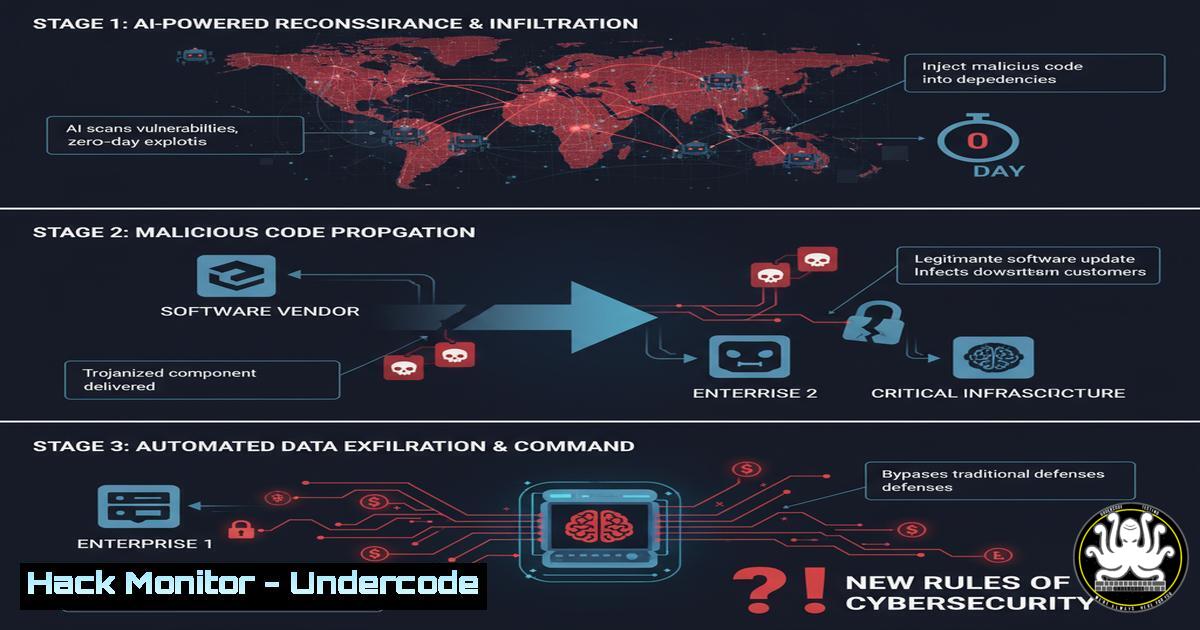
The recent Polyfill.io supply chain attack sent shockwaves through the digital world, compromising over 100,000 websites by injecting malicious code into a seemingly legitimate JavaScript library. This incident is not an anomaly but a harbinger of a new era where AI-powered automation identifies and exploits vulnerabilities at an unprecedented scale and speed, turning trusted software dependencies into potent weapons.
Learning Objectives:
- Understand the mechanics of a modern software supply chain attack and how to identify its indicators.
- Learn critical command-line techniques for detecting malicious scripts and unauthorized network connections on both Linux and Windows systems.
- Implement proactive hardening measures for web servers and cloud environments to mitigate against future supply chain compromises.
You Should Know:
1. Detecting Malicious JavaScript with Command-Line Tools
The first line of defense is identifying suspicious script behavior. Command-line tools can quickly analyze content without loading a browser.
`curl -s https://cdn.polyfill.io/v3/polyfill.min.js | grep -i “document.write\|eval\|atob” | head -n 5`
Step-by-step guide:
- The `curl -s` command silently fetches the content of the provided URL.
- The output is piped `|` to `grep -i` which performs a case-insensitive search for high-risk JavaScript functions like `document.write` (often used for dynamic script injection), `eval` (executes code from a string), and `atob` (decodes base64-encoded strings, a common obfuscation technique).
3. `head -n 5` limits the output to the first five matches to avoid clutter. - Any output from this command on a production CDN library is a major red flag warranting immediate investigation.
2. Monitoring Network Connections on Linux
Attackers establish command and control (C2) connections. Identifying unexpected outbound traffic is crucial.
`ss -tunp | grep ESTAB | awk ‘{print $5 ” -> ” $7}’ | grep -vE “(127.0.0.1|::1|:443$|:80$)” | sort`
Step-by-step guide:
1. `ss -tunp` shows all TCP (-t), UDP (-u) connections, and includes numerical addresses and process information (-n and -p).
2. `grep ESTAB` filters to only established connections.
3. `awk ‘{print $5 ” -> ” $7}’` formats the output to show “IP:Port -> Process”.
4. `grep -vE “(127.0.0.1|::1|:443$|:80$)”` excludes common benign connections (localhost, and common HTTPS/HTTP ports).
5. `sort` organizes the output for easier reading. Investigate any unknown processes making connections to unfamiliar external IPs.
3. Investigating Processes and Binaries on Windows
On Windows servers, PowerShell is your best tool for rapid forensic analysis.
`Get-WmiObject -Class Win32_Process | Select-Object Name, ProcessId, CommandLine | Where-Object {$_.CommandLine -like “polyfill”} | Format-List`
Step-by-step guide:
1. Run PowerShell as Administrator.
2. This command queries all running processes (`Win32_Process`).
- It selects the process Name, PID, and most importantly, the full CommandLine, which shows exactly how the process was executed.
- It filters (
Where-Object) for any command line argument containing “polyfill” (or any other suspect keyword).
5. `Format-List` presents the output in a readable list format. This can reveal malicious scripts masquerading as legitimate services.
4. Hardening Web Server Content Security Policy (CSP)
A strong CSP is a critical mitigation, preventing injected scripts from executing even if they are loaded.
`Header always set Content-Security-Policy “default-src ‘self’; script-src ‘self’ ‘sha256-verifiedhash=’ https://trusted.cdn.com; object-src ‘none’;”`
Step-by-step guide:
- This is a directive for an Apache server’s `.htaccess` or `httpd.conf` file.
2. `Header always set` ensures the CSP header is sent with every response.
3. `default-src ‘self’` dictates that by default, resources can only be loaded from the site’s own origin. - `script-src ‘self’ ‘sha256-hash’ https://trusted.cdn.com` is a stricter rule for scripts, allowing them only from ‘self’, a specific trusted CDN, or if they match a cryptographic hash of their content.
5. `object-src ‘none’` disallows dangerous plugins like Flash. This policy would have blocked the malicious Polyfill script from executing.
5. Auditing User and Service Accounts
Attackers often create or compromise accounts for persistence. Regular auditing is essential.
`awk -F: ‘($3 >= 1000) {print $1, $3, $6}’ /etc/passwd Linux`
`Get-LocalUser | Where-Object Enabled -eq $True | Select-Object Name, LastLogon Windows PowerShell`
Step-by-step guide:
Linux: The `awk` command parses /etc/passwd, printing the username, UID, and home directory for all users with a UID >= 1000 (typically regular users, not system accounts). Audit this list for unknown or recently added users.
Windows: The PowerShell cmdlet `Get-LocalUser` fetches all local users. It’s filtered (Where-Object) to show only enabled accounts and displays their name and last logon time. Look for dormant accounts that have recently become active or default accounts that should be disabled.
6. Leveraging Cloud-Native Logging and Monitoring
In AWS, enabling and querying CloudTrail logs is non-negotiable for detecting unauthorized API calls.
`aws cloudtrail lookup-events –lookup-attributes AttributeKey=EventName,AttributeValue=CreateUser –region us-east-1 –max-items 5`
Step-by-step guide:
- Ensure AWS CloudTrail is enabled across all regions.
- This AWS CLI command performs a lookup in CloudTrail logs.
3. `–lookup-attributes` searches for a specific API event, in this case,CreateUser.
4. `–region` specifies which region’s logs to query.
5. `–max-items 5` returns the five most recent matching events.
6. Schedule regular queries for high-risk API actions like CreateUser, CreateAccessKey, CreatePolicy, ConsoleLogin, and `StopLogging` to catch attacker reconnaissance and persistence actions.
7. Validating File Integrity with Checksums
A core tenet of supply chain security is verifying that the file you downloaded is exactly the one the publisher created.
`sha256sum ./downloads/polyfill.js Linux`
`Get-FileHash -Path C:\downloads\polyfill.js -Algorithm SHA256 Windows PowerShell`
Step-by-step guide:
- Always download the checksum file (e.g.,
package.sha256sum) from the official source alongside the binary or library. - Generate the SHA-256 hash of the file you downloaded using the appropriate command for your OS.
- Compare the generated hash with the value in the official checksum file. They must match exactly.
- Any discrepancy means the file has been altered in transit or is malicious, and it must be deleted immediately.
What Undercode Say:
- The Attack Surface is Now the Supply Chain: Perimeter defense is obsolete. Your security is only as strong as the weakest link in your entire software dependency tree, which now numbers in the thousands for a typical application.
- Automation is a Double-Edged Sword: The same AI that powers defensive automation can be weaponized to find vulnerable targets, craft polymorphic payloads, and execute attacks at a scale humans cannot match.
The Polyfill.io incident is a canonical example of a “weakest link” failure. The attack didn’t exploit a complex technical flaw in a web server; it exploited trust. Organizations blindly included a third-party script without robust security policies like Subresource Integrity (SRI). This event forces a paradigm shift from “protecting our code” to “continuously validating everyone else’s code.” Future defenses must be built on a zero-trust principle for all external resources, mandated integrity checks, and pervasive monitoring for behavioral anomalies, not just known signatures. The software supply chain is the new battlefield.
Prediction:
The success of the Polyfill.io attack will catalyze a new wave of AI-driven supply chain assaults. We predict a rise in “typosquatting” 2.0, where AI algorithms automatically generate and publish packages with names similar to popular ones, waiting for developers to mistype during installation. Furthermore, AI will be used to inject extremely targeted, context-aware malicious code into dependencies—code that remains dormant unless it detects it’s running on a specific high-value target’s infrastructure, making detection vastly more difficult. The industry will respond with mandated Software Bills of Materials (SBOMs) and AI-powered security tools that continuously analyze dependency trees for behavioral threats, not just known vulnerabilities.
🎯Let’s Practice For Free:
IT/Security Reporter URL:
Reported By: https://lnkd.in/p/dK4fwxh2 – Hackers Feeds
Extra Hub: Undercode MoN
Basic Verification: Pass ✅


