
Listen to this Post
Introduction:
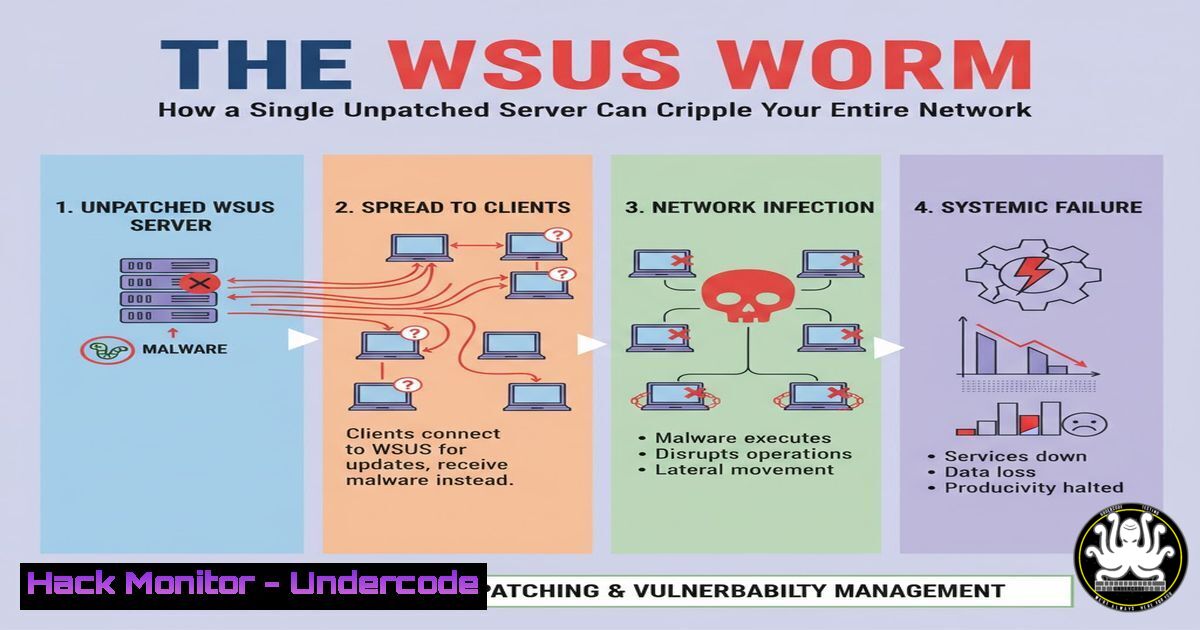
A critical, wormable vulnerability in Windows Server Update Services (CVE-2025-59287) threatens enterprise networks globally. This remote code execution flaw allows unauthenticated attackers to take complete control of WSUS servers, potentially creating a chain reaction of compromise across an organization’s core update infrastructure.
Learning Objectives:
- Understand the mechanism and severe risk posed by CVE-2025-59287.
- Learn how to immediately patch affected Windows Server versions and verify the patch’s installation.
- Develop strategies to harden WSUS servers and detect potential exploitation attempts.
You Should Know:
1. Immediate Patching: The First Line of Defense
The primary mitigation is to apply Microsoft’s Out-of-Band (OOB) emergency update. The initial October Patch Tuesday update was insufficient, making this new patch non-negotiable.
Verified Commands:
`Get-Hotfix -Id KB5044391` (PowerShell): This command checks for the specific KB patch on the server. A returned result confirms installation.
`wmic qfe list brief | findstr “5044391”` (Command Prompt): An alternative method to verify the patch is installed.
`Get-WindowsFeature -Name UpdateServices` (PowerShell): Confirms if the WSUS server role is installed, identifying a potentially vulnerable system.
Step-by-step guide:
To secure your server, you must first identify if it is vulnerable and then apply the patch. Start by checking for the WSUS role using PowerShell. If the role is installed, proceed to manually download and install the OOB update from the Microsoft Update Catalog. After a mandatory reboot, re-run the `Get-Hotfix` command to confirm the patch (KB5044391) is present and active.
2. Network Isolation and Traffic Analysis
While patching is underway, segmenting the WSUS server can prevent lateral movement and worm-like propagation. Monitoring for specific network patterns can also reveal active exploitation.
Verified Commands & Configurations:
Firewall Rule (Windows): `New-NetFirewallRule -DisplayName “Block WSUS Inbound” -Direction Inbound -Protocol TCP -LocalPort 8530,8531 -Action Block`
Wireshark Filter: `tcp.port == 8530 || tcp.port == 8531`
Nmap Scan (from external tester): `nmap -p 8530,8531
Step-by-step guide:
The WSUS service typically uses ports 8530 (HTTP) and 8531 (HTTPS). Temporarily blocking inbound traffic to these ports on the host firewall can act as a emergency stop-gap. Use the provided PowerShell command to create a blocking rule. Simultaneously, use a tool like Wireshark with the supplied filter to monitor for unusual connection attempts or data transfers on these ports, which could indicate a scan or attack in progress.
3. Exploitation Mechanism and Code Execution Prevention
CVE-2025-59287 is a deserialization vulnerability. Attackers send a specially crafted malicious serialized object to the WSUS server’s API. When the server deserializes this object without proper safeguards, it executes the attacker’s embedded code.
Verified Commands & Code:
PowerShell Script Block Logging (Enable): `Set-ItemProperty -Path HKLM:\SOFTWARE\Policies\Microsoft\Windows\PowerShell\ScriptBlockLogging -Name EnableScriptBlockLogging -Value 1`
Process Creation Monitoring (Sysmon): `wsusservice.exe
AppLocker Policy (PowerShell): `New-AppLockerPolicy -Service -User Everyone -Xml -Path C:\Policy\WSUS_Service_Policy.xml`
Step-by-step guide:
To detect and prevent exploitation, enable deep logging. Activating PowerShell Script Block Logging can capture malicious scripts that an attacker might attempt to run. Deploying a Sysmon configuration to alert on any new processes spawned by the core WSUS service executable (wsusservice.exe) is a critical detection step, as this is abnormal behavior. Furthermore, creating a restrictive AppLocker policy for the WSUS service account can limit what binaries can be executed, mitigating the impact of a successful code execution.
4. Post-Compromise Forensic Analysis
If you suspect a breach, immediate forensic analysis is required to determine the scope and impact.
Verified Commands:
`Get-WinEvent -FilterHashtable @{LogName=’Security’,’System’,’Application’; StartTime=(Get-Date).AddHours(-24)} | Export-Csv C:\Audit\RecentEvents.csv`
`netstat -ano | findstr :8530` (Checks for active connections on WSUS ports)
`schtasks /query /fo LIST /v` (Lists all scheduled tasks, a common persistence mechanism)
`autoruns.exe -ct` (Sysinternals tool to check for all auto-start locations)
Step-by-step guide:
Begin by exporting the last 24 hours of system logs for analysis. Check for any unusual event IDs, particularly related to service failures, new user creation, or process creation. Use `netstat` to identify any unexpected established connections to or from the WSUS server. Inspect scheduled tasks and auto-start entries for any newly created, suspicious entries that an attacker may have planted to maintain access.
5. Cloud and Hybrid Environment Hardening
For WSUS servers operating in hybrid or cloud environments, additional security controls are essential.
Verified Commands & Configurations:
Azure NSG Rule: `az network nsg rule create –nsg-name WSUS-NSG –name Deny-WSUS-Inbound –priority 100 –source-address-prefixes ” –destination-port-ranges 8530 8531 –access Deny –direction Inbound`
Azure Monitor Query (KQL): `SecurityEvent | where EventID == 4688 | where NewProcessName contains “wsusservice.exe”`
AWS Security Group: `aws ec2 revoke-security-group-ingress –group-id sg-xxxxxx –protocol tcp –port 8530 –cidr 0.0.0.0/0`
Step-by-step guide:
In cloud environments like Azure, use Network Security Groups (NSGs) to strictly control access to the WSUS server’s ports, allowing only from specific management subnets, not the entire internet. Leverage cloud-native logging like Azure Sentinel or AWS CloudTrail integrated with your on-premises logs. Create alerts in Azure Monitor using Kusto Query Language (KQL) to detect processes spawned by the WSUS service, a key indicator of compromise for CVE-2025-59287.
6. Building a Resilient Update Infrastructure
This vulnerability underscores the need for a defense-in-depth strategy for update management.
Verified Commands & Configurations:
Windows Defender Application Control (WDAC) Policy: `New-CIPolicy -FilePath C:\Policy\WSUS_BasePolicy.xml -Level FilePublisher -Fallback Hash -UserPEs -DriverPaths C:\Windows\servicing`
PowerShell to Test WSUS Health: `Get-Service -Name WsusService; Get-WsusServer | Get-WsusUpdate -Approval Unapproved -Status FailedOrNeeded`
GPO for SMB Signing: `Computer Configuration -> Policies -> Windows Settings -> Security Settings -> Local Policies -> Security Options: Microsoft network server: Digitally sign communications (always) -> Enabled`
Step-by-step guide:
Move beyond basic patching. Implement WDAC to create a code integrity policy that only allows authorized, signed applications to run on the WSUS server, drastically reducing the attack surface. Regularly monitor the health of the WSUS service and its update approvals to spot anomalies. Ensure all internal server communication, including that of WSUS, requires SMB signing to prevent credential interception and lateral movement via man-in-the-middle attacks.
What Undercode Say:
- The Patch is Not the Endgame. Treating this event as a simple patching exercise is a catastrophic error. The wormable nature of this flaw means a single unpatched server can act as a patient zero for a network-wide incident.
- The Shared Responsibility of the Admin. This vulnerability sits in a critical, trusted service. It’s a stark reminder that the very tools we use to secure our environments can become the primary attack vector. Proactive hardening, monitoring, and segmentation of administrative infrastructure is no longer optional.
The WSUS vulnerability represents a systemic failure in a core trust mechanism. The fact that the initial patch was incomplete suggests the underlying code is complex and fragile. This incident will force a industry-wide re-evaluation of relying on centralized update services without robust, zero-trust isolation. Expect a surge in targeted attacks in the weeks following the patch release as threat actors reverse-engineer the fix to target laggard organizations.
Prediction:
The incomplete initial patch for CVE-2025-59287 will erode confidence in automated patch management systems, prompting a shift towards more segmented and gated update approval processes. In the long term, this event will accelerate the adoption of immutable infrastructure and cloud-based update delivery models that are inherently less susceptible to widespread, wormable exploits, fundamentally changing how enterprises manage endpoint updates.
🎯Let’s Practice For Free:
IT/Security Reporter URL:
Reported By: Pavithra Pavee – Hackers Feeds
Extra Hub: Undercode MoN
Basic Verification: Pass ✅


