
Listen to this Post
Introduction:
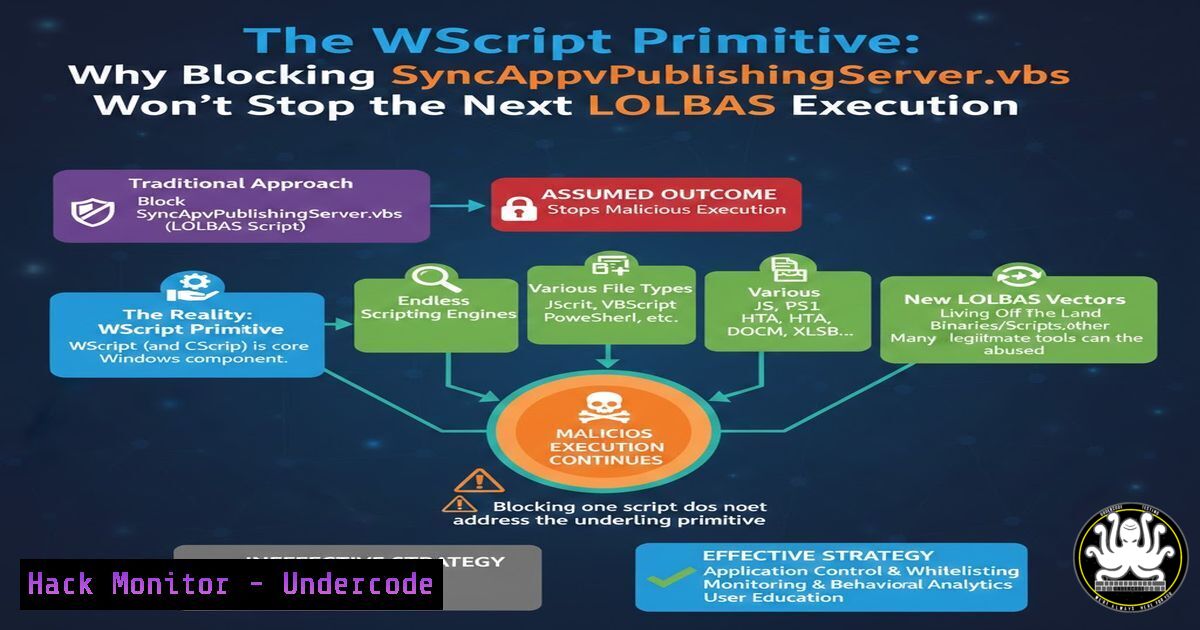
Attackers have returned to an old favorite: living-off-the-land binaries and scripts (LOLBAS). The latest campaign weaponizes `SyncAppvPublishingServer.vbs` — a legitimate Microsoft-signed script — to execute malicious code via wscript.exe. Defenders chasing file hashes or script names are losing the race; the real dependency is the scripting host itself. By blocking the execution primitive instead of the individual binary, organizations can neutralize entire families of fileless attacks before they ever reach memory.
Learning Objectives:
- Understand why `wscript.exe` is the true attack surface in LOLBAS script executions.
- Learn to implement application control policies that target execution primitives, not just file names.
- Deploy hunting queries and Sysmon configurations to detect anomalous scripting host activity.
- Apply the same “primitive blocking” philosophy to Linux and cloud-native environments.
You Should Know:
- Why the Script Doesn’t Matter — The Primitive Does
`SyncAppvPublishingServer.vbs` is signed by Microsoft and lives inC:\Windows\System32. Attackers can invoke it with command-line arguments that force the script to execute arbitrary code embedded in the registry or passed via environment variables. Traditional antivirus often ignores this because the parent file is trusted and signed.
The actual primitive is `wscript.exe` executing untrusted command lines. If `wscript.exe` (or cscript.exe) is blocked from spawning from untrusted parents — or restricted to specific allowlisted command-line patterns — the entire class of VBS-based LOLBAS collapses.
Step‑by‑step guide – Blocking wscript.exe via AppLocker (Windows):
- Open Local Security Policy → Application Control Policies → AppLocker.
- Configure Executable Rules: Create a deny rule for `%SYSTEM32%\wscript.exe` and `%SYSTEM32%\cscript.exe` for all users except local administrators (or better, create an allowlist).
- Configure Script Rules: Deny scripts stored outside of `C:\Windows` or
C:\Program Files. - Deploy via GPO and test in audit mode before enforcement.
Verify with PowerShell:
Get-AppLockerPolicy -Local | Test-AppLockerPolicy -Path C:\Windows\System32\wscript.exe -User Everyone
2. Hunting the WMI Child Process
In many campaigns, `SyncAppvPublishingServer.vbs` is launched by WMI, not directly by the user. Attackers use:
wmic process call create "cscript.exe SyncAppvPublishingServer.vbs"
This leaves a forensic trail: the parent process is wmiprvse.exe, the child is a scripting host.
Step‑by‑step guide – Hunting with Sysmon and Event Logs:
1. Install Sysmon with a configuration that logs Event ID 1 (Process Creation) and includes command-line details.
2. Query Windows Event Log for events where `ParentImage` contains `wmiprvse.exe` and `Image` contains `wscript.exe` or cscript.exe.
3. Use this KQL-style query in Event Viewer:
EventID=1 AND ParentImage contains "wmiprvse" AND (Image contains "wscript" OR Image contains "cscript")
4. Correlate with network connections (Sysmon Event ID 3) to identify C2 callbacks immediately after script execution.
- Linux Parallel: Blocking the Interpreter, Not the Payload
Linux adversaries abusepython3,perl, or `lua` installed on systems to execute malicious one-liners. Blocking `python3` system-wide may break legitimate automation, but restricting which parent processes may invoke interpreters is the same primitive defense.
Step‑by‑step guide – Using AppArmor or SELinux to constrain interpreters:
– AppArmor profile for python3:
/profile/python3 {
/usr/bin/python3 mrix,
deny /home//.cache/ w,
deny /tmp/ w,
audit deny //.pyc w,
}
– Load profile: `sudo apparmor_parser -r /etc/apparmor.d/python3`
– Place python3 in enforce mode: `sudo aa-enforce /usr/bin/python3`
This prevents python3 from writing cached files or creating new scripts in temp directories — common post-exploitation staging.
4. Command Line Anomalies in Microsoft‑Signed Scripts
`SyncAppvPublishingServer.vbs` normally takes zero or very specific arguments (e.g., /Sync). Attackers pass junk arguments or use the script as a proxy to execute VBScript embedded in the command line via `-Embedding` or Execute.
Step‑by‑step guide – Logging and alerting on abnormal command lines:
1. Enable Command Line auditing via GPO:
- Administrative Templates → System → Audit Process Creation → Include command line in process creation events.
- Deploy a SIEM rule that flags `wscript.exe` command lines containing:
– `SyncAppvPublishingServer.vbs` followed by more than 2 arguments.
– `-Embedding` (indicates COM activation, unusual for this binary).
– `eval` or `Execute` as part of the argument string.
3. Test with:
wscript.exe C:\Windows\System32\SyncAppvPublishingServer.vbs "MsgBox 1"
This should trigger an alert despite the script being signed.
5. Sysmon Config to Catch the Primitive
Rather than listing every LOLBAS script, a mature Sysmon config blocks the use of the scripting host unless it is invoked by a trusted system process (e.g., `svchost.exe` with specific service tags).
Step‑by‑step guide – Sysmon rule snippet:
<RuleGroup name="" groupRelation="or">
<ProcessCreate onmatch="exclude">
<ParentImage condition="is">C:\Windows\System32\svchost.exe</ParentImage>
<Image condition="is">C:\Windows\System32\wscript.exe</Image>
</ProcessCreate>
<ProcessCreate onmatch="include">
<ParentImage condition="contains any">wmiprvse;explorer;winword</ParentImage>
<Image condition="is">C:\Windows\System32\wscript.exe</Image>
</ProcessCreate>
</RuleGroup>
This logs only suspicious parenting events rather than all wscript.exe executions.
6. Cloud Hardening: Primitive Thinking in Serverless
In AWS Lambda or Azure Functions, the “primitive” is the ability to download external packages or shell out to the OS runtime. Attackers may not need to exploit the application code if they can simply execute OS commands via the Lambda runtime (e.g., Node.js child_process).
Step‑by‑step guide – Primitive blocking in Lambda:
- Set Lambda environment variables to `NODE_OPTIONS=”–disable-proto=delete”` to restrict prototype pollution.
- Use Lambda Runtime Policy to block outbound traffic to non-approved repositories (e.g., block `pypi.org` except from build stages).
- Apply an execution role that explicitly denies `lambda:InvokeFunction` to any untrusted principals — the primitive here is the invocation API, not the function code itself.
7. Registry Persistence via Script Host Misuse
Attackers commonly store VBScript payloads in registry keys (e.g., HKCU\Software\Microsoft\Windows\CurrentVersion\Run) and invoke them via wscript.exe //E:vbscript "reg:...".
Step‑by‑step guide – Monitoring registry‑sourced script execution:
1. Enable Audit Registry via Advanced Audit Policy.
- Hunt for wscript.exe command lines containing `//E:vbscript` and
reg:. - Deploy a PowerShell monitor that logs registry value reads immediately prior to wscript.exe launch:
$filter = @{Path='HKLM:\Software\Microsoft\Windows\CurrentVersion\Run\';ExecutionContext=''}
Register-WmiEvent -Query "SELECT  FROM RegistryKeyChangeEvent $filter" -Action { ... }
What Undercode Say:
- Key Takeaway 1: Blocking script hosts (
wscript,cscript,python,node) from spawning by untrusted parents is exponentially more effective than blacklisting script paths. The campaign using `SyncAppvPublishingServer.vbs` is merely the current avatar of a decade‑old primitive abuse. - Key Takeaway 2: The “primitive” approach transcends Windows. Linux interpreters, serverless runtimes, and even cloud IAM actions share the same characteristic: defenders over‑rotate on IoCs (file hashes, IPs) while attackers simply reuse the same trusted executables.
Analysis:
Organizations that invested heavily in detecting `SyncAppvPublishingServer.vbs` specifically will be breached when attackers pivot to PubPrn.vbs, Manage-bde.wsf, or the next signed script. The real fix is architectural: assume any signed binary that can execute third‑party code will be abused. Move from signature‑based whitelisting to behavior‑based execution control. This requires deep collaboration between endpoint security, identity, and cloud teams — a cultural shift many firms still resist.
Prediction:
Within the next six months, we will see a surge in LOLBAS campaigns using .NET‑based execution primitives (e.g., InstallUtil.exe, RegAsm.exe) paired with Windows Script Host disabled by attackers via reflective DLL loading to bypass the very controls recommended here. Defenders will then need to block the regsvr32 and rundll32 primitives, triggering new compatibility battles in enterprises that rely on legacy COM components. The arms race will move up the stack, forcing Microsoft to finally consider breaking changes in how signed system utilities handle untrusted input.
▶️ Related Video (84% Match):
🎯Let’s Practice For Free:
IT/Security Reporter URL:
Reported By: Https: – Hackers Feeds
Extra Hub: Undercode MoN
Basic Verification: Pass ✅


