Listen to this Post
Introduction:
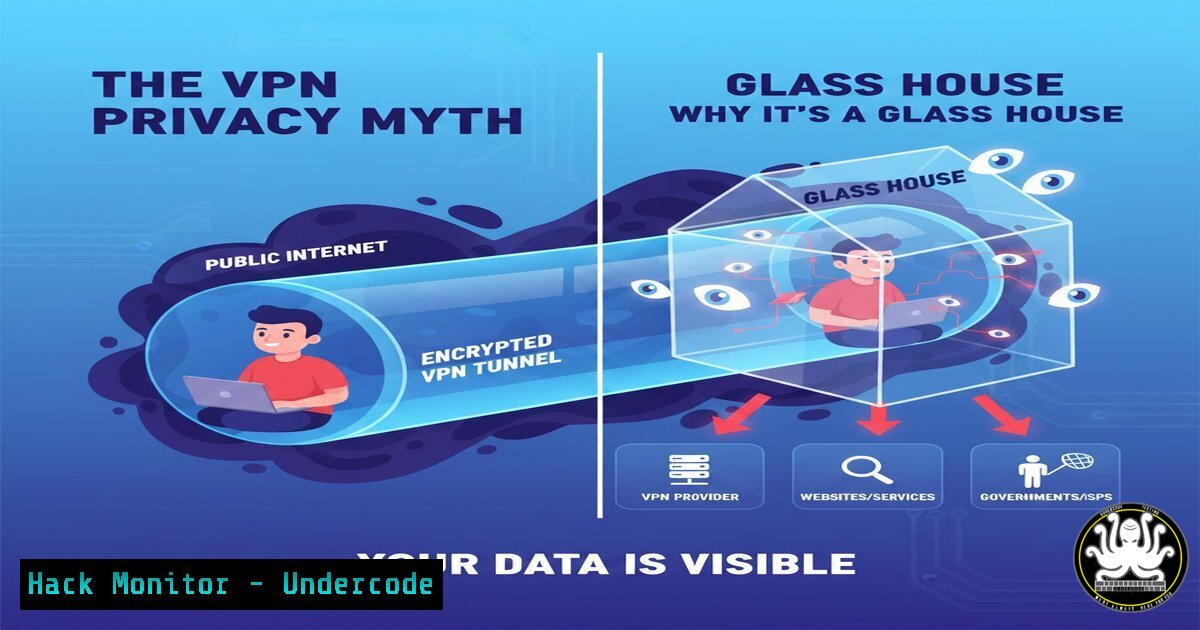
The common belief that a Virtual Private Network (VPN) serves as an all-in-one privacy shield is a dangerous oversimplification. While a VPN effectively encrypts data in transit between your device and the VPN server—securing your connection on public Wi-Fi—it does not make you anonymous. Your internet activity, device fingerprint, and the domains you visit remain visible to your VPN provider, your browser, your apps, and your operating system, creating a rich trail of data that defines your digital identity beyond the encrypted tunnel.
Learning Objectives:
- Understand the technical distinction between VPN-protected “data in transit” and the pervasive data collection that compromises privacy.
- Learn to implement layered defenses, including browser hardening and network monitoring, to complement or replace reliance on VPNs.
- Master essential command-line tools for Linux and Windows to diagnose connections, manage firewalls, and investigate potential data leaks.
You Should Know:
- Your Digital Footprint is Larger Than Your IP Address
The original post correctly states that a VPN does not hide your UUID or the domains you visit. This is because identification relies on multiple techniques like browser fingerprinting (collecting screen resolution, installed fonts, plugins) and tracking via third-party cookies. Your IP address is just one data point among hundreds.
Step-by-step guide to audit your own footprint:
Use OSINT Tools on Yourself: Security professionals and attackers use Open-Source Intelligence (OSINT) to find publicly exposed data. You can use tools like Maltego or SpiderFoot to see what information about your email addresses, usernames, or associated domains is readily available online. This reveals data a VPN cannot hide.
Check for Breached Credentials: Use the service HaveIBeenPwned to verify if your email address or passwords have been exposed in known data breaches. Reusing passwords across sites is a critical risk that VPNs do not mitigate.
Linux Command – View Active Network Connections: Use the `ss` command (replacing older netstat) to see all active connections from your machine, revealing what services are communicating externally.
ss -tuln
This command (-t for TCP, `-u` for UDP, `-l` for listening, `-n` for numeric) shows all listening ports, helping you identify unexpected services that may be phoning home.
- Browser & OS Tracking: The VPN Blind Spot
Your browser and operating system are primary data collectors. They store browsing history, location data, form autofill info, and credentials. A VPN does not prevent this local data harvesting.
Step-by-step guide to harden your browser:
Block Third-Party Cookies: This is the most effective single setting. In Chrome, go to Settings > Privacy and security > Third-party cookies and select “Block third-party cookies”. In Firefox, use Settings > Privacy & Security > Enhanced Tracking Protection with “Strict” mode.
Disable Ad Personalization: Turn off ad personalization in your browser settings to limit the data used for targeted ads.
Install a Reputable Ad/Tracker Blocker: Extensions like uBlock Origin or AdGuard block tracking scripts and malicious ads at the source. CISA recommends using ad blockers to prevent malware delivery.
Vet Extensions Rigorously: Malicious browser extensions are a major threat. A notable example from December 2025 involved a VPN extension that intercepted millions of users’ AI chats and browsing data. Only install extensions from official stores with many positive reviews and clear privacy policies.
3. Choosing a VPN: Security Asset or Liability?
Not all VPNs are equal. A poorly chosen VPN can become a security risk, as it has full visibility into your encrypted traffic.
Step-by-step guide for selecting and auditing a VPN:
Avoid Free VPNs: Free services often monetize by selling user data, injecting ads, or hijacking user bandwidth for botnets.
Demand a Verified No-Logs Policy: Choose providers with a transparent, audited no-logs policy, ideally based in jurisdictions with strong privacy laws.
Enable Kill Switch & DNS Leak Protection: A kill switch blocks all internet traffic if the VPN connection drops, preventing accidental exposure of your real IP. Ensure DNS queries are routed through the VPN tunnel and not your ISP to prevent DNS leaks.
Use Strong Protocols: Prefer modern protocols like OpenVPN or IKEv2/IPsec. Avoid outdated protocols like PPTP which have known vulnerabilities.
Windows Command – Create a Firewall Rule for a VPN App: Use PowerShell to create a strict firewall rule that only allows a specific VPN application to connect externally, blocking it if the VPN software is not running.
New-NetFirewallRule -DisplayName "Allow Only VPN Client" -Direction Outbound -Program "C:\Path\To\YourVPN.exe" -Action Allow
New-NetFirewallRule -DisplayName "Block All Other Outbound" -Direction Outbound -Action Block
(Note: The second rule is illustrative; apply carefully as it can block all internet access if misconfigured.)
- From Consumer Tool to Enterprise Control: SD-WAN & Zero Trust
For organizations, the solution transcends consumer VPNs. Enterprise networks use technologies like SD-WAN (Software-Defined Wide Area Network) to intelligently route traffic over multiple connections (MPLS, broadband) based on security policies and application needs. The modern framework is Zero Trust, which assumes no connection is trustworthy by default, requiring strict identity verification for every person and device trying to access resources.
Step-by-step guide for basic network monitoring:
Use `tcpdump` for Packet Analysis: On Linux, use `tcpdump` to capture raw network packets. This is an advanced but powerful way to see exactly what data is leaving your interface.
sudo tcpdump -i eth0 -c 100 -w capture.pcap
This captures 100 packets from interface `eth0` to a file for analysis with tools like Wireshark.
Trace the Path: Use `traceroute` (tracert on Windows) to see the network hops your data takes. With a VPN, all traffic should first go to your VPN server’s IP.
traceroute 8.8.8.8
- The Future of Privacy: AI, OSINT, and Beyond
The privacy arms race is escalating. Adversaries increasingly use AI-powered OSINT (Open-Source Intelligence) tools to automatically scrape, correlate, and analyze vast amounts of public data from social media, code repositories, and breach databases to profile targets. Defensively, AI is being used to filter noise and identify relevant threats from OSINT data streams.
Step-by-step guide for proactive defense:
Practice “Google Dorking” on Yourself: Use advanced Google search operators to find information inadvertently exposed about you or your organization.
– `site:github.com “yourcompany.com” password` – searches for commits containing passwords.
– `filetype:pdf “Internal Use Only” yourname` – searches for exposed internal documents.
Implement Password Management & MFA: Use a password manager (e.g., Bitwarden, 1Password) to generate and store unique, complex passwords for every site. Enable Multi-Factor Authentication (MFA) everywhere possible, especially on your primary email and financial accounts.
What Undercode Say:
- VPNs Are a Layer, Not a Solution. They solve the specific problem of encrypting data on untrusted networks but are ineffective against endpoint tracking, browser fingerprinting, and data aggregation by the apps and services you use.
- Privacy Requires Continuous, Layered Effort. Effective privacy is an ongoing process involving software choices (browsers, blockers), configuration (cookie settings, firewall rules), and behavior (password hygiene, data sharing). No single tool provides a set-it-and-forget-it solution.
The central analysis is that the over-marketing of VPNs has created a false sense of complete security, diverting attention from more significant privacy threats. The future of digital privacy lies not in trying to hide a single identifier (like an IP address) but in aggressively minimizing and fragmenting the digital breadcrumbs we leave across systems, combined with legislative pressure for data minimization. As AI makes correlation of disparate data points trivial, the concept of privacy will increasingly depend on technological obfuscation and strict legal controls on data collection, moving beyond the obsolete model of simple connection encryption.
Prediction:
The “VPN-only” privacy model will become completely obsolete within the next 3-5 years. We will see a rapid shift towards integrated privacy suites that combine encrypted proxies with local machine learning agents that manage application permissions, sanitize metadata, and generate synthetic or fragmented digital identities to poison tracking datasets. Furthermore, regulatory frameworks will begin to mandate “privacy by design,” forcing software and hardware vendors to build in strong defaults that minimize data collection, fundamentally changing the landscape from one where users must bolt on protection to one where systems are inherently private.
▶️ Related Video (84% Match):
🎯Let’s Practice For Free:
IT/Security Reporter URL:
Reported By: Piatesdorf Uuid – Hackers Feeds
Extra Hub: Undercode MoN
Basic Verification: Pass ✅


