Listen to this Post
Introduction:
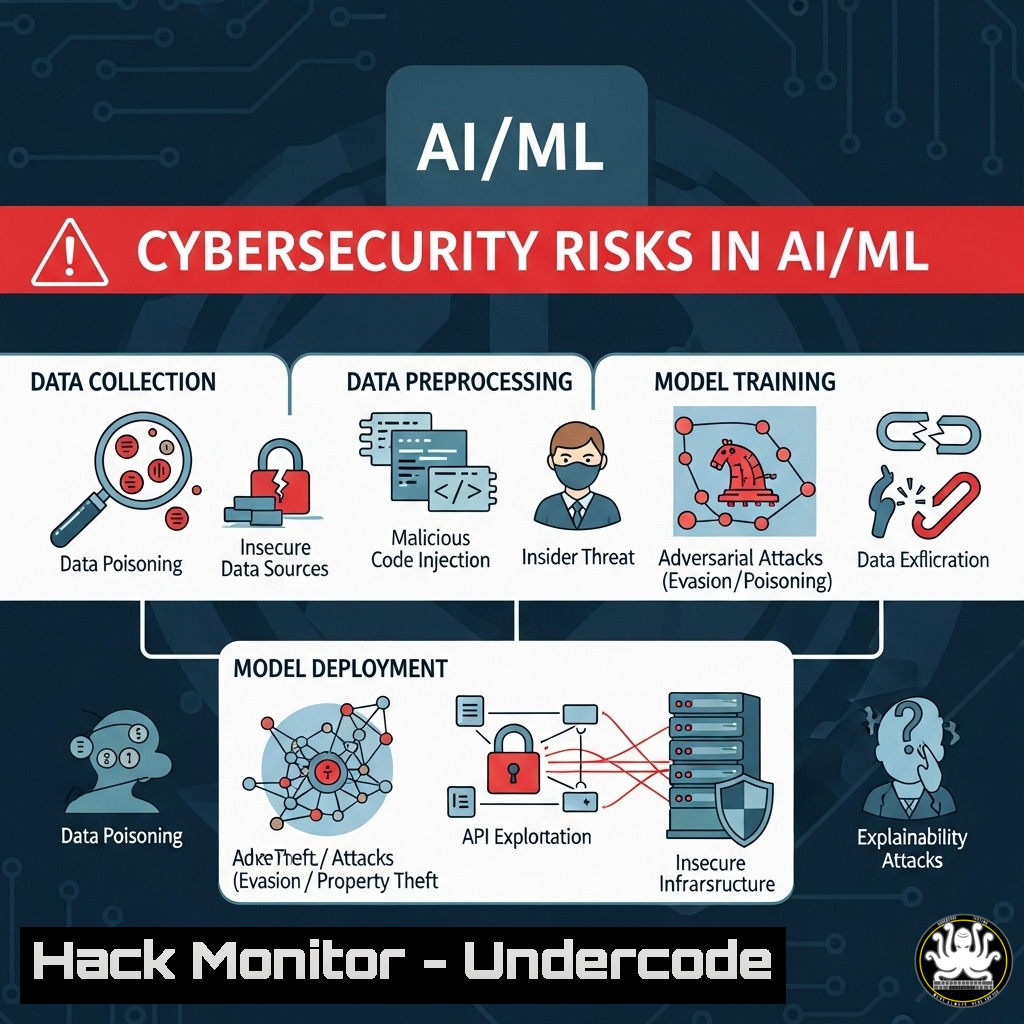
The rapid integration of Artificial Intelligence and Machine Learning into critical business operations has created a new frontier of technical debt and unseen vulnerabilities. While organizations race to deploy AI models for a competitive edge, the security of the data pipelines, training environments, and underlying infrastructure is often an afterthought, creating a massive attack surface for malicious actors. This article deconstructs the hidden risks within ML pipelines and provides actionable, verified commands to harden these environments against modern threats.
Learning Objectives:
- Identify and mitigate common vulnerabilities within AI/ML data processing and model training pipelines.
- Implement security hardening for Linux-based data science workstations and cloud training environments.
- Establish monitoring and integrity checks for training data and deployed models to prevent poisoning and evasion attacks.
You Should Know:
1. Securing Your Data Science Workstation
The foundation of any AI project is a secure development environment. A compromised workstation can lead to poisoned training data or stolen intellectual property.
 Harden a Linux-based DS workstation: Update, install minimal tools, and enable firewall.
sudo apt update && sudo apt upgrade -y
sudo apt install --no-install-recommends python3-pip python3-venv git ufw
sudo ufw enable
sudo ufw allow ssh
sudo systemctl enable ufw && sudo systemctl start ufw

Check for unnecessary services and listen ports
ss -tulpn
sudo systemctl list-unit-files --state=enabled | grep service
This series of commands ensures your base operating system is up-to-date, installs only essential packages in a minimal configuration, and enables a host-based firewall (UFW) to block all incoming connections except for SSH. The final commands audit running services and open ports, which is critical for reducing the attack surface.
2. Validating Training Data Integrity
Data poisoning is a primary attack vector. Ensuring the integrity and source of your training datasets is paramount.
 Generate and verify SHA-256 checksums for your dataset files
sha256sum training_data.csv > training_data.sha256
sha256sum -c training_data.sha256

Use GnuPG to verify the authenticity of a downloaded dataset
gpg --verify dataset_signature.asc training_data.csv

Recursively generate checksums for a directory structure
find ./datasets -type f -exec sha256sum {} \; > dataset_manifest.sha256
Checksums provide a cryptographic fingerprint for files. By generating a checksum on a trusted source system and verifying it before use, you can ensure data has not been altered in transit. Using GPG to verify a signature adds a layer of authenticity, confirming the data came from a trusted party.
3. Hardening Jupyter Notebook Servers
Default Jupyter installations are notoriously insecure and often exposed incorrectly to the network, leading to remote code execution.
 Generate a secure Jupyter config with hashed password and SSL
jupyter notebook --generate-config
jupyter server password  Prompts for password and creates hash
openssl req -x509 -nodes -days 365 -newkey rsa:2048 -keyout mykey.key -out mycert.pem

Edit ~/.jupyter/jupyter_notebook_config.py with:
c.NotebookApp.ip = 'localhost'  Bind only to localhost
c.NotebookApp.password = 'sha1:your:hashed:password'  From previous command
c.NotebookApp.certfile = '/absolute/path/to/mycert.pem'
c.NotebookApp.keyfile = '/absolute/path/to/mykey.key'
c.NotebookApp.open_browser = False
This configuration prevents the server from being exposed on all interfaces, forces password authentication with a pre-hashed password (instead of tokens), and encrypts traffic with SSL/TLS. Always use an SSH tunnel for remote access instead of directly exposing the service.
4. Auditing Python Package Dependencies
Malicious packages in PyPI and other repositories are a common supply chain attack method targeting data scientists.
 Use pip-audit to check for known vulnerabilities in your environment
pip install pip-audit
pip-audit -r requirements.txt

Scan for malware in packages using Safety CLI
pip install safety
safety check -r requirements.txt

List all installed packages and their versions for auditing
pip list --format=freeze
Tools like `pip-audit` cross-reference your installed packages against databases of known vulnerabilities (e.g., CVE). `Safety` performs similar checks. Regularly auditing your `requirements.txt` file is a critical step in preventing the introduction of vulnerable or malicious code into your project.
5. Containerizing and Isolating Training Environments
Using containers ensures consistency and isolates the training environment from the host OS, limiting the blast radius of a compromise.
 Sample Dockerfile for a secure ML training environment
FROM python:3.9-slim-bullseye
RUN useradd --create-home --shell /bin/bash mluser
WORKDIR /home/mluser/app
COPY requirements.txt .
RUN pip install --no-cache-dir --user -r requirements.txt
USER mluser
COPY --chown=mluser:mluser . .
CMD ["python", "train.py"]
 Build and run the container with non-root user and no network
docker build -t ml-training:secure .
docker run -it --rm --read-only --network none -v $(pwd)/data:/home/mluser/app/data:ro ml-training:secure
This Dockerfile creates a minimal image, adds a non-root user, and installs packages in the user directory. The `docker run` command starts the container with a read-only filesystem (--read-only), no network access (--network none), and a read-only volume for data. This significantly reduces the privileges available to any process that escapes the training script.
6. Monitoring Model Endpoints for Adversarial Attacks
Deployed models are targets for inference attacks and adversarial examples. Monitoring input patterns is key to detection.
 Simple Flask app snippet with input anomaly logging
from flask import Flask, request, jsonify
import numpy as np
import logging

logging.basicConfig(filename='inference.log', level=logging.INFO)
app = Flask(<strong>name</strong>)

@app.route('/predict', methods=['POST'])
def predict():
data = request.get_json()
input_data = np.array(data['features'])

Log input statistics for anomaly detection
logging.info(f"Request IP: {request.remote_addr}, "
f"Input Shape: {input_data.shape}, "
f"Input Mean: {input_data.mean()}, "
f"Input Std: {input_data.std()}")

... prediction logic ...
return jsonify({'prediction': prediction.tolist()})

if <strong>name</strong> == '<strong>main</strong>':
app.run(ssl_context='adhoc')  Use proper certs in production
This code logs metadata about every prediction request, including the remote IP and statistical properties of the input feature vector. A sudden shift in these statistics (e.g., wildly different means, unusual shapes) could indicate an ongoing adversarial attack or data drift, triggering an alert for investigation.
7. Implementing Cloud ML Security Hardening
When using cloud platforms like AWS SageMaker or GCP Vertex AI, configuration is critical.
 Example AWS CLI command to check SageMaker Notebook instance security
aws sagemaker describe-notebook-instance --notebook-instance-name my-instance --query '{
Name:NotebookInstanceName,
DirectInternetAccess:DirectInternetAccess,
RootAccess:RootAccess,
VolumeEncrypted:VolumeEncrypted,
Subnet:SubnetId,
SG:SecurityGroups
}'

Use IAM to apply least privilege to the notebook execution role
aws iam list-attached-role-policies --role-name SageMakerExecutionRole
This command audits key security settings for a SageMaker notebook: internet access, root privileges, encryption-at-rest, and network placement. Always ensure `DirectInternetAccess` is disabled, forcing all traffic through a secured VPC, and that the execution role has only the minimum permissions required.
What Undercode Say:
- The rush to adopt AI is creating a massive and overlooked attack surface, where technical debt translates directly into cybersecurity risk.
- Security must be integrated into the ML pipeline from the outset (Data Collection, Training, Deployment) rather than bolted on at the end.
The core issue is a cultural and procedural gap. Data scientists are focused on model accuracy and performance, not on secure coding practices or infrastructure hardening. This creates an environment where a single compromised package, an exposed Jupyter server, or a poisoned dataset can undermine the entire project. The commands and configurations provided are not one-time fixes but part of a necessary continuous security process for any organization serious about leveraging AI safely. The “unfinished business” is the systematic application of fundamental cybersecurity hygiene to the entirely new world of AI development.
Prediction:
The next 12-24 months will see a significant rise in targeted attacks against AI infrastructure. We will move beyond theoretical papers on adversarial attacks to widespread, practical exploits. Criminal groups will actively target organizations to poison competitive models, steal proprietary training data, or manipulate model outputs for financial gain. The organizations that proactively implement hardening, monitoring, and supply chain security for their AI pipelines will survive this coming wave; those that do not will face severe reputational damage, financial loss, and operational disruption.
🎯Let’s Practice For Free:
IT/Security Reporter URL:
Reported By: Carolyn Christie – Hackers Feeds
Extra Hub: Undercode MoN
Basic Verification: Pass ✅


