Listen to this Post
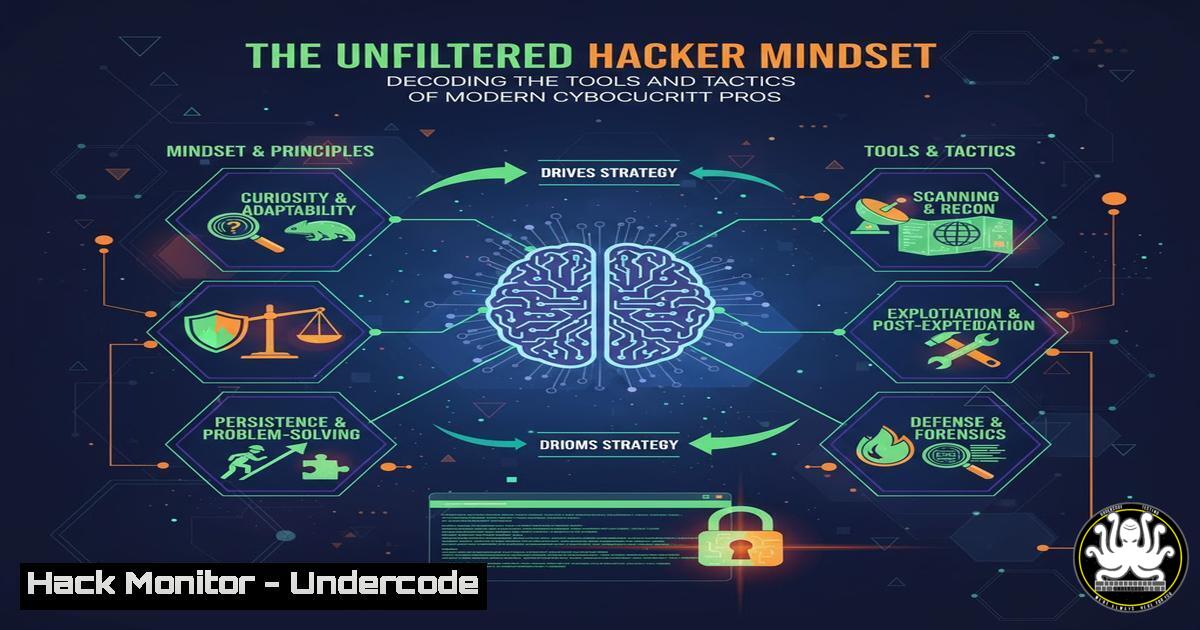
Introduction:
The world of cybersecurity is driven by a unique blend of technical prowess and a specific, relentless mindset. Beyond the code and commands lies a strategic approach to problem-solving that separates successful professionals from the rest. This article deconstructs the core technical skills and the underlying hacker mentality essential for defending modern digital infrastructures.
Learning Objectives:
- Master essential command-line tools for reconnaissance, vulnerability assessment, and hardening on both Linux and Windows platforms.
- Understand the practical steps for exploiting common misconfigurations and implementing immediate mitigations.
- Develop a strategic understanding of the “business mindset” as applied to offensive and defensive security operations.
You Should Know:
1. Network Reconnaissance with Nmap
Nmap is the quintessential network discovery and security auditing tool. It is used to identify live hosts, discover open ports, and detect services and operating systems running on a network.
`nmap -sS -sV -O -T4 192.168.1.0/24`
-sS: Performs a SYN scan, a stealthy method that doesn’t complete the TCP handshake.
-sV: Probes open ports to determine service/version information.
-O: Enables OS detection based on TCP/IP stack fingerprinting.
-T4: Sets the timing template to “aggressive” for faster execution.
192.168.1.0/24: The target network range in CIDR notation.
Step-by-step guide:
- Install Nmap on your system (
sudo apt install nmapon Kali/Ubuntu). - Ensure you have explicit permission to scan the target network.
- Run the command in your terminal. The output will list all active IP addresses, their open ports, and the associated services.
- Analyze the results to identify potentially risky services (e.g., outdated FTP servers, open SMB shares) for further investigation.
2. Vulnerability Assessment with Nikto
Nikto is an open-source web server scanner that performs comprehensive tests against web servers for multiple items, including dangerous files/CGIs, outdated server software, and version-specific problems.
`nikto -h http://www.target.com -o nikto_scan_report.html`
`-h`: Specifies the target host.
-o: Outputs the results to an HTML file for easy reading.
Step-by-step guide:
- Launch your terminal and navigate to a directory where you want to save the report.
- Execute the command, replacing `http://www.target.com` with your target URL.
- Nikto will begin its scan, testing for over 6700 potentially dangerous files/programs and checking for outdated versions.
- Review the generated HTML report to prioritize vulnerabilities like exposed configuration files, default files, and informative error messages that leak data.
3. Hardening Linux with System Auditing
The Linux Audit Daemon (auditd) is a powerful tool for tracking security-relevant events on your system. This command helps in monitoring file access.
`auditctl -w /etc/passwd -p wa -k identity_access`
auditctl: The command to control the audit subsystem.
-w /etc/passwd: Adds a watch on the `/etc/passwd` file.
-p wa: Specifies the permissions to watch for: write (w) and attribute change (a).
-k identity_access: Applies a custom key to the rule for easy searching in logs.
Step-by-step guide:
- Ensure `auditd` is installed and running (
sudo systemctl status auditd).
2. Run the `auditctl` command with root privileges.
- Any attempt to write or change attributes of the `/etc/passwd` file will now be logged.
- Search the audit logs using `ausearch -k identity_access` to review access attempts.
4. Windows Privilege Escalation Enumeration
Understanding system misconfigurations is key to both attack and defense. This PowerShell command checks for services that are unquoted and have spaces in their file paths, a common privilege escalation vector.
`Get-WmiObject -Class Win32_Service | Where-Object {$_.PathName -like ” ” -and $_.PathName -notlike ‘””}’ | Select-Object Name, PathName`
Step-by-step guide:
1. Open a PowerShell window with administrative privileges.
- Execute the command. It queries all services and filters for those with unquoted paths containing spaces.
- The output will list vulnerable services. An attacker can potentially place a malicious executable in a path that gets executed before the legitimate one. A defender should then quote the service paths in the registry.
5. API Security Testing with curl
APIs are a primary attack surface. The `curl` command is invaluable for manually testing API endpoints for issues like insecure direct object references (IDOR) or missing access controls.
`curl -H “Authorization: Bearer
Step-by-step guide:
- Obtain a valid authentication token (JWT) from the target application.
- Replace `
` and the user ID ( 1234) in the command. - Run the command to see if you can access user
1234‘s data. - Now, change the user ID to `1235` and run the command again. If you can access another user’s data, you have found a critical IDOR vulnerability.
6. Cloud Hardening: Restricting S3 Bucket Policies
Misconfigured Amazon S3 buckets are a leading cause of data breaches. This AWS CLI command sets a bucket policy to explicitly deny public read access.
`aws s3api put-bucket-policy –bucket my-secure-bucket –policy ‘{“Version”:”2012-10-17″,”Statement”:[{“Sid”:”PublicReadGetObject”,”Effect”:”Deny”,”Principal”:””,”Action”:”s3:GetObject”,”Resource”:”arn:aws:s3:::my-secure-bucket/”}]}’`
Step-by-step guide:
- Install and configure the AWS CLI with appropriate credentials.
- Replace `my-secure-bucket` with the name of your bucket.
- Execute the command in your terminal. This policy will override any other policies that might grant public access, ensuring the bucket remains private.
- Verify the policy by attempting to access an object via a public URL; it should return an “Access Denied” error.
7. Incident Response: Process Analysis on Linux
During a security incident, identifying malicious processes is critical. This command chain provides a detailed snapshot of running processes.
`ps aux –sort=-%mem | head -10`
ps aux: Lists all running processes with detailed information.
--sort=-%mem: Sorts the processes by memory usage in descending order.
head -10: Displays only the top 10 memory-consuming processes.
Step-by-step guide:
- Open a terminal on the suspect Linux system.
- Run the command to quickly identify processes consuming excessive memory, which could indicate malware or a resource-intensive attack.
- Investigate any unknown or suspicious process names, their PIDs (Process IDs), and their full paths. This is a first step in triaging a compromised system.
What Undercode Say:
- The technical toolkit is only as effective as the strategic mindset wielding it. The “business mindset” discussed by security leaders is about prioritizing efforts based on risk and impact, not just chasing vulnerabilities.
- True security mastery requires understanding both the exploitation of a flaw and the operational process of implementing a robust mitigation, turning a point-in-time fix into a permanent control.
The conversation around a “business mindset” in cybersecurity is not corporate fluff; it’s a force multiplier. It shifts the focus from simply finding bugs to understanding which bugs truly matter to the business’s bottom line and operational continuity. This mindset informs tool selection, command usage, and remediation priorities. An attacker thinks about the easiest path to a goal; a professional defender must think like an attacker while also managing resources, time, and business risk. The commands and techniques listed are the fundamental vocabulary, but the strategy—the “why” behind their use—is the language of a true security expert.
Prediction:
The increasing emphasis on the hacker mindset fused with business acumen will redefine security hiring and team structures. We will see a decline in the value placed on purely technical operators who lack strategic vision and a corresponding rise in roles like “Security Risk Analyst” and “Offensive Security Engineer,” who can articulate the business impact of a vulnerability as clearly as they can exploit it. This evolution will force a tighter integration between red teams, blue teams, and executive leadership, making cybersecurity a core, strategic business function rather than a technical silo.
🎯Let’s Practice For Free:
IT/Security Reporter URL:
Reported By: Raunak Gupta – Hackers Feeds
Extra Hub: Undercode MoN
Basic Verification: Pass ✅


