Listen to this Post
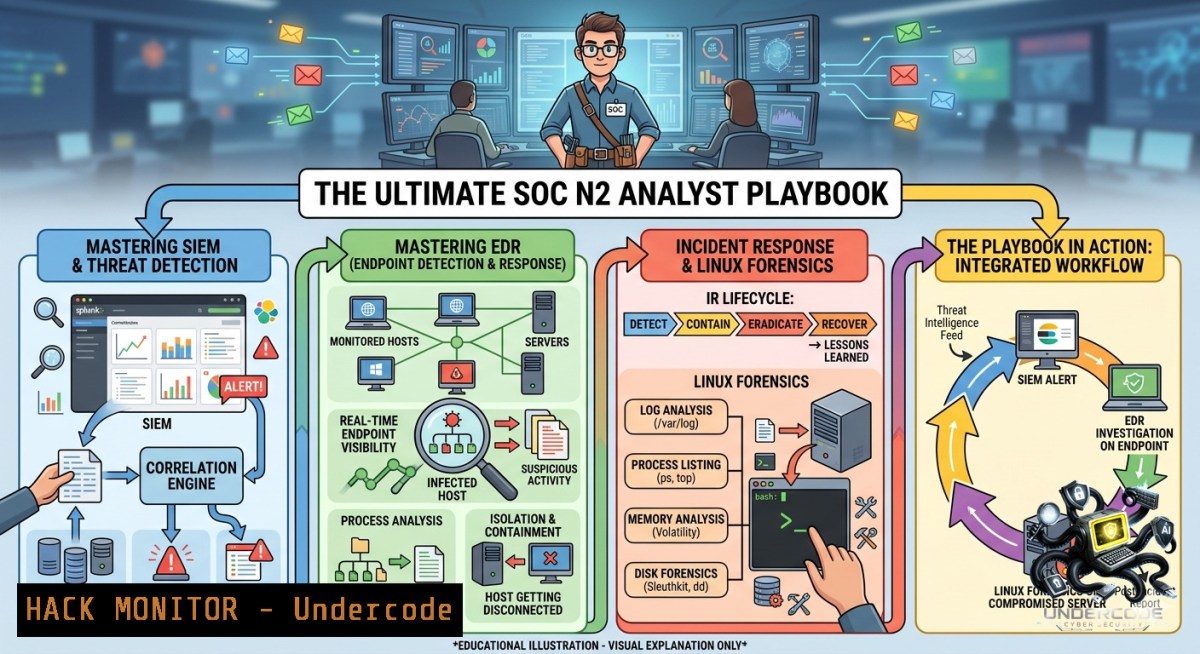
Introduction:
A Security Operations Center (SOC) Level 2 analyst bridges the gap between alert triage and deep incident investigation. Unlike L1’s rule‑based correlation, L2 requires proactive threat hunting, forensic analysis, and fine‑tuning detection logic. This article transforms the job requirements from a real SOC N2 opening into a technical playbook—covering SIEM query optimization, EDR evasion detection, Linux memory forensics, and Windows artifact analysis.
Learning Objectives:
- Write advanced SIEM queries to identify lateral movement and privilege escalation.
- Perform memory and disk forensics on compromised Linux/Windows hosts using open‑source tools.
- Tune IDS/IPS rules and create custom Sigma detections to reduce false positives.
You Should Know:
1. SIEM Power Queries for Lateral Movement Detection
A SOC N2 analyst must go beyond dashboards. Using Splunk or ELK, you can hunt for Pass‑the‑Hash (PtH) or RDP brute‑force patterns. Below are verified queries that detect unusual Event Codes across Windows environments.
Splunk query – Failed logons followed by success (brute‑force / password spraying):
index=windows EventCode=4625 | stats count by Account_Name, Source_Network_Address | where count > 5
| join Account_Name [search index=windows EventCode=4624] | table _time, Account_Name, Source_Network_Address
Linux `journalctl` command – Detect repeated sudo failures:
sudo journalctl -u sshd --since "1 hour ago" | grep "Failed password" | awk '{print $9}' | sort | uniq -c | sort -1r
How to use:
Schedule these queries to run every 15 minutes against your SIEM. For real‑time, convert them into correlation rules with a threshold of 5 failures in 60 seconds. Then escalate to L2 for memory capture.
2. EDR Evasion: Detecting Process Injection via Sysmon
Modern attackers bypass EDR by injecting into trusted processes (e.g., notepad.exe). Use Sysmon Event ID 8 (CreateRemoteThread) to spot anomalies. First, install Sysmon with a configuration that logs all process accesses.
Install Sysmon (Windows):
 Download from Microsoft
Invoke-WebRequest -Uri "https://live.sysinternals.com/Sysmon64.exe" -OutFile "$env:TEMP\Sysmon64.exe"
 Install with default config (customize for Event 8)
& "$env:TEMP\Sysmon64.exe" -accepteula -i
Query Sysmon logs (PowerShell):
Get-WinEvent -FilterHashtable @{LogName='Microsoft-Windows-Sysmon/Operational'; ID=8} |
Where-Object {$_.Message -match "TargetImage.\notepad.exe"} | Format-List
Step‑by‑step investigation:
1. Collect Sysmon logs from suspected host.
- Look for Event ID 8 where `SourceImage` is a non‑standard path (e.g.,
C:\Users\Public\mal.exe). - Cross‑reference with network logs – the injected process often initiates outbound C2.
3. Linux Forensic Triage with `volatility` and `dd`
When an incident is confirmed, L2 analysts must capture RAM before reboot. On Linux, `dd` creates a memory image, then `volatility3` extracts suspicious processes.
Acquire memory (live):
sudo dd if=/dev/mem of=/mnt/evidence/memory.lime bs=1M
 Or use LiME module for a cleaner image
Run volatility3 (Python3):
git clone https://github.com/volatilityfoundation/volatility3.git
cd volatility3
python3 vol.py -f /mnt/evidence/memory.lime linux.psaux.PsAux
Look for:
- Processes running from `/tmp` or
/dev/shm. - Parent‑child mismatch (e.g., `bash` spawned by
nginx). - Hidden kernel modules:
python3 vol.py -f memory.lime linux.lsmod.Lsmod.
4. Windows Artifact Analysis: Prefetch and Amcache
Windows Prefetch (.pf files) and Amcache.hve record executed programs – even if the malware self‑deletes. Use `PECmd` from Eric Zimmerman’s tools.
Download and run PECmd:
 Download PECmd.exe
Invoke-WebRequest -Uri "https://f001.backblazeb2.com/file/EricZimmermanTools/PECmd.zip" -OutFile PECmd.zip
Expand-Archive PECmd.zip -Force
 Parse all Prefetch files
.\PECmd.exe -d "C:\Windows\Prefetch" --csv "C:\Investigation"
Analyze Amcache (execution from USB or network share):
 Using AmcacheParser
.\AmcacheParser.exe -f "C:\Windows\appcompat\Programs\Amcache.hve" --csv "C:\Investigation"
What to hunt:
- Files executed with `LastModifiedTime` matching the incident window.
- Paths pointing to `\Users\Public\` or
\Temp. - Missing SHA1 hashes (deleted artifacts).
5. IDS/IPS Rule Tuning to Reduce Noise
SOC N2 improves detection logic. Using Suricata, you can modify rules to exclude legitimate admin traffic.
Example Suricata rule (detect WinRM brute‑force but whitelise jump host):
alert http $EXTERNAL_NET any -> $HOME_NET 5985 (msg:"WinRM Auth Attempt"; flow:to_server; content:"POST"; http_method; content:"/wsman"; http_uri; threshold: type both, track by_src, count 10, seconds 30; sid:9000001; rev:1;)
Whitelist a trusted IP (Linux iptables + Suricata):
 Add to suricata.yaml under 'vars: address-groups:'
HOME_NET: "[192.168.1.0/24,10.0.0.0/8]"
EXTERNAL_NET: "!$HOME_NET"
 Then create a pass rule before the alert rule
pass $TRUSTED_IP any -> $HOME_NET 5985 (msg:"Whitelisted Admin"; sid:9000000;)
Step‑by‑step tuning:
- Extract top 10 triggered rules from
eve.json:jq 'select(.alert.signature_id)' eve.json | jq '.alert.signature_id' | sort | uniq -c | sort -1r | head -10. - For each noisy rule, identify the source IPs.
- If legitimate, add a `pass` rule for those IPs. Re‑test with a week of traffic.
6. Incident Escalation and Coordination Workflow
When L2 confirms a breach (e.g., ransomware hash detected), escalation must be structured. Use TheHive or Cortex for case management.
Linux script to automate evidence packaging:
!/bin/bash
 gather_evidence.sh
mkdir /tmp/case_$(date +%Y%m%d)
cp /var/log/auth.log /tmp/case_$(date +%Y%m%d)/
cp -r /var/log/nginx/ /tmp/case_$(date +%Y%m%d)/
sudo tcpdump -i eth0 -c 10000 -w /tmp/case_$(date +%Y%m%d)/capture.pcap
tar -czf case_$(date +%Y%m%d).tar.gz /tmp/case_$(date +%Y%m%d)/
Escalation checklist:
- [ ] Isolate host: `sudo iptables -I INPUT -s
-j DROP` (Linux) or `New-1etFirewallRule` (Windows). - [ ] Collect memory and disk image.
- [ ] Create a timeline using `plaso` (log2timeline).
- [ ] Notify CSIRT via encrypted channel (e.g., Matrix or Signal).
What Undercode Say:
- Key Takeaway 1: A SOC N2 analyst is not a button‑pusher. Mastery of memory forensics (Volatility) and Windows artifact parsing (PECmd) directly reduces dwell time—often cutting incident response from days to hours.
- Key Takeaway 2: Detection rules must be treated as living code. Regularly tune Suricata/Sigma rules with real‑world feedback loops; otherwise, false positives will drown out true threats.
Analysis: The job posting’s emphasis on Unix/GNU Linux and forensic participation reveals a shift toward hybrid cloud‑on‑prem environments. Traditional SOC playbooks that rely solely on Windows event logs fail against Linux‑based ransomware (e.g., LockBit for ESXi). The listed certifications (OSCP, OSEP, etc.) suggest that offensive knowledge is now baseline for L2—meaning analysts should practice breaking into test systems to understand attacker TTPs. Additionally, the requirement for “amélioration continue des règles de détection” implies that automation (using tools like Sigma to ELK/Splunk converters) will soon replace manual rule writing. Those who combine scripting (Python/Bash) with forensic tooling will lead the next SOC evolution.
Prediction:
- +1 Demand for hybrid SOC analysts who can pivot between Windows Prefetch and Linux `volatility` will increase 40% by 2026 as cloud migration accelerates.
- -1 Without automated SIEM rule tuning (e.g., using ML to whitelist benign anomalies), L2 analysts will suffer burnout from false positive fatigue, causing turnover rates to exceed 35%.
- +1 Open‑source forensic tools (Velociraptor, KAPE, Volatility3) will become mandatory for SOC N2 roles, replacing expensive commercial suites in mid‑sized MSSPs.
- -1 The skills gap in Linux memory forensics is widening—most SOCs still reboot compromised Linux VMs without capturing RAM, destroying critical evidence. This will lead to failed legal prosecutions in 2025.
▶️ Related Video (78% Match):
🎯Let’s Practice For Free:
🎓 Live Courses & Certifications:
Join Undercode Academy for Verified Certifications
🚀 Request a Custom Project:
Secure, high-velocity infrastructure and disruptive technological engineering. Contact our engineering team for high-tier development and proprietary systems:
[email protected]
💎 Smart Architecture | 🛡️ Secure by Design | ⭐ Trusted by Thousands
IT/Security Reporter URL:
Reported By: Tristan %E3%85%A4 – Hackers Feeds
Extra Hub: Undercode MoN
Basic Verification: Pass ✅


