Listen to this Post
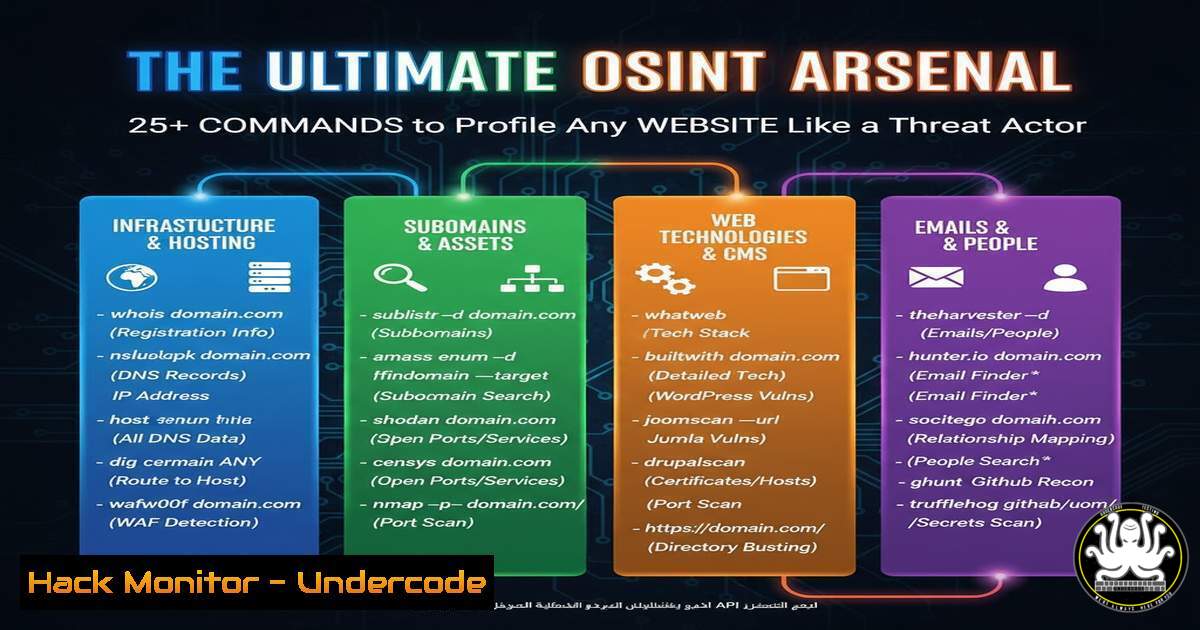
Introduction:
In the digital age, open-source intelligence (OSINT) is the cornerstone of both offensive security operations and proactive defense. Understanding the digital footprint of a target website is the first step in modeling the threat actor’s approach, allowing security teams to identify and remediate exposed information before it can be weaponized. This guide provides a professional toolkit of verified commands to conduct comprehensive website reconnaissance, mirroring the methodologies used by real-world adversaries.
Learning Objectives:
- Master foundational and advanced OSINT techniques for website profiling.
- Utilize command-line tools to uncover hidden directories, subdomains, and server technologies.
- Learn to correlate disparate data points to build a complete threat intelligence picture.
You Should Know:
1. Uncovering the Digital Perimeter with Subdomain Enumeration
Subdomains often host development, staging, or administrative portals that are less secure than the main website. Enumerating them is critical to understanding the full attack surface.
Command:
subfinder -d target.com -o subdomains.txt
amass enum -passive -d target.com -o amass_subs.txt
assetfinder --subs-only target.com | tee assetfinder_subs.txt
sort -u subdomains.txt amass_subs.txt assetfinder_subs.txt > final_subs.txt
Step-by-step guide:
This workflow uses multiple passive reconnaissance tools (subfinder, amass, assetfinder) to cast a wide net for subdomains associated with target.com. Using different tools ensures more comprehensive coverage due to their unique data sources. The final command merges and deduplicates the results into a single, clean list (final_subs.txt). This consolidated list represents the target’s known subdomain infrastructure and is the foundation for further probing.
2. Interrogating Web Servers with Banner Grabbing
Banner grabbing retrieves version information from services like web servers, which can be cross-referenced with known vulnerabilities.
Command:
curl -I https://target.com
nc target.com 80
HEAD / HTTP/1.0
[bash]
[bash]
Step-by-step guide:
The `curl -I` command fetches only the HTTP headers, which often reveal the server software (e.g., Server: nginx/1.18.0), the PHP version, and other framework details. Alternatively, using `netcat` (nc) to connect to port 80 and manually sending a `HEAD` request can yield similar results. This information is crucial for attackers searching for unpatched vulnerabilities in specific software versions.
3. Discovering Hidden Content with Directory Bruteforcing
Websites often have hidden directories and files not linked from the main site, containing backups, configuration files, or administrative interfaces.
Command:
gobuster dir -u https://target.com -w /usr/share/wordlists/dirb/common.txt -t 50 -x php,txt,json,bak
ffuf -u https://target.com/FUZZ -w /usr/share/wordlists/SecLists/Discovery/Web-Content/common.txt -fc 403
Step-by-step guide:
`Gobuster` and `ffuf` are high-speed directory busters. `Gobuster` is instructed to scan `target.com` using a common wordlist (-w), with 50 threads (-t) for speed, and to check for common file extensions (-x). `Ffuf` uses `-fc 403` to filter out common “Forbidden” responses, reducing noise. Any `200 OK` or `301 Moved Permanently` responses should be manually investigated.
4. Analyzing SSL/TLS Certificate Intelligence
SSL certificates contain a wealth of information, including additional hostnames (SANs) that may not be public knowledge.
Command:
openssl s_client -connect target.com:443 < /dev/null 2>/dev/null | openssl x509 -noout -text | grep -A 1 "Subject Alternative Name"
nmap --script ssl-cert -p 443 target.com
Step-by-step guide:
The `openssl s_client` command initiates a connection and retrieves the certificate. The output is piped to `openssl x509` to display its details in text form. We then `grep` for the “Subject Alternative Name” (SAN) field, which lists all domains and subdomains the certificate is valid for. This can reveal internal domains or legacy systems. The `nmap` script provides a more formatted output of the same data.
5. Identifying Associated Technologies with Passive Analysis
Knowing the technology stack (e.g., WordPress, React, a specific CDN) helps tailor further attacks and search for technology-specific vulnerabilities.
Command:
whatweb -v https://target.com
wappalyzer target.com
 Browser Extension: Wappalyzer
Step-by-step guide:
`Whatweb` is a command-line tool that analyzes a website and outputs the technologies it detects, from JavaScript libraries and CMS platforms to web servers and analytics trackers. The `-v` flag provides verbose output. For a more user-friendly experience, the Wappalyzer browser extension automatically detects and displays the technology stack when you visit a site in your browser.
6. Harvesting Historical Data from Public Archives
The Wayback Machine archives historical versions of websites, which can reveal old, exposed endpoints, comments in source code, or retired login forms.
Command:
waybackurls target.com | tee wayback.txt
grep -E ".(js|php|asp|xml|config)" wayback.txt > interesting_urls.txt
curl -s "https://web.archive.org/cdx/search/cdx?url=target.com/&output=text&fl=original&collapse=urlkey" | sort -u
Step-by-step guide:
`waybackurls` is a simple tool to fetch all archived URLs for a domain from the Wayback Machine. The output is saved and then filtered with `grep` to find URLs with interesting file extensions, as these often contain logic or configuration data. The final `curl` command is an alternative method to query the Wayback CDX API directly, providing a raw list of captured URLs.
7. Extracting Intelligence from JavaScript Files
Client-side JavaScript files can inadvertently leak API keys, internal endpoints, and hardcoded credentials.
Command:
subjs -i final_subs.txt | tee all_js_files.txt
cat all_js_files.txt | httpx -status-code | grep "200" | awk '{print $1}' > live_js_files.txt
for url in $(cat live_js_files.txt); do curl -s $url | grep -oE "[a-zA-Z0-9./?=<em>-]api[a-zA-Z0-9./?=</em>-]" ; done | sort -u
Step-by-step guide:
First, `subjs` is used to find all JavaScript files linked from the live subdomains in final_subs.txt. `Httpx` then checks which of these JS files are accessible, returning a list of live URLs. Finally, a `for` loop fetches each file and uses `grep` to search for strings containing “api”, which could reveal internal or third-party API endpoints used by the application.
What Undercode Say:
- The barrier to entry for sophisticated OSINT is lower than ever, with powerful, automated tools available to anyone. Defenders must assume this reconnaissance is being performed against them constantly.
- True security lies not in obscurity but in resilience. The focus should be on minimizing the actionable intelligence gleaned from these techniques by hardening systems and purging unnecessary information leaks.
The analysis reveals a fundamental shift in the cyber landscape: reconnaissance is automated, continuous, and often indistinguishable from normal traffic. Defensive strategies can no longer rely on hiding but must pivot to a model of “assumed breach” from an information perspective. Every piece of data publicly available about your digital estate is a potential pivot point for an attacker. Proactively using these same OSINT tools against your own organization is no longer just a pen-testing activity; it is a critical component of continuous security monitoring and threat exposure management. By knowing what the adversary knows, you can prioritize remediation efforts effectively.
Prediction:
The future of website OSINT will be dominated by AI-driven correlation engines that automatically stitch together data from these disparate tools, creating dynamic, real-time attack surface maps. Threat actors will use machine learning to identify subtle patterns and anomalies in archived data or JavaScript files that human analysts would miss, leading to faster, more targeted initial access. Defensively, AI will be crucial for autonomously monitoring the public-facing digital footprint and alerting on new, potentially malicious exposures as they appear, turning the tables on the attacker’s mindset.
🎯Let’s Practice For Free:
IT/Security Reporter URL:
Reported By: Abhirup Konwar – Hackers Feeds
Extra Hub: Undercode MoN
Basic Verification: Pass ✅


