Listen to this Post
Introduction:
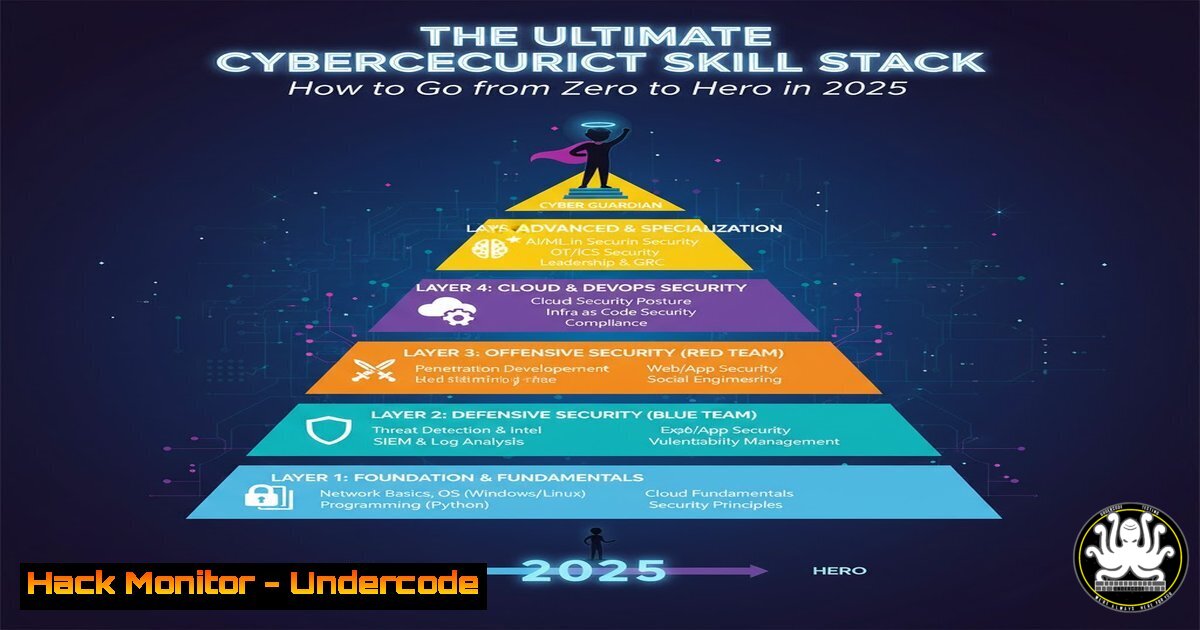
The cybersecurity landscape is evolving at a breakneck pace, demanding a new breed of professionals who are not just theoretically sound but also relentlessly practical. Building a successful career now hinges on a structured approach to mastering in-demand technical skills, from foundational IT concepts to advanced offensive security techniques. This guide provides a actionable blueprint for assembling the essential skill stack required to thrive in the dynamic field of cybersecurity.
Learning Objectives:
- Understand the core technical domains, including Operating Systems, Networking, and Cloud security, that form the foundation of any cybersecurity role.
- Learn practical, command-level skills for system enumeration, vulnerability assessment, and network analysis.
- Develop a roadmap for continuous learning through hands-on labs, certification paths, and active engagement with the security community.
You Should Know:
1. Mastering the Fundamentals: OS and Networking
Before attempting to exploit systems, you must first understand how they operate. A deep familiarity with both Linux and Windows environments is non-negotiable. This includes navigating the file system, managing processes, and understanding user permissions. Similarly, grasping networking fundamentals—TCP/IP, DNS, HTTP/S, and subnetting—is critical for analyzing traffic and identifying misconfigurations.
Step‑by‑step guide explaining what this does and how to use it.
Linux Command Line Proficiency: Begin with Kali Linux or a Ubuntu VM.
`ls -la` – List all files and directories, including hidden ones, with permissions.
`find / -type f -perm -4000 2>/dev/null` – Find all SUID files, a common privilege escalation vector.
`ps aux | grep root` – View all running processes and filter for those running as root.
`netstat -tuln` – Display all listening ports and the associated services.
Windows Command Line and PowerShell:
`whoami /priv` – Display the privileges of the current user.
`Get-NetTCPConnection | where {$_.State -eq “Listen”}` (PowerShell) – List listening network ports.
`systeminfo` – Gather detailed system configuration information.
2. The Art of Reconnaissance and Enumeration
The first phase of any security assessment is information gathering. Active and passive reconnaissance involves collecting data about the target without triggering alarms. This data is then used to build an attack surface, identifying potential entry points like open ports, running services, and associated subdomains.
Step‑by‑step guide explaining what this does and how to use it.
Passive Reconnaissance with `whois` and `theHarvester`:
1. `whois target.com` – Query public databases for domain registration information, including the owner and name servers.
2. `theHarvester -d target.com -b google` – Use this tool to gather emails, subdomains, and hosts from public sources like search engines.
Active Scanning with `nmap`:
1. `nmap -sS -A -O target_ip` – Perform a TCP SYN stealth scan with OS and version detection.
2. `nmap -sU -p 53,67,68,161 target_ip` – Launch a UDP scan against common service ports.
3. `nmap –script vuln target_ip` – Run the Nmap Scripting Engine (NSE) to check for known vulnerabilities.
3. Vulnerability Assessment and Exploitation
Once services are enumerated, the next step is to identify specific vulnerabilities and test their exploitability. This involves using automated scanners and manual techniques to find weaknesses in applications and systems, then leveraging frameworks like Metasploit to gain initial access.
Step‑by‑step guide explaining what this does and how to use it.
Web Application Scanning with `nikto`:
nikto -h http://target.com` - A comprehensive web server scanner that checks for dangerous files, outdated servers, and specific version problems.metasploit`:
<h2 style="color: yellow;"> Exploitation with
1. `msfconsole` – Launch the Metasploit framework.
2. `search exploit_name` – Search for an exploit module.
3. `use exploit/path/to/module` – Select the module.
4. `set RHOSTS target_ip` – Set the target host.
5. `set PAYLOAD windows/x64/meterpreter/reverse_tcp` – Set the payload.
6. `exploit` – Execute the exploit to gain a shell session.
4. Post-Exploitation and Privilege Escalation
Gaining a foothold is only the beginning. Post-exploitation involves maintaining access, moving laterally through the network, and most critically, escalating privileges to gain full control of the system. This often involves exploiting misconfigured file permissions, weak service configurations, or kernel vulnerabilities.
Step‑by‑step guide explaining what this does and how to use it.
Windows Privilege Escalation Checks:
`winPEAS.exe` – Run this powerful script to automatically enumerate common privilege escalation paths.
Check for unquoted service paths: `wmic service get name,displayname,pathname,startmode | findstr /i “Auto” | findstr /i /v “C:\Windows\\” | findstr /i /v “””`
Linux Privilege Escalation Checks:
`linpeas.sh` – The Linux equivalent, a comprehensive enumeration script.
Check for sudo permissions: `sudo -l`
Check for capabilities: `getcap -r / 2>/dev/null`
5. API Security and Cloud Hardening
Modern applications are built on APIs and hosted in the cloud, making these areas prime targets. Understanding how to secure REST APIs and harden cloud configurations (especially in AWS, Azure, and GCP) is an essential skill. Common issues include broken object-level authorization, excessive data exposure, and misconfigured S3 buckets or IAM roles.
Step‑by‑step guide explaining what this does and how to use it.
Testing API Endpoints with `curl`:
`curl -H “Authorization: Bearer
`curl -X PUT https://api.target.com/v1/users/123 -d ‘{“email”:”[email protected]”}’` – Test for insecure direct object references (IDOR) by trying to change another user’s data.
AWS S3 Bucket Misconfiguration Check:
Use the AWS CLI: `aws s3 ls s3://misconfigured-bucket/` – If this command returns a list without authentication, the bucket is public.
Mitigation: Always set the bucket policy to deny public access and use IAM roles for granular control.
- The Human Element: Social Engineering and Phishing Mitigation
Technology is only one part of the defense. Social engineering remains a highly effective attack vector. Security professionals must understand these tactics to defend against them, which includes implementing technical controls and conducting user awareness training.
Step‑by‑step guide explaining what this does and how to use it.
Setting up DMARC, DKIM, and SPF Records: These DNS records help prevent email spoofing and phishing.
1. SPF Record (TXT): `”v=spf1 ip4:192.0.2.0/24 include:_spf.google.com ~all”`
2. DMARC Record (TXT): `”v=DMARC1; p=quarantine; rua=mailto:[email protected]”`
Conducting a Phishing Simulation: Use tools like GoPhish to create and send simulated phishing emails to employees, tracking who clicks on links or enters credentials to measure awareness.
7. Continuous Learning: Labs and Certifications
The learning never stops. The field demands constant skill refinement. Engage with hands-on platforms and pursue structured certifications to validate your knowledge and stay current with emerging threats.
Step‑by‑step guide explaining what this does and how to use it.
Hands-On Practice Platforms:
- TryHackMe / Hack The Box: Start with beginner-friendly learning paths on TryHackMe, then progress to active machines on Hack The Box.
- PortSwigger Web Security Academy: Provides free, in-browser labs for every major web vulnerability.
Certification Path:
Beginner: CompTIA Security+
Technical: GIAC Penetration Tester (GPEN) or Offensive Security Certified Professional (OSCP)
Cloud: Certified AWS Security Specialty or Microsoft Certified: Azure Security Engineer Associate
What Undercode Say:
- A theoretical certificate is useless without the practical muscle memory to back it up. The most sought-after professionals can transition from a `nmap` command to a Python exploit script to a cloud misconfiguration analysis seamlessly.
- The community is your greatest asset. Engaging with platforms like TryHackMe and following security researchers on LinkedIn, as highlighted in the original post, provides not just knowledge, but context and real-world application.
The original post emphasizes a journey of passion and continuous learning, which is the absolute core of a successful cybersecurity career. The technical skills listed are the tools, but the mindset—a persistent curiosity and a desire to understand how systems break—is the engine. This approach moves beyond checklist-based security and cultivates the analytical thinking required to anticipate novel attack vectors. The integration of cloud and API security is no longer optional; it is fundamental, as the attack surface has permanently shifted. Building this “skill stack” systematically ensures you are not just prepared for today’s threats, but are also adaptable enough for tomorrow’s.
Prediction:
The convergence of AI-powered security tools and AI-augmented cyberattacks will define the next five years. Defenders will increasingly rely on AI for behavioral analysis and threat prediction, while attackers will use it to generate sophisticated phishing content, automate vulnerability discovery, and create adaptive malware. The professionals who will thrive are those who understand both the offensive and defensive applications of these technologies, blending deep technical expertise with strategic oversight to protect increasingly complex digital ecosystems.
🎯Let’s Practice For Free:
IT/Security Reporter URL:
Reported By: Fekria Friaa – Hackers Feeds
Extra Hub: Undercode MoN
Basic Verification: Pass ✅


