Listen to this Post
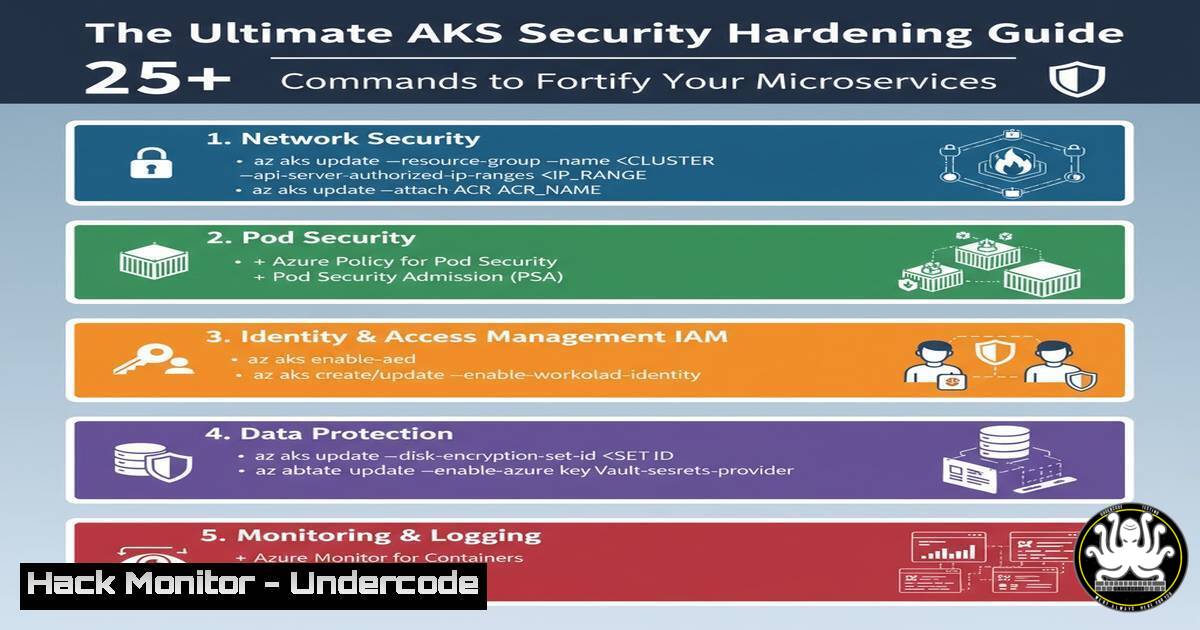
Introduction:
The adoption of Azure Kubernetes Service (AKS) for microservices architectures is accelerating, but this expanded attack surface demands rigorous security practices. A single misconfiguration in the complex interplay of containers, networks, and cloud services can lead to catastrophic data breaches. This guide provides actionable, command-level security hardening for your AKS environment.
Learning Objectives:
- Master essential `kubectl` and `az cli` commands for cluster security assessment and configuration.
- Implement network security, identity and access management (IAM), and secret protection controls.
- Establish continuous monitoring, vulnerability scanning, and Pod Security Standard enforcement.
You Should Know:
1. Cluster Security Baseline & Compliance Scanning
Verified Linux/Windows/Cybersecurity command list or code snippet or tutorials related to article
Step‑by‑step guide explaining what this does and how to use it.
`az aks get-credentials –resource-group myResourceGroup –name myAKSCluster`
What this does & How to use: This command merges the credentials for your AKS cluster into your local `~/.kube/config` file, allowing you to use `kubectl` to interact with your cluster. Always verify you are targeting the correct cluster first using kubectl config current-context.
`kubectl get nodes -o wide`
What this does & How to use: This provides a list of all worker nodes in your cluster with their IP addresses and status. Use this to quickly identify any unhealthy or unscheduled nodes that could indicate a security or resource issue.
`kubectl get pods –all-namespaces`
What this does & How to use: This command lists all pods across every namespace in the cluster. It is the first step in auditing what is actually running, looking for suspicious pods or services in unexpected namespaces.
2. Network Policy Enforcement for Microservice Isolation
Verified Linux/Windows/Cybersecurity command or code snippet related to article
Step‑by‑step guide explaining what this does and how to use it.
`az aks show –resource-group myResourceGroup –name myAKSCluster –query networkProfile.networkPolicy`
What this does & How to use: This Azure CLI command checks if a network policy engine (like Azure Network Policy Manager or Calico) is enabled on your AKS cluster. Network policies are essential for enforcing a zero-trust network model between microservices.
<
h2 style=”color: yellow;”>kubectl apply -f - <<EOF</h2>
<h2 style="color: yellow;">apiVersion: networking.k8s.io/v1</h2>
<h2 style="color: yellow;">kind: NetworkPolicy</h2>
<h2 style="color: yellow;">metadata:</h2>
<h2 style="color: yellow;">name: deny-all</h2>
<h2 style="color: yellow;">spec:</h2>
<h2 style="color: yellow;">podSelector: {}</h2>
<h2 style="color: yellow;">policyTypes:</h2>
- Ingress
- Egress
<h2 style="color: yellow;">EOF
What this does & How to use: This is a foundational “default-deny” policy. It applies to all pods and blocks all incoming (ingress) and outgoing (egress) traffic. You must then create more specific policies to allow necessary communication, drastically reducing the attack surface.
3. Microsoft Entra ID Integration and RBAC Configuration
`az aks show –resource-group myResourceGroup –name myAKSCluster –query aadProfile`
What this does & How to use: Verifies that your AKS cluster is integrated with Microsoft Entra ID (Azure AD). This is critical for using organizational identities for authentication instead of static service accounts or certificates.
`kubectl get clusterroles,clusterrolebindings –all-namespaces`
What this does & How to use: Lists all cluster-wide roles and the bindings that associate them with users or service accounts. Audit these regularly to ensure the principle of least privilege is maintained and no overly permissive roles exist.
`kubectl auth can-i create pods –as=system:serviceaccount:default:my-sa`
What this does & How to use: This command lets you check if a specific service account (or user) has permissions to perform an action. It’s invaluable for testing and validating your RBAC rules before deployment.
4. Secret Management with Azure Key Vault
`az keyvault create –name “MyKeyVault” –resource-group “myResourceGroup” –location “EastUS”`
What this does & How to use: Creates an Azure Key Vault instance for securely storing secrets, keys, and certificates. Never store secrets in plain text within your container images or Kubernetes YAML files.
`kubectl create secret generic my-secret –from-literal=password=’MyPassword!’`
What this does & How to use: While not for production secrets, this creates a generic secret in Kubernetes. It’s a basic method but highlights that secrets in Kubernetes are only base64 encoded, not encrypted, by default. For production, use the Azure Key Vault Provider for Secrets Store CSI Driver.
5. Container Image Integrity and Vulnerability Scanning
`az acr repository list –name myContainerRegistry –output table`
What this does & How to use: Lists all repositories in your Azure Container Registry (ACR). This helps you inventory all container images that are being deployed to your cluster.
`az acr task create –name scan-image –registry myContainerRegistry –context https://github.com/my-repo.git –file Dockerfile –image my-app:{{.Run.ID}} –git-access-token myToken –arg MY_VAR=value`
What this does & How to use: Creates an ACR Task that automatically builds and scans a container image for vulnerabilities whenever code is pushed to a Git repository. This integrates security directly into your CI/CD pipeline.
`trivy image my-app:latest`
What this does & How to use: Trivy is a popular open-source scanner. This command scans a local container image for known vulnerabilities in its operating system packages and application dependencies. Run this in your development and pipeline environments.
6. Pod Security Context and Policy Enforcement
<
h2 style=”color: yellow;”>kubectl apply -f - <<EOF</h2>
<h2 style="color: yellow;">apiVersion: policy/v1</h2>
<h2 style="color: yellow;">kind: PodSecurityStandard</h2>
<h2 style="color: yellow;">metadata:</h2>
<h2 style="color: yellow;">name: restricted</h2>
<h2 style="color: yellow;">spec:</h2>
<h2 style="color: yellow;">privileged: false</h2>
<h2 style="color: yellow;">allowPrivilegeEscalation: false</h2>
<h2 style="color: yellow;">requiredDropCapabilities:</h2>
- ALL
<h2 style="color: yellow;">runAsNonRoot: true</h2>
<h2 style="color: yellow;">seLinux:</h2>
<h2 style="color: yellow;">rule: RunAsAny</h2>
<h2 style="color: yellow;">supplementalGroups:</h2>
<h2 style="color: yellow;">rule: 'MustRunAs'</h2>
<h2 style="color: yellow;">ranges:</h2>
- min: 1
<h2 style="color: yellow;">max: 65535</h2>
<h2 style="color: yellow;">fsGroup:</h2>
<h2 style="color: yellow;">rule: 'MustRunAs'</h2>
<h2 style="color: yellow;">ranges:</h2>
- min: 1
<h2 style="color: yellow;">max: 65535</h2>
<h2 style="color: yellow;">EOF
What this does & How to use: This defines a restrictive Pod Security Standard (a replacement for the deprecated PodSecurityPolicy). It prevents pods from running as root, drops all Linux capabilities, and more. Apply this via a Pod Security Admission controller.
`kubectl get pods –all-namespaces -o jsonpath='{.items[].spec.containers[].securityContext}’ | jq .`
What this does & How to use: This complex command extracts the securityContext settings for all containers in all pods. Use `jq` to format the JSON output for auditing, ensuring pods are running with non-root users and read-only root filesystems where possible.
- Audit Logging and Threat Detection with Azure Monitor
`az monitor diagnostic-settings create –resource myAKSCluster –name myMonitoring –workspace myLogAnalyticsWorkspace –logs [category=category-enabled] –metrics [category=category-enabled]`
What this does & How to use: This command configures Azure Monitor to collect diagnostic logs and metrics from your AKS cluster and send them to a Log Analytics Workspace for centralized analysis, alerting, and threat hunting.
`kubectl logs deployment/my-app –previous`
What this does & How to use: Fetches the logs from a previously crashed pod instance. This is crucial for debugging why a pod is failing, which can sometimes be due to security controls like a failing liveness probe or a permission error.
`kubectl top pods`
What this does & How to use: Displays the current CPU and memory usage of pods. Abnormally high resource usage can be a sign of a compromised pod running crypto-mining software or other malicious activity.
What Undercode Say:
- Identity is the New Perimeter: In a microservices architecture, the network perimeter is porous. The primary security control shifts to robust identity and access management (IAM) using Microsoft Entra ID and precise Kubernetes RBAC. A single over-permissioned service account is a higher risk than an open port.
- Configuration Drift is the Silent Killer: The declarative nature of Kubernetes is a double-edged sword. An infrastructure-as-code (IaC) deployment can be perfectly secure at launch, but manual `kubectl edit` commands or overlooked API updates can introduce critical misconfigurations over time. Automated compliance scanning with tools like `kubectl bench` for CIS benchmarks is non-negotiable.
The analysis reveals that the complexity of AKS is its own worst enemy. While the provided architecture diagram highlights scalability and management ease, it glosses over the hundreds of security decisions required. The integration points—between AKS and Entra ID, ACR, and Key Vault—are where most security gaps manifest. Future attacks will not just exploit a single CVE but will chain together minor misconfigurations across these services to achieve a full cluster compromise. Relying solely on Azure’s “managed” service aspects creates a false sense of security; the shared responsibility model means the configuration of the workloads, network policies, and secrets falls squarely on the user.
Prediction:
The convergence of AI-driven attack toolkits with the inherent complexity of cloud-native environments will lead to a new class of automated penetration testing tools that can actively probe and exploit AKS misconfigurations at scale. We predict a significant rise in “supply chain” attacks targeting not just container images but the entire CI/CD pipeline, specifically tools like Helm and Azure Pipelines, to inject malicious code into deployment artifacts. Furthermore, as service mesh adoption (e.g., Istio, Linkerd) grows within AKS, they will become a primary attack vector, with threat actors targeting their control planes to manipulate traffic routing and intercept sensitive data.
🎯Let’s Practice For Free:
IT/Security Reporter URL:
Reported By: Cloudairy %F0%9D%97%A0%F0%9D%97%B6%F0%9D%97%B0%F0%9D%97%BF%F0%9D%97%BC%F0%9D%98%80%F0%9D%97%B2%F0%9D%97%BF%F0%9D%98%83%F0%9D%97%B6%F0%9D%97%B0%F0%9D%97%B2 – Hackers Feeds
Extra Hub: Undercode MoN
Basic Verification: Pass ✅


