
Listen to this Post
Introduction:
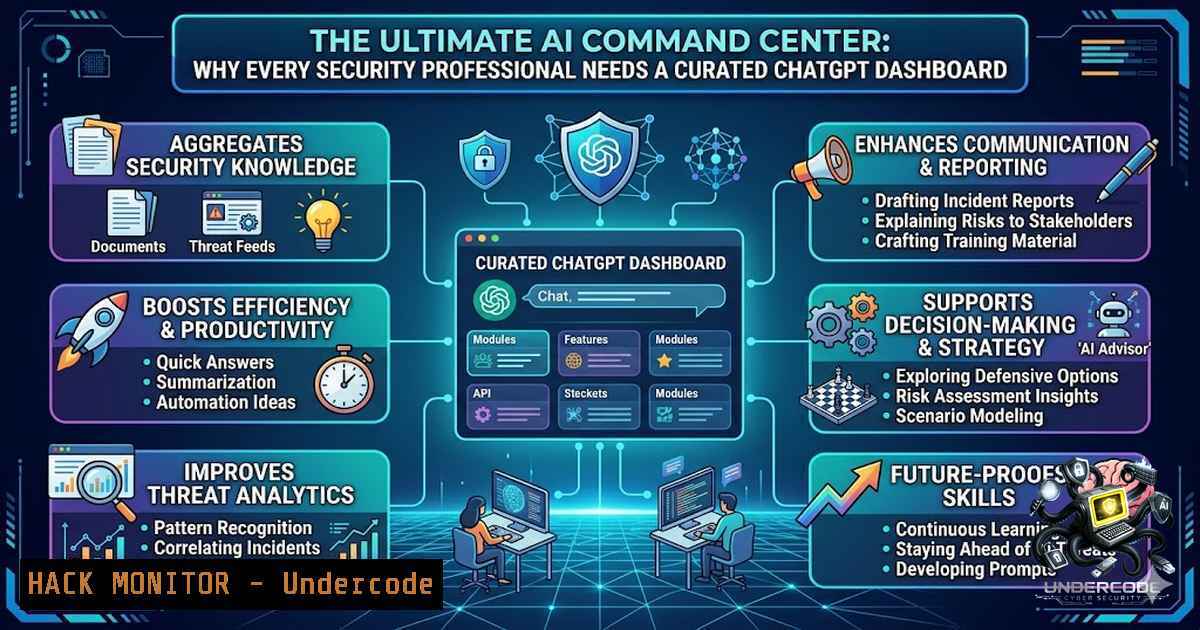
The rapid proliferation of artificial intelligence tools has created a paradoxical challenge for cybersecurity professionals: while AI promises to revolutionize threat detection and incident response, the sheer volume of platforms, APIs, and prompt engineering techniques has fragmented knowledge into countless browser tabs. A curated AI dashboard consolidates prompt engineering guides, API security documentation, privacy resources, and tool directories into a single, organized workspace—transforming chaotic research into streamlined, actionable intelligence. For analysts, this isn’t just about convenience; it’s about operational efficiency and maintaining security posture in an AI-driven landscape.
Learning Objectives:
- Master the architecture and configuration of a centralized AI research dashboard for cybersecurity workflows
- Implement API security best practices when integrating ChatGPT and other LLMs into security operations
- Apply prompt engineering techniques to extract threat intelligence and automate vulnerability assessments
- Building Your AI Research Dashboard: A Step‑by‑Step Implementation Guide
A well-structured AI dashboard serves as the single pane of glass for all AI-related research, training, and operational tasks. Start.me, a customizable personal start page, enables users to consolidate bookmarks, RSS feeds, widgets, and dynamic content into a unified interface. This approach eliminates the cognitive load of tab-hopping and ensures that critical resources—from OpenAI’s API documentation to privacy policy updates—are always one click away.
Step 1: Platform Selection and Initial Setup
Choose a dashboard platform that supports widgets, RSS integration, and custom bookmarks. Start.me is optimized for Chrome, Edge, and Safari, making it accessible across most enterprise environments. Create an account and configure the basic layout with categories such as “Prompt Engineering,” “API Security,” “Privacy & Compliance,” and “Tool Directories.”
Step 2: Curating Resource Feeds
Integrate RSS feeds from trusted cybersecurity blogs, OpenAI’s official blog, and AI security research publications. This ensures that the dashboard automatically updates with the latest threat intelligence and AI developments. Configure widgets for quick access to ChatGPT, Claude, Gemini, and other LLM interfaces.
Step 3: Embedding Interactive Tools
Leverage the dashboard’s widget capabilities to embed live search tools, API testing consoles, and real-time status monitors for AI services. This transforms the dashboard from a static bookmark collection into an active command center for AI operations.
- Securing Your AI Pipeline: API Key Management and Access Controls
The integration of ChatGPT and other LLMs into security workflows introduces significant API security considerations. Exposed API keys remain one of the most common vectors for AI-related data breaches, yet many organizations treat them as afterthoughts.
Step 1: Environment Variable Hardening
Never hardcode API keys in application code or configuration files. Use environment variables or secrets management tools like HashiCorp Vault or AWS Secrets Manager. On Linux systems, export keys using:
export OPENAI_API_KEY="your-key-here"
For persistent storage, add the export command to `~/.bashrc` or ~/.zshrc. On Windows, use:
$env:OPENAI_API_KEY="your-key-here"
Step 2: Implementing Rate Limiting and Usage Monitoring
Configure rate limiting to prevent abuse and unexpected costs. OpenAI’s API provides usage tiers; implement middleware to track request counts and enforce organizational limits. Use the dashboard to monitor usage patterns and detect anomalies that may indicate compromised credentials.
Step 3: Regular Key Rotation and Auditing
Establish a policy for rotating API keys every 30–90 days. Audit API access logs weekly to identify unauthorized usage. Integrate these logs into your SIEM (Security Information and Event Management) system for automated alerting.
3. Prompt Engineering for Security Operations
Prompt engineering is the art of crafting inputs that elicit precise, actionable outputs from LLMs. In cybersecurity, this translates to extracting threat intelligence, generating detection rules, and automating report writing. A curated dashboard should include a dedicated section for prompt templates categorized by use case.
Step 1: Structuring Prompts for Threat Intelligence
Effective prompts follow the “Role + Context + Request + Questions” framework. For example:
Role: You are a senior incident responder.
Context: We are investigating a potential ransomware infection in a Windows domain environment.
Request: Generate a list of forensic artifacts to collect and analyze.
Questions: What registry keys, event logs, and file system indicators should we prioritize?
Step 2: Automating Vulnerability Assessments
Use ChatGPT to parse vulnerability scan outputs and generate prioritized remediation plans. Feed the model with CVE data and asset criticality scores, then request a ranked action list. Store successful prompts in the dashboard’s knowledge base for team-wide reuse.
Step 3: Refining Outputs with Iterative Prompting
Treat prompt engineering as an iterative process. If the initial output is too generic, refine the prompt with additional constraints:
Provide the response in a structured JSON format with fields: "vulnerability_id", "severity", "remediation_steps", and "estimated_effort_hours".
4. Privacy and Compliance in the AI Era
Data privacy regulations—GDPR, CCPA, HIPAA—impose strict requirements on how organizations handle data submitted to AI platforms. Many security professionals inadvertently expose sensitive information by pasting logs, code, or incident reports into public ChatGPT instances.
Step 1: Implementing Data Sanitization Workflows
Before submitting any data to an LLM, sanitize it to remove PII (Personally Identifiable Information), credentials, and proprietary business logic. Use regular expressions or dedicated anonymization libraries:
import re
def sanitize_log(log_entry):
 Remove email addresses
log_entry = re.sub(r'\b[A-Za-z0-9._%+-]+@[A-Za-z0-9.-]+.[A-Z|a-z]{2,}\b', '[bash]', log_entry)
 Remove IP addresses
log_entry = re.sub(r'\b(?:[0-9]{1,3}.){3}[0-9]{1,3}\b', '[bash]', log_entry)
return log_entry
Step 2: Choosing Enterprise-Grade AI Solutions
For sensitive workflows, prefer enterprise versions of AI tools that offer data isolation, on-premises deployment options, and compliance certifications. ChatGPT Enterprise, for example, provides workspace analytics and enhanced admin controls.
Step 3: Building a Privacy Policy Dashboard Widget
Include a widget that links to your organization’s AI usage policy, data retention schedules, and incident response procedures for AI-related data breaches. This ensures that the dashboard itself reinforces compliance awareness.
5. AI Tool Directories and Continuous Learning
The AI landscape evolves at breakneck speed. New models, frameworks, and security vulnerabilities emerge weekly. A curated dashboard must include dynamic directories that aggregate the latest tools, training courses, and research papers.
Step 1: Integrating AI Tool Aggregators
Add widgets that pull from AI tool directories such as ToolNavs, which categorize tools by use case—intelligent customer service, marketing copywriting, academic research, software development, and knowledge management. This transforms the dashboard into a discovery engine for emerging technologies.
Step 2: Curating Training and Certification Resources
Include links to OpenAI Academy, cybersecurity training platforms, and AI security certification programs. Organize these by skill level—beginner, intermediate, advanced—and track completion progress within the dashboard.
Step 3: Establishing a Knowledge Sharing Culture
Encourage team members to submit new resources, prompt templates, and lessons learned to the dashboard. This collective intelligence approach ensures that the dashboard evolves with the team’s needs and stays ahead of emerging threats.
6. Linux and Windows Commands for AI Integration
Integrating AI tools into security operations often requires command-line interaction. Below are verified commands for common tasks across Linux and Windows environments.
Linux: Automating API Calls with cURL
!/bin/bash
 Send a prompt to ChatGPT API and save the response
API_KEY="your-api-key"
PROMPT="Analyze the following log snippet for indicators of compromise: [INSERT LOG]"
curl https://api.openai.com/v1/chat/completions \
-H "Content-Type: application/json" \
-H "Authorization: Bearer $API_KEY" \
-d '{
"model": "gpt-4",
"messages": [{"role": "user", "content": "'"$PROMPT"'"}]
}' > response.json
Windows: PowerShell API Integration
$apiKey = "your-api-key"
$prompt = "Generate a YARA rule for detecting Cobalt Strike beacons."
$body = @{
model = "gpt-4"
messages = @(@{role = "user"; content = $prompt})
} | ConvertTo-Json
Invoke-RestMethod -Uri "https://api.openai.com/v1/chat/completions" `
-Method Post `
-Headers @{"Authorization" = "Bearer $apiKey"; "Content-Type" = "application/json"} `
-Body $body
Linux: Monitoring API Usage with jq
 Parse the response to extract the assistant's reply
cat response.json | jq '.choices[bash].message.content'
What Undercode Say:
- Key Takeaway 1: Centralized AI dashboards are not merely organizational tools—they are force multipliers for security operations, reducing cognitive load and accelerating threat intelligence workflows.
- Key Takeaway 2: API security and data privacy must be embedded into every layer of AI integration, from environment variable management to prompt sanitization, to prevent AI tools from becoming attack vectors.
Analysis: The consolidation of AI resources into a single dashboard represents a paradigm shift in how security professionals approach continuous learning and operational efficiency. As AI models become more powerful and pervasive, the ability to rapidly access and apply the latest research, tools, and best practices will distinguish effective security teams from those overwhelmed by information overload. However, this convenience introduces new risks: centralized dashboards could become single points of failure if not properly secured, and the ease of AI access may encourage over-reliance on automated outputs without human validation. Organizations must balance the efficiency gains of AI dashboards with rigorous governance, regular security audits, and a culture of critical thinking that treats AI as an assistant, not an oracle.
Prediction:
- +1 The proliferation of curated AI dashboards will drive the development of specialized “AI Security Analyst” roles, combining prompt engineering expertise with traditional cybersecurity skills.
- +1 Open-source dashboard frameworks will emerge, enabling organizations to build custom AI command centers tailored to their specific threat models and compliance requirements.
- -1 The convenience of centralized AI dashboards may lead to complacency in API key management, resulting in a wave of credential exposure incidents unless organizations implement mandatory rotation and monitoring policies.
- +1 AI dashboards will evolve into collaborative platforms, integrating real-time threat feeds and enabling distributed teams to share intelligence instantaneously, much like modern SIEM systems.
- -1 Regulatory scrutiny will intensify as dashboards aggregate data from multiple AI providers, raising questions about data sovereignty and cross-border data transfers under frameworks like GDPR and the EU AI Act.
▶️ Related Video (80% Match):
🎯Let’s Practice For Free:
🎓 Live Courses & Certifications:
Join Undercode Academy for Verified Certifications
🚀 Request a Custom Project:
Secure, high-velocity infrastructure and disruptive technological engineering. Contact our engineering team for high-tier development and proprietary systems:
[email protected]
💎 Smart Architecture | 🛡️ Secure by Design | ⭐ Trusted by Thousands
IT/Security Reporter URL:
Reported By: Syed Muneeb – Hackers Feeds
Extra Hub: Undercode MoN
Basic Verification: Pass ✅


