
Listen to this Post
Introduction:
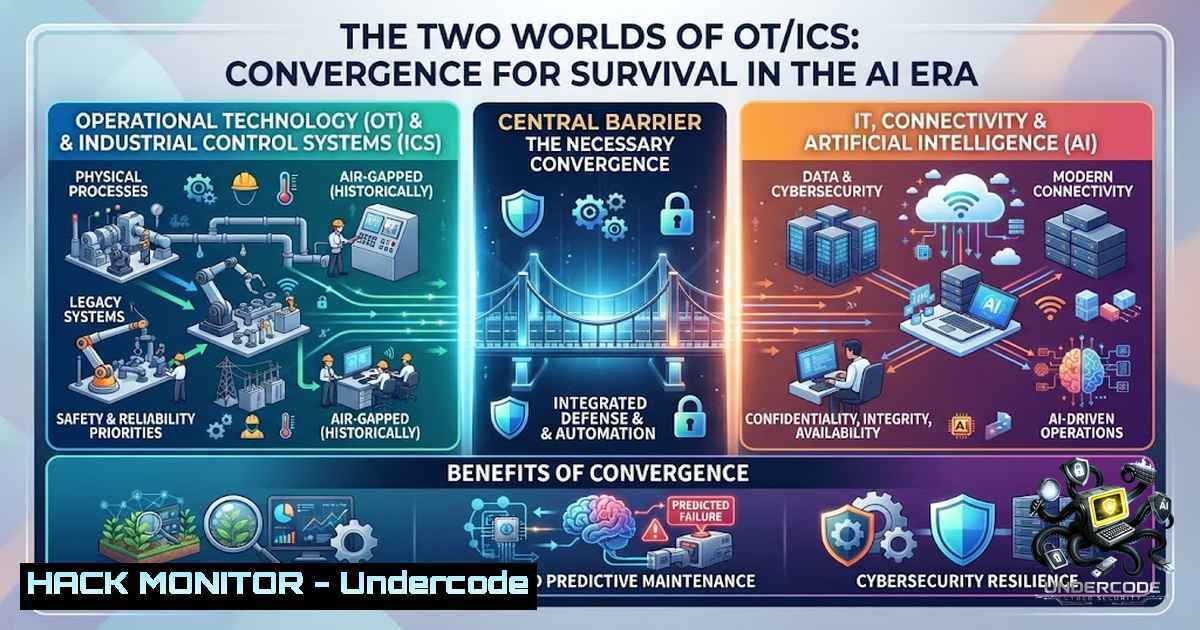
Operational Technology (OT) and Industrial Control Systems (ICS) form the backbone of critical infrastructure, yet they are often protected by professionals who speak entirely different technical languages. The “Automation” expert sees a PLC as a tool to ensure process continuity and efficiency, while the “Security” expert views the same device as a potential entry point for catastrophic failure. This fundamental dichotomy creates a chasm that, unless bridged, leaves modern industrial environments vulnerable to both legacy exploits and emergent AI-driven threats, as highlighted by a seasoned architect who lived through the raw, undocumented frontier of OT security.
Learning Objectives:
- Understand the inherent cultural and technical conflict between Automation engineers and Security professionals in OT/ICS environments.
- Identify the legacy challenges of isolated, undocumented, and unpatched ICS networks that persist in modern industry.
- Explore the new threat landscape introduced by AI connections, autonomous automation, and virtualized PLCs (vPLC).
- Master a combined approach to ICS/OT security that leverages both process knowledge and attack vectors.
- Learn practical command-line and configuration techniques to audit, monitor, and harden industrial networks.
You Should Know:
- The Legacy of Isolation: The “Make It Work” Mentality and its Security Costs
In the early days of OT, as described by industry veterans who lived in remote oil stations, the primary objective was purely functional: “make four turbines work.” This environment was brutal in its simplicity—networks were physically isolated, completely air-gapped from the IT world, and documentation was virtually non-existent. The focus was on high availability and reliability, not confidentiality or integrity. Security was an afterthought, often seen as a hindrance to the “make it work” imperative.
This legacy persists today in many brownfield sites. You will find shadow devices—unauthorized switches or serial-to-Ethernet converters installed by engineers to bypass a failing network port—that aren’t in any asset inventory. You will discover PLCs running firmware from the early 2000s that haven’t been patched because a reboot could cost millions in downtime. To audit such an environment, a Security professional must start with reconnaissance, but must do so passively to avoid disrupting critical processes.
Step‑by‑Step Guide to Passive Asset Discovery:
- Step 1: Establish a Mirror Port. Configure a managed switch to mirror the trunk port connecting to your SCADA network. This allows you to capture traffic without injecting any packets.
- Step 2: Deploy a Passive IDS. On a Linux machine (Ubuntu 22.04 LTS), install a tool like Zeek (formerly Bro) for passive analysis. Use the command:
sudo apt-get install zeek. Configure Zeek to listen on the mirror interface (e.g.,eth1) by editing the `node.cfg` file. - Step 3: Capture Traffic with tcpdump. To get a raw capture for offline analysis, use:
sudo tcpdump -i eth1 -s 0 -w capture.pcap. This is less intrusive than an active scan like Nmap. - Step 4: Analyze with GRASSMARLIN. Use the NSA’s GRASSMARLIN tool to generate a network topology map from the `capture.pcap` file. This reveals “shadow devices” by identifying IPs that communicate but aren’t documented.
- Step 5: Inventory Check with Nmap (Caution). If you have a maintenance window, a limited version of Nmap can be run:
sudo nmap -sV -p 502,44818,102 --open 192.168.1.0/24. The `-sV` flag identifies service versions, but you must avoid the `-A` flag (aggressive) or `–script=default` which can crash legacy devices with malformed packets.
- The Modern Chaos: AI, vPLC, and the Expansion of the Attack Surface
The era of pure isolation is ending. The modern ICS stack is evolving to incorporate AI connections for predictive maintenance, autonomous agents for process optimization, and the virtualization of PLCs (vPLC) where software replaces hardware. This convergence reduces the “air gap” and introduces a new wave of vulnerabilities. While vPLCs offer flexibility, they run on hypervisors (like VMware ESXi or KVM) which introduce IT hypervisor vulnerabilities into the OT layer. An AI agent that monitors temperature data might be trained on a public dataset, potentially exposing process knowledge to a third party or introducing a maliciously crafted model.
Security professionals must now protect not just the physical controller but the virtual infrastructure hosting it and the ML models analyzing its data.
Step‑by‑Step Guide for Securing a vPLC Environment:
- Step 1: Harden the Hypervisor. Ensure the host OS (e.g., Windows Server Hyper-V or Linux KVM) is patched. For Linux KVM, disable unused virtual networks and edit the libvirtd.conf file: `listen_tls = 1` and
listen_tcp = 0. For Windows, use PowerShell to disable unnecessary services:Get-Service -1ame vm | Where-Object {$_.Status -eq 'Running'}. - Step 2: Implement Network Segmentation. Use VLANs and strict firewall rules to separate the vPLC management network from the PLC runtime network. On a Linux-based firewall, use iptables to restrict access:
`sudo iptables -A INPUT -s 10.10.10.0/24 -p tcp –dport 443 -j ACCEPT` (Allow SCADA management)
`sudo iptables -A INPUT -s 10.10.20.0/24 -p tcp –dport 502 -j ACCEPT` (Allow Modbus traffic)
`sudo iptables -A INPUT -j DROP`
- Step 3: Check AI Model Integrity. Implement model signing to ensure the AI model hasn’t been tampered with. If using Python for your ML stack, use a hash checker. Example:
import hashlib; hashlib.sha256(open('model.pkl','rb').read()).hexdigest(). Compare this hash against a secure baseline. - Step 4: Monitor vPLC Runtime. Deploy application-level monitoring. For the CODESYS runtime (common for vPLC), use CODESYS Security Agent to monitor for unauthorized modifications or memory changes.
- Bridging the Gap: A Hybrid Approach to Vulnerability Assessment
The core challenge is that Automation engineers know how the process must run (the logic), while Security professionals know how it breaks (the exploits). The solution is a hybrid vulnerability assessment. A pure security scan may flag a service as “vulnerable” and demand an update. The automation engineer knows that updating that service requires a 48-hour plant shutdown and a complete safety validation. The hybrid approach combines a security mindset with process knowledge to prioritize risk.
Step‑by‑Step Guide for a Hybrid Assessment (Windows & Linux Focus):
- Step 1: Gather ICS Protocols. Use a packet analyzer like Wireshark to identify which protocols are in use (Modbus TCP, DNP3, S7comm, EtherNet/IP). Filter for these using the command line:
tshark -r capture.pcap -Y "modbus || s7comm". - Step 2: Identify Critical Assets. Use the Automation logic or P&ID diagrams to map IPs to critical functions. A pump is critical; a temperature sensor is less so.
- Step 3: Perform a “Safe” Vulnerability Scan. Use OpenVAS on a Linux machine but with a policy tuned for OT (e.g., “Full and fast” with timeouts increased to 600ms to avoid dropping connections):
sudo gvm-cli socket --gmp-username admin --gmp-password pass socket --xml "<create_task><name>SCADA_Scan</name><config id='daba56a8-73ec-11df-a475-002264764cea'/></create_task>". - Step 4: Correlate CVEs with Process Impact. On Windows, you can check for installed patches on a SCADA server:
wmic qfe list. Then, correlate CVEs (e.g., CVEs affecting Siemens S7) with your critical list. If the vulnerable device controls a turbine, the risk is “Critical.” - Step 5: Create a Mitigation Roadmap. Instead of patching immediately, propose compensating controls. If you can’t patch a Windows-based HMI, restrict its outbound access using the Windows Firewall:
netsh advfirewall firewall add rule name="BlockOut" dir=out action=block remoteip=Any.
4. API Security in Cloud-Connected OT
With the push for Industry 4.0, OT is increasingly connected to the cloud via APIs. This allows for remote monitoring but exposes the control plane to potential supply chain attacks. Securing these APIs is now paramount.
Step‑by‑Step Guide to API Security Assessment:
- Step 1: Audit Authentication Methods. Check if API endpoints use OAuth2 or basic authentication. Using a Linux tool like
curl, test the endpoint:curl -X GET "https://api.industrial-cloud.com/v1/status" -H "Authorization: Bearer [bash]". Ensure tokens have a short lifespan. - Step 2: Validate Inputs. Check for injection vulnerabilities. For example, an API that takes a JSON payload to set a setpoint. Test for SQL injection or command injection:
curl -X POST "https://api.industrial-cloud.com/v1/set" -H "Content-Type: application/json" -d '{"value":"100; rm -rf /"}'. - Step 3: Rate Limiting Check. Attempt multiple requests in a short period to see if the API rate limits, preventing DoS attacks that could mirror a process failure.
- Step 4: Review API Logs. On the Windows server hosting the API gateway, enable advanced audit logging in PowerShell:
auditpol /set /subcategory:"Application Group Management" /success:enable /failure:enable.
- Extending Your Toolkit: Commands and Configurations for ICS/OT
Here is a consolidated list of commands you should know:
- Linux Network Monitoring (Non-Intrusive):
– `sudo tcpdump -i eth0 -s 0 -1 -v ‘port 502 or port 44818’` (Capture only ICS protocols).
– `sudo iftop -i eth0` (Real-time bandwidth monitoring). - Linux System Hardening (for vPLC Hosts):
– `sudo sysctl -w net.ipv4.tcp_syncookies=1` (Enable TCP SYN flood protection).
– `sudo apt install fail2ban` (Prevent brute force attacks). - Windows Security (for HMI/Servers):
– `Get-Process | Where-Object {$_.ProcessName -match “win32”} | fl` (List processes).
– `Get-1etFirewallRule -DisplayName “Block”` (Check firewall rules).
– `Get-WinEvent -LogName Security -MaxEvents 10` (Review recent security events). - Cloud Hardening (AWS/Azure):
- Use Azure CLI to check for open ports: `az network nsg rule list –resource-group myRG –1sg-1ame myNSG –query “[?access==’Allow’ && sourcePortRange==”]”` (Find overly permissive rules).
What Undercode Say:
- Key Takeaway 1: The “Automation vs. Security” mentality is a liability. True security emerges only when process knowledge is integrated with offensive/defensive security tactics.
- Key Takeaway 2: The field remains as brutal as ever, but the threats have evolved from isolation to cloud convergence. The lack of documentation and unpatched systems is now compounded by AI model poisoning and vPLC hypervisor vulnerabilities.
The journey into OT/ICS is rarely linear. Whether you came from a pure security background and learned the mechanics of a turbine, or from automation and learned to think like an attacker, the conclusion is the same: we need to combine both. The field is moving towards autonomous systems with minimal human intervention, making it crucial that the embedded security logic is flawless. The “Pentest” mentality—finding a vulnerability and leaving—is insufficient. We must stay to help fix it, ensuring systems are built to be reliable by design.
Prediction:
+1: The convergence of AI and automation will create a new class of “Autonomous Security Agents” that can model process behavior and predict cyberattacks before they affect physical outputs, operating faster than human operators.
+1: The rise of vPLC and software-defined control will dramatically reduce the cost of implementing security patches, as virtual environments can be snapshotted and rolled back, enabling faster CI/CD cycles for OT.
-1: The complexity introduced by AI and autonomous processes will outpace current security talent. The shortage of individuals who understand both the “process” and “the code” will lead to significant incidents as companies rush to deploy unproven technologies without adequate safeguards.
-1: Unpatched legacy devices will remain the Achilles’ heel. As connectivity increases, these devices will be exposed to more sophisticated malware that can bypass signature-based detection, requiring a shift to behavior-based anomaly detection.
▶️ Related Video (76% Match):
🎯Let’s Practice For Free:
🎓 Live Courses & Certifications:
Join Undercode Academy for Verified Certifications
🚀 Request a Custom Project:
Secure, high-velocity infrastructure and disruptive technological engineering. Contact our engineering team for high-tier development and proprietary systems:
[email protected]
💎 Smart Architecture | 🛡️ Secure by Design | ⭐ Trusted by Thousands
IT/Security Reporter URL:
Reported By: Zakharb I – Hackers Feeds
Extra Hub: Undercode MoN
Basic Verification: Pass ✅


