Listen to this Post
Introduction
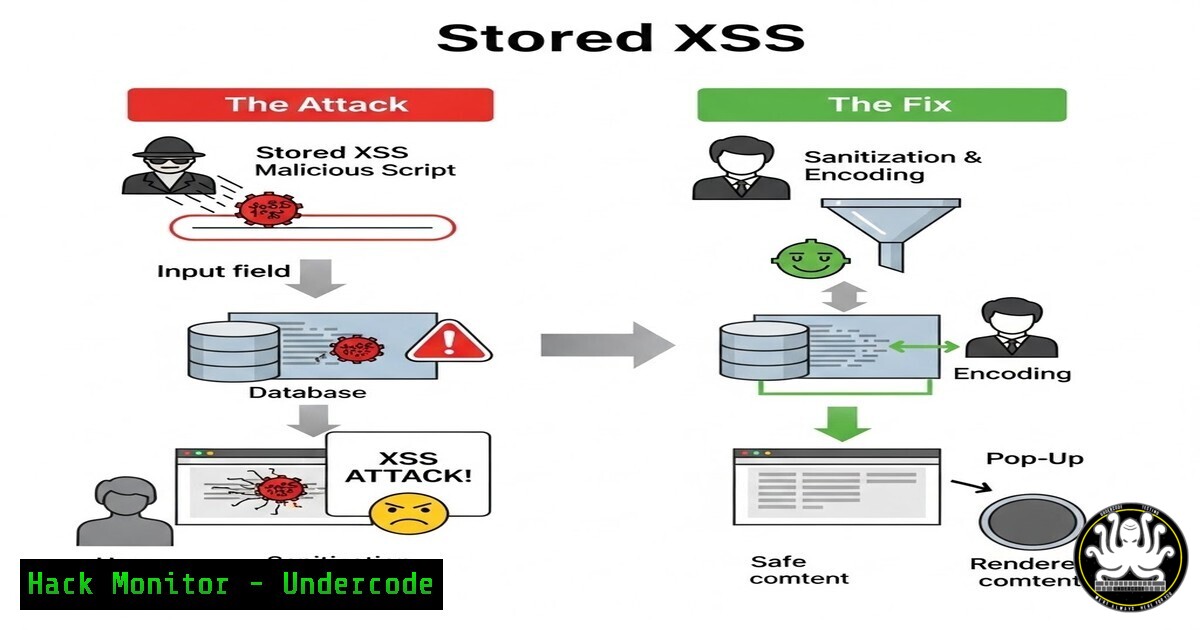
Stored Cross-Site Scripting (XSS) remains one of the most pervasive and high-impact web application flaws, frequently netting critical‑severity bounties and enabling attackers to hijack sessions, deface websites, or deliver malware without any user interaction. Unlike reflected XSS, stored XSS permanently embeds malicious scripts on a target server – every visitor who accesses the compromised page becomes a victim. This article delivers a hands‑on, step‑by‑step blueprint for ethical hackers and security engineers to discover, exploit, and eliminate stored XSS vulnerabilities in modern web environments.
Learning Objectives
- Differentiate stored XSS from other XSS types and assess its business impact.
- Perform manual and automated stored XSS detection using real payloads and industry‑standard tools.
- Implement robust, defence‑in‑depth mitigations including context‑aware encoding and Content Security Policy (CSP).
You Should Know:
- Anatomy of Stored XSS – Where the Payload Lives Forever
Stored XSS occurs when an application accepts untrusted input and saves it to a backend data store (database, file system, cache) without proper sanitisation. Later, when the stored data is served to a user’s browser without safe encoding, the injected script executes.
Common injection points:
- Comment sections, forum posts, user profiles.
- Uploaded file metadata (EXIF data, filenames).
- JSON/XML configuration files.
Step‑by‑step manual test:
- Identify an input field that persists data (e.g., “Update Status”).
2. Submit a standard test payload: ``.
- Reload the page where the input is reflected. If the alert fires, the vulnerability exists.
- Check if the payload executes every time – this confirms persistence.
2. Building a Safe Lab Environment
Use Docker to spin up OWASP’s broken web applications project (WebGoat or DVWA) on Linux/Windows.
Linux (Ubuntu/Debian):
sudo apt update && sudo apt install docker.io -y
sudo systemctl start docker
sudo docker run -d -p 80:80 vulnerables/web-dvwa
Windows (PowerShell Admin):
docker run -d -p 80:80 vulnerables/web-dvwa
Access `http://localhost` and configure DVWA to “low” security for stored XSS testing. This isolated environment is legal for practicing exploitation and logging every request.
- Manual Exploitation with Burp Suite and Custom Payloads
Burp Suite Professional (or Community) enables interception and payload mutation. -
Intercept the request that submits a comment / profile data.
- Send to Repeater – modify the parameter to include an event‑handler payload, e.g.:
` `
`
- Observe response – if the payload is reflected unaltered, it is stored.
- Verify persistence – revisit the page in a private browser session; if the alert fires, the XSS is truly stored.
Linux command‑line verification with curl:
curl -X POST -d "comment=<script>alert(1)</script>" http://localhost/dvwa/vulnerabilities/xss_s/
curl http://localhost/dvwa/vulnerabilities/xss_s/ | grep -i "<script>"
If the raw script tag appears in the HTML, the application is not sanitising output.
4. Automated Scanning with OWASP ZAP (CLI Mode)
ZAP’s active scanner can identify stored XSS without manual fuzzing.
Headless ZAP Docker command (Linux/Windows):
docker run -t owasp/zap2docker-stable zap-full-scan.py -t http://target-site.com -r report.html
Important: Run this only on authorised targets. The scanner injects payloads into all forms and analyses persistence across sessions.
After the scan, examine `report.html` for “Stored XSS” alerts. ZAP marks them as High risk if a payload is successfully stored and executed.
- Advanced Bypass Techniques – WAF and Sanitisation Evasion
Many applications deploy Web Application Firewalls (WAF) or client‑side sanitisation. Use polyglot payloads and context‑breaking tricks.
Polyglot example that fires in multiple contexts:
`jaVasCript:/-/`/`/’/”//(/ /oNcliCk=alert(1) )//%0D%0A%0d%0a//\x3csVg/
Bypass HTML‑sanitisation libraries:
- Use `javascript:alert(1)` in `src` or `href` attributes if the scheme is not filtered.
- Exploit SVG namespaces:
<svg><script>alert(1)</script></svg>. - If angle brackets are removed, try `”>
Step‑by‑step testing in Burp Intruder:
- Load a wordlist of XSS polyglots (e.g., from PortSwigger’s XSS cheat sheet).
- Grep‑extract for reflection and event execution in response.
3. Analyse which payloads survive storage.
6. Mitigation – Hardening the Application Layer
Developers must adopt a defence‑in‑depth strategy. The following commands and configurations demonstrate proper hardening.
Output Encoding (PHP Example – context‑aware):
// HTML body context
echo htmlspecialchars($userComment, ENT_QUOTES, 'UTF-8');

// JavaScript context
echo json_encode($userComment);
Content Security Policy (CSP) – deploy via HTTP header:
 .htaccess on Apache
Header set Content-Security-Policy "default-src 'self'; script-src 'self'"
Windows IIS URL Rewrite (block script‑tag injection):
<rule name="Block XSS" stopProcessing="true">
<match url="." />
<conditions>
<add input="{QUERY_STRING}" pattern="<script.>" />
</conditions>
<action type="CustomResponse" statusCode="403" />
</rule>
Input validation alone is insufficient – always encode on output, not filter on input (except for specific cases like user‑provided HTML with a safe library).
7. Real‑World Bug Bounty Case Study
In a recent private programme, a researcher discovered stored XSS in a user “job title” field. The field allowed up to 50 characters and was reflected on internal admin dashboards. The payload `