Listen to this Post
Introduction:
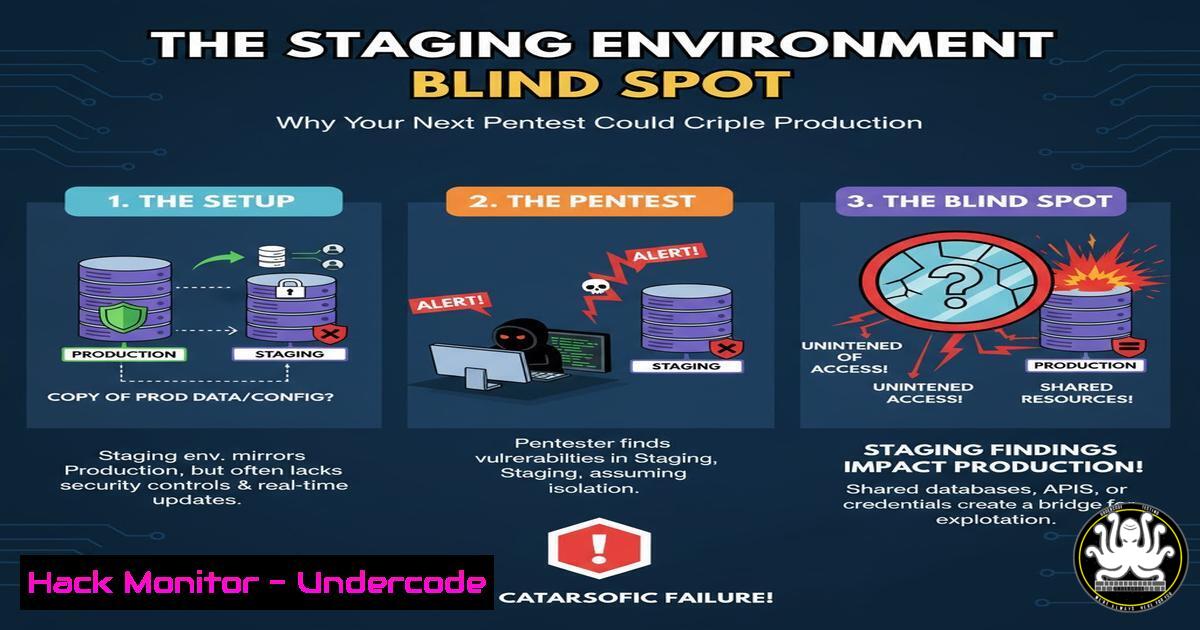
Penetration testing is a critical component of modern cybersecurity strategy, simulating real-world attacks to identify vulnerabilities. However, the testing process itself introduces significant risks to operational stability if not properly managed, potentially leading to service disruption and system failure in live environments.
Learning Objectives:
- Understand the critical differences between production and staging environments for security testing
- Implement robust pre-pentest preparation checklists and system hardening techniques
- Master monitoring and mitigation strategies to maintain system integrity during security assessments
You Should Know:
1. Environment Segmentation and Isolation Protocols
The foundation of safe penetration testing begins with proper environment segregation. Production systems handling live user data and transactions must never serve as the initial battleground for security testing. A properly configured staging environment should mirror production specifications while maintaining complete network and data isolation.
Step-by-step guide explaining what this does and how to use it:
First, establish network segmentation using VLANs or separate subnets:
 On Linux using iptables to isolate staging segment
iptables -A FORWARD -s 192.168.100.0/24 -d 192.168.1.0/24 -j DROP
iptables -A FORWARD -d 192.168.100.0/24 -s 192.168.1.0/24 -j DROP

Windows equivalent using PowerShell for network isolation
New-NetFirewallRule -DisplayName "Block-Staging-to-Prod" `
-Direction Inbound -Protocol Any -Action Block `
-LocalAddress 192.168.1.0/24 -RemoteAddress 192.168.100.0/24
Next, implement database segregation using separate instances with synthetic or anonymized data:
-- Create isolated database user for staging
CREATE USER 'staging_pentest'@'192.168.100.%' IDENTIFIED BY 'ComplexPassword123!';
GRANT SELECT, INSERT, UPDATE ON staging_db. TO 'staging_pentest'@'192.168.100.%';
REVOKE DROP, DELETE, ALTER ON staging_db. FROM 'staging_pentest'@'192.168.100.%';
2. Pre-Test System Hardening and Backup Strategies
Before engaging any penetration testing service, including AI-driven platforms like Ethiack, systems must undergo rigorous hardening and comprehensive backup procedures. This ensures quick recovery from any testing-induced failures and protects against accidental data corruption.
Step-by-step guide explaining what this does and how to use it:
Implement automated backup routines using enterprise-grade tools:
 Linux example: Automated LVM snapshot creation pre-pentest
lvcreate --size 10G --snapshot --name pre_pentest_snapshot /dev/vg0/lv_root

Windows using WBAdmin for system state backup
wbadmin start backup -backupTarget:E: -include:C: -systemState -quiet
Harden system configurations against common testing payloads:
 Configure rate limiting in nginx to prevent traffic-based outages
http {
limit_req_zone $binary_remote_addr zone=pentest:10m rate=10r/s;

server {
location / {
limit_req zone=pentest burst=20 nodelay;
}
}
}

Windows Defender application control policies
New-CIPolicy -FilePath Pentest_Base.xml -Level FilePublisher
ConvertFrom-CIPolicy -XmlFilePath Pentest_Base.xml BinaryFilePath Pentest_Base.cip
3. Traffic Monitoring and Anomaly Detection Configuration
During penetration testing, sophisticated monitoring systems must track system behavior, network traffic patterns, and application performance metrics. This enables rapid detection of potential service disruptions before they escalate into full outages.
Step-by-step guide explaining what this does and how to use it:
Deploy comprehensive monitoring stacks with custom alert thresholds:
 Prometheus configuration for pentest-specific monitoring
groups:
- name: pentest_alerts
rules:
- alert: HighPentestTraffic
expr: rate(http_requests_total[bash]) > 1000
labels:
severity: warning
annotations:
summary: "Unusually high traffic during pentest"

Linux system monitoring with custom thresholds
!/bin/bash
while true; do
CPU_USAGE=$(top -bn1 | grep "Cpu(s)" | awk '{print $2}' | cut -d'%' -f1)
if (( $(echo "$CPU_USAGE > 85" | bc -l) )); then
echo "CRITICAL: High CPU usage detected during pentest: $CPU_USAGE%"
systemctl stop apache2  Example mitigation
fi
sleep 30
done
- Web Application Firewall (WAF) Tuning for Testing Scenarios
Conventional WAF configurations often block legitimate penetration testing activities while missing sophisticated attack vectors. Pre-test tuning creates a balanced security posture that allows testing efficacy while maintaining protection.
Step-by-step guide explaining what this does and how to use it:
Configure ModSecurity with pentest-appropriate rule sets:
 ModSecurity configuration for controlled testing
SecRuleEngine DetectionOnly
SecRule REQUEST_HEADERS:User-Agent "nikto|sqlmap|metasploit" \
"id:1001,phase:1,log,allow,msg:'Pentest Tool Detection'"

Cloud WAF (AWS) example for testing windows
aws wafv2 update-web-acl \
--name Pentest-WebACL \
--scope REGIONAL \
--rules file://pentest-rules.json \
--default-action Allow
Create specialized rule sets that log without blocking:
{
"Name": "Pentest-Monitoring",
"Priority": 1,
"Statement": {
"ByteMatchStatement": {
"FieldToMatch": { "UriPath": {} },
"SearchString": "(../|etc/passwd|bin/sh)",
"TextTransformations": [{ "Type": "NONE", "Priority": 0 }]
}
},
"OverrideAction": { "None": {} },
"VisibilityConfig": {
"SampledRequestsEnabled": true,
"CloudWatchMetricsEnabled": true
}
}
5. Email System Fortification Against Testing Overload
Penetration testing frequently targets email infrastructure with phishing simulations and stress testing. Proper preparation prevents email service disruption, blacklisting, and user impact during these assessments.
Step-by-step guide explaining what this does and how to use it:
Implement rate limiting and testing isolation for email services:
 Postfix configuration for pentest traffic control
smtpd_client_connection_rate_limit = 100
anvil_rate_time_unit = 60s
smtpd_client_message_rate_limit = 100

Create isolated testing user accounts
postmap /etc/postfix/recipient_access
[email protected] OK
@production.example.com REJECT
Configure Exchange Server protections:
 PowerShell: Set transport rules for pentest isolation
New-TransportRule -Name "PentestTrafficControl" `
-From "[email protected]" `
-ApplyHtmlDisclaimerTransportRulesPredicates @{Add="InScope"}) `
-SetSCL -1 -Comments "Allow Ethiack testing traffic"
6. API Endpoint Protection and Monitoring
Modern applications rely heavily on APIs, which become primary targets during penetration testing. Specialized protection strategies prevent API gateway overload and data exposure while allowing comprehensive security assessment.
Step-by-step guide explaining what this does and how to use it:
Implement API rate limiting and payload validation:
 Kubernetes API protection annotations
apiVersion: networking.k8s.io/v1
kind: Ingress
metadata:
name: api-ingress
annotations:
nginx.ingress.kubernetes.io/limit-rps: "100"
nginx.ingress.kubernetes.io/limit-burst-multiplier: "5"
Configure API gateway security policies:
// AWS API Gateway usage plan for controlled testing
const params = {
name: 'Pentest-Usage-Plan',
description: 'Rate limiting for penetration testing',
apiStages: [{
apiId: 'your-api-id',
stage: 'staging'
}],
throttle: {
burstLimit: 1000,
rateLimit: 500
}
};
7. Incident Response Planning for Testing Scenarios
Despite thorough preparation, penetration testing can trigger unexpected system behavior. A specialized incident response plan ensures rapid containment and recovery without compromising the assessment’s validity.
Step-by-step guide explaining what this does and how to use it:
Develop pentest-specific incident response playbooks:
!/bin/bash
 Emergency response script for testing incidents
echo "Pentest Incident Detected: $1"
case $1 in
"service_crash")
systemctl restart $2
docker-compose -f /opt/staging/docker-compose.yml up -d
;;
"resource_exhaustion")
killall -9 $2
sysctl -w vm.swappiness=10
;;
esac
Create communication protocols and escalation matrices:
INCIDENT RESPONSE MATRIX:
- Level 1: Service degradation -> Notify test team, continue monitoring
- Level 2: Single service failure -> Isolate component, continue other tests
- Level 3: Multiple service failures -> Pause testing, implement recovery
- Level 4: Production impact -> Immediate test termination, full recovery
What Undercode Say:
- Proper staging environment isolation isn’t just best practice—it’s the foundation that determines whether your pentest yields actionable intelligence or creates business disruption
- The emergence of AI-driven continuous testing platforms like Ethiack represents a paradigm shift from periodic assessments to ongoing security validation, requiring permanent environmental preparations
The traditional annual pentest model is evolving toward continuous security validation, making proper environmental preparation a permanent operational requirement rather than a periodic exercise. Organizations that fail to implement robust staging environments and monitoring systems will increasingly face service disruptions as testing frequency intensifies. The integration of AI-driven testing platforms necessitates architectural changes that maintain business continuity while enabling comprehensive security assessment. Future cybersecurity maturity will be measured not just by vulnerability detection rates, but by an organization’s ability to sustain continuous testing without operational impact.
Prediction:
The convergence of AI-powered continuous testing and DevOps practices will drive adoption of “always-on” security assessment environments by 2025, making isolated staging infrastructure a non-negotiable enterprise requirement. Organizations lacking these capabilities will face increasing service disruptions as security testing becomes integrated into continuous deployment pipelines, potentially creating competitive disadvantages in regulated industries and security-conscious markets.
🎯Let’s Practice For Free:
IT/Security Reporter URL:
Reported By: Ethiack As – Hackers Feeds
Extra Hub: Undercode MoN
Basic Verification: Pass ✅


