Listen to this Post
Introduction:
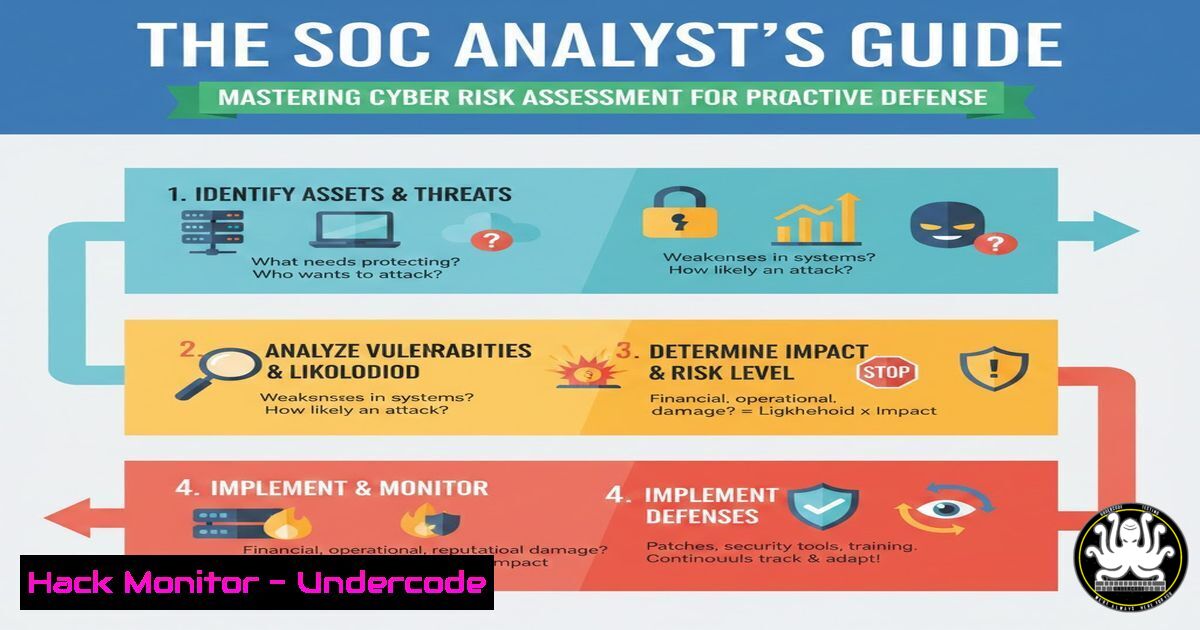
In the high-stakes environment of a Security Operations Center (SOC), the difference between a minor incident and a catastrophic breach often comes down to context. While security tools generate thousands of alerts, they lack the business intelligence to determine what truly matters. This is where Cybersecurity Risk Assessment bridges the gap, transforming raw technical data into prioritized, business-focused intelligence. By understanding the formula of Risk (Likelihood x Impact) and factoring in asset criticality and threat intelligence, analysts can move beyond reactive monitoring to proactive defense.
Learning Objectives:
- Understand the mathematical and contextual framework of IT Risk (Likelihood x Impact).
- Learn to integrate Asset Criticality and Threat Intelligence into SIEM alert prioritization.
- Master practical commands and techniques for identifying vulnerabilities and exposure levels in Linux and Windows environments.
- Develop a step-by-step methodology for risk-based incident triage in SOC operations.
You Should Know:
- The Anatomy of Risk: Deconstructing Likelihood and Impact
Risk is not just a theoretical number; it is the cornerstone of SOC operations. The traditional formula, Risk = Likelihood x Impact, serves as a starting point, but in a live environment, this equation is weighted by additional factors. For a SOC analyst, “Likelihood” is informed by real-time threat intelligence feeds (like known active exploits for a specific CVE) and the exposure level of the asset (is it internet-facing or internal?). “Impact” is determined by the asset’s criticality—is it a Domain Controller, a SQL server containing PII, or a development sandbox?
To practically apply this, you must first inventory and tag assets based on their business function.
Step‑by‑step guide: Asset Discovery and Criticality Tagging
Objective: Identify live assets on the network and assign a criticality score (High/Medium/Low).
- On Linux (Network Scanning with Nmap):
Use Nmap to perform a ping sweep to identify live hosts. This helps map the “Exposure Level.”Scan a /24 network for live hosts without port scanning (fast) nmap -sn 192.168.1.0/24 Perform a service version detection on a specific critical server to understand its role nmap -sV -p 80,443,445,3389 192.168.1.105
What this does: The `-sn` flag disables port scanning, simply listing which IPs are active. The `-sV` flag probes open ports to determine the service and version running (e.g., Apache 2.4.49), which is crucial for matching against vulnerability databases.
-
On Windows (PowerShell for Asset Information):
Use PowerShell to query system roles and installed software to determine criticality.Get installed roles/features to identify if it's a critical server (e.g., AD DS) Get-WindowsFeature | Where-Object {$_.Installed -eq $true} List all installed software to inventory potential vulnerable applications Get-WmiObject -Class Win32_Product | Select-Object Name, Version, VendorHow to use it: Run these scripts on servers during the onboarding phase. If a server has the “Active Directory Domain Services” role, tag it as “Critical” in your CMDB. This data feeds directly into your SIEM as context.
2. Quantitative Risk Calculation: CVSS and Environmental Metrics
While qualitative assessment (High/Medium/Low) is useful, quantitative scoring provides a standard for prioritization. The Common Vulnerability Scoring System (CVSS) is the industry standard. However, the base CVSS score (found on the NVD website) is generic. SOC analysts must calculate the Environmental Score to reflect the true risk to their organization.
Step‑by‑step guide: Calculating Environmental Risk Score
Objective: Modify a generic vulnerability score to fit your specific environment.
Let’s assume you have a critical vulnerability: CVE-2021-44228 (Log4Shell) . The Base CVSS score is 10.0 (Critical). You need to adjust this.
1. Determine the CVSS Vector:
You can find the vector string on the NVD website. For Log4Shell, it might look like: CVSS:3.1/AV:N/AC:L/PR:N/UI:N/S:C/C:H/I:H/A:H.
2. Modify for Environmental Metrics:
Using a CVSS calculator (like the one from FIRST.org), modify the Environmental Metrics based on your asset discovery.
– Confidentiality Requirement (CR): If the asset stores PII, set this to High (CR:H).
– Availability Requirement (AR): If it’s a critical web application, set this to High (AR:H).
– Modified Attack Vector (MAV): If the asset is not internet-facing but internal only, change this to Adjacent Network (MAV:A).
- Command Line Calculation (using `cvss` library in Python):
You can automate this in a SOAR playbook.
 Example Python script to calculate environmental score
from cvss import CVSS3

Base vector for Log4Shell
base_vector = "CVSS:3.1/AV:N/AC:L/PR:N/UI:N/S:C/C:H/I:H/A:H"
 Environmental metrics: Modified Attack Vector (Adjacent) and High Confidentiality Requirement
environmental_vector = base_vector + "/MAV:A/CR:H"

c = CVSS3(environmental_vector)
print(f"Base Score: {c.base_score}")
print(f"Environmental Score: {c.environmental_score}")
What this does: This script takes the base vulnerability and recalculates the score based on your environment. An internal server with PII might have a recalculated score of 8.5, which is still critical, but a development server with no sensitive data might drop to a 6.0, changing your prioritization.
3. Integrating Threat Intelligence into Risk Context
Risk is dynamic. A vulnerability with a high CVSS score but no known exploit is less urgent than a medium vulnerability that is being actively used by ransomware gangs. SOC analysts must enrich alerts with external threat intelligence feeds (MISP, AlienVault OTX, or commercial feeds).
Step‑by‑step guide: Correlating Alerts with Threat Feeds
Objective: Use command-line tools to check if an IOC (Indicator of Compromise) or a vulnerable software version is associated with active campaigns.
1. Check IP Reputation (Linux):
If you see an alert for outbound traffic to a suspicious IP, use `curl` to query a threat intel API.
 Example using AbuseIPDB API (you need an API key)
curl -G https://api.abuseipdb.com/api/v2/check \
--data-urlencode "ipAddress=45.155.205.233" \
-d "maxAgeInDays=90" \
-H "Key: YOUR_API_KEY" \
-H "Accept: application/json" | jq .
How to use it: Pipe the output to `jq` to parse the JSON. Look for "abuseConfidenceScore". A score above 50 indicates high risk, increasing the Likelihood factor in your risk equation.
2. Check Hash Against Malware Databases:
Use `curl` to query VirusTotal or other aggregators.
 Query VirusTotal for a file hash (simplified, requires API key)
curl --request GET \
--url 'https://www.virustotal.com/api/v3/files/YOUR_FILE_HASH' \
--header 'x-apikey: YOUR_API_KEY' | jq '.data.attributes.last_analysis_stats'
What this does: This returns a count of how many security vendors flagged this file as malicious. If the `malicious` count is > 0, the risk is immediate.
4. Windows Event Log Analysis for Likelihood Indicators
Within a Windows environment, the “Likelihood” of a breach can be gauged by specific Event IDs that indicate reconnaissance or brute-force attempts. These are early warning signs that raise the probability score of a full compromise.
Step‑by‑step guide: Hunting for Brute-Force Indicators in Event Logs
Objective: Use `wevtutil` and PowerShell to identify failed logins (Event ID 4625) which increase risk likelihood.
1. Query Security Log for Failed Logins:
Use PowerShell to extract failed login attempts over the last 24 hours.
 Get failed logins from the last 24 hours
$yesterday = (Get-Date).AddDays(-1)
Get-WinEvent -FilterHashtable @{
LogName='Security'
ID=4625
StartTime=$yesterday
} | Select-Object TimeCreated, Message
How to use it: If a single user account has 100+ failed logins from a foreign IP, the likelihood of a successful brute-force attack is high. This information should be used to temporarily lock the account and raise the risk level of that specific alert.
2. Export and Parse with `wevtutil`:
For large environments, export logs for offline analysis.
wevtutil epl Security C:\temp\seclog.evtx "/q:[System[(EventID=4625)]]"
What this does: This command exports only the events with ID 4625 to a separate file, allowing for deep-dive forensic analysis without impacting the live server’s performance.
5. Linux Hardening: Reducing Attack Surface (Impact Mitigation)
Risk isn’t just about detection; it’s about mitigation. By hardening systems, you reduce the potential “Impact” of a successful breach. If an attacker compromises a service, minimizing its permissions ensures they cannot pivot to critical assets.
Step‑by‑step guide: Implementing the Principle of Least Privilege
Objective: Restrict sudo access and secure SSH configurations to lower the impact of credential theft.
1. Audit Sudoers Files:
Check who has root privileges. Excessive sudo access increases impact.
 List all users with sudo privileges
grep -Po '^sudo.+:\K.$' /etc/group

Check the main sudoers file for insecure configurations (e.g., NOPASSWD)
sudo cat /etc/sudoers | grep -E "NOPASSWD|!authenticate"
What this does: `NOPASSWD` means an attacker who compromises a user session can immediately run root commands without a password, drastically increasing the impact of a low-level compromise.
2. Harden SSH Configuration:
Edit `/etc/ssh/sshd_config` to disable root login and use key-based auth.
 Disable root login and password authentication
sudo sed -i 's/PermitRootLogin yes/PermitRootLogin no/' /etc/ssh/sshd_config
sudo sed -i 's/PasswordAuthentication yes/PasswordAuthentication no/' /etc/ssh/sshd_config

Restart SSH service
sudo systemctl restart sshd
Analysis: By disabling root login, you force an attacker to first compromise a standard user and then attempt privilege escalation, buying your SOC team valuable detection time.
What Undercode Say:
- Context is King: A vulnerability is just noise until it is mapped to a critical asset with active threat intelligence. SOC analysts must transition from “alert viewers” to “risk analysts” by constantly enriching raw data with business and environmental context.
- Automation of Risk Scoring: Manual CVSS calculation is impractical at scale. Implementing SOAR playbooks that automatically query asset databases and threat feeds to recalculate risk scores in real-time is the next evolutionary step for mature SOCs.
The modern SOC is no longer a fortress built on logs and alerts, but a dynamic risk engine where every event is weighed against its potential business impact. By shifting focus from the volume of alerts to the context of risk, blue teams can effectively protect business continuity, ensuring that security operations align perfectly with organizational priorities.
Prediction:
As AI-driven attacks become more sophisticated, we will see the rise of “Autonomous Risk-Based Response” systems. These systems will not just prioritize alerts but will automatically initiate containment actions based on a pre-calculated risk threshold, such as isolating a compromised IoT device the moment its risk score crosses a critical level, without waiting for human intervention. The role of the SOC analyst will then evolve from triage to strategic oversight of these automated risk engines.
▶️ Related Video (84% Match):
🎯Let’s Practice For Free:
IT/Security Reporter URL:
Reported By: Ganesh Saikumar – Hackers Feeds
Extra Hub: Undercode MoN
Basic Verification: Pass ✅


