Listen to this Post
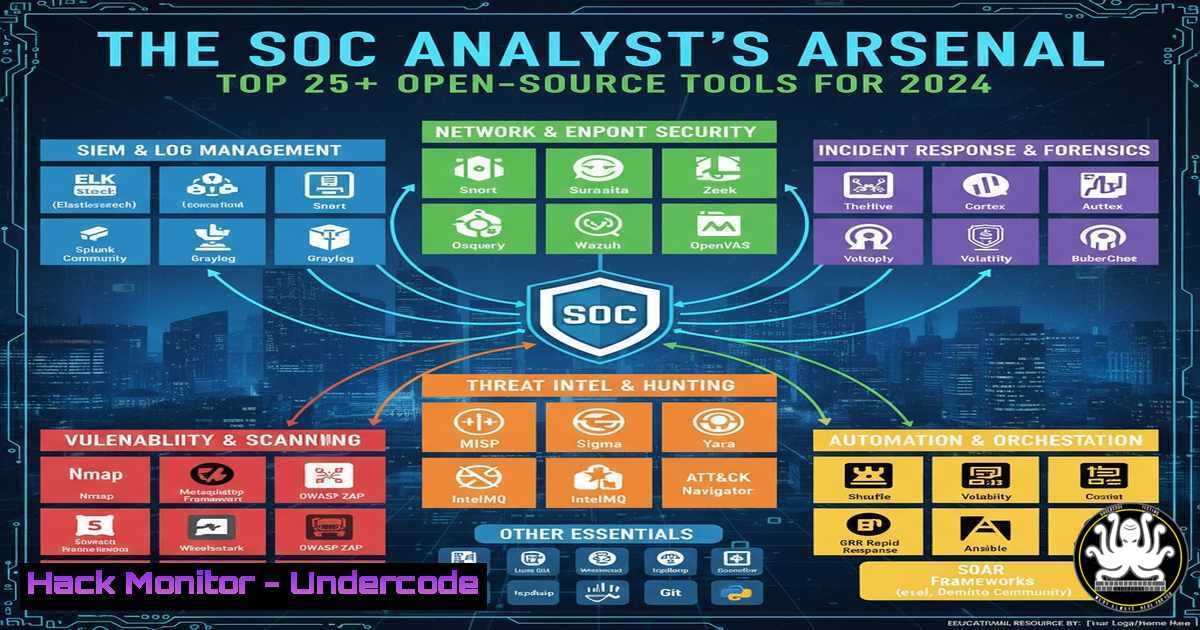
Introduction:
The modern Security Operations Center (SOC) is the beating heart of an organization’s cyber defense. In an era of sophisticated threats and budget constraints, open-source tools have become indispensable, providing enterprise-grade capabilities without the enterprise price tag. This guide curates the essential open-source toolkit for building a robust and effective SOC.
Learning Objectives:
- Identify and deploy critical open-source tools for log management, intrusion detection, and digital forensics.
- Understand the core functions of a SOC and how these tools integrate into a cohesive security monitoring workflow.
- Develop the skills to perform proactive threat hunting and incident response using freely available software.
You Should Know:
1. Centralized Log Management with the ELK Stack
The Elastic Stack (ELK – Elasticsearch, Logstash, Kibana) is the cornerstone of modern log analysis. It aggregates, parses, and visualizes data from every corner of your network.
Step-by-Step Guide:
First, install the Elastic Stack on a dedicated server. Use Logstash to ingest and parse raw log data. A basic Logstash configuration (/etc/logstash/conf.d/your-pipeline.conf) to ingest Windows Event Logs might look like this:
input {
beats {
port => 5044
}
}
filter {
if [bash][file][bash] =~ "Security" {
grok {
match => { "message" => "%{NUMBER:EventID}" }
}
}
}
output {
elasticsearch {
hosts => ["localhost:9200"]
index => "windows-logs-%{+YYYY.MM.dd}"
}
}
This configuration uses Filebeat (a lightweight shipper) to send logs to Logstash on port 5044. The `grok` filter parses the message to extract the critical `EventID` field. Finally, the logs are indexed into Elasticsearch for visualization in Kibana, where you can create dashboards to track specific security events.
2. Network Intrusion Detection with Security Onion
Security Onion is a complete Linux distribution that bundles powerful tools like Suricata (Network IDS/IPS), Zeek (network analysis), and Wazuh (HIDS). It’s a full-featured SOC-in-a-box.
Step-by-Step Guide:
After installing Security Onion, you must configure its tools. A critical step is updating Suricata’s rules. Use the `so-rule` command to manage them.
 Update all Security Onion rules
sudo so-rule update

Check the status of the Suricata service
sudo so-status

Pull the latest community ruleset for Suricata
sudo suricata-update
These commands ensure your intrusion detection system has the latest signatures to detect new threats. `so-rule update` fetches the latest curated rules, while `suricata-update` pulls from external sources, keeping your NIDS current.
3. Endpoint Visibility with Wazuh Agent
Wazuh provides deep visibility into your endpoints (Windows, Linux, macOS), monitoring for file integrity, rootkits, and suspicious processes.
Step-by-Step Guide:
Deploy the Wazuh agent on a critical server. On a Linux host, you can install and register the agent using these commands:
 Add the Wazuh repository
curl -s https://packages.wazuh.com/key/GPG-KEY-WAZUH | sudo gpg --no-default-keyring --keyring gnupg_kb:/dev/null --import-
echo "deb https://packages.wazuh.com/4.x/apt/ stable main" | sudo tee -a /etc/apt/sources.list.d/wazuh.list

Install the agent
sudo apt-get update
sudo apt-get install wazuh-agent

Register the agent with the Wazuh manager (replace MANAGER_IP)
sudo systemctl daemon-reload
sudo systemctl enable wazuh-agent
sudo systemctl start wazuh-agent
sudo /var/ossec/bin/agent-auth -m <MANAGER_IP> -A "My-Linux-Server"
This registers the endpoint with your central Wazuh manager, allowing you to monitor its security posture, collect system logs, and detect anomalies in real-time.
4. Proactive Threat Hunting with YARA
YARA is the industry standard for identifying and classifying malware. It allows you to create descriptions of malware families based on textual or binary patterns.
Step-by-Step Guide:
Create a YARA rule to hunt for a specific malware sample. Save the following to a file like suspicious_malware.yar:
rule Suspicious_PowerShell_Backdoor {
meta:
description = "Detects a PowerShell backdoor with specific obfuscation"
author = "SOC Analyst"
date = "2024-01-01"
strings:
$a = "Invoke-Expression" nocase
$b = /FromBase64String([^)]+)/
$c = "System.Net.WebClient"
condition:
all of them
}
To use this rule, run the `yara` command against a directory of files or a live memory dump.
 Scan a directory with your YARA rule
yara -r suspicious_malware.yar /path/to/scan/

Scan a specific process memory
yara -p 4 suspicious_malware.yar /proc/<PID>/mem
This rule looks for a combination of strings common in PowerShell-based backdoors. A match would trigger an immediate incident response.
5. Incident Response & Memory Forensics with Volatility
When a breach occurs, Volatility is the tool of choice for analyzing memory dumps from a compromised system to uncover malicious processes, network connections, and code injection.
Step-by-Step Guide:
Acquire a memory dump (e.g., using `dumpit.exe` on Windows or `LiME` on Linux). Then, use Volatility 3 with a profile for the correct OS.
 Identify the operating system profile of the memory dump
vol -f memory_dump.raw windows.info

List running processes at the time of the dump
vol -f memory_dump.raw windows.pslist

Scan for hidden processes or those with injected code
vol -f memory_dump.raw windows.malfind

Extract command lines from processes to see what was executed
vol -f memory_dump.raw windows.cmdline
The `malfind` command is particularly potent as it identifies processes with memory regions that have executable characteristics but are not backed by a file on disk—a strong indicator of malware.
6. Vulnerability Scanning with OpenVAS
OpenVAS (now part of Greenbone Vulnerability Management) is a full-featured vulnerability scanner that identifies security holes in your systems before attackers can exploit them.
Step-by-Step Guide:
After setting up the Greenbone Community Edition, you can use the `gvm-cli` or the web interface to manage scans. From the command line, you can initiate tasks.
 Authenticate and create a target (replace credentials and IP)
gvm-cli --gmp-username admin --gmp-password password socket --xml "<create_target><name>Web Server Scan</name><hosts>192.168.1.100</hosts></create_target>"

Create and start a task for that target
gvm-cli --gmp-username admin --gmp-password password socket --xml "<create_task><name>Full Scan</name><config id='daba56c8-73ec-11df-a475-002264764cea'/><target id='TARGET_UUID'/></create_task>"
This automates the process of scheduling and running vulnerability scans, providing you with a prioritized list of vulnerabilities to patch.
7. Cloud Security Hardening with Prowler
For organizations in the cloud, Prowler is an essential open-source tool for AWS security assessment, auditing, and hardening, based on the CIS AWS Benchmarks.
Step-by-Step Guide:
Configure Prowler with your AWS CLI credentials and run specific checks.
 Install Prowler
git clone https://github.com/prowler-cloud/prowler
cd prowler

Run a specific check for ensuring MFA is enabled on the root account
./prowler -c extra739

Run a full CIS Benchmark check
./prowler -c check1,check2,check3,...,check100

Output the results to an HTML report
./prowler -M html
Commands like `-c extra739` perform critical checks. The tool will output a report detailing any misconfigurations, such as public S3 buckets, lack of encryption, or weak IAM policies, allowing you to quickly remediate risks in your cloud environment.
What Undercode Say:
- Open-Source is Enterprise-Ready. The maturity and integration capabilities of tools like Wazuh and the Elastic Stack mean that a lack of budget is no longer an excuse for a lack of visibility. They form a defensible, scalable foundation for any SOC.
- The Human Element is the True Multiplier. These tools are force multipliers for skilled analysts. The most sophisticated stack is useless without the expertise to interpret its alerts, write effective YARA rules, and perform deep-dive forensics with Volatility.
The landscape is clear: the barrier to entry for building a capable SOC has been demolished by the open-source community. While commercial solutions have their place, the core functions of log management, intrusion detection, and incident response are now accessible to all. The future of defense lies not in simply purchasing a silver bullet, but in strategically integrating these powerful, free tools and investing in the analysts who wield them. The playing field is being leveled.
Prediction:
The convergence of AI and open-source security tools will redefine the SOC’s workflow. We predict that within two years, AI-powered plugins for tools like Volatility and Wazuh will automatically correlate IOCs, suggest YARA rules based on emerging threats, and even perform initial triage of alerts. This will shift the SOC analyst’s role from constant alert monitoring to proactive threat hunting and complex incident resolution, fundamentally increasing the efficiency and effectiveness of cyber defense.
🎯Let’s Practice For Free:
IT/Security Reporter URL:
Reported By: Ludovic G – Hackers Feeds
Extra Hub: Undercode MoN
Basic Verification: Pass ✅


