Listen to this Post
Introduction:
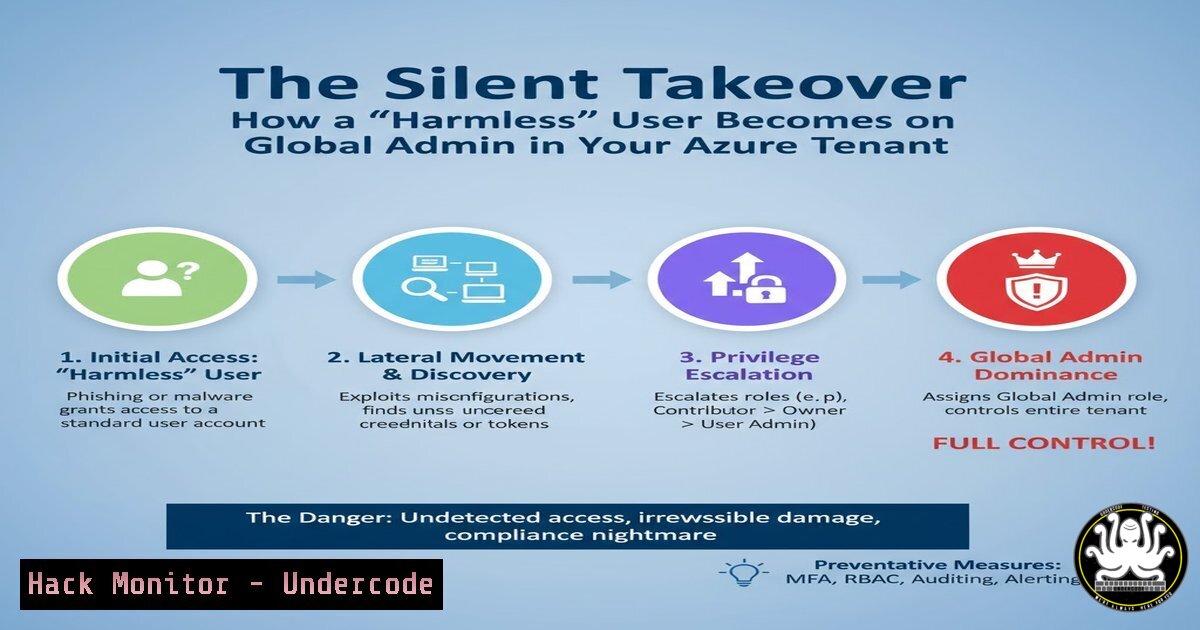
In the complex architecture of modern cloud environments, the most dangerous threats are often not sophisticated zero-day exploits but misconfigured identity and access management pathways. A standard user account, often considered low-risk, can initiate a chain of privilege escalation that leads to a complete tenant compromise. This article deconstructs the identity attack chain, from a seemingly innocuous role like Authentication Administrator to the ultimate prize of Global Admin, revealing critical vulnerabilities in Azure Entra ID (formerly Azure AD) that automated tools like ARGOS are designed to uncover.
Learning Objectives:
- Understand the step-by-step mechanics of an identity-based privilege escalation chain in Azure Entra ID.
- Learn to use PowerShell and Microsoft Graph API commands to audit for and identify these dangerous pathways.
- Implement mitigation strategies to harden your identity security posture and break these attack chains.
You Should Know:
- The Attack Chain: From Authentication Administrator to Global Admin
The attack leverages the interconnected nature of roles, users, and service principals. It begins with an account possessing the `Authentication Administrator` role. This role allows a user to reset passwords for non-admin users and other Authentication Administrators.
Step-by-Step Guide:
- Step 1: Identify a Target. The attacker, with `Authentication Administrator` rights, identifies a high-value user account. This could be a user who owns a service principal or has high-privilege directory roles.
- Step 2: Password Reset. The attacker uses their role to reset the target user’s password.
PowerShell (AzureAD Module):
 Connect to Azure AD
Connect-AzureAD
 Reset the user's password
Set-AzureADUserPassword -ObjectId "[email protected]" -Password "NewStrongPassword123!" -ForceChangePasswordNextLogin $false
– Step 3: Impersonation. The attacker logs in as the target user with the new password.
– Step 4: Abuse Service Principal Permissions. If the compromised user owns a service principal (an identity for an application) that has high-privilege Microsoft Graph API permissions (e.g., Directory.ReadWrite.All, RoleManagement.ReadWrite.Directory), the attacker can leverage those permissions.
– Step 5: Elevate to Global Admin. Using the service principal’s powerful Graph API permissions, the attacker can grant their original (or another) account the Global Administrator role.
2. Auditing for the Authentication Administrator Role
The first line of defense is knowing who has this powerful role.
Step-by-Step Guide:
- Step 1: Use PowerShell to List Role Members. The AzureAD PowerShell module is a straightforward tool for this audit.
PowerShell (AzureAD Module):
 Get the Authentication Administrator role object
$AuthAdminRole = Get-AzureADDirectoryRole | Where-Object {$_.DisplayName -eq 'Authentication Administrator'}
 Get all members of this role
Get-AzureADDirectoryRoleMember -ObjectId $AuthAdminRole.ObjectId
– Step 2: Use Microsoft Graph API. For more advanced scripting and automation, the Microsoft Graph API is the modern standard.
PowerShell (Using Microsoft Graph `Invoke-MgGraphRequest`):
 Ensure you have the required permission (Directory.Read.All)
Connect-MgGraph -Scopes "Directory.Read.All"
 Get the role template ID for Authentication Administrator
$roleTemplateId = (Get-MgDirectoryRoleTemplate | Where-Object {$<em>.DisplayName -eq 'Authentication Administrator'}).Id
 Get the directory role object
$directoryRole = Get-MgDirectoryRole | Where-Object {$</em>.RoleTemplateId -eq $roleTemplateId}
 Get members of the role
$members = Get-MgDirectoryRoleMember -DirectoryRoleId $directoryRole.Id
$members | Select-Object Id, DisplayName, UserPrincipalName
3. Identifying Users Who Can Reset Passwords
Beyond the built-in role, custom permissions can grant similar abilities.
Step-by-Step Guide:
- Step 1: Check for Custom Administrative Units. Scoped admin roles within Administrative Units can grant password reset rights for a specific group of users.
PowerShell (Microsoft Graph):
 Get all Administrative Units
Get-MgDirectoryAdministrativeUnit
 For each AU, get its members and scoped role members
Get-MgDirectoryAdministrativeUnitMember -AdministrativeUnitId <AU_Id>
– Step 2: Review Privileged Identity Management (PIM). Check PIM for users who can activate the Authentication Administrator or Helpdesk Administrator role, even temporarily.
4. Finding Service Principals and Their Owners
The link between a compromised user and a powerful service principal is critical.
Step-by-Step Guide:
- Step 1: List All Service Principals and Owners. A service principal’s owners are typically users.
PowerShell (Microsoft Graph):
 Get all service principals
$servicePrincipals = Get-MgServicePrincipal -All
foreach ($sp in $servicePrincipals) {
$owners = Get-MgServicePrincipalOwner -ServicePrincipalId $sp.Id
foreach ($owner in $owners) {
[bash]@{
ServicePrincipalDisplayName = $sp.DisplayName
ServicePrincipalAppId = $sp.AppId
OwnerDisplayName = $owner.AdditionalProperties.displayName
OwnerId = $owner.Id
}
}
}
– Step 2: Audit Service Principal Permissions. Check the Graph API permissions granted to each service principal.
$servicePrincipals | ForEach-Object {
$spn = $_
$perms = $spn.Oauth2PermissionScopes | Where-Object { $_.Type -eq "Admin" }
if ($perms) {
[bash]@{
ServicePrincipal = $spn.DisplayName
PowerfulPermissions = $perms.Value -join ", "
}
}
}
5. Breaking the Attack Chain: Mitigation Strategies
Prevention is key. Implement these controls to disrupt the identity escalation pathway.
Step-by-Step Guide:
- Step 1: Principle of Least Privilege. Radically limit the number of Authentication Administrators. Use PIM for Just-In-Time (JIT) access if the role is absolutely necessary.
- Step 2: Protect High-Value Accounts. Enforce strong authentication (MFA) and don’t assign high-value users (especially service principal owners) weak built-in roles. Consider making cloud-only “break-glass” accounts that are not owners of any service principal.
- Step 3: Monitor for Password Reset Events. Create alerts in Azure Sentinel or your SIEM for password reset activities, especially those performed by privileged accounts and targeting other privileged accounts.
KQL Query Example for Azure Sentinel:
AuditLogs
| where OperationName == "Reset user password"
| extend TargetUser = tostring(TargetResources[bash].userPrincipalName)
| extend InitiatedBy = tostring(InitiatedBy.user.userPrincipalName)
| project TimeGenerated, OperationName, InitiatedBy, TargetUser, Result
– Step 4: Regular Access Reviews. Conduct frequent access reviews for all directory roles, administrative unit roles, and service principal ownership. Automate this process where possible.
What Undercode Say:
- Individual permissions are less important than the interconnected pathways they create. A security posture focused solely on “is this user an admin?” is fundamentally flawed.
- The cloud attack surface is defined by identity chains. Tools that can automatically map these relationships, like ARGOS, are transitioning from luxury to necessity for any serious cloud security program.
The analysis reveals a systemic issue in cloud security: a compliance-driven checklist approach is insufficient. Organizations often pass audits by ensuring no single user has excessive direct permissions but fail to model the transitive trust between roles, users, and applications. This creates a hidden attack surface that is invisible to traditional assessment methods but is readily exploitable by an attacker with an initial foothold. The shift must be towards continuous, automated threat modeling that visualizes and scores these identity attack paths in real-time.
Prediction:
Identity-based attacks will become the primary vector for cloud tenant compromise, surpassing vulnerabilities in code and infrastructure. As AI becomes more integrated into security operations, we will see a rise in AI-driven “identity chain” analysis tools on both the defensive and offensive sides. Red teams will use AI to automatically discover and exploit these complex pathways at scale, while blue teams will rely on AI-powered security posture management platforms to proactively hardend their identity fabric, leading to an automated “arms race” within cloud identity systems.
🎯Let’s Practice For Free:
IT/Security Reporter URL:
Reported By: Obrien David – Hackers Feeds
Extra Hub: Undercode MoN
Basic Verification: Pass ✅


