Listen to this Post
Introduction:
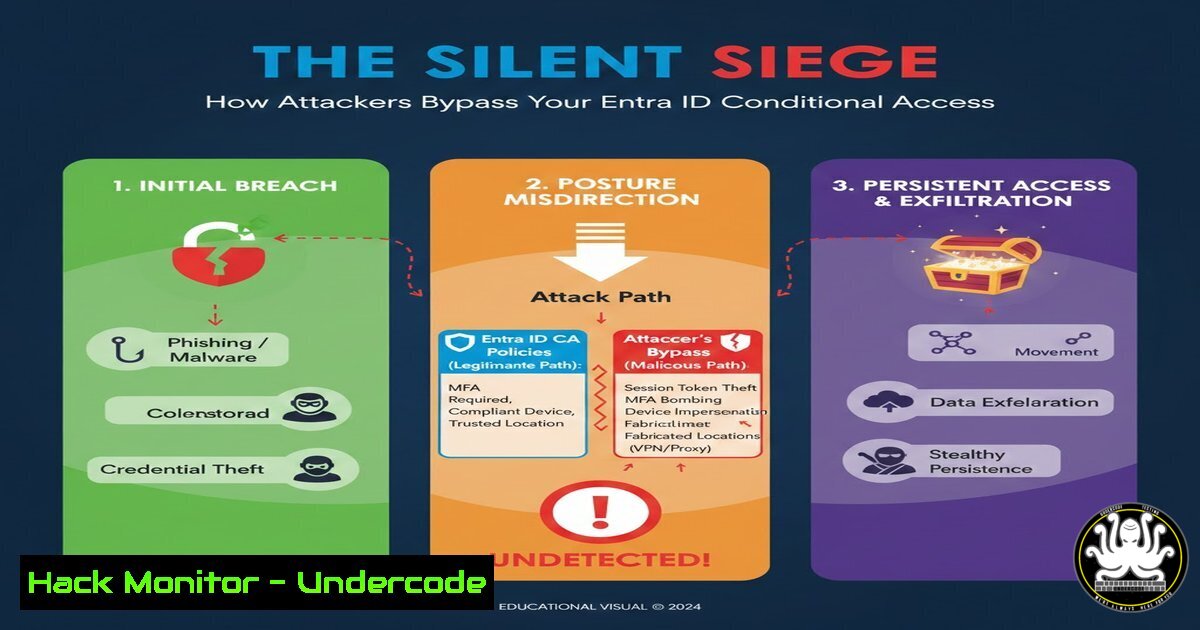
Entra ID Conditional Access (CA) is the cornerstone of modern identity security in Microsoft environments, acting as the gatekeeper for your organizational resources. However, as revealed in the groundbreaking TROOPERS25 talk by security researchers Fabian Bader and Dirk-jan Mollema, attackers have developed structured methodologies to systematically find and exploit weaknesses in CA policies, potentially granting them unauthorized access to critical data and applications while completely bypassing your security controls.
Learning Objectives:
- Understand the structured methodology attackers use to enumerate and test for Entra ID Conditional Access bypasses.
- Identify the most common misconfigurations and legacy protocol weaknesses that render CA policies ineffective.
- Implement defensive hardening techniques to close these security gaps and protect your identity perimeter.
You Should Know:
- The Attacker’s Methodology: A Structured Approach to CA Bypass
Modern attackers no longer rely on random attempts but follow a meticulous process to dismantle Conditional Access. The research presented outlines a formalized kill chain for CA bypass, beginning with comprehensive reconnaissance of an organization’s Entra ID tenant and existing CA policies. Attackers first map the entire authentication landscape, identifying all registered applications, service principals, and user roles. They then analyze the specific conditions set within CA policies, looking for inconsistencies, overly permissive rules, and excluded accounts that can be leveraged as initial entry points.
Step‑by‑step guide explaining what this does and how to use it.
Step 1: Tenant Reconnaissance. Using tools like `MicroBurst` or `AzureHound` (part of BloodHound), an attacker enumerates the Entra ID environment.
 Example of using AzureHound for data collection (Attacker Perspective)
 This would be run after obtaining initial credentials.
AzureHound.ps1 -CollectionMethod All
Step 2: Policy Enumeration. With the `Policy.Read.All` or `Directory.Read.All` permission, an attacker can list all CA policies via Microsoft Graph API to understand the security landscape.
 Using Microsoft Graph API to list Conditional Access policies
 Requires a valid access token with appropriate permissions
GET https://graph.microsoft.com/v1.0/identity/conditionalAccess/policies
Step 3: Gap Analysis. The attacker compares the policies against known bypass techniques, such as legacy authentication, unsupported client types, or misconfigured trusted locations, to identify the weakest link.
2. Exploiting Legacy Authentication Protocols
One of the most critical and common bypass vectors is the continued allowance of legacy authentication protocols like POP3, SMTP, IMAP, and older ActiveSync clients. These protocols do not support modern multi-factor authentication (MFA) prompts and are often explicitly excluded from strict CA policies to maintain backward compatibility. An attacker can exploit this by using tools to force a legacy auth login, completely circumventing MFA and other grant controls.
Step‑by‑step guide explaining what this does and how to use it.
Step 1: Identify if Legacy Auth is Enabled. An attacker can use a password spray attack targeting a legacy endpoint to probe for its availability.
 Example using a tool like MailSniper or a custom script to test for ActiveSync
 This attempts to authenticate using a common password list against the Microsoft Exchange Online endpoint.
Invoke-PasswordSpray -Url https://outlook.office365.com/autodiscover/autodiscover.xml -UserList users.txt -Password Winter2024! -Threads 10 -OutFile spray_results.txt
Step 2: Execute the Bypass. Once a valid account is found via legacy auth, the attacker gains an authenticated session without triggering the CA policy that requires MFA for modern authentication.
Mitigation Step (Defender): The most effective defense is to disable legacy authentication entirely using Entra ID’s authentication flow policy.
 Connect to Exchange Online PowerShell and disable legacy auth for all clients
Connect-ExchangeOnline
Set-OrganizationConfig -DefaultAuthenticationPolicyBlockLegacyAuthEnabled $true
3. The Device Enrollment & Compliance Loophole
CA policies often grant access based on device compliance (e.g., “Require device to be marked as compliant”). Attackers can bypass this by registering a new, non-compliant device to the tenant. If the “Require device to be marked as compliant” policy is not paired with a policy that blocks non-compliant devices, access may still be granted. Furthermore, if users have permissions to join devices to the Entra ID, this can be a self-service bypass for an attacker who has compromised a user’s credentials.
Step‑by‑step guide explaining what this does and how to use it.
Step 1: Check User Device Registration Rights. An attacker with user credentials can check if they are allowed to join devices.
 Using MSOL PowerShell to check a user's ability to join devices (Attacker Perspective)
Connect-MsolService
Get-MsolUser -UserPrincipalName [email protected] | Select-Object DisplayName, DisplayName, ObjectId, StrongAuthenticationRequirements
 The ability is often governed by a global setting or group membership.
Step 2: Register a New Device. The attacker simply adds a new workstation to the Azure AD from the settings menu or via PowerShell, creating a new, non-compliant but trusted entity.
Mitigation Step (Defender): Tightly control who can join devices and ensure compliance policies are enforced with block controls, not just grant controls.
 Use Entra ID Admin Center or Graph API to restrict device joining to a security group.
 Ensure a CA policy exists that uses a "Block" access control for non-compliant devices.
- Bypassing CA with Trusted Locations and MFA Claims
Policies that exclude “Trusted Locations” (based on IP range) from MFA requirements are a prime target. Attackers can compromise a machine or VPN credential within that trusted network to gain access without MFA. A more advanced technique involves token manipulation, where an attacker acquires a token with a valid MFA claim from a low-risk application and reuses it to access a high-value resource.
Step‑by‑step guide explaining what this does and how to use it.
Step 1: Acquire a Token with MFA Claim. An attacker logs into a less-secure application (e.g., the Office portal) that triggers MFA, receiving a primary refresh token (PRT) with an MFA claim.
Step 2: Token Replay. The attacker can then use this token to make requests to other applications, like the Graph API, potentially bypassing CA policies that require MFA because the claim is already present in the session.
Mitigation Step (Defender): Implement Continuous Access Evaluation (CAE) to enforce real-time session revocation and mitigate token replay attacks. Configure CA policies with session risk levels rather than relying solely on initial MFA claims.
- The Danger of Service Principal and Application-Level Bypasses
Many organizations forget that Conditional Access policies can be bypassed by using service principals and their associated credentials (client secrets, certificates). If a CA policy is scoped only to user accounts and not to service principals, an attacker with a compromised application secret can use the Microsoft Graph API with extensive permissions, moving laterally without ever triggering a user-facing CA policy.
Step‑by‑step guide explaining what this does and how to use it.
Step 1: Compromise an Application Credential. This could be through code repository leaks, phishing a developer, or exploiting weak certificate management.
Step 2: Authenticate as the Service Principal. The attacker uses the client ID and secret/certificate to obtain an access token.
 Using curl to get an access token as a service principal (Attacker Perspective)
curl -X POST -H "Content-Type: application/x-www-form-urlencoded" \
-d 'client_id=CLIENT_ID&client_secret=CLIENT_SECRET&scope=https://graph.microsoft.com/.default&grant_type=client_credentials' \
'https://login.microsoftonline.com/TENANT_ID/oauth2/v2.0/token'
Step 3: Access Resources. The token is then used to call the Graph API, potentially accessing mail, files, or other data, completely bypassing user-based CA.
Mitigation Step (Defender): Apply CA policies to service principals where possible (a relatively new capability). Conduct regular audits of application permissions and enforce the principle of least privilege.
What Undercode Say:
- The perimeter is now identity, and Conditional Access is its firewall. A structured offensive approach reveals that misconfigurations, not flaws in the CA engine itself, are the primary cause of breaches.
- Defense-in-depth is non-negotiable. Relying on a single CA policy, such as MFA, without complementary controls for devices, applications, and network location creates critical blind spots.
The research by Bader and Mollema underscores a critical evolution in the cyber threat landscape: attackers are applying software development-like rigor to their tradecraft. The systematic enumeration and testing of identity controls represent a significant threat to organizations that have not matured their Entra ID security posture beyond baseline configurations. This is not about exploiting a zero-day vulnerability in Microsoft’s code, but rather about meticulously finding and exploiting the gaps in an organization’s unique policy configuration and operational practices. The defense, therefore, must be equally strategic, moving beyond simple compliance checks to a continuous threat-modeling exercise against one’s own identity infrastructure.
Prediction:
The structured approach to finding CA bypasses will rapidly become standardized within attacker toolkits, leading to an increase in automated reconnaissance and exploitation campaigns against Entra ID. In response, Microsoft and the security community will pivot towards more intelligent, behavior-based CA policies leveraging AI to analyze risk in real-time, moving beyond static rules. We will see a rise in the default security posture of Entra ID tenants, with features like “Security Defaults” being replaced by more granular, yet universally applied, baseline policies that explicitly block, rather than just conditionally grant, access. The era of assuming CA policies are unbreachable is over; the next phase will be a continuous offensive and defensive arms race centered on identity session integrity.
🎯Let’s Practice For Free:
IT/Security Reporter URL:
Reported By: Fabianbader Troopers25 – Hackers Feeds
Extra Hub: Undercode MoN
Basic Verification: Pass ✅


