Listen to this Post
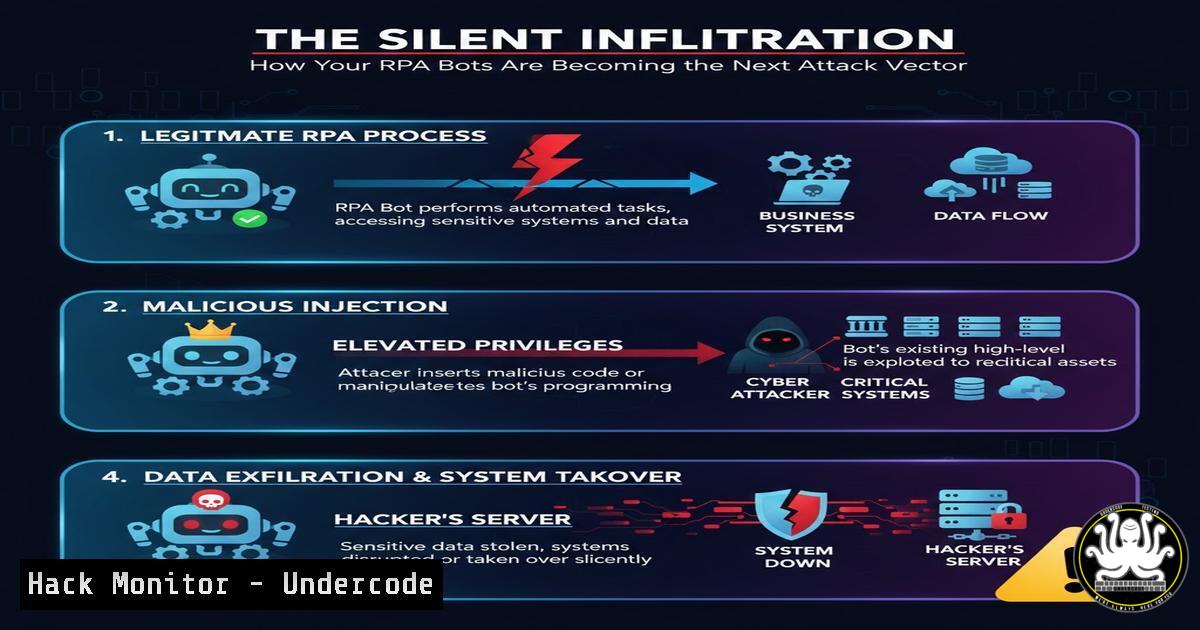
Introduction:
Robotic Process Automation (RPA) is revolutionizing efficiency, from automating highway toll collections to streamlining back-office tasks. However, this new wave of automation introduces a massive, often overlooked, attack surface. Cybercriminals are now targeting these unattended digital workers to gain a persistent, trusted foothold within enterprise networks, turning business accelerators into powerful cyber weapons.
Learning Objectives:
- Understand the critical security vulnerabilities inherent in RPA bot architectures.
- Learn to identify and detect malicious RPA bot activity through forensic analysis and logging.
- Implement hardening strategies to secure RPA platforms like UiPath, Automation Anywhere, and Blue Prism against exploitation.
You Should Know:
1. Credential Harvesting from Bot Configurations
RPA bots are typically granted privileged access to multiple enterprise systems, from databases to CRMs. Their credential stores are a goldmine for attackers. Instead of hardcoding credentials, bots must use secure vaults, but misconfigurations are common.
Step‑by‑step guide explaining what this does and how to use it.
Step 1: Locate Bot Configuration Files. Unattended bots often store configurations in XML or JSON files. An attacker with initial access can search for these.
Windows Command:
dir C:\ .config /s | findstr /i "uipath automation"
Linux Command (if on a shared file server):
find /shared_drives -name ".json" -o -name ".xml" | xargs grep -l "password|credential" 2>/dev/null
Step 2: Decrypt Stored Credentials. While credentials are often encrypted, the decryption keys may be stored locally.
Analysis: Use a tool like `UiPath.Crypto.exe` (from the official installation) with the found `crypto.key` to decrypt `Settings.json` files.
Mitigation: Mandate the use of a centralized credentials vault (e.g., Azure Key Vault, CyberArk) and ensure the bot’s identity is managed via certificates or managed identities, not static keys.
2. Lateral Movement via Trusted Bot Pathways
Once a bot is compromised, an attacker can abuse its trusted network pathways to move laterally to high-value systems that the bot is authorized to access, such as SAP, SQL servers, or mainframes.
Step‑by‑step guide explaining what this does and how to use it.
Step 1: Map Bot Permissions. Identify all systems and data sources the bot interacts with by reviewing its workflow packages and execution logs.
Step 2: Weaponize the Bot. An attacker can modify the bot’s workflow package to include a malicious step, such as exfiltrating data from a connected SQL database.
Example Malicious SQL Task (Conceptual): The attacker injects a step that runs:
EXEC xp_cmdshell 'powershell -EncodedCommand [Base64-encoded payload to exfiltrate data]';
Step 3: Detection via Network Logs. Monitor for unusual data transfers from bot runners to external IPs.
Windows Command (to check established connections from a bot runner machine):
netstat -anb | findstr "ESTABLISHED" | findstr /i "uipath"
3. Defense Evasion Using Legitimate Bot Processes
Malicious activity can be hidden within the normal, high-volume of actions performed by a legitimate RPA process, making it difficult for EDR and SIEM systems to flag anomalies.
Step‑by‑step guide explaining what this does and how to use it.
Step 1: Process Spoofing. An attacker can write a script that uses the `UiPath.Agent.exe` or `AutomationAnywhere.BotAgent.exe` process to perform malicious actions, making them appear legitimate.
Step 2: Detect Anomalous Child Processes. Configure your EDR to alert on rare child processes spawned by the core RPA executables.
Example EDR Query (Splunk-like):
index=edr_logs parent_process_name="UiPath.Agent.exe"
| stats count by process_name
| search count < 5  Flag processes that rarely occur as children
4. Hardening the RPA Controller and Development Environment
The central RPA orchestrator (controller) is the most critical asset. A compromise here leads to control over the entire bot fleet.
Step‑by‑step guide explaining what this does and how to use it.
Step 1: Enforce Principle of Least Privilege. Bots should run with the minimum permissions required for their specific task, not local administrator rights.
Step 2: Secure the SDLC for Bots. Treat bot development like software development.
Action: Implement version control (Git) for all bot workflows.
Action: Require peer review and security scanning of bot packages before deployment.
Action: Use separate, isolated environments for development, testing, and production.
5. API Security for RPA Integrations
Modern RPA heavily relies on REST APIs to interact with other services. Insecure APIs are a primary entry point.
Step‑by‑step guide explaining what this does and how to use it.
Step 1: Audit API Endpoints. Identify all APIs your bots call. Use a tool like `OWASP ZAP` to scan them for common vulnerabilities (e.g., Broken Object Level Authorization, SQLi).
Step 2: Implement Robust Authentication. Use OAuth 2.0 with client credentials grant for machine-to-machine (bot-to-API) communication instead of API keys in configuration files.
Example: Getting a Token with PowerShell:
$body = @{
grant_type = "client_credentials"
client_id = "your_bot_client_id"
client_secret = "your_secret"
scope = "https://graph.microsoft.com/.default"
}
$response = Invoke-RestMethod -Uri "https://login.microsoftonline.com/your_tenant/oauth2/v2.0/token" -Method POST -Body $body
$accessToken = $response.access_token
6. Incident Response and Forensic Logging for Bots
Standard OS logs are insufficient. You must enable and centralize RPA platform-specific auditing.
Step‑by‑step guide explaining what this does and how to use it.
Step 1: Enable Comprehensive Logging.
UiPath: Enable `Orchestrator.Audit` and `Orchestrator.Webhook` logs. Log all bot job starts/stops, package publishes, and credential changes.
Automation Anywhere: Configure `Event Logs` in the Control Room to track user and bot activity.
Step 2: Create Dedicated IR Playbooks. Your incident response plan must include a section for “Suspicious Bot Activity.” This should include steps to immediately quarantine a bot runner machine, revoke its credentials, and audit all transactions it performed in the last 72 hours.
What Undercode Say:
- Trust is a Vulnerability. The core business value of RPA—seamless, trusted automation—is its greatest security weakness. Organizations must adopt a “Zero-Trust” mindset for their digital workforce.
- The Attack Surface is Programmatic. Unlike human attackers, a compromised bot can execute complex, high-speed attacks across multiple systems in minutes. Defenses must be equally automated and programmatic, focusing on behavioral analytics rather than static signatures.
The automation driving our critical infrastructure and business operations is a double-edged sword. The rush to implement RPA for gains in speed and cost-efficiency has dangerously outpaced the maturity of security controls governing it. The “Otoban gişe” automation, while impressive, is a microcosm of a global problem. We are embedding powerful, connected, and often poorly secured automations into the core of our enterprises. The future of cyber-physical attacks may not be a direct assault on a SCADA system, but a compromise of the RPA bot that manages its logistics or reporting, leading to cascading failures. Securing this new layer of digital labor is not an IT afterthought; it is a foundational business imperative.
Prediction:
Within the next 18-24 months, we will witness the first major, public-facing ransomware or data breach event directly caused by the compromise of an RPA bot. This will trigger a watershed moment, forcing industry-wide adoption of RPA-specific security frameworks and compliance requirements, much like the evolution of cloud security postures over the last decade. The focus will shift from preventing bot creation to ensuring their immutable integrity and monitored behavior.
🎯Let’s Practice For Free:
IT/Security Reporter URL:
Reported By: Dr Ismail – Hackers Feeds
Extra Hub: Undercode MoN
Basic Verification: Pass ✅


